


In the complex world of global logistics, the ability to track a single container across oceans, borders, and multiple carriers is the backbone of modern supply chain visibility. As e-commerce and international trade accelerate, logistics platforms must handle massive volumes of data involving shippers, freight forwarders, vessels, and ports, all while maintaining real-time accuracy. A robust database schema is not just a technical requirement; it is the architectural foundation that enables stakeholders to predict ETAs, detect delays, and manage exceptions before they escalate into costly disruptions.
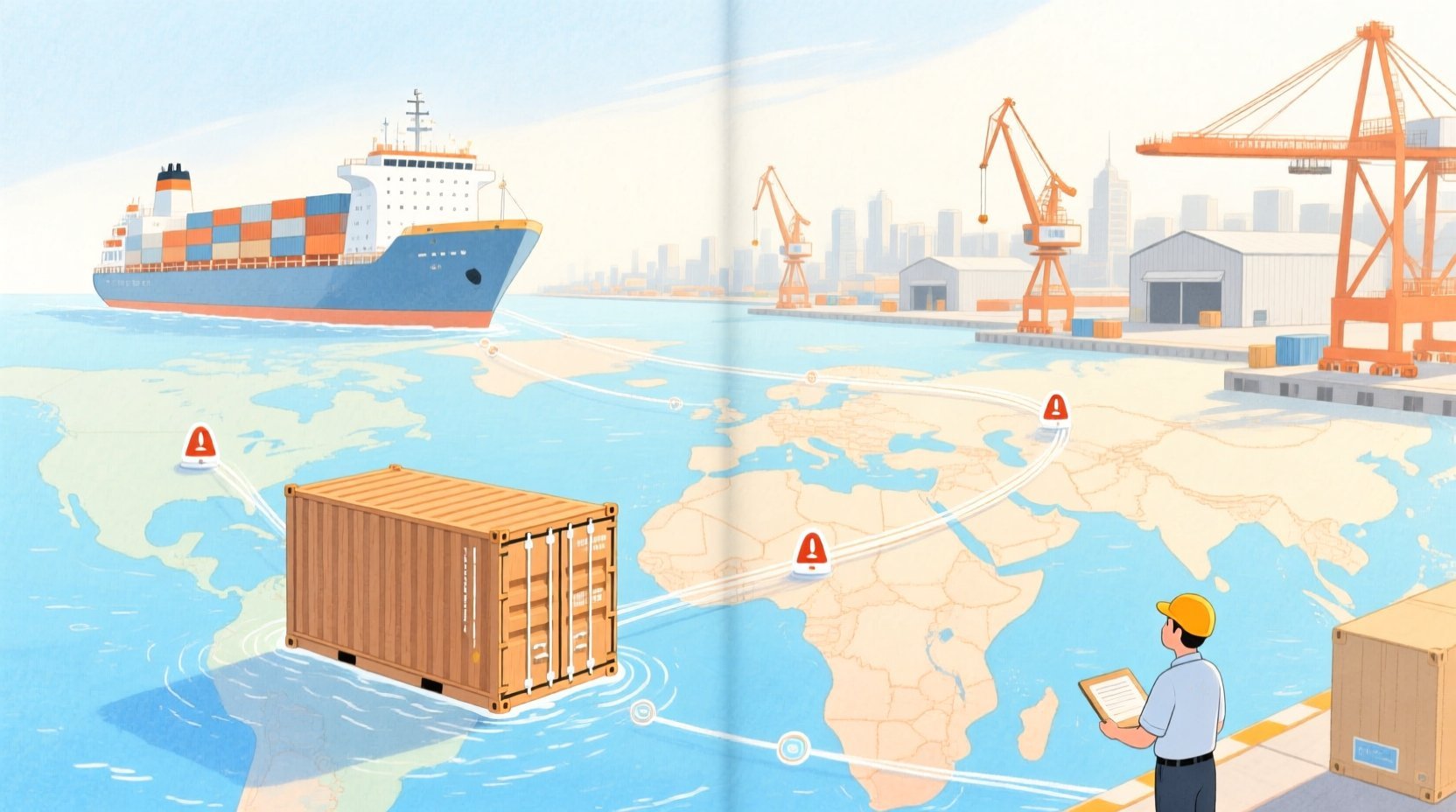
Visualizing this intricate ecosystem through an Entity-Relationship Diagram (ERD) is critical for architects and developers before writing a single line of SQL. By using PlantUML, a diagram-as-code approach, teams can define these relationships declaratively, ensuring consistency and versioning without the drag-and-drop limitations of traditional tools. This tutorial leverages VPasCode to build a comprehensive ERD for a global shipment visibility platform, demonstrating how to model the lifecycle of a container from booking to delivery, including the nuanced relationships between voyages, tracking events, and exception alerts.
Understanding the Model: Purpose, Scope & Problem Framing
The diagram we are about to construct represents the core data backbone of a Global Supply Chain Shipment Visibility and Container Tracking Platform. This is not merely a list of tables; it is a relational map of the physical and digital flow of goods across international trade lanes.
Diagram Abstraction & Representation
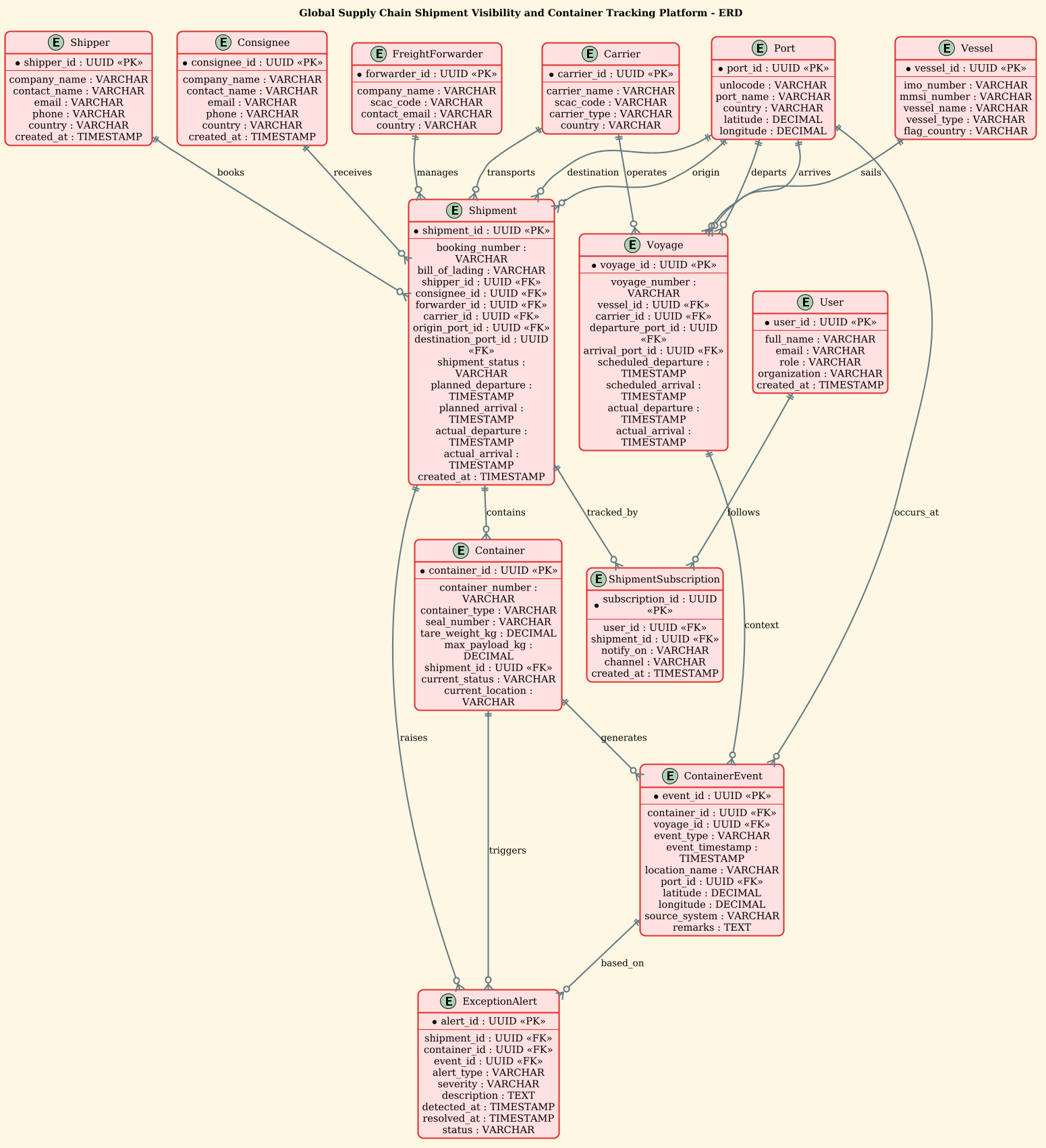
In this ERD, we model the entities as the fundamental nouns of the logistics domain: the Shipper, the Vessel, the Port, and the Container. The relationships (lines) represent the verbs: books, transports, carries, and generates. The cardinality (one-to-many, zero-to-many) is crucial here. For instance, a single Shipment can contain many Containers, but a Container belongs to one specific Shipment at a given time. This abstraction allows us to capture the complexity of multi-container shipments and the hierarchical nature of voyages.
Target Domain Scope & Scenario
The scope of this model covers the end-to-end journey of cargo. It explicitly models the booking phase (Shipper, Consignee, Forwarder), the transport phase (Vessel, Voyage, Port), and the monitoring phase (Container Events, Exception Alerts). It intentionally excludes lower-level warehouse management details to focus on the transit visibility that is critical for global tracking. The diagram defines how a Shipment is linked to a Carrier, how a Container is linked to a Voyage, and how Tracking Events provide the timestamped history required for real-time dashboards.
Key Takeaways & Educational Insights
By the end of this walkthrough, you will understand how to:
- Define complex entities with primary keys (UUIDs) and foreign keys (UUIDs) using PlantUML syntax.
- Model one-to-many relationships critical for logistics hierarchies (e.g., one vessel, many voyages).
- Structure the
ContainerEvententity to support granular tracking at ports and locations. - Implement an alerting system (
ExceptionAlert) that ties back to specific shipments and events.
Complete Diagram & Full Source Code
Before we dive into the step-by-step construction, here is the complete, rendered blueprint. This diagram illustrates the full relational structure of the logistics platform, utilizing the sunlust theme for a professional, warm aesthetic.
@startuml
/'
Diagram Context:
This ERD models a global supply chain shipment visibility and container tracking platform.
It captures the core entities involved in moving goods across international trade lanes:
shippers, carriers, freight forwarders, shipments, containers, vessels, ports, tracking
events, and exception alerts. The model supports end-to-end visibility by linking
shipments to their containers, containers to vessels and voyages, and every milestone
or deviation to a timestamped tracking event. It is intended to help logistics teams,
customers, and operations staff monitor cargo status, predict ETAs, and respond to
delays, customs holds, or route deviations in near real time.
'/
!theme sunlust

title Global Supply Chain Shipment Visibility and Container Tracking Platform - ERD

entity "Shipper" as shipper {
  * shipper_id : UUID <<PK>>
  --
  company_name : VARCHAR
  contact_name : VARCHAR
  email : VARCHAR
  phone : VARCHAR
  country : VARCHAR
  created_at : TIMESTAMP
}

entity "Consignee" as consignee {
  * consignee_id : UUID <<PK>>
  --
  company_name : VARCHAR
  contact_name : VARCHAR
  email : VARCHAR
  phone : VARCHAR
  country : VARCHAR
  created_at : TIMESTAMP
}

entity "FreightForwarder" as forwarder {
  * forwarder_id : UUID <<PK>>
  --
  company_name : VARCHAR
  scac_code : VARCHAR
  contact_email : VARCHAR
  country : VARCHAR
}

entity "Carrier" as carrier {
  * carrier_id : UUID <<PK>>
  --
  carrier_name : VARCHAR
  scac_code : VARCHAR
  carrier_type : VARCHAR
  country : VARCHAR
}

entity "Vessel" as vessel {
  * vessel_id : UUID <<PK>>
  --
  imo_number : VARCHAR
  mmsi_number : VARCHAR
  vessel_name : VARCHAR
  vessel_type : VARCHAR
  flag_country : VARCHAR
}

entity "Port" as port {
  * port_id : UUID <<PK>>
  --
  unlocode : VARCHAR
  port_name : VARCHAR
  country : VARCHAR
  latitude : DECIMAL
  longitude : DECIMAL
}

entity "Shipment" as shipment {
  * shipment_id : UUID <<PK>>
  --
  booking_number : VARCHAR
  bill_of_lading : VARCHAR
  shipper_id : UUID <<FK>>
  consignee_id : UUID <<FK>>
  forwarder_id : UUID <<FK>>
  carrier_id : UUID <<FK>>
  origin_port_id : UUID <<FK>>
  destination_port_id : UUID <<FK>>
  shipment_status : VARCHAR
  planned_departure : TIMESTAMP
  planned_arrival : TIMESTAMP
  actual_departure : TIMESTAMP
  actual_arrival : TIMESTAMP
  created_at : TIMESTAMP
}

entity "Container" as container {
  * container_id : UUID <<PK>>
  --
  container_number : VARCHAR
  container_type : VARCHAR
  seal_number : VARCHAR
  tare_weight_kg : DECIMAL
  max_payload_kg : DECIMAL
  shipment_id : UUID <<FK>>
  current_status : VARCHAR
  current_location : VARCHAR
}

entity "Voyage" as voyage {
  * voyage_id : UUID <<PK>>
  --
  voyage_number : VARCHAR
  vessel_id : UUID <<FK>>
  carrier_id : UUID <<FK>>
  departure_port_id : UUID <<FK>>
  arrival_port_id : UUID <<FK>>
  scheduled_departure : TIMESTAMP
  scheduled_arrival : TIMESTAMP
  actual_departure : TIMESTAMP
  actual_arrival : TIMESTAMP
}

entity "ContainerEvent" as container_event {
  * event_id : UUID <<PK>>
  --
  container_id : UUID <<FK>>
  voyage_id : UUID <<FK>>
  event_type : VARCHAR
  event_timestamp : TIMESTAMP
  location_name : VARCHAR
  port_id : UUID <<FK>>
  latitude : DECIMAL
  longitude : DECIMAL
  source_system : VARCHAR
  remarks : TEXT
}

entity "ExceptionAlert" as exception_alert {
  * alert_id : UUID <<PK>>
  --
  shipment_id : UUID <<FK>>
  container_id : UUID <<FK>>
  event_id : UUID <<FK>>
  alert_type : VARCHAR
  severity : VARCHAR
  description : TEXT
  detected_at : TIMESTAMP
  resolved_at : TIMESTAMP
  status : VARCHAR
}

entity "User" as user {
  * user_id : UUID <<PK>>
  --
  full_name : VARCHAR
  email : VARCHAR
  role : VARCHAR
  organization : VARCHAR
  created_at : TIMESTAMP
}

entity "ShipmentSubscription" as subscription {
  * subscription_id : UUID <<PK>>
  --
  user_id : UUID <<FK>>
  shipment_id : UUID <<FK>>
  notify_on : VARCHAR
  channel : VARCHAR
  created_at : TIMESTAMP
}

shipper ||--o{ shipment : "books"
consignee ||--o{ shipment : "receives"
forwarder ||--o{ shipment : "manages"
carrier ||--o{ shipment : "transports"
port ||--o{ shipment : "origin"
port ||--o{ shipment : "destination"

shipment ||--o{ container : "contains"
carrier ||--o{ voyage : "operates"
vessel ||--o{ voyage : "sails"
port ||--o{ voyage : "departs"
port ||--o{ voyage : "arrives"

container ||--o{ container_event : "generates"
voyage ||--o{ container_event : "context"
port ||--o{ container_event : "occurs_at"

shipment ||--o{ exception_alert : "raises"
container ||--o{ exception_alert : "triggers"
container_event ||--o{ exception_alert : "based_on"

user ||--o{ subscription : "follows"
shipment ||--o{ subscription : "tracked_by"

@endumlStep-by-Step Architectural Walkthrough
Building a complex ERD requires a structured approach. We will construct this diagram in four logical phases: setting the theme, defining the core entities, establishing the relationships, and finally, adding the event tracking and subscription layers.
Phase 1: Canvas Configuration & Layout Directives
Every PlantUML diagram begins with configuration directives that set the stage for the rendering engine. In this logistics model, we use the !theme sunlust directive. This applies a pre-defined color palette (warm oranges, deep blues, and clean whites) that is highly readable and professional, suitable for enterprise architecture documentation.
Additionally, we define a comment block using the /' and '/ syntax. This is not rendered as a diagram element but serves as a crucial piece of documentation embedded directly in the code, explaining the scope and purpose of the ERD for future maintainers.
/'
Diagram Context:
This ERD models a global supply chain shipment visibility...
'/
!theme sunlust

title Global Supply Chain Shipment Visibility and Container Tracking Platform - ERD
Phase 2: Declaring Core Entities, Actors, and Boundaries
The first step in modeling the data is to define the entity blocks. In PlantUML ERD, an entity is defined with a name, an alias, and a list of attributes. We use the * symbol to denote Primary Keys (PK) and UUID as the data type, which is a modern best practice for distributed systems to avoid key collisions.
For example, the Shipper and Consignee entities capture the commercial parties. The Shipment entity is the central hub, linking the commercial parties (Shipper, Consignee, Forwarder, Carrier) to the physical logistics nodes (Ports).
entity "Shipper" as shipper {
  * shipper_id : UUID <>
  --
  company_name : VARCHAR
  contact_name : VARCHAR
  email : VARCHAR
  phone : VARCHAR
  country : VARCHAR
  created_at : TIMESTAMP
}
Notice the -- separator. This visually divides the identifier (PK) from the descriptive attributes, improving readability when the diagram renders.
Phase 3: Mapping Data Flows & Key Interactions
Once entities are defined, we must establish the relationships. PlantUML uses specific syntax for cardinality. The ||--o{ syntax reads as: “One (or many) on the left, Zero or One on the right.” This is perfect for logistics. For instance, a Shipper (left) can book zero or many Shipments (right).
We model the physical movement of goods through the Voyage entity. A Voyage connects a Vessel, a Carrier, and two Ports (departure and arrival). This structure allows the system to track which ship carried which cargo on a specific trip.
carrier ||--o{ voyage : "operates"
vessel ||--o{ voyage : "sails"
port ||--o{ voyage : "departs"
port ||--o{ voyage : "arrives"
The Shipment entity links to Origin and Destination ports, creating the route definition. The Shipment also links to Containers, indicating that a single booking might contain multiple physical units.
Phase 4: Grouping, Annotations & Visual Polish
The final phase adds the dynamic layers: Tracking Events and Alerts. In a real-time system, tracking events are the heartbeat. The ContainerEvent entity is linked to the Container, the Voyage, and the Port where the event occurred. This triad allows the system to answer questions like: “Where was container X when the delay was detected?”
We also introduce the ExceptionAlert entity. This is a critical component for logistics operations. It links back to the Shipment, Container, and the triggering ContainerEvent. This creates a traceable chain of custody from the alert back to the physical event.
Finally, we add the User and ShipmentSubscription entities. This models the notification system, allowing users to subscribe to specific shipments and receive alerts via email or SMS.
user ||--o{ subscription : "follows"
shipment ||--o{ subscription : "tracked_by"
Syntax & Keyword Deep Dive
To master PlantUML ERD, you must understand the specific keywords and symbols used in this diagram. Here is a breakdown of the critical syntax elements:
entity: The primary directive to define a database table. It takes the formentity "Name" as alias { ... }.*(Asterisk):** Used immediately before an attribute name (e.g.,* shipper_id) to indicate a Primary Key. This is rendered with a bold or distinct visual style in the diagram.UUID&FK: While PlantUML is a diagramming tool, using standard SQL types likeUUIDand the stereotype<(Foreign Key) helps developers visualize the database schema directly from the diagram.> ||--o{: This is the relationship syntax.||means “One or Many” (the mandatory side),--is the line, ando{means “Zero or One” (the optional side). This accurately reflects the cardinality of a Shipper booking Shipment."label": The text inside quotes (e.g.,"books") defines the relationship name, making the diagram self-documenting.!theme: A directive to apply a predefined color theme to the entire diagram, ensuring consistency without manual styling.
Best Practices & Pitfalls to Avoid
When designing ERDs for complex logistics systems, adherence to best practices ensures the diagram remains a useful tool rather than a source of confusion.
- Use Meaningful Aliases: As seen in the code, we used
as shipperinstead ofas Shipper. PlantUML is case-sensitive for aliases. Using lowercase aliases for the relationship lines (e.g.,shipper ||--o{ shipment) keeps the code clean and prevents syntax errors. - Separate Identifiers from Attributes: Always use the
--separator to visually and logically separate the Primary Key from the rest of the attributes. This mimics standard SQL schema definitions and improves readability. - Consistent Cardinality: Ensure your relationship arrows match the real-world logic. For example, a
Portcan be the origin for many shipments, but a shipment has only one origin. Using||--o{correctly captures this “One-to-Many” directionality. - Avoid Over-Modeling: While this diagram is comprehensive, remember to only model entities that are critical to the specific problem (visibility and tracking). Avoid adding internal HR or finance tables unless they are directly relevant to the shipment lifecycle.
Start Building Logistics ERDs Faster with VPasCode
Instantly visualize your supply chain data models, test relationship cardinalities, and export professional diagrams in seconds with our free web-based PlantUML editor.