


In the high-stakes environment of humanitarian aid and disaster relief, the speed and accuracy of supply chain mobilization can mean the difference between life and death. When a catastrophic event strikes, organizations must rapidly deploy pre-positioned resources—food, water, medical supplies, and shelter—to affected regions. This operational complexity demands a data model that is not only robust but also capable of tracking the entire lifecycle of aid, from initial warehouse storage to final distribution at the last mile. Without a clear architectural blueprint, the chaos of a disaster can lead to critical bottlenecks, lost inventory, and delayed aid delivery.
Visualizing this intricate logistics network through an Entity Relationship Diagram (ERD) provides the necessary clarity for architects and logistics managers to design resilient systems. By modeling the relationships between disasters, warehouses, inventory batches, and mobilization orders, teams can ensure that every unit of aid is accounted for. Using diagram-as-code with PlantUML in VPasCode allows these complex schemas to be documented as living artifacts, enabling rapid iteration and versioning of the data structure without the overhead of traditional graphical design tools.
Understanding the Model: Purpose, Scope & Problem Framing
This tutorial focuses on constructing a specialized ERD designed for the humanitarian aid sector. The diagram abstracts the critical data entities required to manage a global relief operation, specifically addressing the challenges of pre-positioning supplies and responding to dynamic disaster scenarios.
Diagram Abstraction & Representation
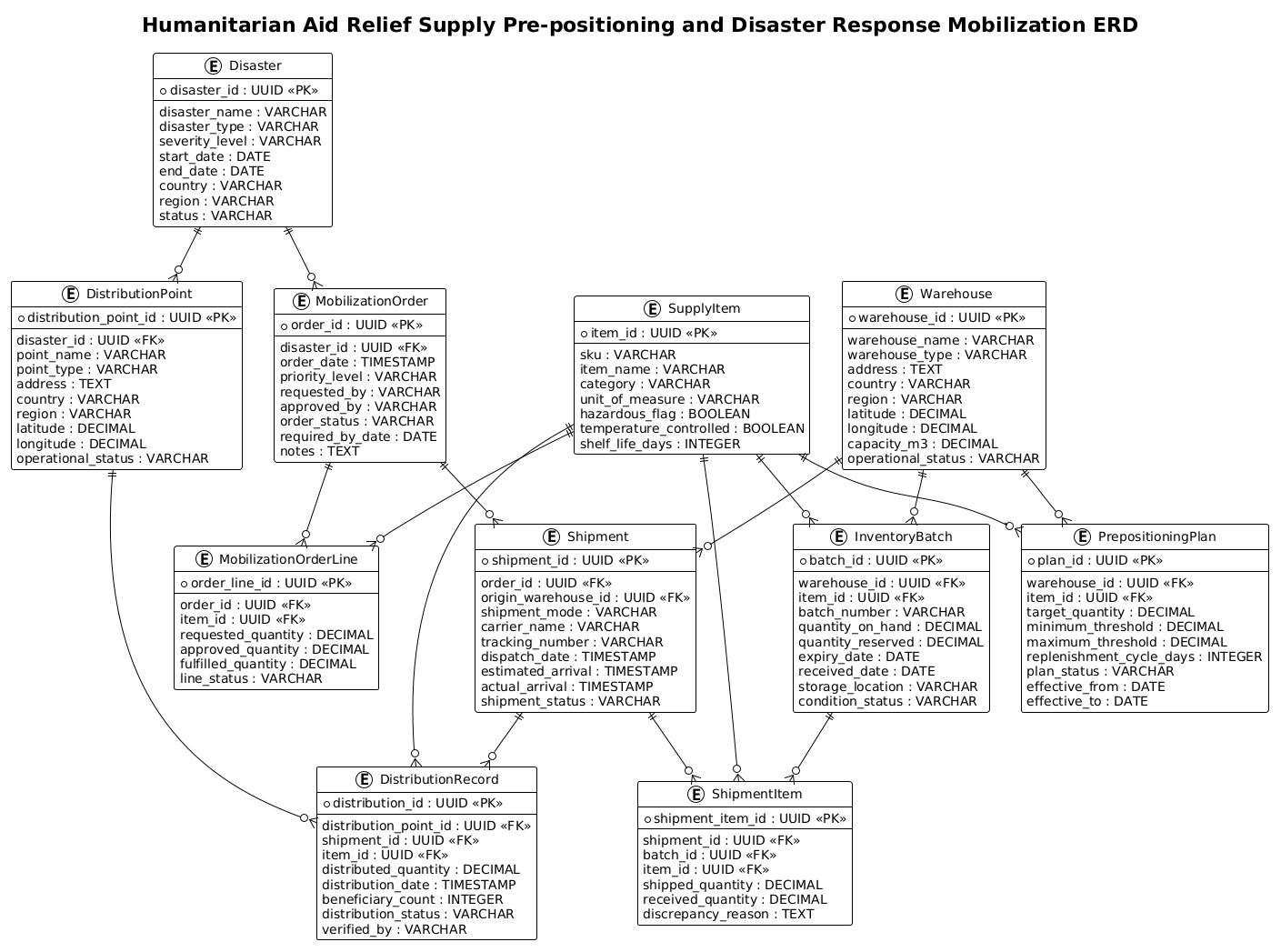
An Entity Relationship Diagram serves as the blueprint for the database that powers the relief logistics system. In this specific model, we represent Disasters as the triggering events that drive demand. We model Warehouses as the static storage nodes where resources are held in readiness. The core of the system lies in the Inventory and Batch entities, which track the specific condition, quantity, and location of individual items. The diagram further captures the dynamic flow of aid through Prepositioning Plans (planned stock levels), Mobilization Orders (requests triggered by disasters), Shipments (physical movement), and Distribution Records (final delivery to beneficiaries).
Target Domain Scope & Scenario
The scope of this diagram covers the end-to-end supply chain of a humanitarian organization. It intentionally excludes internal HR or financial accounting modules to focus strictly on the operational logistics of aid delivery. The model supports scenarios such as:
- Monitoring stock levels against pre-defined thresholds in regional warehouses.
- Generating automatic mobilization orders when a disaster exceeds severity thresholds.
- Tracking shipments from origin to destination, including discrepancies and partial deliveries.
- Recording final distribution to beneficiaries for accountability and impact reporting.
Key Takeaways & Educational Insights
By building this diagram, you will gain a deep understanding of how to model one-to-many relationships in complex logistics systems. You will learn how to structure entities to handle hierarchical data (e.g., Orders containing Order Lines) and how to link physical inventory batches to specific shipments. The resulting diagram provides a clear visual contract for database developers and a reference map for operations teams.
Complete Diagram & Full Source Code
Below is the complete, rendered view of the Humanitarian Aid Relief Supply ERD. This visualization demonstrates the connectivity between the core entities, showing how a single Disaster event triggers a chain of orders, shipments, and distributions.
@startuml
!theme plain
title Humanitarian Aid Relief Supply Pre-positioning and Disaster Response Mobilization ERD

/'
Diagram Context:
This ERD models the data needs of a humanitarian aid organization that pre-positions relief supplies
in warehouses and mobilizes them in response to disasters. The core entities capture disasters,
warehouses, supply items, inventory batches, prepositioning plans, mobilization orders, shipments,
and distribution points. The diagram supports planning, stock monitoring, dispatch tracking, and
last-mile delivery accountability across multiple regions and emergency events.
'/

entity "Disaster" as disaster {
  * disaster_id : UUID <<PK>>
  --
  disaster_name : VARCHAR
  disaster_type : VARCHAR
  severity_level : VARCHAR
  start_date : DATE
  end_date : DATE
  country : VARCHAR
  region : VARCHAR
  status : VARCHAR
}

entity "Warehouse" as warehouse {
  * warehouse_id : UUID <<PK>>
  --
  warehouse_name : VARCHAR
  warehouse_type : VARCHAR
  address : TEXT
  country : VARCHAR
  region : VARCHAR
  latitude : DECIMAL
  longitude : DECIMAL
  capacity_m3 : DECIMAL
  operational_status : VARCHAR
}

entity "SupplyItem" as supplyitem {
  * item_id : UUID <<PK>>
  --
  sku : VARCHAR
  item_name : VARCHAR
  category : VARCHAR
  unit_of_measure : VARCHAR
  hazardous_flag : BOOLEAN
  temperature_controlled : BOOLEAN
  shelf_life_days : INTEGER
}

entity "InventoryBatch" as inventorybatch {
  * batch_id : UUID <<PK>>
  --
  warehouse_id : UUID <<FK>>
  item_id : UUID <<FK>>
  batch_number : VARCHAR
  quantity_on_hand : DECIMAL
  quantity_reserved : DECIMAL
  expiry_date : DATE
  received_date : DATE
  storage_location : VARCHAR
  condition_status : VARCHAR
}

entity "PrepositioningPlan" as prepplan {
  * plan_id : UUID <<PK>>
  --
  warehouse_id : UUID <<FK>>
  item_id : UUID <<FK>>
  target_quantity : DECIMAL
  minimum_threshold : DECIMAL
  maximum_threshold : DECIMAL
  replenishment_cycle_days : INTEGER
  plan_status : VARCHAR
  effective_from : DATE
  effective_to : DATE
}

entity "MobilizationOrder" as mobilizationorder {
  * order_id : UUID <<PK>>
  --
  disaster_id : UUID <<FK>>
  order_date : TIMESTAMP
  priority_level : VARCHAR
  requested_by : VARCHAR
  approved_by : VARCHAR
  order_status : VARCHAR
  required_by_date : DATE
  notes : TEXT
}

entity "MobilizationOrderLine" as orderline {
  * order_line_id : UUID <<PK>>
  --
  order_id : UUID <<FK>>
  item_id : UUID <<FK>>
  requested_quantity : DECIMAL
  approved_quantity : DECIMAL
  fulfilled_quantity : DECIMAL
  line_status : VARCHAR
}

entity "Shipment" as shipment {
  * shipment_id : UUID <<PK>>
  --
  order_id : UUID <<FK>>
  origin_warehouse_id : UUID <<FK>>
  shipment_mode : VARCHAR
  carrier_name : VARCHAR
  tracking_number : VARCHAR
  dispatch_date : TIMESTAMP
  estimated_arrival : TIMESTAMP
  actual_arrival : TIMESTAMP
  shipment_status : VARCHAR
}

entity "ShipmentItem" as shipmentitem {
  * shipment_item_id : UUID <<PK>>
  --
  shipment_id : UUID <<FK>>
  batch_id : UUID <<FK>>
  item_id : UUID <<FK>>
  shipped_quantity : DECIMAL
  received_quantity : DECIMAL
  discrepancy_reason : TEXT
}

entity "DistributionPoint" as distributionpoint {
  * distribution_point_id : UUID <<PK>>
  --
  disaster_id : UUID <<FK>>
  point_name : VARCHAR
  point_type : VARCHAR
  address : TEXT
  country : VARCHAR
  region : VARCHAR
  latitude : DECIMAL
  longitude : DECIMAL
  operational_status : VARCHAR
}

entity "DistributionRecord" as distributionrecord {
  * distribution_id : UUID <<PK>>
  --
  distribution_point_id : UUID <<FK>>
  shipment_id : UUID <<FK>>
  item_id : UUID <<FK>>
  distributed_quantity : DECIMAL
  distribution_date : TIMESTAMP
  beneficiary_count : INTEGER
  distribution_status : VARCHAR
  verified_by : VARCHAR
}

disaster ||--o{ mobilizationorder
warehouse ||--o{ inventorybatch
supplyitem ||--o{ inventorybatch
warehouse ||--o{ prepplan
supplyitem ||--o{ prepplan
mobilizationorder ||--o{ orderline
supplyitem ||--o{ orderline
mobilizationorder ||--o{ shipment
warehouse ||--o{ shipment
shipment ||--o{ shipmentitem
inventorybatch ||--o{ shipmentitem
supplyitem ||--o{ shipmentitem
disaster ||--o{ distributionpoint
distributionpoint ||--o{ distributionrecord
shipment ||--o{ distributionrecord
supplyitem ||--o{ distributionrecord

@endumlStep-by-Step Architectural Walkthrough
Phase 1: Canvas Configuration & Layout Directives
The first step in building a professional diagram is setting the stage. We begin by defining the diagram type and applying a consistent visual theme. In this case, we use the !theme plain directive to ensure a clean, minimalist look that focuses on the data structure rather than decorative elements. This is crucial for technical documentation where clarity is paramount.
We also include a title and a comment block to provide immediate context for anyone viewing the diagram. The comment block is enclosed in /' and '/, allowing us to write multi-line descriptions without affecting the rendering logic.
@startuml
!theme plain
title Humanitarian Aid Relief Supply Pre-positioning and Disaster Response Mobilization ERD

/'
Diagram Context:
This ERD models the data needs of a humanitarian aid organization...
'/
Phase 2: Declaring Core Entities, Actors, and Boundaries
Next, we define the fundamental entities. In PlantUML ERD, we use the entity keyword followed by the entity name and an alias. Inside the entity block, we list attributes. We use * to denote the Primary Key (PK) and -- as a separator between keys and other attributes.
For example, the Disaster entity captures the event details:
entity "Disaster" as disaster {
  * disaster_id : UUID <>
  --
  disaster_name : VARCHAR
  disaster_type : VARCHAR
  severity_level : VARCHAR
  ...
We repeat this pattern for Warehouse, SupplyItem, and InventoryBatch. Note how InventoryBatch includes a foreign key reference to warehouse_id and item_id, indicating a many-to-many relationship resolved through this batch entity.
Phase 3: Mapping Data Flows & Key Interactions
Once entities are defined, we establish the relationships that drive the logistics workflow. PlantUML uses cardinality notation to define how entities relate. We use ||--o{ to represent a “one-to-many” relationship, where the solid line indicates “one” and the crow’s foot indicates “many”.
Consider the flow from a Disaster to an Order:
disaster ||--o{ mobilizationorderThis signifies that one Disaster can trigger many Mobilization Orders. Similarly, we map the relationship between a Warehouse and its InventoryBatches, and a MobilizationOrder to its specific OrderLines. The Shipment entity acts as a bridge, linking the Order to the specific InventoryBatch being moved.
shipment ||--o{ shipmentitem
inventorybatch ||--o{ shipmentitem
supplyitem ||--o{ shipmentitem
Phase 4: Grouping, Annotations & Visual Polish
The final phase involves ensuring the diagram is readable and self-documenting. We have already used the comment block for high-level context. In more complex diagrams, we might use note blocks to explain specific business rules (e.g., “If quantity_on_hand < minimum_threshold, trigger replenishment"). In this specific ERD, the clarity of the entity names and the direct relationships provide sufficient documentation. The use of UUID for primary keys ensures global uniqueness across distributed warehouse systems, a critical consideration for international logistics.
Syntax & Keyword Deep Dive
To master this diagram, it is essential to understand the specific PlantUML syntax features used to construct the ERD.
entity: The keyword used to define a table or entity. It is followed by the display name (e.g., “Disaster”) and the internal alias (e.g.,as disaster)./*...and*/: Standard comment syntax, but in PlantUML ERD, we use/'and'/for multi-line comments that appear as notes or descriptions in the diagram.*: Placed before an attribute name to denote it as the Primary Key (PK).<<PK>>and<<FK>>: Stereotypes used to explicitly label attributes as Primary Keys or Foreign Keys, enhancing readability.||--o{: This is the cardinality notation.||means “one and only one” (mandatory one), ando{means “zero or many” (optional many). This specific combination indicates that one Disaster triggers zero or many Orders, but an Order must belong to exactly one Disaster.--: A separator line used within an entity block to visually distinguish keys from other attributes.
Best Practices & Pitfalls to Avoid
When designing ERDs for complex logistics systems, adhering to best practices ensures the diagram remains useful over time.
- Use Descriptive Aliases: Always provide a short alias (e.g.,
as disaster) after the entity name. This makes writing relationship lines much easier and prevents syntax errors. - Consistent Naming Conventions: Stick to a consistent naming scheme for attributes (e.g., always use
_idfor keys). This helps developers quickly identify relationships when reading the code. - Modularize Complex Entities: If an entity like InventoryBatch becomes too crowded, consider splitting it into a separate diagram or using a note to explain its composite nature.
- Verify Cardinality: Double-check your relationship lines. A common mistake is using
--o{(optional one) instead of||--o{(mandatory one) for foreign keys that are required for data integrity.
Start Building Humanitarian Aid ERDs Faster with VPasCode
Design complex logistics schemas instantly in your browser with VPasCode’s free PlantUML editor—no installation required, just type and visualize.