No, UML (Unified Modeling Language) diagrams are not only for Object-Oriented Programming (OOP). While UML was originally designed with OOP principles in mind, it has evolved into a versatile standard for visualizing systems across modern software paradigms, including functional programming, relational database design, microservices, and DevOps infrastructure. Understanding how to use UML outside of traditional OOP allows development teams to document complex software architectures efficiently using modern practices like Diagram as Code.

The Misconception: Why UML Is Associated Strictly with OOP
The belief that UML is exclusively meant for OOP stems from its history. Created in the mid-1990s by Grady Booch, Ivar Jacobson, and James Rumbaugh (“The Three Amigos”), UML unified several object-oriented modeling methods. Consequently, foundational UML visual structures—such as class diagrams and inheritance arrows—mirror core OOP constructs like classes, interfaces, and polymorphism.
However, restricting UML solely to OOP ignores more than half of the UML specification. UML 2.5 defines 14 distinct diagram types categorized into two major groups:
- Structural Diagrams: Represent static aspects of a system (e.g., Class, Component, Deployment, Package diagrams).
- Behavioral Diagrams: Represent dynamic interactions and state changes (e.g., Sequence, Activity, State Machine, Use Case diagrams).
While structural diagrams like Class diagrams closely match OOP code, behavioral diagrams describe workflow logic, network communication, and execution order—concepts common to all software paradigms.
Beyond OOP: How Non-OOP Paradigms Use UML
Engineers routinely apply UML to solve visual documentation challenges across non-object-oriented frameworks and modern tech stacks.
1. Functional & Procedural Programming
Functional programming emphasizes immutable data and pure function pipelines rather than objects. You can easily map these systems using specific UML behavioral diagrams:
- Activity Diagrams: Model data flow through pure functions, branch conditions, and parallel processing streams.
- Sequence Diagrams: Illustrate function call stacks, asynchronous message passing, and event execution order without assuming underlying object instances.
2. Database Design and Entity Relationship Modeling
Relational databases rely on relational algebra rather than object inheritance. Despite this, UML Class and Object notation works seamlessly for schema architecture:
| UML Element | Database Equivalent | Application |
|---|---|---|
| Class | Database Table | Defines schema structure |
| Attribute | Column / Field | Specifies data types and constraints |
| Association | Foreign Key Relationship | Maps 1:1, 1:N, and N:M table connections |
3. Microservices, DevOps, and System Architecture
Modern microservices architectures combine multiple languages—Go, Rust, Node.js, and Python—into distributed systems. System-level UML diagrams abstract away code details entirely:
- Component Diagrams: Define API gateways, message queues (Kafka, RabbitMQ), and microservice boundaries.
- Deployment Diagrams: Map cloud resources, Docker containers, Kubernetes nodes, and CI/CD pipelines.
Modernizing UML: Moving from Manual Drawing to Diagram-as-Code
Traditional drag-and-drop drawing tools often create documentation drag—diagrams quickly become outdated as code bases evolve. Modern engineering teams solve this by adopting Diagram as Code, writing plain-text scripts that render into dynamic diagrams and live directly in version control repositories.
1. Declarative Diagramming with PlantUML, Mermaid, and D2
Using Domain Specific Languages (DSLs) like PlantUML, Mermaid, or D2, developers can declare relationships using simple syntax:
@startuml
actor User
participant "API Gateway" as Gateway
participant "Auth Service" as Auth

User -> Gateway: POST /login
Gateway -> Auth: Validate Credentials
Auth --> Gateway: Token Issued
Gateway --> User: 200 OK
@endumlThis text-based approach allows visual documentation to be code-reviewed, version-tracked, and edited as fast as code itself.
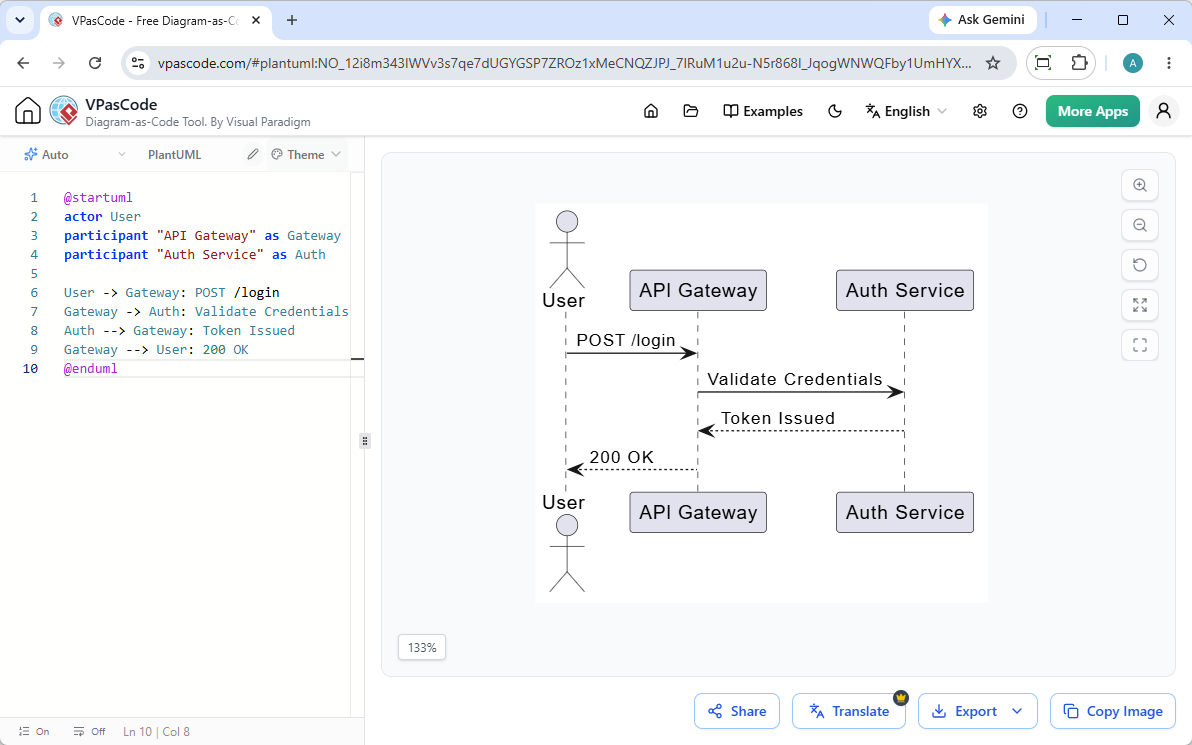
2. Streamlining Multi-Paradigm Visuals with VPasCode
When working across different paradigms, managing multiple local compilers and syntax setup can introduce friction. Visual Paradigm VPasCode eliminates this barrier by providing a unified online Diagram as Code editor and real-time renderer.
Whether you are creating PlantUML Sequence diagrams for microservices, Mermaid flowcharts for functional pipelines, or Graphviz charts for database schemas, VPasCode provides powerful capabilities out of the box:
- Automatic Format Detection: Paste raw PlantUML, Mermaid, D2, or Graphviz code—VPasCode automatically identifies the language and renders it instantly.
- AI-Powered Code Fixing: Syntax errors are resolved instantly using the “Fix by AI” feature, complete with side-by-side code diffs to help you learn syntax faster.
- Native Translation: Translate diagram labels instantly into multiple languages right inside the editor.
- Vector Export & Sharing: Export clean SVG/PNG files or share dynamic URLs and QR codes directly with your team.
Practical Guide: Choosing the Right UML Diagrams for Non-OOP Projects
To avoid over-engineering your visual documentation, select diagram types based on your primary design challenge:
- If you need to map business logic or workflows: Use Activity Diagrams or Mermaid Flowcharts.
- If you need to detail API endpoints or asynchronous events: Use Sequence Diagrams.
- If you need to model system deployments or cloud infrastructure: Use Deployment Diagrams or C4 Architecture Diagrams.
- If you need to plan relational schemas: Use UML ER Diagrams or PlantUML Class Diagrams adapted for tables.
Frequently Asked Questions (FAQ)
Can I use UML diagrams for functional programming languages like Haskell or Erlang?
Yes. Behavioral UML diagrams (such as Sequence and Activity diagrams) model execution flow, state changes, and event handling independent of whether the underlying code uses classes or pure functions.
What is the difference between UML and ER diagrams for database modeling?
ER (Entity-Relationship) diagrams specifically model database entities and relationships. UML Class diagrams offer a broader syntax that can model database tables while seamlessly extending to application logic and API contracts.
What is the fastest way to render UML diagrams from text code?
You can use a free, zero-setup online editor like VPasCode. It automatically detects PlantUML, Mermaid, and D2 code formats and renders SVG/PNG images instantly in your browser.