If you are searching for a reliable PlantUML editor, you need a tool that eliminates local installation headaches while delivering instant, error-free rendering. Whether you are mapping software architecture with Diagram as Code workflows or sketching quick system sequences, choosing the right platform can dramatically streamline your technical documentation.
Understanding PlantUML and Why You Need a Dedicated Editor
A PlantUML editor is a specialized text or code environment designed to parse textual Domain Specific Languages (DSLs) and instantly convert them into clean, standardized visual diagrams.
What is PlantUML and How Does Text-to-Diagram Work?
PlantUML is a popular open-source text-to-diagram language that lets users write code-like scripts to generate architecture, sequence, use case, and class diagrams. Instead of manually dragging and aligning shapes in a traditional vector graphics tool, you define relationships using text:
- Write lightweight script representations of complex systems.
- Version control your diagrams seamlessly alongside source code in Git repositories.
- Automate diagram generation within continuous integration pipelines.
Limitations of Using Standard Text Editors for PlantUML
While you can type PlantUML syntax into any basic text editor like Notepad or generic IDEs, doing so often lacks critical real-time validation. Standard text editors rarely provide instant visual feedback, forcing you to constantly compile scripts locally or switch contexts to check whether your syntax rendered correctly.
Traditional vs. Modern PlantUML Editors: What Are Your Options?
Developers and enterprise architects generally choose between traditional desktop environments and modern web-based code platforms when rendering diagrams.
Desktop-Based PlantUML Tools and Plugins
Desktop utilities and IDE extensions (such as plugins for VS Code or IntelliJ) offer offline capabilities but often require local Java dependencies, Graphviz configurations, and manual plugin maintenance to keep rendering engines up to date.
Web-Based and Zero-Setup Platforms
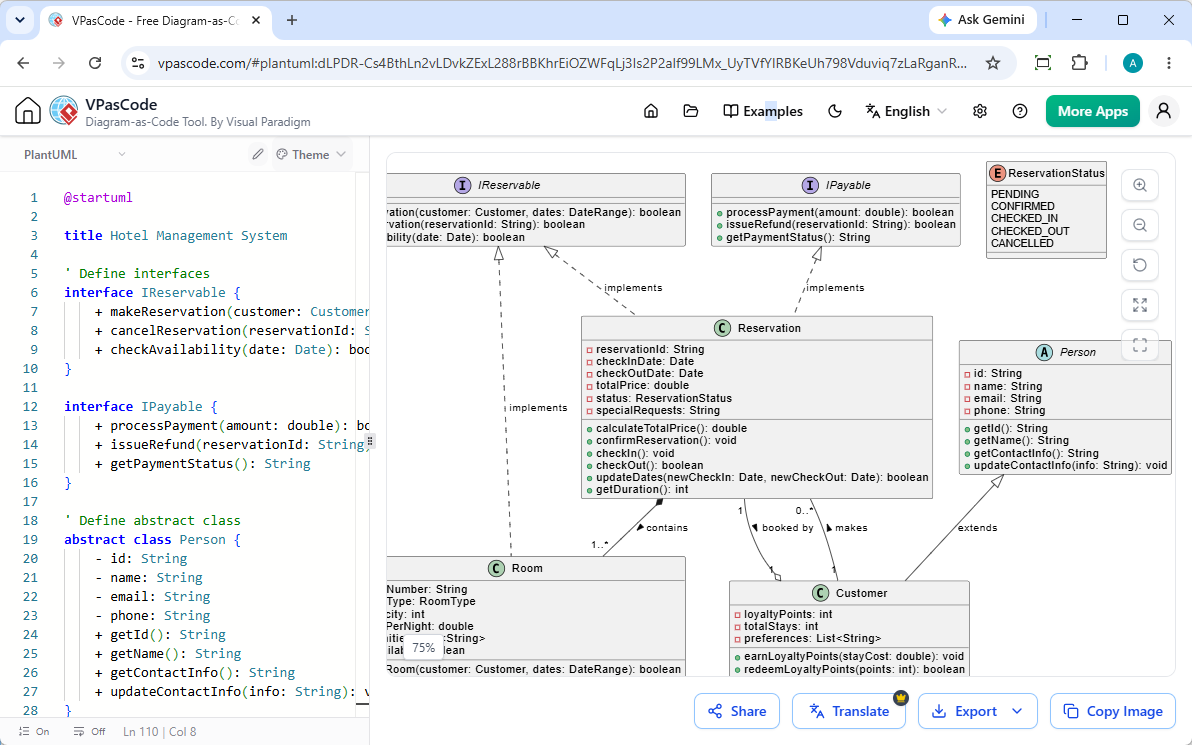
Web-based editors remove friction by running entirely in your browser. Platforms like Visual Paradigm VPasCode provide a frictionless cloud environment where you can start writing and rendering diagrams immediately without local installations.
Key Features to Look for in a Modern PlantUML Editor
To maximize productivity, an ideal PlantUML editor should feature automation and collaborative flexibility that supports fast-paced engineering teams.
Instant Live Preview and Real-Time Rendering
Real-time rendering updates your visual diagrams instantly character-by-character as you type, ensuring zero lag between code modification and visual verification.
Automatic Format Detection and Multi-DSL Support
Modern platforms like Visual Paradigm VPasCode feature automatic format detection. When you paste raw code into the editor, it instantly recognizes PlantUML, Mermaid, D2, or Markmap scripts without requiring manual language toggling.
Seamless Export and Sharing Capabilities
Collaboration requires flexibility. A robust editor should offer:
- Scalable SVG vector image exports for high-resolution presentations.
- High-PPI PNG downloads for documentation embedding.
- Shareable URLs and instant QR code generation for quick team alignment.
Overcoming Common PlantUML Bottlenecks with AI and Automation
Writing complex DSL scripts often leads to frustrating syntax errors or localization hurdles. Advanced code editors solve these challenges using embedded intelligence.
Instant Syntax Troubleshooting and AI Error Fixing
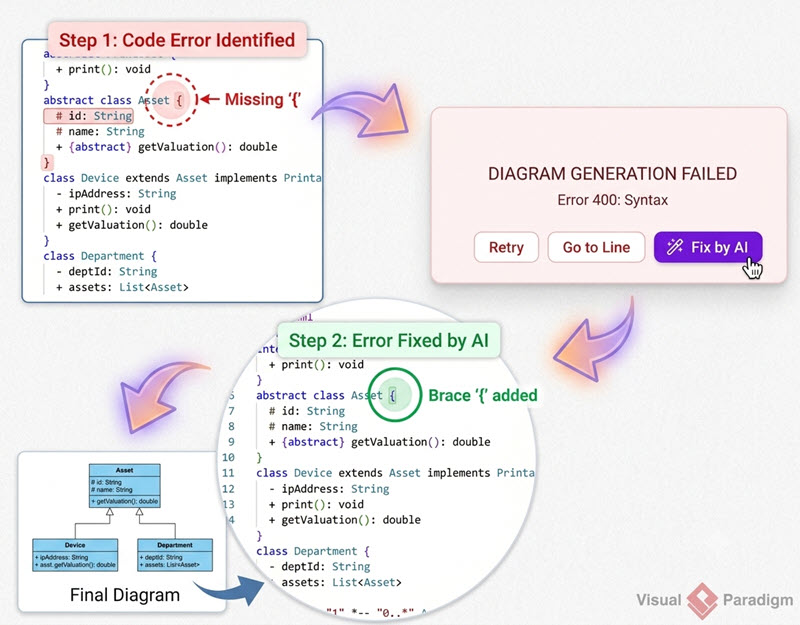
When syntax mistakes break your diagram build, tools like Visual Paradigm VPasCode offer a “Fix by AI” feature. Clicking this button automatically repairs broken scripts while displaying a side-by-side code diff to help you learn proper syntax faster.
Native Translation and Documentation Integration
Enterprise teams frequently need to localize diagram text or push visuals directly into documentation hubs. VPasCode allows native AI translation of diagram labels and integrates smoothly with Visual Paradigm OpenDocs to build comprehensive technical wikis.
Choosing the Right PlantUML Editor for Your Workflow
Selecting the ideal editor depends on your project scale, collaboration frequency, and technical environment requirements.
When to Use Free Web Editors vs. Enterprise Suites
| Editor Tier | Best Suited For | Key Capabilities |
|---|---|---|
| Free Core Plan | Quick scripting, single developers, fast prototyping | Online code editing, auto-format detection, live rendering, SVG/PNG export, and URL sharing. |
| Premium Enterprise Plan | Engineering teams, technical writers, secure documentation workflows | AI Error Fixing, AI Translation, and OpenDocs integration via VP Online or VP Desktop editions. |
For instant, zero-setup diagramming that scales with your team, head over to Visual Paradigm VPasCode and try out its free core editor today.