


In the realm of modern public administration and environmental management, the ability to visualize complex data structures is just as critical as the data itself. National parks face a unique challenge: they must simultaneously manage the delicate balance of wildlife conservation and the high-volume logistics of public recreation. A fragmented data approach often leads to siloed systems where wildlife census data exists in one database and visitor booking data in another, making it impossible to analyze the correlation between human activity and animal behavior. This architectural disconnect can hinder strategic decision-making, from habitat preservation to revenue optimization.
By adopting a diagram-as-code approach, architects can create a unified, living documentation of these dual-domain systems. Using PlantUML within the VPasCode editor allows teams to define the Entity Relationship Diagram (ERD) for a National Park Wildlife Census and Campsite Booking System with precision. This method ensures that the schema for tracking animal sightings, ranger surveys, and visitor reservations is not just a static image, but a versionable, testable, and instantly renderable blueprint. It bridges the gap between ecological needs and operational efficiency, enabling park managers to build systems that are robust, scalable, and aligned with government data standards.
Understanding the Model: Purpose, Scope & Problem Framing
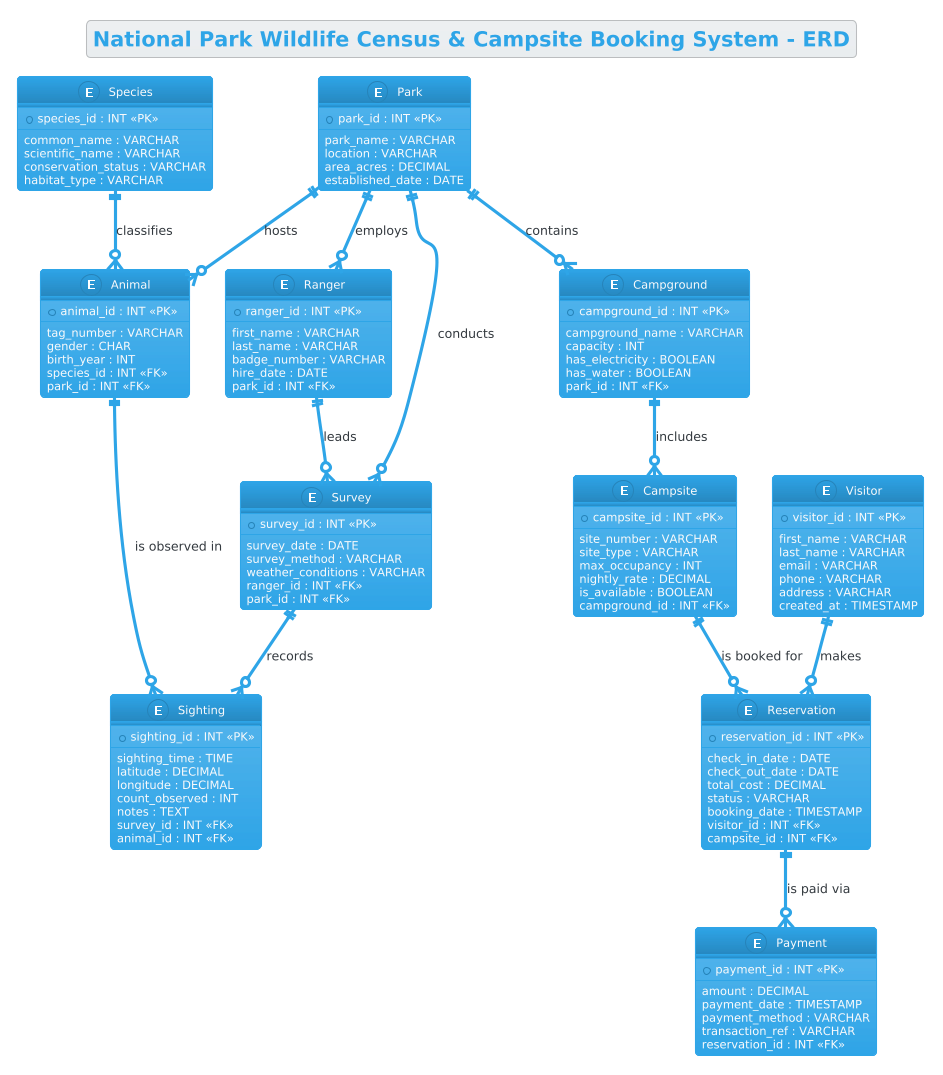
This specific ERD is designed to model a hybrid operational environment where conservation biology meets tourism management. The diagram abstraction represents two distinct but interconnected domains: the Wildlife Census Domain and the Visitor Reservation Domain. The Wildlife Census Domain focuses on biodiversity monitoring, capturing entities like Species, Animal, Survey, and Sighting to track population health and migration patterns. The Visitor Reservation Domain handles the logistical side, managing Visitor, Campground, Campsite, and Reservation entities to ensure efficient space utilization and revenue tracking.
The scope of this model is bounded by the Park entity, which acts as the central anchor. Every ranger, animal, survey, and campground is linked back to a specific park, ensuring data integrity across potentially multiple locations. The core problem this model solves is the need for a unified schema that allows cross-domain reporting. For instance, park management might need to correlate the density of Animal sightings with the number of Reservations in a specific zone to assess the impact of tourism on wildlife. By modeling these relationships explicitly in PlantUML, we create a clear blueprint for database implementation that supports these complex queries.
Key takeaways from this model include a deep understanding of one-to-many relationships (e.g., one Park hosts many Rangers), the importance of foreign keys for data normalization, and how to structure a system that handles both static reference data (Species) and transient transactional data (Payments). This diagram serves as a masterclass in managing multi-faceted government data requirements.
Complete Diagram & Full Source Code
Below is the finalized Entity Relationship Diagram, rendered directly from the PlantUML code. This visual representation clarifies the hierarchical structure of the park system, showing how entities like Park and Ranger bridge the gap between conservation efforts and visitor services.
@startuml
!theme cerulean
title National Park Wildlife Census & Campsite Booking System - ERD

/'
Diagram Context:
This ERD models the data requirements for a national park system that manages two integrated
operational areas: wildlife census tracking and visitor campsite reservations.

The wildlife census domain captures species records, individual animal sightings, park rangers
who conduct surveys, and the specific survey events where population data is collected.
This supports biodiversity monitoring, population trend analysis, and habitat management.

The visitor reservation domain manages campgrounds, individual campsites, visitor profiles,
and booking transactions. It handles availability, reservation periods, payment tracking,
and campsite assignment to ensure efficient visitor management.

Both domains share common entities such as Park and Ranger, creating a unified system
where conservation data and public use data coexist. The design supports reporting
on wildlife populations alongside visitor impact analysis, enabling park management
to balance conservation goals with recreational access.
'/

' ==================== ENTITIES ====================

entity "Park" as park {
  * park_id : INT <<PK>>
  --
  park_name : VARCHAR
  location : VARCHAR
  area_acres : DECIMAL
  established_date : DATE
}

entity "Ranger" as ranger {
  * ranger_id : INT <<PK>>
  --
  first_name : VARCHAR
  last_name : VARCHAR
  badge_number : VARCHAR
  hire_date : DATE
  park_id : INT <<FK>>
}

entity "Species" as species {
  * species_id : INT <<PK>>
  --
  common_name : VARCHAR
  scientific_name : VARCHAR
  conservation_status : VARCHAR
  habitat_type : VARCHAR
}

entity "Animal" as animal {
  * animal_id : INT <<PK>>
  --
  tag_number : VARCHAR
  gender : CHAR
  birth_year : INT
  species_id : INT <<FK>>
  park_id : INT <<FK>>
}

entity "Survey" as survey {
  * survey_id : INT <<PK>>
  --
  survey_date : DATE
  survey_method : VARCHAR
  weather_conditions : VARCHAR
  ranger_id : INT <<FK>>
  park_id : INT <<FK>>
}

entity "Sighting" as sighting {
  * sighting_id : INT <<PK>>
  --
  sighting_time : TIME
  latitude : DECIMAL
  longitude : DECIMAL
  count_observed : INT
  notes : TEXT
  survey_id : INT <<FK>>
  animal_id : INT <<FK>>
}

entity "Campground" as campground {
  * campground_id : INT <<PK>>
  --
  campground_name : VARCHAR
  capacity : INT
  has_electricity : BOOLEAN
  has_water : BOOLEAN
  park_id : INT <<FK>>
}

entity "Campsite" as campsite {
  * campsite_id : INT <<PK>>
  --
  site_number : VARCHAR
  site_type : VARCHAR
  max_occupancy : INT
  nightly_rate : DECIMAL
  is_available : BOOLEAN
  campground_id : INT <<FK>>
}

entity "Visitor" as visitor {
  * visitor_id : INT <<PK>>
  --
  first_name : VARCHAR
  last_name : VARCHAR
  email : VARCHAR
  phone : VARCHAR
  address : VARCHAR
  created_at : TIMESTAMP
}

entity "Reservation" as reservation {
  * reservation_id : INT <<PK>>
  --
  check_in_date : DATE
  check_out_date : DATE
  total_cost : DECIMAL
  status : VARCHAR
  booking_date : TIMESTAMP
  visitor_id : INT <<FK>>
  campsite_id : INT <<FK>>
}

entity "Payment" as payment {
  * payment_id : INT <<PK>>
  --
  amount : DECIMAL
  payment_date : TIMESTAMP
  payment_method : VARCHAR
  transaction_ref : VARCHAR
  reservation_id : INT <<FK>>
}

' ==================== RELATIONSHIPS ====================

park ||--o{ ranger : "employs"
park ||--o{ animal : "hosts"
park ||--o{ survey : "conducts"
park ||--o{ campground : "contains"

ranger ||--o{ survey : "leads"

species ||--o{ animal : "classifies"

survey ||--o{ sighting : "records"
animal ||--o{ sighting : "is observed in"

campground ||--o{ campsite : "includes"

campsite ||--o{ reservation : "is booked for"

visitor ||--o{ reservation : "makes"

reservation ||--o{ payment : "is paid via"

@endumlStep-by-Step Architectural Walkthrough
Phase 1: Canvas Configuration & Layout Directives
The first step in constructing a professional diagram in VPasCode is setting the stage. We begin by defining the rendering theme and the title. The !theme cerulean directive applies a clean, blue-toned visual style that is highly readable for technical documentation. Following this, the title directive provides an immediate context for the diagram. Crucially, we use a comment block to embed a high-level summary of the diagram’s purpose. This ensures that anyone viewing the diagram, regardless of their technical background, understands the operational scope immediately.
!theme cerulean
title National Park Wildlife Census & Campsite Booking System - ERD

/'
Diagram Context:
This ERD models the data requirements for a national park system...
'/
Phase 2: Declaring Core Entities, Actors, and Boundaries
Next, we define the fundamental building blocks of the system using the entity keyword. In PlantUML, an entity represents a table in the database. We start with the Park entity, which serves as the root. It contains attributes like park_id (Primary Key) and park_name. The entity block allows us to define attributes with their data types (e.g., INT, VARCHAR) and mark them as Primary Keys (<<PK>>) or Foreign Keys (<<FK>>). This phase also includes the Ranger, Species, and Visitor entities, establishing the core actors and reference data.
entity "Park" as park {
* park_id : INT <>
--
park_name : VARCHAR
location : VARCHAR
}
entity "Species" as species {
* species_id : INT < >
--
common_name : VARCHAR
scientific_name : VARCHAR
} Phase 3: Mapping Data Flows & Key Interactions
With entities defined, we now establish the relationships that bind them. This is the heart of the ERD. We use the ||--o{ syntax to denote a one-to-many relationship. For example, a Park (the single entity on the left) employs many Rangers (the many entities on the right). The || indicates mandatory participation (a park must have rangers, or at least the relationship is defined), and the o{ indicates zero or more on the other side. We map the logical flows: Species classify Animals, Rangers lead Surveys, and Visitors make Reservations.
park ||--o{ ranger : "employs"
species ||--o{ animal : "classifies"
survey ||--o{ sighting : "records"
campsite ||--o{ reservation : "is booked for"
Phase 4: Grouping, Annotations & Visual Polish
The final phase involves ensuring the diagram is semantically complete. We add the Reservation and Payment entities to close the loop on the visitor domain, ensuring that every booking is linked to a payment record. We also ensure that the Sighting entity correctly links both the Survey and the Animal, capturing the precise moment of observation. The use of descriptive labels on the relationships (e.g., "is observed in") makes the diagram self-documenting, removing ambiguity about how the data interacts.
Syntax & Keyword Deep Dive
To fully leverage PlantUML for database design, it is essential to understand the specific syntax elements used in this National Park ERD:
entity: The primary keyword for defining a database table. It accepts a label (the table name) and an alias (the short variable used in relationships).<<PK>>and<<FK>>: These are stereotypes used to explicitly mark Primary Keys and Foreign Keys. VPasCode renders these visually, helping developers quickly identify the schema’s integrity constraints.||--o{: This is the Crow’s Foot notation for relationships.||represents “one and only one” (mandatory), ando{represents “zero or many” (optional). This is critical for defining cardinality."label": Placing text in quotes after a relationship arrow defines the semantic meaning of that link, such as “employs” or “is booked for”./* ... */or/' ... '/: Used for comments. The/' ... '/block is used here to embed a rich text description that renders as a note or context block in the diagram.
Best Practices & Pitfalls to Avoid
When designing ERDs for complex government systems like national parks, adherence to best practices ensures long-term maintainability:
- Normalize Your Data: Avoid storing redundant data. For example, instead of storing the Species name in the Animal table, store the
species_idas a Foreign Key. This ensures that if a species name changes, you only update it in one place. - Use Consistent Naming Conventions: Stick to snake_case or camelCase for attribute names. In this diagram, we used
snake_case(e.g.,park_id) which is a common standard for database schemas. - Define Cardinality Clearly: Always explicitly define the relationship type. Using
||--o{(one-to-many) is different from--o{(zero-to-many). Ambiguity here can lead to database design errors. - Keep Relationships Descriptive: Don’t just link tables; explain the relationship with labels like “is paid via” or “employs”. This turns the diagram into a communication tool for stakeholders, not just developers.
Start Building National Park ERDs Faster with VPasCode
Design complex government data models instantly in your browser with VPasCode, the free PlantUML editor that brings your ERD diagrams to life without any installation.