


A darmowy edytor PlantUMLod dawna był domyślnym wyborem programistów zamieniających tekst w diagramy architektury, jednak lokalne nakłady na konfigurację Javy, kruchość składni i wąskie gardła renderowania często spowalniają zespoły. Znalezienie odpowiedniego edytory diagramów jako koduwymaga zrównoważenia kompatybilności wstecznej dla starszych .pumlskryptów z nowoczesnymi funkcjami, takimi jak natychmiastowe renderowanie w chmurze, obsługa wielu języków DSL i debugowanie wspomagane przez AI.
1. Dlaczego szukać alternatywy dla PlantUML? (Ukryte problemy)
PlantUML było pionierem modelowania opartego na tekście, jednak nowoczesne przepływy pracy programistyczne ujawniły fundamentalne punkty tarcia w jego rdzennej architekturze.
1.1 Zależności od Javy i nakłady na lokalną konfigurację
PlantUML polega na Graphviz i środowisku uruchomieniowym Javy (JRE). Konfiguracja środowisk lokalnych w rozproszonych zespołach często prowadzi do niezgodności wersji, błędów ścieżek i złożonych zależności w potokach CI/CD tylko po to, aby zbudować prostą dokumentację.
1.2 Kruchość składni i debugowanie metodą prób i błędów
Jedno brakujące nawiasu klamrowego lub literówka w złożonym sekwencyjnym diagramie lub diagramie ArchiMate może spowodować awarię renderera PlantUML. Ręczne debugowanie błędów składni wymaga przełączania się między kodem a podglądem, co powoduje ciągłe zmęczenie wynikające z częstego przełączania kontekstu.
1.3 Wąskie gardła w zakresie współpracy i udostępniania
Udostępnianie natywnych plików PlantUML zazwyczaj wymaga niestandardowych konfiguracji serwerów renderujących, wtyczek do przeglądarki lub ręcznego eksportu do statycznych plików PNG/SVG. Ta rozbieżność przerywa aktualizacje dokumentacji na żywo podczas szybkich sprintów inżynieryjnych.
2. Porównanie najlepszych alternatyw dla PlantUML: Na pierwszy rzut oka
Poniższa macierza porównuje wiodące edytory diagramów jako koduplatformy w oparciu o elastyczność języków DSL, wsparcie AI i łatwość wdrażania.
| Narzędzie / Platforma | Główny obszar skupienia | Wsparcie wielu języków DSL | Generowanie i naprawa wspomagane przez AI | Darmowy plan |
|---|---|---|---|---|
| Visual Paradigm VPasCode | Zjednoczony diagram jako kod i obsługa wielu języków DSL | Tak (PlantUML, Mermaid, D2, Data) | Tak (generowanie przez AI, modyfikacja kodu i naprawa składni) | Tak (oparty na przeglądarce) |
| Mermaid.js | Natywne dokumentacja Markdown i Git | Ograniczone | Nie | Tak (Otwarte Źródło) |
| Skrypt D2 | Nowoczesne deklaratywne układy wizualne | Nie | Nie | Tak (Otwarte Źródło) |
| Structurizr | Model architektury oprogramowania C4 | Nie | Nie | Ograniczony darmowy plan |
3. Cztery najlepsze alternatywy dla PlantUML w 2026 roku
3.1 Visual Paradigm VPasCode: Kompleksowe rozwiązanie Diagram-as-Code
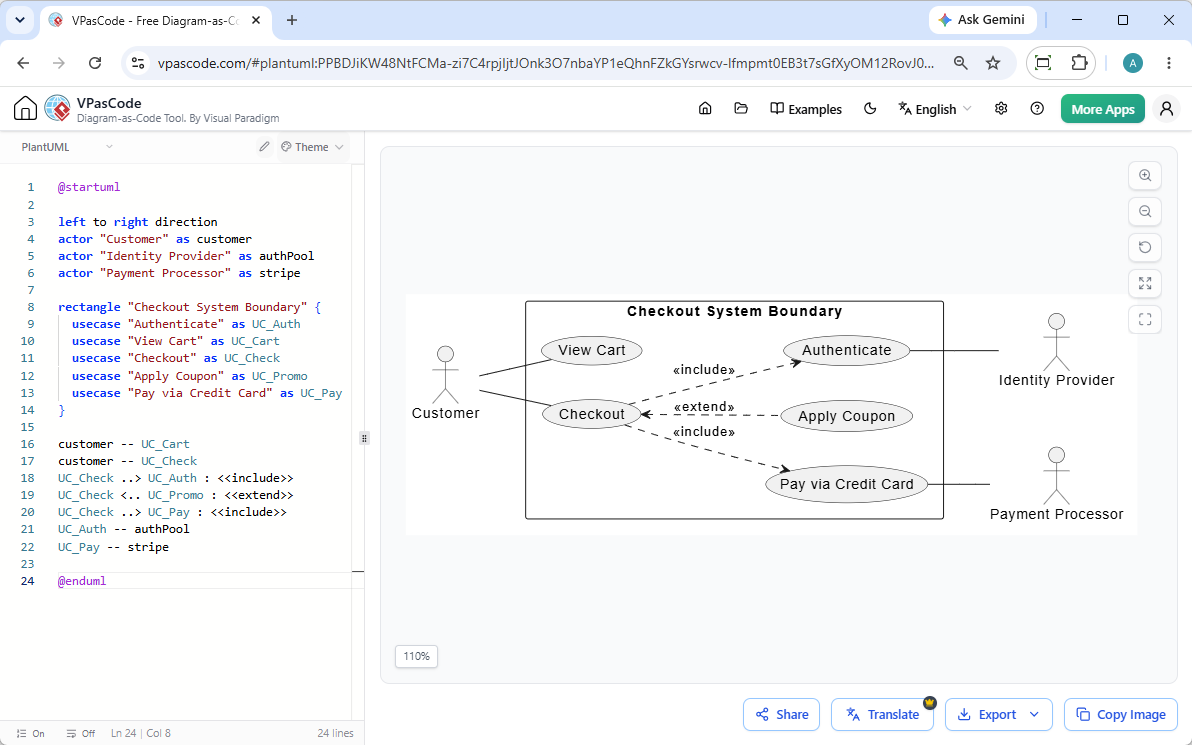
Visual Paradigm VPasCode to zintegrowane, oparte na przeglądarcedarmowy edytor PlantUMLi silnik renderowania wielo-DSL. Całkowicie eliminuje konieczność lokalnej instalacji Javy, zachowując 100% kompatybilności renderowania z istniejącymi skryptami PlantUML.
- Natywne generowanie i modyfikacja diagramów przy użyciu AI: Jak szczegółowo opisano w naszymWielka aktualizacja VPasCode: Generowanie i modyfikacja diagramów natychmiastowo przy użyciu AI, możesz generować kompletne diagramy na podstawie poleceń w języku naturalnym (np.„Wygeneruj diagram przypadków użycia w PlantUML dla systemu bankomatu”) i instruować AI do refaktoryzacji istniejących skryptów bezpośrednio w locie.
- Automatyczne wykrywanie formatu:Wklej surowy kod PlantUML, Mermaid, D2 lub dane strukturalne (JSON, YAML, SQL) do edytora w czasie rzeczywistym; VPasCode automatycznie wykrywa język i renderuje natychmiast.
- Naprawianie błędów kodu przez AI i porównanie obok siebie: Gdy składnia zostanie naruszona, kliknij „Napraw przez AI” aby automatycznie naprawić uszkodzony kod i wyświetlić przejrzystą różnicę wyjaśniającą poprawkę składni.
- Natywne tłumaczenie językowe przez AI: Tłumacz etykiety na diagramach architektury zlokalizowanych międzynarodowo jednym kliknięciem bezpośrednio na płótnie.
- Natychmiastowe udostępnianie i eksport: Generuj udostępnialne adresy URL w sieci, kody QR lub eksportuj skalowalne zasoby SVG oraz wysokiej rozdzielczości pliki PNG do dokumentacji technicznej.
(Uwaga: Zaawansowane funkcje generowania diagramów przez AI, modyfikacji kodu i naprawiania błędów są dostępne w wersji Visual Paradigm Online Deluxe Edition / Visual Paradigm Desktop Professional Edition+).
3.2 Mermaid.js: Najlepszy do natywnej integracji z Markdown
Mermaid.js jest szeroko zintegrowany z GitHub, GitLab i Notion. Oferuje lekki składnię idealną do prostych diagramów przepływu i sekwencji bezpośrednio w standardowych plikach Markdown, choć brakuje mu natywnej obsługi złożonych diagramów PlantUML ArchiMate lub niestandardowych rozszerzeń UML.
3.3 D2: Najlepszy do nowoczesnej estetyki układu
D2 to nowoczesny język tekstowy do tworzenia diagramów, zaprojektowany specjalnie do generowania czystych, automatycznych silników układu wizualnego. Doskonale radzi sobie z automatycznym układaniem złożonych zagnieżdżonych węzłów, choć migracja wymaga całkowitego przepisania istniejących skryptów PlantUML na składnię D2.
3.4 Structurizr: Najlepszy do czystego modelowania architektury C4
Structurizr wymusza model architektury C4 (Kontekst, Kontenery, Komponenty, Kod) za pomocą własnego języka DSL. Jest idealny dla architektów przedsiębiorstw, którzy priorytetowo traktują modelowanie strukturalne nad ogólnym tworzeniem diagramów.
4. Jak przejść z PlantUML bez przepisywania diagramów
Przejście na inną platformę nie oznacza wyrzucenia dziedzicznego .puml baz kodu. Zespoły mogą przyjąć nowoczesne środowisko renderowania bez refaktoryzacji istniejących aktywów.
4.1 Hybrydowe wielojęzyczne przepływy pracy DSL
Wykorzystując otwartą platformę taką jak VPasCode, zespoły mogą zachować niezmienione dziedziczne skrypty PlantUML, jednocześnie tworząc nowe mapy usług w Mermaid lub D2. Automatyczne wykrywanie formatu zapewnia programistom możliwość przeglądania i edycji dowolnego formatu bez zmiany lokalnych narzędzi.
4.2 Uproszczenie dokumentacji technicznej dzięki OpenDocs
Zamiast zarządzać izolowanymi plikami skryptów, eksportuj żywe, wyrenderowane bloki kodu bezpośrednio do scentralizowanych systemów, takich jak Visual Paradigm OpenDocs, aby utrzymać automatycznie aktualizowaną dokumentację architektury oprogramowania.
5. Ramy decyzyjne: Którą alternatywę dla PlantUML powinieneś wybrać?
Wybierz platformę do tworzenia diagramów w oparciu o natychmiastowe wymagania przepływu pracy Twojego zespołu:
- Wybierz VPasCode, jeśli: Chcesz zera konfiguracji, opartego na sieci edytora PlantUML który natywnie renderuje istniejący kod PlantUML, generuje i modyfikuje diagramy za pomocą poleceń AI w języku naturalnym, automatycznie naprawia błędy składni i obsługuje Mermaid, D2 oraz SQL w jednym narzędziu.
- Wybierz Mermaid.js, jeśli: Potrzebujesz tylko podstawowych diagramów wbudowanych natywnie w pliki Markdown GitHub.
- Wybierz D2, jeśli:Rozpoczynasz nowy projekt od zera i priorytetowo traktujesz zautomatyzowane stylowanie wizualne na rzecz standardów UML.
Wypróbuj VPasCode teraz za darmo na stronie: https://www.vpascode.com/