


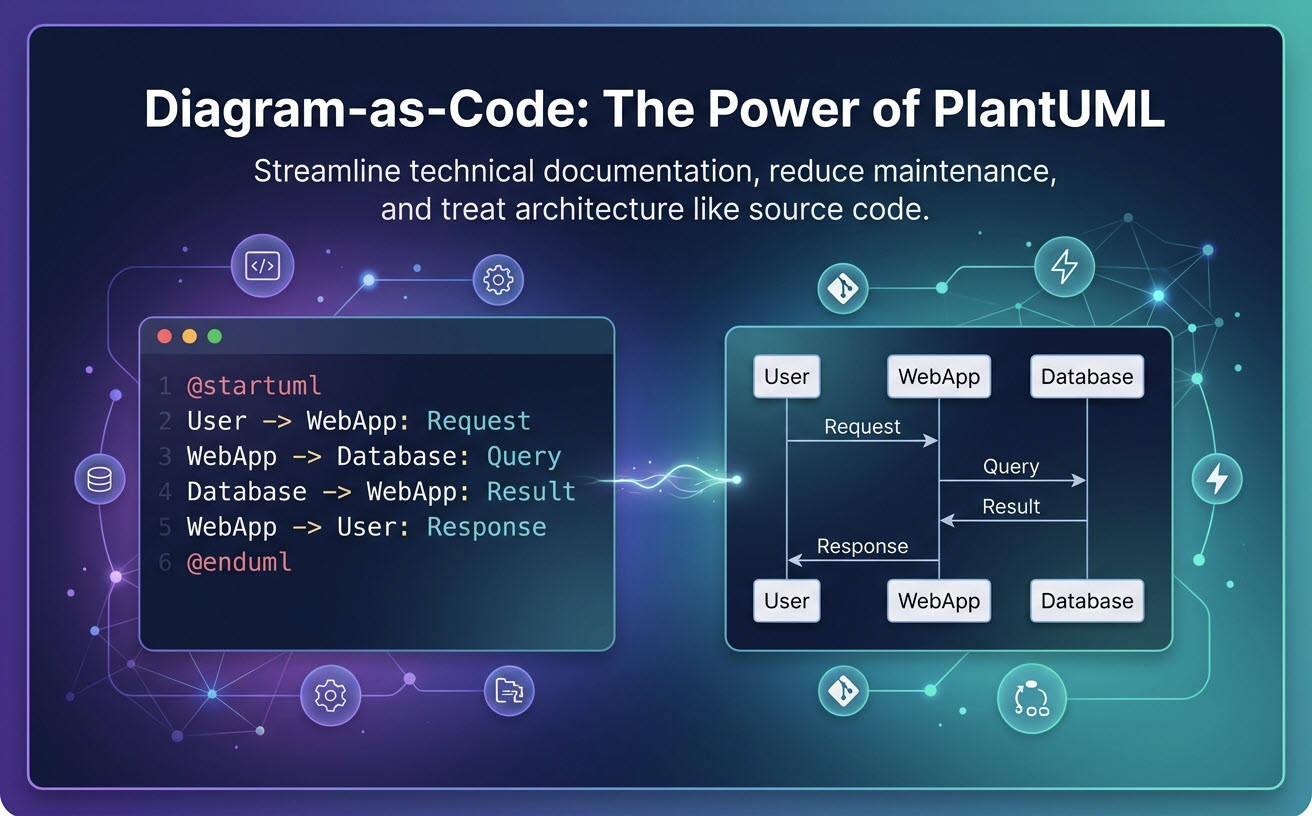
PlantUML to narzędzie typu diagram-as-code o otwartym źródle, które konwertuje skrypty w zwykłym tekście na strukturalne modele wizualne, takie jak diagramy sekwencji, klas i komponentów.Wraz ze wzrostem złożoności systemów oprogramowania zespoły inżynieryjne odchodzą od ręcznych narzędzi do projektowania typu „przeciągnij i upuść” na rzecz diagramowania w zwykłym tekście. Korzystanie ze specjalistycznego “edytora diagramów jako koduumożliwia programistom traktowanie modeli architektury jak kodu źródłowego – co zapewnia bezproblemową kontrolę wersji, szybkie aktualizacje oraz spójny styl wizualny w całej dokumentacji.
Czym jest PlantUML i dlaczego programiści odchodzą od rozwiązań typu „przeciągnij i upuść”?”
PlantUML to język specyficzny dla danej dziedziny (DSL), który definiuje architekturę za pomocą tekstu czytelnego dla ludzi, a nie kształtów graficznych.Tradycyjne aplikacje do projektowania wizualnego wymagają ręcznego wyrównywania, dostosowywania kolorów i żmudnego przemieszczania elementów za każdym razem, gdy zmieni się projekt systemu. PlantUML przenosi nacisk z ręcznego stylowania na logikę deklaratywną: piszesz, co system robi, a silnik zajmuje się tym, jak to wygląda.
Ukryte koszty diagramowania opartego na interfejsie użytkownika (konserwacja i rozbieżności)
Narzędzia do diagramowania wizualnego z interfejsem użytkownika generują znaczący nakład operacyjny dla zespołów technicznych:
- Rozbieżności w dokumentacji:Przestarzałe pliki PNG lub JPEG przechowywane na stronach Wiki rzadko odpowiadają rzeczywistemu kodu produkcyjnemu.
- Wysoki czas konserwacji:Dodanie jednego serwisu do diagramu sekwencji wymaga ręcznego przemieszczania dziesiątek strzałek i linii życia.
- Brak śledzalności:Plików obrazowych nie można łatwo porównać za pomocą narzędzia diff w Git, co uniemożliwia audytowanie poprzednich decyzji architektonicznych.
Jak działają diagramy jako kod: od skryptu tekstowego do wizualnej architektury
W przepływie pracy diagram-as-code projekt oprogramowania jest pisany bezpośrednio w standardowych plikach tekstowych (np. .puml). Silnik interpretuje relacje i automatycznie generuje układ wizualny. Poniżej znajduje się podstawowy skrypt PlantUML ilustrujący, jak minimalny składnia renderuje przepływ architektury:
@startuml
User -> WebApp: Żądanie danych
WebApp -> Database: Zapytanie rekordu
Database --> WebApp: Zwróć wynik
WebApp --> User: Renderuj pulpit
@endumlTop 5 powodów używania PlantUML do dokumentacji technicznej
| Korzyść | Tradycyjne przeciągnij i upuść | PlantUML (Diagramy jako kod) |
|---|---|---|
| Kontrola wersji | Obrazy binarne; brak sensownych różnic w Git | Tekst zwykły; natywne zatwierdzenia Git i pull requesty |
| Utrzymanie układu | Ręczne dopasowanie pikseli przy każdej aktualizacji | Automatyczne renderowanie i pozycjonowanie węzłów |
| Spójność | Niespójne czcionki, kolory i style linii | Jednolite globalne standardy renderowania |
| Przenośność | Własne formaty plików (uzależnienie od dostawcy) | Otwarte skrypty tekstowe uruchamialne wszędzie |
1. Kontrola wersji i integracja z Git dla dokumentacji architektury
Ponieważ pliki PlantUML są przechowywane jako tekst zwykły, natywnie wpisują się one we współczesne procesy pracy programistów. Zespoły mogą przechowywać diagramy obok kodu źródłowego aplikacji, przeglądać zmiany w architekturze podczas standardowych pull requestów w Git oraz śledzić dokładne historyczne rewizje w czasie.
2. Bezkłopotowe utrzymanie i automatyczne ponowne układanie
PlantUML automatycznie oblicza współrzędne elementów i trasy połączeń. Gdy architektura mikroserwisów się rozrasta, programiści po prostu wstawiają nową linię skryptu tekstowego; silnik układania natychmiast przelicza odstępy i pozycjonuje elementy.
3. Standaryzowany, spójny styl wizualny w zespołach
Narzędzia ręczne często prowadzą do rozdrobnionych stylów wizualnych w rozproszonych zespołach inżynierskich. PlantUML stosuje jednolite reguły renderowania we wszystkich wyjściach, zapewniając, że diagramy sekwencji, klas i komponentów zachowują profesjonalne standardy bez ręcznych dostosowań projektowych.
4. Natywne wsparcie dla ogromnej różnorodności diagramów (UML, C4, mapy myśli)
PlantUML obejmuje szeroki zakres wymagań wizualizacji technicznych. Poza podstawowymi formatami UML (sekwencji, przypadków użycia, aktywności, stanu, wdrożenia) obsługuje modele architektury C4, ArchiMate, wykresy Gantta, mapy myśli, WBS i diagramy sieciowe w ramach jednego składni języka.
5. Lekka, otwarta przenośność tekstu bez uzależnienia od dostawcy
Dokumentacja oparta na tekście gwarantuje długoterminową dostępność. Skrypty PlantUML pozostają czytelne dla ludzi nawet bez programu do przeglądania, eliminując ryzyko utraty krytycznej dokumentacji systemu z powodu własnych formatów plików lub uzależnienia od platformy.
Typowe punkty tarcia w PlantUML (i jak je pokonać)
Mimo swojej efektywności, tradycyjne wdrażanie PlantUML wprowadza specyficzne przeszkody operacyjne:
Ominięcie lokalnych problemów z instalacją Javy i Graphviz
Uruchamianie PlantUML lokalnie zazwyczaj wymaga zainstalowania środowiska uruchomieniowego Javy (JRE) wraz z zależnościami Graphviz do renderowania złożonych kształtów. Konfigurowanie tych lokalnych zależności w całym zespole inżynierskim może tworzyć niepotrzebne tarcie środowiskowe.
Rozwiązywanie złożonych błędów składni bez frustracji
Brak jednego nawiasu, słowa kluczowego składni lub cudzysłowu może zepsuć renderowanie. Rozszyfrowywanie niejasnych komunikatów błędów kompilatora często odwraca uwagę programistów od pisania rzeczywistych specyfikacji architektury.
Przyspieszanie przepływów pracy PlantUML dzięki VPasCode i natywnej AI
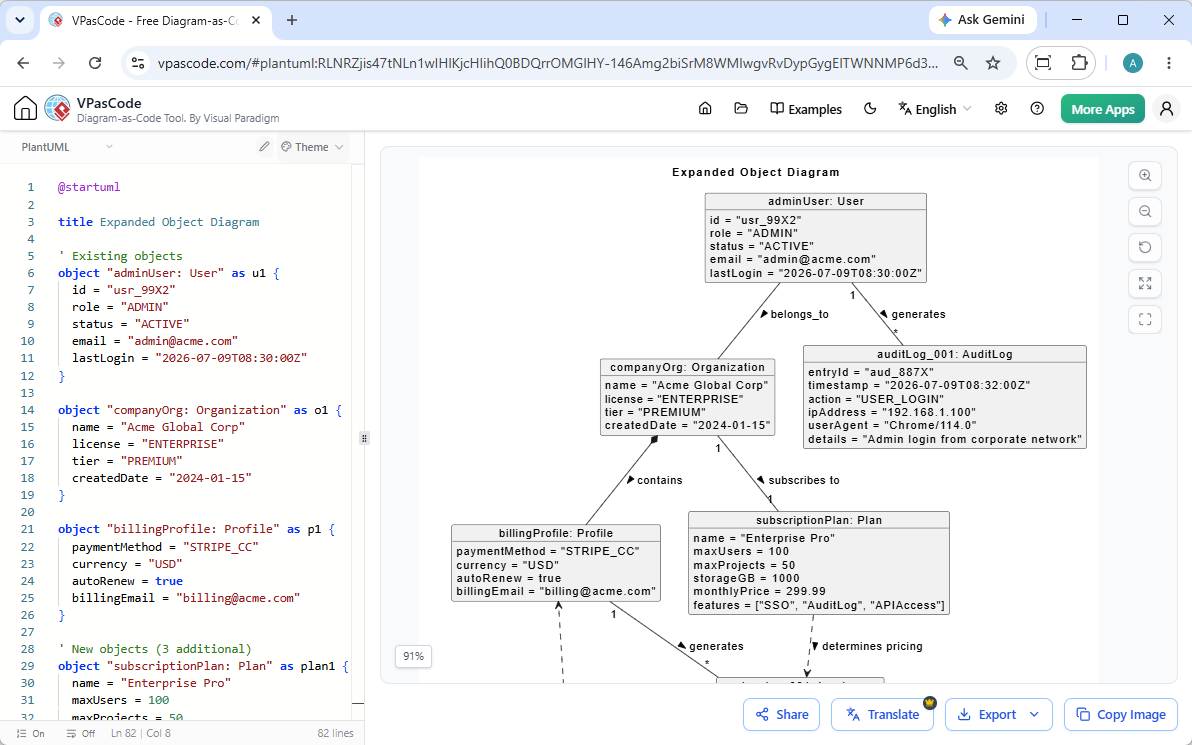
Aby wyeliminować zależności lokalnego środowiska, opóźnienia w rozwiązywaniu błędów składni i tarcie związane z pustym ekranem, współczesne zespoły techniczne polegają na narzędziach natywnych dla chmury z wbudowanymi możliwościami AI.Visual Paradigm VPasCode zapewnia wysokowydajne,darmowy edytor PlantUMLbezpośrednio w Twojej przeglądarce.
Natychmiastowa generacja i modyfikacja diagramów przy użyciu AI
Jak podkreślono w naszym Wielka aktualizacja VPasCode: Natychmiastowa generacja i modyfikacja diagramów przy użyciu AI, możesz całkowicie pominąć ręczne kodowanie, wpisując polecenia w języku naturalnym — takie jak „Wygeneruj diagram przypadków użycia w PlantUML dla systemu bankomatu”—co pozwala Ci tworzyć i refaktoryzować diagramy natywnie wewnątrz edytora w ciągu kilku sekund.
Natychmiastowe wykrywanie automatyczne i renderowanie w czasie rzeczywistym w przeglądarce
Dzięki VPasCode, nie ma potrzeby ręcznej instalacji Javy ani Graphviz. Platforma automatycznie wykrywa składnię PlantUML po wklejeniu skryptu do edytora i natychmiast renderuje wysokiej rozdzielczości diagramy SVG lub PNG w czasie rzeczywistym.
Naprawianie błędów przy użyciu AI jednym kliknięciem oraz porównanie kodu obok siebie
Gdy wystąpią błędy składni, natywne funkcje VPasCode „Napraw przez AI” analizuje skrypt, wskazuje na pominięcia składniowe i automatycznie naprawia skrypt. Przejrzyste porównanie kodu obok siebie wyświetla dokładne poprawki, dzięki czemu programiści szybko uczą się składni, zachowując skupienie na projektowaniu.
Wielojęzyczne tłumaczenie przy użyciu AI dla globalnych zespołów rozproszonych
Globalne jednostki inżynieryjne często potrzebują zlokalizowanej dokumentacji architektury. VPasCode zawiera wbudowane tłumaczenie przy użyciu AI, umożliwiając użytkownikom tłumaczenie etykiet diagramów i elementów tekstowych na wiele języków jednym kliknięciem, bez naruszania struktury kodu DSL.
(Uwaga: Zaawansowane funkcje generowania diagramów przy użyciu AI, modyfikacji kodu i naprawiania błędów są dostępne w wersji Deluxe Visual Paradigm Online / wersji Professional+ Visual Paradigm Desktop).
PlantUML vs. Mermaid vs. D2: Wybór odpowiedniego języka DSL dla Twojego projektu
Wybór odpowiedniego języka do tworzenia diagramów zależy od specyficznych wymagań architektonicznych Twojego projektu:
- PlantUML: Najlepszy do głębokiej zgodności z UML, złożonych architektur przedsiębiorstw i modeli C4.
- Mermaid: Najlepszy do prostych schematów blokowych i szybkiej integracji Markdown w plikach README GitHub/GitLab.
- D2: Zoptymalizowany do nowoczesnych diagramów architektury oprogramowania z możliwością skryptowania i zaawansowanymi opcjami stylizacji wizualnej.
Uwaga: Jeśli Twój zespół używa wielu formatów składni w różnych repozytoriach, VPasCode natywnie obsługuje PlantUML, Mermaid, D2, Graphviz i Markmap w ramach jednej platformy edytora.
Jak rozpocząć pracę z PlantUML w mniej niż 5 minut
- Przejdź do online Edytor PlantUML takie jak vpascode.com.
- Użyj poleceń w języku naturalnym, aby natychmiast wygenerować swoją architekturę za pomocą AI, lub napisz i wklej swój początkowy skrypt tekstowy PlantUML do panelu edytora na żywo.
- Sprawdź wizualny wynik w czasie rzeczywistym na płótnie podglądu.
- Użyj wbudowanych asystentów AI do czyszczenia składni lub tłumaczenia etykiet tekstowych, jeśli jest to konieczne.
- Eksportuj swój diagram jako plik wektorowy SVG, obraz PNG o wysokiej rozdzielczości lub udostępnialny adres URL w sieci bezpośrednio do swojej dokumentacji technicznej.