


In the fast-paced logistics and recycling industry, operational efficiency relies heavily on accurate data tracking from the moment raw material enters the facility to the final sale of processed bales. A recycling center must manage a complex web of relationships: tracking which supplier delivered which waste stream, how that material was sorted into specific commodities, the precise weight of the resulting bales, and the fluctuating market prices that determine revenue. Without a clear, unified data model, discrepancies in weight recording, pricing errors, and lost inventory become inevitable, leading to significant financial losses and compliance risks.
Visualizing this complex ecosystem through an Entity-Relationship Diagram (ERD) is not just a documentation exercise; it is a critical architectural step for building robust database systems and reporting dashboards. By translating these physical workflows into a logical data structure, architects can ensure that every kilogram of cardboard or aluminum is traceable, priced correctly, and settled with the right supplier. This guide demonstrates how to model the entire lifecycle of waste processing—from inbound streams to outbound shipments—using the power of diagram-as-code.
Using VPasCode, a free web-based diagram editor, you can define this entire data schema in PlantUML, instantly render the visual relationships, and iterate on your design without ever leaving the browser. This approach eliminates the friction of manual drawing tools and allows for precise, version-ready documentation that evolves with your business needs.
Understanding the Model: Purpose, Scope & Problem Framing
Diagram Abstraction & Representation
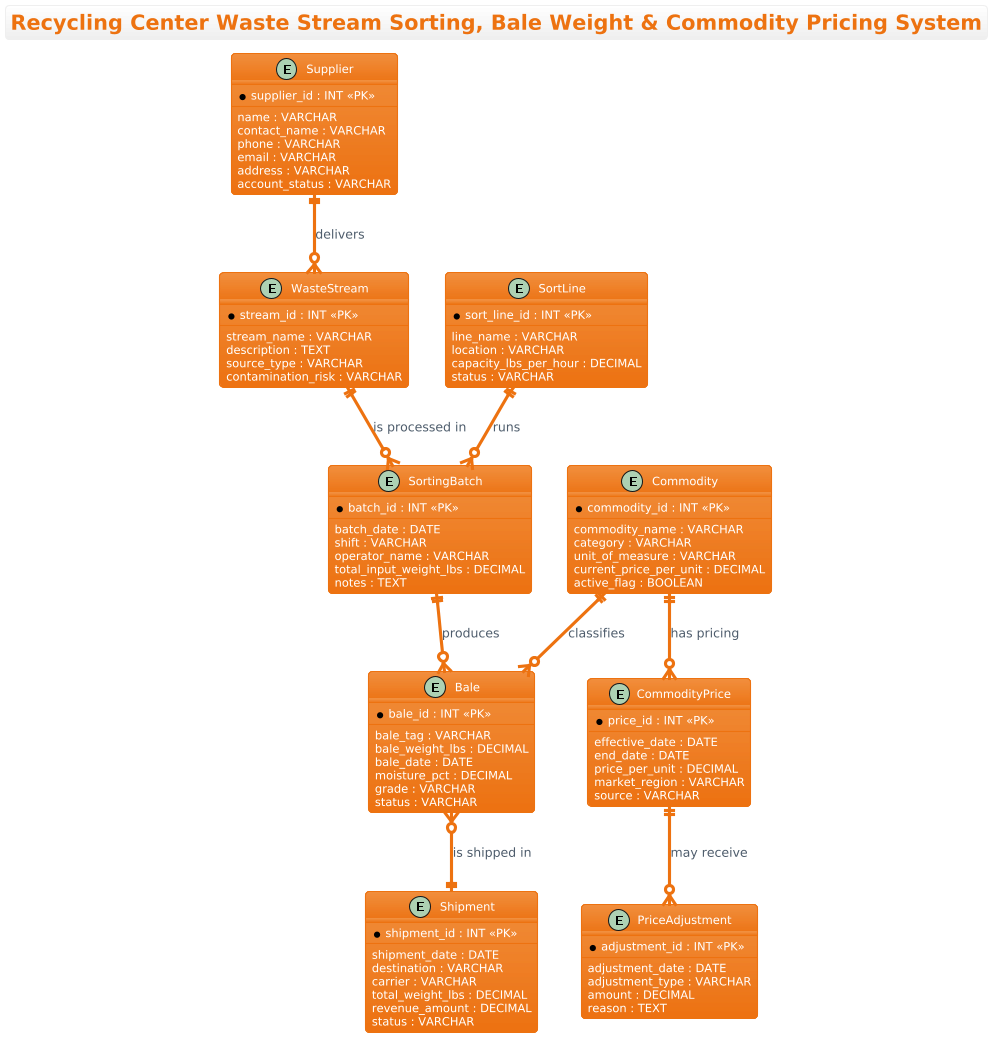
The Entity-Relationship Diagram (ERD) is the foundational blueprint for any relational database. In this specific context, the ERD models the static structure of the recycling center’s operational data. It defines the “things” (entities) that exist in the system—such as a Supplier or a Bale—and the rules (relationships) that govern how they interact. For instance, the diagram clarifies that a single Supplier can deliver multiple WasteStreams, but a specific Bale is produced from a single SortingBatch. This abstraction allows developers to understand data integrity requirements, such as ensuring that every bale has a recorded weight and is linked to a valid commodity price.
Target Domain Scope & Scenario
The scope of this diagram covers the core operational loop of a recycling facility. It begins with inbound logistics (Suppliers and Waste Streams), moves through processing (Sorting Batches, Sort Lines, and Bales), and concludes with financial settlement (Commodities, Pricing, and Shipments). The diagram intentionally excludes external systems like payment gateways or third-party carrier APIs, focusing strictly on the internal data entities required to track the physical movement and valuation of waste materials.
Key Takeaways & Educational Insights
By studying this model, readers will gain insight into how to normalize data for complex manufacturing-like processes in recycling. You will learn how to link historical pricing data to specific commodities, how to track the physical attributes of a bale (moisture, grade, weight), and how to structure relationships to support revenue calculation reports. This model serves as a template for any industry dealing with raw material intake, processing, and variable pricing.
Complete Diagram & Full Source Code
Below is the complete visual representation of the Recycling Center Waste Stream Sorting, Bale Weight & Commodity Pricing System. This diagram encapsulates the data flow from supplier delivery to final shipment, highlighting the critical entities and their cardinalities.
Copy the following code block to see the live diagram in the VPasCode editor:
@startuml
!theme aws-orange
title Recycling Center Waste Stream Sorting, Bale Weight & Commodity Pricing System

/'
Diagram Context:
This ERD models the core data structure of a recycling center operation that
receives mixed waste streams, sorts them into commodity categories (e.g.,
cardboard, PET, aluminum), and produces weighed bales for sale. The diagram
captures the flow from inbound material through sorting, baling, and weight
recording, to commodity market pricing and revenue calculation. It supports
tracking which supplier delivered which material, how it was sorted, the
resulting bale weights, and the current or historical prices applied to each
commodity for accurate settlement and reporting.
'/

' ── Core Entities ──────────────────────────────────────────────

entity "Supplier" as supplier {
  * supplier_id : INT <<PK>>
  --
  name : VARCHAR
  contact_name : VARCHAR
  phone : VARCHAR
  email : VARCHAR
  address : VARCHAR
  account_status : VARCHAR
}

entity "WasteStream" as wastestream {
  * stream_id : INT <<PK>>
  --
  stream_name : VARCHAR
  description : TEXT
  source_type : VARCHAR
  contamination_risk : VARCHAR
}

entity "Commodity" as commodity {
  * commodity_id : INT <<PK>>
  --
  commodity_name : VARCHAR
  category : VARCHAR
  unit_of_measure : VARCHAR
  current_price_per_unit : DECIMAL
  active_flag : BOOLEAN
}

entity "SortingBatch" as sortingbatch {
  * batch_id : INT <<PK>>
  --
  batch_date : DATE
  shift : VARCHAR
  operator_name : VARCHAR
  total_input_weight_lbs : DECIMAL
  notes : TEXT
}

entity "SortLine" as sortline {
  * sort_line_id : INT <<PK>>
  --
  line_name : VARCHAR
  location : VARCHAR
  capacity_lbs_per_hour : DECIMAL
  status : VARCHAR
}

entity "Bale" as bale {
  * bale_id : INT <<PK>>
  --
  bale_tag : VARCHAR
  bale_weight_lbs : DECIMAL
  bale_date : DATE
  moisture_pct : DECIMAL
  grade : VARCHAR
  status : VARCHAR
}

entity "CommodityPrice" as commodityprice {
  * price_id : INT <<PK>>
  --
  effective_date : DATE
  end_date : DATE
  price_per_unit : DECIMAL
  market_region : VARCHAR
  source : VARCHAR
}

entity "PriceAdjustment" as priceadjustment {
  * adjustment_id : INT <<PK>>
  --
  adjustment_date : DATE
  adjustment_type : VARCHAR
  amount : DECIMAL
  reason : TEXT
}

entity "Shipment" as shipment {
  * shipment_id : INT <<PK>>
  --
  shipment_date : DATE
  destination : VARCHAR
  carrier : VARCHAR
  total_weight_lbs : DECIMAL
  revenue_amount : DECIMAL
  status : VARCHAR
}

' ── Relationships ──────────────────────────────────────────────

supplier ||--o{ wastestream : "delivers"
wastestream ||--o{ sortingbatch : "is processed in"
sortline ||--o{ sortingbatch : "runs"
sortingbatch ||--o{ bale : "produces"
commodity ||--o{ bale : "classifies"
commodity ||--o{ commodityprice : "has pricing"
commodityprice ||--o{ priceadjustment : "may receive"
bale }o--|| shipment : "is shipped in"

@endumlStep-by-Step Architectural Walkthrough
Phase 1: Canvas Configuration & Layout Directives
The foundation of any PlantUML ERD is the configuration block. In this tutorial, we begin by setting the theme to match the brand identity of the logistics operation. The !theme aws-orange directive applies a warm, professional color palette to the entire diagram, ensuring consistency across documentation.
We also define the diagram title using the title directive. This provides immediate context for anyone viewing the diagram. Crucially, we include a comment block using /' ... '/ syntax. This block serves as a living document, explaining the business logic and scope of the model without affecting the rendering engine.
!theme aws-orange
title Recycling Center Waste Stream Sorting, Bale Weight & Commodity Pricing System

/'
Diagram Context:
This ERD models the core data structure...
'/
Phase 2: Declaring Core Entities, Actors, and Boundaries
Next, we define the core entities. In PlantUML ERD, the entity keyword is used to create a table-like structure. Each entity represents a real-world object, such as Supplier or Bale.
Inside each entity block, we define attributes. The syntax * attribute_name : TYPE < is used to mark the Primary Key. For example, in the Supplier entity, supplier_id is the unique identifier. The -- separator is used to visually divide keys from other attributes, improving readability. We also define data types like INT, VARCHAR, DECIMAL, and BOOLEAN to ensure the diagram accurately reflects database schema requirements.
entity "Supplier" as supplier {
  * supplier_id : INT <>
  --
  name : VARCHAR
  contact_name : VARCHAR
  ...
Phase 3: Mapping Data Flows & Key Interactions
The power of an ERD lies in the relationships between entities. We use the ||--o{ syntax to define cardinality. The double bar || represents “one and only one” (mandatory), while the crow’s foot { represents “many”. The o represents “zero” (optional).
For instance, supplier ||--o{ wastestream : "delivers" indicates that one supplier must deliver at least one waste stream, but a specific waste stream record might not exist yet (optional on the receiving end in this specific modeling choice, or rather, a supplier can exist without a current stream, but the relationship implies a one-to-many flow). In this specific model, we ensure that every Bale is produced by a SortingBatch and classified by a Commodity, creating a clear lineage of data.
sortingbatch ||--o{ bale : "produces"
commodity ||--o{ bale : "classifies"
bale }o--|| shipment : "is shipped in"
Phase 4: Grouping, Annotations & Visual Polish
While this ERD is primarily focused on entity declaration, the title and the comment block act as high-level annotations. The use of as alias in the entity definition (e.g., entity "Supplier" as supplier) allows us to reference the entity by a shorter name in relationship lines, keeping the diagram code clean and the visual output uncluttered.
We also utilize the entity block structure to group related attributes, which helps in generating the final database schema. The visual separation of Primary Keys and other fields using the -- line ensures that the generated diagram clearly distinguishes identifying columns from descriptive data.
Syntax & Keyword Deep Dive
To master PlantUML ERD modeling, it is essential to understand the specific syntax keywords used in this diagram:
- entity: Defines a new table or entity in the diagram. The syntax is
entity "Label" as alias { ... }. - attribute definition: Inside an entity, attributes are defined as
name : TYPE. TheTYPEcan be standard SQL types likeINT,VARCHAR,DATE, or custom types. - Primary Key (PK): Marked with
*at the start of the line and the stereotype<. This visually indicates the unique identifier for the entity.> - Relationships: The syntax
entity1 ||--o{ entity2 : "label"defines the relationship.||means mandatory one,--is the line, ando{means zero or many. Other combinations include|{(one or many) and}|--(optional one). - Comments: Single-line comments start with
', and multi-line comments are wrapped in/'and'/. - Theme: The
!themedirective applies a predefined color scheme to the entire diagram, allowing for consistent branding.
Best Practices & Pitfalls to Avoid
When modeling complex logistics systems like recycling centers, adhering to best practices ensures your diagrams remain maintainable and clear:
- Normalize Your Entities: Avoid creating a single massive entity that contains all supplier, bale, and pricing data. Instead, break them down into logical units like
Supplier,WasteStream, andCommodityPriceto reduce redundancy and improve data integrity. - Use Clear Naming Conventions: Use descriptive names for attributes (e.g.,
bale_weight_lbsinstead of justweight) to avoid ambiguity when the diagram is used as a reference for database developers. - Manage Cardinality Carefully: Double-check your relationship arrows. A common pitfall is reversing the “one” and “many” sides, which can lead to incorrect database constraints and application logic errors.
- Keep Comments Up-to-Date: The comment block at the top of the diagram is a critical part of the documentation. Ensure it is updated whenever the business logic or scope of the system changes.
Try It Yourself with VPasCode
Ready to architect your own logistics data models? Start building professional ERDs instantly with VPasCode.
Start Building Recycling ERDs Faster with VPasCode
Instantly render, customize, and export your PlantUML entity diagrams in your browser—no installation required, just code and clarity.