


In the high-stakes environment of shipbuilding, the integrity of a vessel’s hull is non-negotiable. Every weld joint, from the initial block assembly to the final sea trial, must be meticulously documented to satisfy rigorous classification society standards and safety regulations. The challenge for manufacturing engineers and quality managers lies not just in performing the welds, but in maintaining a seamless, traceable digital thread that links physical components to the specific welding procedures used, the certified personnel who executed them, and the subsequent non-destructive testing (NDT) results.

Traditional paper-based or siloed spreadsheet tracking systems often struggle to maintain this level of granularity, leading to gaps in compliance and difficulty in auditing. A robust Entity-Relationship Diagram (ERD) provides the architectural blueprint for a database that can handle this complexity. By visualizing the relationships between hull blocks, weld joints, welding procedure specifications (WPS), welders, and NDT reports, architects can design systems that ensure every weld is backed by a valid procedure and verified by a qualified inspector. This tutorial demonstrates how to build such a critical data model using diagram-as-code with PlantUML in VPasCode.
Understanding the Model: Purpose, Scope & Problem Framing
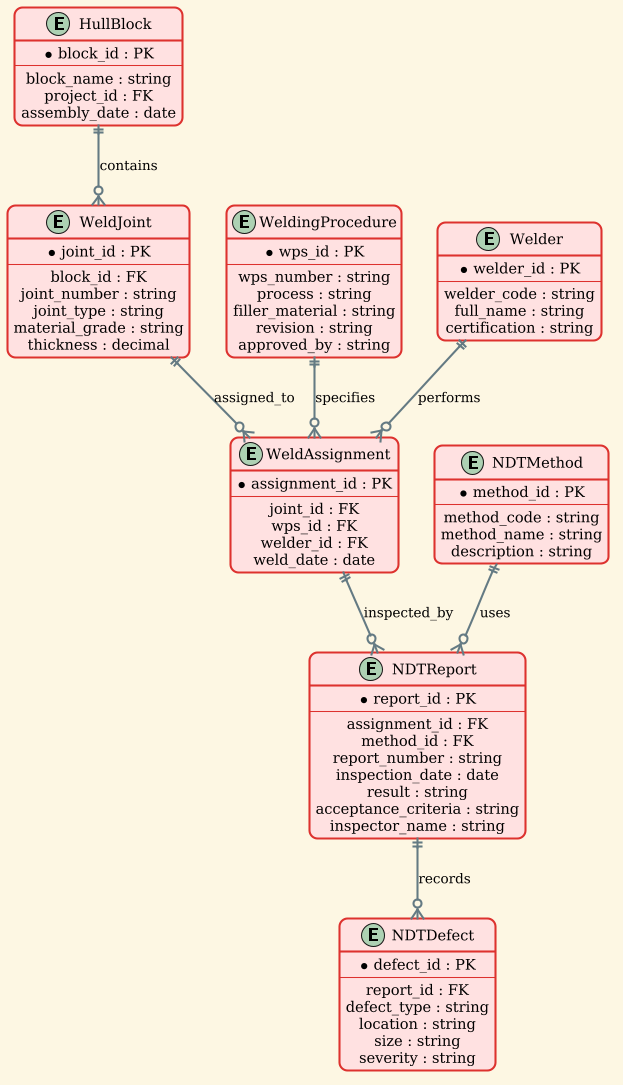
This ERD is designed to solve a specific data modeling problem in the maritime manufacturing sector: ensuring end-to-end traceability for hull block assembly. The diagram abstraction here focuses on the “Quality Chain”—the logical sequence of entities that must exist for a weld to be considered compliant.
Diagram Abstraction & Representation
In this model, entities represent physical or administrative objects: HullBlock represents the physical section of the ship, WeldJoint represents the specific seam, WeldingProcedure represents the technical recipe (WPS), and Welder represents the human resource. The relationships (lines) define the cardinality of these interactions, ensuring that a weld cannot exist without a joint, a joint cannot be assigned without a procedure, and an inspection report cannot exist without a specific assignment.
Target Domain Scope & Scenario
The scope is strictly limited to the hull block assembly phase. It covers the lifecycle from the definition of the block, through the assignment of the welding procedure and personnel, to the final NDT inspection. It intentionally excludes upstream design phases or downstream painting/coating processes to maintain focus on the welding quality workflow.
Key Takeaways & Educational Insights
By constructing this diagram, you will learn how to model many-to-many relationships (like welders performing multiple joint assignments) through associative entities (like WeldAssignment). You will also see how to handle optional relationships, such as recording specific defects found during NDT, which are linked only when a failure occurs.
Complete Diagram & Full Source Code
Below is the finished blueprint. This ERD clearly delineates the entities required for a shipyard’s welding quality management system, utilizing the sunlust theme for a professional, warm aesthetic suitable for engineering documentation.
@startuml
/'
Diagram Context:
This ERD models the data structure required to manage welding procedure specifications (WPS)
and non-destructive testing (NDT) reports for hull block assembly in a shipyard.
It covers hull blocks, weld joints, assigned welding procedures, welders,
NDT methods, and the resulting inspection reports.
The diagram illustrates how quality documentation is linked to physical weld locations
to ensure traceability and compliance with classification society rules.
'/
!theme sunlust

entity "HullBlock" as hull_block {
  * block_id : PK
  --
  block_name : string
  project_id : FK
  assembly_date : date
}

entity "WeldJoint" as weld_joint {
  * joint_id : PK
  --
  block_id : FK
  joint_number : string
  joint_type : string
  material_grade : string
  thickness : decimal
}

entity "WeldingProcedure" as wps {
  * wps_id : PK
  --
  wps_number : string
  process : string
  filler_material : string
  revision : string
  approved_by : string
}

entity "Welder" as welder {
  * welder_id : PK
  --
  welder_code : string
  full_name : string
  certification : string
}

entity "WeldAssignment" as weld_assignment {
  * assignment_id : PK
  --
  joint_id : FK
  wps_id : FK
  welder_id : FK
  weld_date : date
}

entity "NDTMethod" as ndt_method {
  * method_id : PK
  --
  method_code : string
  method_name : string
  description : string
}

entity "NDTReport" as ndt_report {
  * report_id : PK
  --
  assignment_id : FK
  method_id : FK
  report_number : string
  inspection_date : date
  result : string
  acceptance_criteria : string
  inspector_name : string
}

entity "NDTDefect" as ndt_defect {
  * defect_id : PK
  --
  report_id : FK
  defect_type : string
  location : string
  size : string
  severity : string
}

hull_block ||--o{ weld_joint : contains
weld_joint ||--o{ weld_assignment : assigned_to
wps ||--o{ weld_assignment : specifies
welder ||--o{ weld_assignment : performs
weld_assignment ||--o{ ndt_report : inspected_by
ndt_method ||--o{ ndt_report : uses
ndt_report ||--o{ ndt_defect : records

@endumlStep-by-Step Architectural Walkthrough
Phase 1: Canvas Configuration & Layout Directives
Before defining any entities, we establish the visual style and the context for the diagram. In PlantUML, the !theme directive allows for rapid visual customization without writing individual style properties. Here, we use the sunlust theme to give the diagram a distinct, professional look that stands out in technical reports.
Additionally, we include a comment block at the very beginning. This is crucial for documentation. The comment block starts with /' and ends with '/, containing a plain-text description of the diagram’s purpose. This ensures that anyone viewing the source code immediately understands the business context.
/'
Diagram Context:
This ERD models the data structure required to manage welding procedure specifications (WPS)
and non-destructive testing (NDT) reports for hull block assembly in a shipyard.
...
'/
!theme sunlust
Phase 2: Declaring Core Entities, Actors, and Boundaries
The foundation of the ERD lies in the entity definitions. We use the entity keyword followed by the entity name, an alias (for use in relationships), and a block containing attributes. Primary Keys (PK) are marked with an asterisk *, and Foreign Keys (FK) are marked with FK to denote their referential integrity role.
We define the core physical entities first: HullBlock and WeldJoint. The HullBlock entity holds the project context, while WeldJoint links back to the block via block_id. We then define the administrative entities: WeldingProcedure (the WPS) and Welder. These are master data tables that will be referenced by the transactional table we will build next.
entity "WeldingProcedure" as wps {
  * wps_id : PK
  --
  wps_number : string
  process : string
  filler_material : string
  revision : string
  approved_by : string
}
Phase 3: Mapping Data Flows & Key Interactions
The heart of this ERD is the WeldAssignment entity. In manufacturing, a many-to-many relationship exists between Welders, Weld Joints, and Procedures. A single welder performs many joints, and a single joint type might be performed by many welders using different procedures. To resolve this, we create an associative entity WeldAssignment that links them all together, capturing the specific weld_date and the foreign keys to the joint, procedure, and welder.
Similarly, the NDT process is modeled through NDTReport, which links back to the WeldAssignment (via assignment_id) and the NDTMethod used (via method_id). This ensures that every inspection report is tied to a specific weld execution.
entity "WeldAssignment" as weld_assignment {
  * assignment_id : PK
  --
  joint_id : FK
  wps_id : FK
  welder_id : FK
  weld_date : date
}
Phase 4: Grouping, Annotations & Visual Polish
The final phase involves drawing the relationships using PlantUML’s ERD syntax. We use the ||--o{ notation to define one-to-many relationships where the circle represents the “zero or one” side and the crow’s foot represents the “many” side. For instance, a HullBlock contains zero or many WeldJoints.
We also model the optional nature of defects. A report ||--o{ records zero or many defects, reflecting that most welds are defect-free, but when they aren’t, the NDTDefect entity captures the details.
hull_block ||--o{ weld_joint : contains
weld_joint ||--o{ weld_assignment : assigned_to
wps ||--o{ weld_assignment : specifies
welder ||--o{ weld_assignment : performs
Syntax & Keyword Deep Dive
Understanding the specific PlantUML syntax is key to mastering ERD creation. Here are the critical keywords used in this shipyard model:
entity: Defines a new table or entity in the diagram. The syntax isentity "Name" as alias { ... }.PK/FK: Labels used within the attribute block to denote Primary Keys and Foreign Keys. While PlantUML renders these visually, these labels serve as a guide for database developers reading the code.||--o{: The ERD relationship connector. The||indicates “one and only one” (mandatory) on the left, and theo{indicates “zero or many” (optional) on the right. This is crucial for modeling the “contains” relationship between a block and its joints.!theme: A directive to apply a pre-defined color scheme and styling to the entire diagram, instantly changing the visual tone./' ... '/: The multi-line comment syntax. Anything between these delimiters is ignored by the renderer but remains visible in the source code for documentation.
Best Practices & Pitfalls to Avoid
When modeling complex manufacturing data like this, avoid the following common pitfalls:
- Don’t Over-Model: Only include entities that are necessary for the specific workflow. For example, if you are only tracking “Pass/Fail” results and not specific defect details, you might not need the
NDTDefectentity, keeping the diagram cleaner. - Use Consistent Naming: Stick to the
snake_caseconvention for aliases (e.g.,weld_assignment) to ensure readability, especially when drawing long relationship lines. - Clarify Cardinality: Be precise about whether a relationship is mandatory or optional. In shipbuilding, a weld joint must have a procedure assigned (mandatory), but it might not have a defect record (optional). Using the correct
||--o{notation communicates this business rule clearly. - Document Context: Always use the comment block (
/' ... '/) to explain the “Why” behind the diagram, not just the “What”. This is invaluable for future maintainers of the database schema.
Start Building Shipyard ERDs Faster with VPasCode
Instantly visualize, edit, and export your complex manufacturing database schemas online with our free PlantUML editor—no local installation required.