


In the high-precision world of electronics manufacturing, the efficiency of a Surface Mount Technology (SMT) line relies heavily on accurate tracking of component feeders and reels. A single error in mapping which reel is loaded onto which feeder, or failing to track consumption rates in real-time, can lead to costly downtime, incorrect PCB assemblies, and inventory discrepancies. As production lines scale and product mixes become more complex, manual tracking methods fail, necessitating a robust data model that captures the intricate hierarchy of production lines, machines, feeders, and the specific components they process.
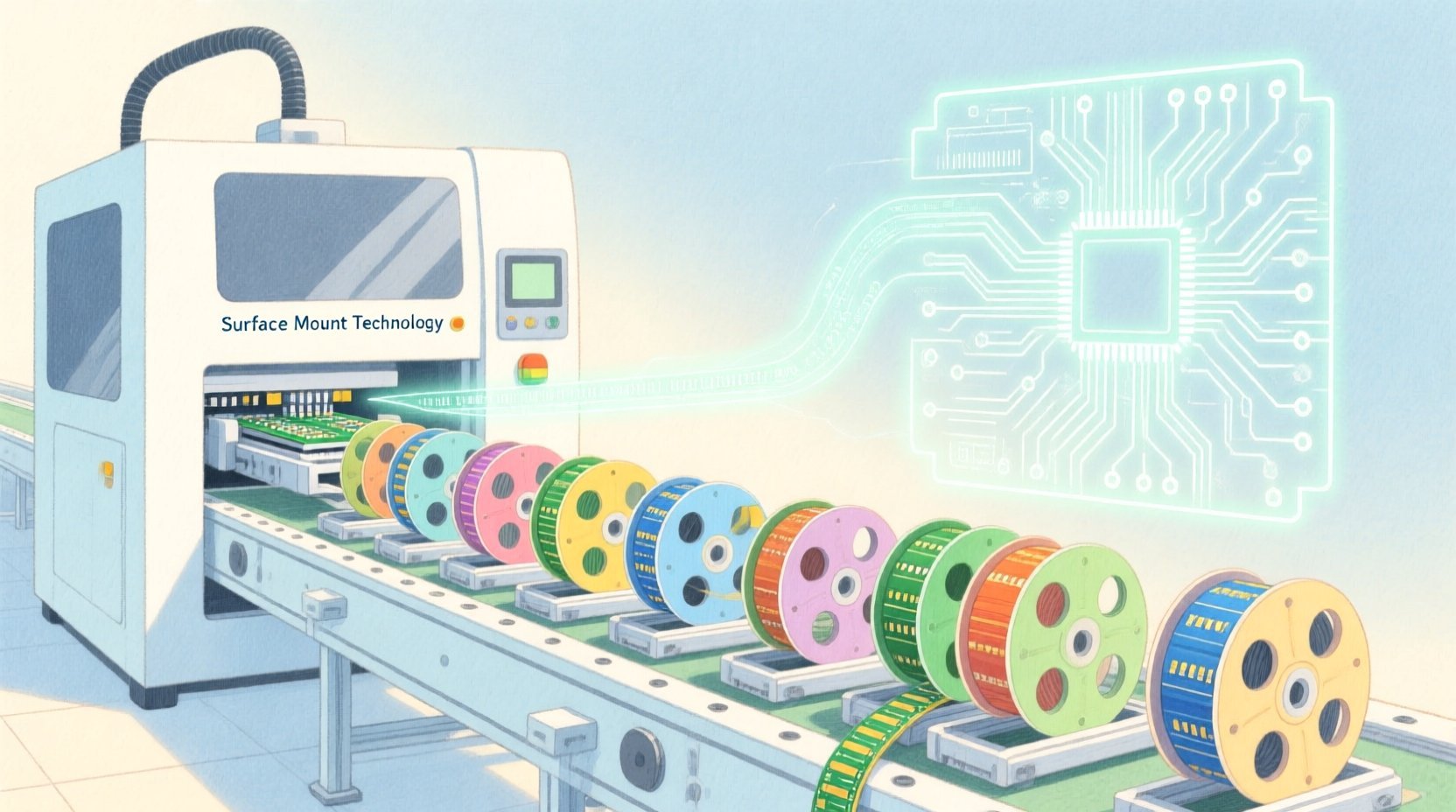
This tutorial guides you through building a comprehensive Entity-Relationship Diagram (ERD) specifically designed for an SMT placement feeder setup and component reel consumption tracker. By leveraging the power of diagram-as-code with PlantUML in VPasCode, we move beyond static drawing tools to create a living, versionable documentation asset. This model not only defines the static structure of the manufacturing data but also clarifies the dynamic relationships required to trace a component’s journey from a reel on a feeder to a specific PCB serial number.
Understanding the Model: Purpose, Scope & Problem Framing
Diagram Abstraction & Representation
The Entity-Relationship Diagram (ERD) is the architectural blueprint for relational databases, serving as the foundation for data integrity in manufacturing execution systems (MES). In this specific context, the ERD abstracts the physical reality of the SMT line into logical entities. It maps the one-to-many relationships inherent in the hardware: a single Production Line hosts multiple SMT Machines, each Machine holds multiple Feeders, and each Feeder is associated with a specific Component Reel. Furthermore, it captures the temporal nature of the process through FeederSetup and ConsumptionEvent entities, which link the physical hardware to the specific actions taken during production.
Target Domain Scope & Scenario
The scope of this diagram is strictly defined around the data entities required to track the lifecycle of a component reel within a production environment. It covers the hierarchy from the factory floor (Production Line) down to the individual component placement event. The diagram intentionally excludes upstream supply chain details (like supplier data) or downstream shipping logistics, focusing solely on the internal mechanics of the SMT line: setup configuration, reel inventory levels, and real-time consumption tracking against specific PCB builds.
Key Takeaways & Educational Insights
By constructing this model, you will gain a clear understanding of how to normalize complex manufacturing data. You will learn how to handle junction tables (like FeederSetup) to resolve many-to-many relationships between feeders and reels, how to model temporal events (consumption) that depend on a specific setup, and how to link physical assets to their operational outcomes (PCB products). This approach ensures that the resulting database schema supports critical queries like “Which reel was used on Machine 3 for Product X?” or “What is the remaining quantity on Reel Y?”
Complete Diagram & Full Source Code
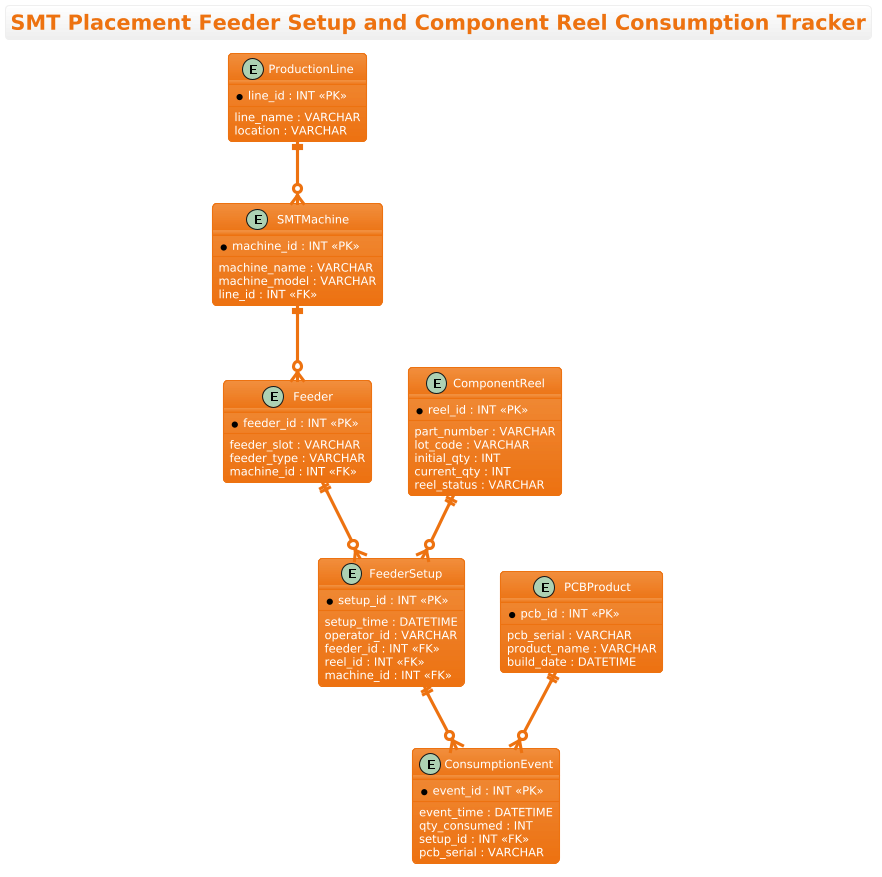
Below is the complete source code for the SMT Feeder Setup ERD. This code utilizes the aws-orange theme to provide a modern, high-contrast visual style suitable for technical documentation.
@startuml
!theme aws-orange
title SMT Placement Feeder Setup and Component Reel Consumption Tracker

/'
Diagram Context:
This ERD models the setup and tracking of SMT (Surface Mount Technology) placement feeders
and their associated component reels on a PCB assembly line. It captures the relationship
between a production line, the SMT placement machines on that line, the feeders loaded
onto each machine, the component reels mounted on those feeders, and the consumption
events recorded as components are placed. The goal is to trace which reel is used on
which feeder, at which machine, for which product/PCB, and to track reel depletion over
time.
'/

entity "ProductionLine" as line {
  * line_id : INT <<PK>>
  --
  line_name : VARCHAR
  location : VARCHAR
}

entity "SMTMachine" as machine {
  * machine_id : INT <<PK>>
  --
  machine_name : VARCHAR
  machine_model : VARCHAR
  line_id : INT <<FK>>
}

entity "Feeder" as feeder {
  * feeder_id : INT <<PK>>
  --
  feeder_slot : VARCHAR
  feeder_type : VARCHAR
  machine_id : INT <<FK>>
}

entity "ComponentReel" as reel {
  * reel_id : INT <<PK>>
  --
  part_number : VARCHAR
  lot_code : VARCHAR
  initial_qty : INT
  current_qty : INT
  reel_status : VARCHAR
}

entity "FeederSetup" as setup {
  * setup_id : INT <<PK>>
  --
  setup_time : DATETIME
  operator_id : VARCHAR
  feeder_id : INT <<FK>>
  reel_id : INT <<FK>>
  machine_id : INT <<FK>>
}

entity "ConsumptionEvent" as consumption {
  * event_id : INT <<PK>>
  --
  event_time : DATETIME
  qty_consumed : INT
  setup_id : INT <<FK>>
  pcb_serial : VARCHAR
}

entity "PCBProduct" as pcb {
  * pcb_id : INT <<PK>>
  --
  pcb_serial : VARCHAR
  product_name : VARCHAR
  build_date : DATETIME
}

line ||--o{ machine
machine ||--o{ feeder
feeder ||--o{ setup
reel ||--o{ setup
setup ||--o{ consumption
pcb ||--o{ consumption

@endumlStep-by-Step Architectural Walkthrough
Phase 1: Canvas Configuration & Layout Directives
The first step in any PlantUML ERD is setting the stage with global directives. We begin by declaring the start of the diagram with @startuml. Immediately following this, we apply the !theme aws-orange directive. This single line of code transforms the visual output, applying a color palette inspired by AWS documentation—warm oranges, deep grays, and clean whites—which is particularly effective for industrial and technical diagrams as it reduces eye strain and looks professional in reports.
We also define a title directive to provide a clear caption for the diagram. Crucially, we insert a multi-line comment block using /' and '/. This block allows us to embed a detailed description of the diagram’s context directly within the code file. This practice is vital for “living documentation,” ensuring that anyone reading the code (or the rendered diagram) immediately understands the business problem being solved without needing external documentation.
!theme aws-orange
title SMT Placement Feeder Setup and Component Reel Consumption Tracker

/'
Diagram Context:
This ERD models the setup and tracking of SMT (Surface Mount Technology) placement feeders
and their associated component reels on a PCB assembly line.
'/
Phase 2: Declaring Core Entities, Actors, and Boundaries
With the canvas ready, we define the core entities. In PlantUML ERD, we use the entity keyword. Each entity represents a table in the database. We define the ProductionLine entity first, as it is the root of our hierarchy. Inside the entity block, we define attributes. The * symbol before an attribute name (e.g., * line_id) denotes a Primary Key (PK), which is the unique identifier for that record. We use the -- separator to visually divide keys from regular attributes.
We then define SMTMachine, Feeder, and ComponentReel. Notice how line_id in SMTMachine and machine_id in Feeder are marked with < (Foreign Key). This explicitly tells the diagram renderer that these columns link back to the primary keys of their parent entities, establishing the structural hierarchy of the manufacturing line.
entity "ProductionLine" as line {
* line_id : INT <>
--
line_name : VARCHAR
location : VARCHAR
}
entity "SMTMachine" as machine {
* machine_id : INT < >
--
machine_name : VARCHAR
machine_model : VARCHAR
line_id : INT <>
} Phase 3: Mapping Data Flows & Key Interactions
The most complex part of this ERD is handling the many-to-many relationships. A single Feeder can be used in multiple setups over time, and a single ComponentReel can be loaded onto different feeders. To model this, we introduce the FeederSetup entity. This acts as a junction table (or associative entity) that captures the specific instance of a reel being loaded onto a feeder at a specific time. It holds foreign keys to Feeder, Reel, and Machine, effectively creating a snapshot of the state at the moment of setup.
Similarly, we model the ConsumptionEvent. This entity records the actual usage of components. It links back to the FeederSetup (to know which reel/feeder combination was used) and the PCBProduct (to know which board was being built). This creates a complete audit trail from the physical reel to the finished product.
entity "FeederSetup" as setup {
* setup_id : INT <>
--
setup_time : DATETIME
operator_id : VARCHAR
feeder_id : INT <>
reel_id : INT < >
machine_id : INT < >
}
entity "ConsumptionEvent" as consumption {
* event_id : INT <>
--
event_time : DATETIME
qty_consumed : INT
setup_id : INT <>
pcb_serial : VARCHAR
} Phase 4: Grouping, Annotations & Visual Polish
The final phase is defining the relationships using the syntax Entity1 ||--o{ Entity2. The || represents the “one” side (mandatory), and the o{ represents the “zero-or-more” side (optional). For example, line ||--o{ machine means a Production Line must have at least one machine (in this model’s logic, though technically it could be zero, the notation here implies the structural link), and a machine belongs to exactly one line.
We apply this pattern to all relationships: machine ||--o{ feeder, feeder ||--o{ setup, and reel ||--o{ setup. The FeederSetup is the central hub here, receiving relationships from both feeder and reel, which correctly visualizes the many-to-many resolution. Finally, we link setup and pcb to consumption, completing the data flow from hardware setup to product output.
line ||--o{ machine
machine ||--o{ feeder
feeder ||--o{ setup
reel ||--o{ setup
setup ||--o{ consumption
pcb ||--o{ consumption
Syntax & Keyword Deep Dive
Understanding the specific PlantUML ERD syntax is crucial for maintaining and extending this diagram. Here are the key keywords and conventions used in this model:
entity: The primary keyword used to define a table or entity. It takes a label (e.g.,"ProductionLine") and an alias (e.g.,as line) for use in relationship definitions.entity { ... }: The block syntax used to define the attributes (columns) of an entity. Attributes are listed inside the braces.*: A prefix used before an attribute name (e.g.,* line_id) to indicate that this attribute is the Primary Key.<and> <: Stereotypes used to explicitly label attributes as Primary Keys or Foreign Keys. While> *marks the PK,<helps visually identify foreign keys in the diagram output.> --: A separator used within an entity block to visually divide the Primary Key from the rest of the attributes, improving readability.||--o{: The relationship syntax.||indicates the “one” side (mandatory participation), ando{indicates the “zero or many” side (optional participation). This notation clearly communicates cardinality./' ... '/: The syntax for multi-line comments. This allows for rich text descriptions to be embedded in the code without affecting the rendering of the diagram.
Best Practices & Pitfalls to Avoid
When modeling complex manufacturing systems like SMT lines, adhering to best practices ensures your diagram remains maintainable and accurate.
- Use Junction Tables for Many-to-Many: Never try to force a many-to-many relationship directly between two entities (e.g., linking
FeederandReeldirectly). Always introduce an associative entity likeFeederSetupto hold the foreign keys and any specific attributes of that relationship (likesetup_timeoroperator_id). - Consistent Naming Conventions: Use clear, singular names for entities (e.g.,
FeedernotFeeders) and consistent aliases (e.g.,as feeder) to keep relationship lines readable. Avoid generic names likeEntity1orTable1. - Separate Static from Dynamic Data: Distinguish between static configuration data (like
Feederproperties) and dynamic transactional data (likeConsumptionEvent). Grouping these logically in the diagram helps developers understand which tables are for configuration and which are for transactional logging. - Document the “Why”: Use the comment block (
/' ... '/) to explain the business logic. For example, explaining whyFeederSetupexists helps future developers understand that a feeder can change reels multiple times.
Try It Yourself with VPasCode
Ready to bring this SMT manufacturing model to life? Use VPasCode to instantly render, edit, and customize this PlantUML ERD directly in your browser.
Start Building SMT ERDs Faster with VPasCode
Instantly render your manufacturing data models, test relationship cardinalities, and customize themes without installing any tools or configuring a local environment.