


In the complex ecosystem of government social services, the integrity of data flows is paramount. A single error in calculating benefit eligibility or tracking disbursements can lead to significant financial discrepancies, compliance violations, or the denial of essential aid to vulnerable populations. To ensure these critical systems are robust, architects must visualize the intricate relationships between applicants, households, programs, and financial ledgers before a single line of backend code is written. This is where diagramming-as-code becomes an indispensable asset, offering a precise, version-ready blueprint for complex database schemas.

Modeling a Social Welfare Benefit system requires more than just listing tables; it demands a clear representation of how eligibility is determined through a series of criteria checks, how household compositions impact income thresholds, and how payment ledgers reconcile with approved awards. By using PlantUML within VPasCode, architects can iteratively refine this data model in a browser, instantly visualizing the cardinality of relationships between entities like Eligibility_Determination and Payment_Disbursement. This approach ensures that the resulting database schema is not only technically sound but also aligns perfectly with the operational realities of government auditing and financial reporting.
Understanding the Model: Purpose, Scope & Problem Framing
This diagram serves as the foundational data architecture for a government social welfare management system. It addresses the critical problem of tracing the lifecycle of a benefit from the initial application through to final disbursement, ensuring every step is auditable and logically consistent.
Diagram Abstraction & Representation
As an Entity Relationship Diagram (ERD), this model uses standard notation to represent the structural constraints of the database. It defines Entities (such as Applicant and Household) as the core objects of interest, and Relationships (lines connecting entities) to define how data interacts. For instance, the relationship between Household and Household_Member illustrates that one household can contain multiple members, but each member belongs to exactly one household. The inclusion of Eligibility_Criteria and Determination_Criteria_Result demonstrates a flexible rule engine design, allowing the system to evaluate dynamic inputs against static program rules.
Target Domain Scope & Scenario
The scope of this model is strictly limited to the core operational workflow of benefit management. It covers the intake of applicants, the assessment of their eligibility based on income and residency, the formal determination of benefits, and the subsequent financial ledger for payments. It intentionally excludes peripheral systems like external tax data APIs or third-party banking gateways, focusing instead on the internal data structures that govern the decision-making process and financial accountability.
Key Takeaways & Educational Insights
By studying this model, you will gain insights into how to handle one-to-many relationships in government data (e.g., one program having many applications), how to implement audit trails through entities like Caseworker and Appeal, and how to structure a payment ledger that links back to specific award decisions. The use of UUID as primary keys highlights modern scalability requirements for distributed government systems.
Complete Diagram & Full Source Code
Below is the complete visualization of the Social Welfare Benefit Eligibility Determination and Payment Disbursement Ledger. This diagram encapsulates the entire data lifecycle, from the initial applicant profile to the final reconciliation of a payment.
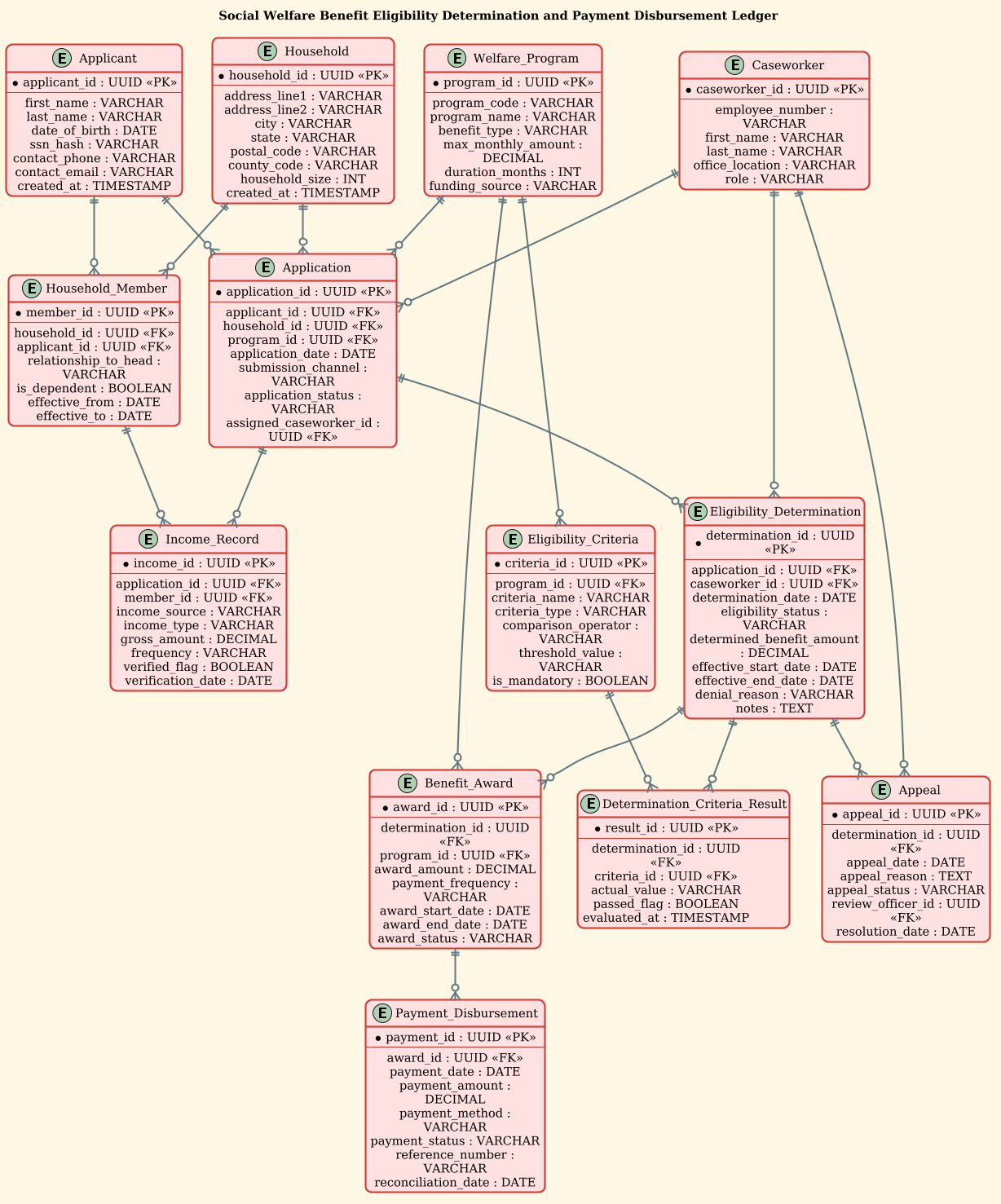
@startuml
/'
This ERD models the core data structures supporting a social welfare benefit
eligibility determination and payment disbursement ledger. It captures how
applicants and their households are assessed against welfare programs using
income, residency, and categorical criteria, producing an eligibility decision
that authorizes recurring or one-time benefit payments. The ledger records
each disbursement against an approved benefit award, tracking payment method,
status, and reconciliation details for audit and financial reporting. The model
also preserves caseworker actions and determination history so that decisions
can be reviewed, appealed, or recalculated when circumstances change.
'/
!theme sunlust

title Social Welfare Benefit Eligibility Determination and Payment Disbursement Ledger

entity "Applicant" as applicant {
  * applicant_id : UUID <<PK>>
  --
  first_name : VARCHAR
  last_name : VARCHAR
  date_of_birth : DATE
  ssn_hash : VARCHAR
  contact_phone : VARCHAR
  contact_email : VARCHAR
  created_at : TIMESTAMP
}

entity "Household" as household {
  * household_id : UUID <<PK>>
  --
  address_line1 : VARCHAR
  address_line2 : VARCHAR
  city : VARCHAR
  state : VARCHAR
  postal_code : VARCHAR
  county_code : VARCHAR
  household_size : INT
  created_at : TIMESTAMP
}

entity "Household_Member" as household_member {
  * member_id : UUID <<PK>>
  --
  household_id : UUID <<FK>>
  applicant_id : UUID <<FK>>
  relationship_to_head : VARCHAR
  is_dependent : BOOLEAN
  effective_from : DATE
  effective_to : DATE
}

entity "Welfare_Program" as welfare_program {
  * program_id : UUID <<PK>>
  --
  program_code : VARCHAR
  program_name : VARCHAR
  benefit_type : VARCHAR
  max_monthly_amount : DECIMAL
  duration_months : INT
  funding_source : VARCHAR
}

entity "Eligibility_Criteria" as eligibility_criteria {
  * criteria_id : UUID <<PK>>
  --
  program_id : UUID <<FK>>
  criteria_name : VARCHAR
  criteria_type : VARCHAR
  comparison_operator : VARCHAR
  threshold_value : VARCHAR
  is_mandatory : BOOLEAN
}

entity "Application" as application {
  * application_id : UUID <<PK>>
  --
  applicant_id : UUID <<FK>>
  household_id : UUID <<FK>>
  program_id : UUID <<FK>>
  application_date : DATE
  submission_channel : VARCHAR
  application_status : VARCHAR
  assigned_caseworker_id : UUID <<FK>>
}

entity "Income_Record" as income_record {
  * income_id : UUID <<PK>>
  --
  application_id : UUID <<FK>>
  member_id : UUID <<FK>>
  income_source : VARCHAR
  income_type : VARCHAR
  gross_amount : DECIMAL
  frequency : VARCHAR
  verified_flag : BOOLEAN
  verification_date : DATE
}

entity "Eligibility_Determination" as eligibility_determination {
  * determination_id : UUID <<PK>>
  --
  application_id : UUID <<FK>>
  caseworker_id : UUID <<FK>>
  determination_date : DATE
  eligibility_status : VARCHAR
  determined_benefit_amount : DECIMAL
  effective_start_date : DATE
  effective_end_date : DATE
  denial_reason : VARCHAR
  notes : TEXT
}

entity "Determination_Criteria_Result" as determination_criteria_result {
  * result_id : UUID <<PK>>
  --
  determination_id : UUID <<FK>>
  criteria_id : UUID <<FK>>
  actual_value : VARCHAR
  passed_flag : BOOLEAN
  evaluated_at : TIMESTAMP
}

entity "Benefit_Award" as benefit_award {
  * award_id : UUID <<PK>>
  --
  determination_id : UUID <<FK>>
  program_id : UUID <<FK>>
  award_amount : DECIMAL
  payment_frequency : VARCHAR
  award_start_date : DATE
  award_end_date : DATE
  award_status : VARCHAR
}

entity "Payment_Disbursement" as payment_disbursement {
  * payment_id : UUID <<PK>>
  --
  award_id : UUID <<FK>>
  payment_date : DATE
  payment_amount : DECIMAL
  payment_method : VARCHAR
  payment_status : VARCHAR
  reference_number : VARCHAR
  reconciliation_date : DATE
}

entity "Caseworker" as caseworker {
  * caseworker_id : UUID <<PK>>
  --
  employee_number : VARCHAR
  first_name : VARCHAR
  last_name : VARCHAR
  office_location : VARCHAR
  role : VARCHAR
}

entity "Appeal" as appeal {
  * appeal_id : UUID <<PK>>
  --
  determination_id : UUID <<FK>>
  appeal_date : DATE
  appeal_reason : TEXT
  appeal_status : VARCHAR
  review_officer_id : UUID <<FK>>
  resolution_date : DATE
}

applicant ||--o{ application
applicant ||--o{ household_member
household ||--o{ household_member
household ||--o{ application
welfare_program ||--o{ eligibility_criteria
welfare_program ||--o{ application
welfare_program ||--o{ benefit_award
application ||--o{ income_record
application ||--o{ eligibility_determination
household_member ||--o{ income_record
eligibility_determination ||--o{ determination_criteria_result
eligibility_criteria ||--o{ determination_criteria_result
eligibility_determination ||--o{ benefit_award
eligibility_determination ||--o{ appeal
benefit_award ||--o{ payment_disbursement
caseworker ||--o{ application
caseworker ||--o{ eligibility_determination
caseworker ||--o{ appeal

@endumlStep-by-Step Architectural Walkthrough
Constructing a complex ERD like this requires a systematic approach. We will break down the creation process into four logical phases: setup, entity declaration, relationship mapping, and final polish.
Phase 1: Canvas Configuration & Layout Directives
Every PlantUML diagram begins with configuration directives that set the stage for the visual output. In this government-focused model, we need a clean, professional look that handles dense data structures well.
First, we define the diagram type and include a comment block to document the context. This is crucial for long-term maintenance of government documentation.
/'
This ERD models the core data structures supporting a social welfare benefit
eligibility determination and payment disbursement ledger...
'/
Next, we apply the !theme sunlust directive. This theme provides a warm, high-contrast color palette that improves readability for large tables of attributes, which is essential for ERDs with many columns like Income_Record.
!theme sunlust
Phase 2: Declaring Core Entities, Actors, and Boundaries
We now define the fundamental building blocks of the system. In PlantUML, the entity keyword creates a box representing a database table.
Consider the Applicant entity. It uses the entity keyword, followed by the display name and an alias (e.g., as applicant). The alias is critical for drawing relationships later. Inside the entity, we define attributes using the syntax attribute_name : DATA_TYPE.
entity "Applicant" as applicant {
  * applicant_id : UUID <>
  --
  first_name : VARCHAR
  last_name : VARCHAR
  ...
}
Notice the use of * before applicant_id to denote a Primary Key (PK) and the stereotype < for visual clarity. The -- separator divides the key attributes from the rest of the data fields, improving visual scanning.
We repeat this pattern for all core entities: Household, Welfare_Program, Application, and Caseworker. Each entity captures specific domain data, such as ssn_hash for security or benefit_type for program classification.
Phase 3: Mapping Data Flows & Key Interactions
Once entities are defined, we establish the relationships that define the business logic. In ERD notation, lines with specific arrowheads indicate cardinality (one-to-many, many-to-one).
The syntax ||--o{ represents a mandatory one-to-many relationship. For example, a Household must have at least one member (or be linked to one), but a Household_Member belongs to exactly one Household.
household ||--o{ household_member
Similarly, we map the critical flow of benefits. An Eligibility_Determination leads to a Benefit_Award, which in turn triggers one or more Payment_Disbursement records. This chain ensures that no payment is made without a corresponding approved award.
eligibility_determination ||--o{ benefit_award
benefit_award ||--o{ payment_disbursement
Phase 4: Grouping, Annotations & Visual Polish
The final phase involves ensuring the diagram is self-documenting. We use the title directive to provide a clear header for the entire diagram.
title Social Welfare Benefit Eligibility Determination and Payment Disbursement Ledger
We also ensure that all foreign keys (marked as FK in the attribute list) align with the primary keys they reference. This structural consistency is vital for database integrity. The final output should clearly show how Caseworker entities interact with applications and determinations, highlighting the human element in the automated workflow.
Syntax & Keyword Deep Dive
To build this ERD effectively, it is essential to understand the specific PlantUML keywords and conventions used to represent government data structures.
- entity: The core keyword used to define a table or class. It accepts a display name and an alias for referencing.
- attribute syntax: Defined as
name : type. PlantUML supports standard SQL types likeUUID,DECIMAL,TIMESTAMP, andTEXT. - Primary Key (PK): Indicated by
*before the attribute name and<as a stereotype. This visually distinguishes unique identifiers from regular data fields.> - Foreign Key (FK): Marked with
<to indicate a reference to another entity’s primary key, crucial for maintaining referential integrity.> - Relationship Arrows: The
||--o{syntax is a standard ERD notation for “Mandatory One to Optional Many.” The double bar||means “one and only one” on the left, and the circle-braceo{means “zero or more” on the right. - Comment Blocks: Wrapped in
/'and'/, these allow for multi-line documentation directly within the code, ensuring the diagram’s purpose is preserved alongside the schema.
Best Practices & Pitfalls to Avoid
When modeling complex government systems like social welfare ledgers, adherence to best practices ensures the diagram remains a reliable source of truth.
- Use Clear Aliases: Always assign a short alias to entities (e.g.,
as applicant). Without aliases, drawing relationships between long entity names can become cluttered and error-prone. - Group Related Attributes: Use the
--separator to visually group Primary Keys at the top of the entity box. This makes it easier to quickly identify the unique identifier of a table. - Consistent Naming Conventions: Stick to a consistent naming convention for attributes (e.g., camelCase or snake_case) and data types. In government systems, clarity is paramount; avoid abbreviations that might be ambiguous.
- Document Cardinality Explicitly: Ensure the relationship arrows accurately reflect the business rules. For instance, a
Household_Membermust belong to aHousehold, so the relationship should be mandatory on the household side.
Start Building Social Welfare ERDs Faster with VPasCode
Instantly design, preview, and export complex government data models using PlantUML in your browser—no installation required.