


In the high-stakes environment of modern textile manufacturing, operational efficiency is no longer just about speed; it is about data-driven precision. A single textile mill can house hundreds of looms, each running continuously to produce yarn and fabric. When a yarn breakage occurs, it halts production, wastes raw materials, and impacts delivery schedules. To maintain a competitive edge, mill managers must move beyond manual logs and adopt a robust digital data foundation that tracks not just the output, but the why behind every inefficiency.
The challenge lies in correlating disparate data points: the specific loom code, the operator on duty, the raw material batch used, the machine’s RPM, and the precise time of a breakage event. Without a structured data model, these variables remain siloed, making root cause analysis a guessing game. This is where the power of diagram-as-code shines. By defining the relationships between entities like Production Shifts, Efficiency Readings, and Yarn Breakage Events in code, architects can instantly visualize the entire data architecture, ensuring that every critical metric is captured and linked correctly for downstream analytics.
Understanding the Model: Purpose, Scope & Problem Framing
This tutorial focuses on constructing a specialized Entity Relationship Diagram (ERD) tailored for the textile industry. Unlike generic database schemas, this model is designed to answer specific operational questions: “Which loom is underperforming?”, “What raw material batch is causing the most breakages?”, and “How does maintenance frequency correlate with downtime?”
Diagram Abstraction & Representation
An ERD (Entity Relationship Diagram) is the blueprint for relational databases. In this context, we represent physical assets (Mills, Looms) and operational events (Shifts, Breakages) as Entities. Each entity is a table containing specific Attributes (columns) such as timestamps, codes, and measurements. The Relationships (lines connecting entities) define the cardinality of the data, ensuring that one Loom can have many Shifts, but each Shift belongs to exactly one Loom. This structure enforces data integrity, preventing orphaned records where a breakage event exists without a linked loom or operator.
Target Domain Scope & Scenario
The scope of this diagram covers the entire production lifecycle within a single mill. It begins with the MILL and PRODUCTION_LINE hierarchy, drills down into individual LOOM units, and captures the temporal data of PRODUCTION_SHIFTS. Crucially, it extends into the quality domain by modeling YARN_BREAKAGE_EVENTs, linking them to CAUSE categories and YARN_BATCHes. It also integrates MAINTENANCE_ACTION records to provide a historical context of machine health.
Key Takeaways & Educational Insights
By building this diagram, you will gain insights into how to model hierarchical manufacturing structures and temporal event logs. You will learn how to link a specific quality failure (a breakage) back to its upstream causes (material batch, machine condition, or operator), enabling a closed-loop system for continuous improvement.
Complete Diagram & Full Source Code
Before diving into the step-by-step construction, here is the complete, rendered visualization of the Textile Mill Loom Efficiency ERD. This diagram illustrates the complex web of relationships required to track efficiency and diagnose breakages.
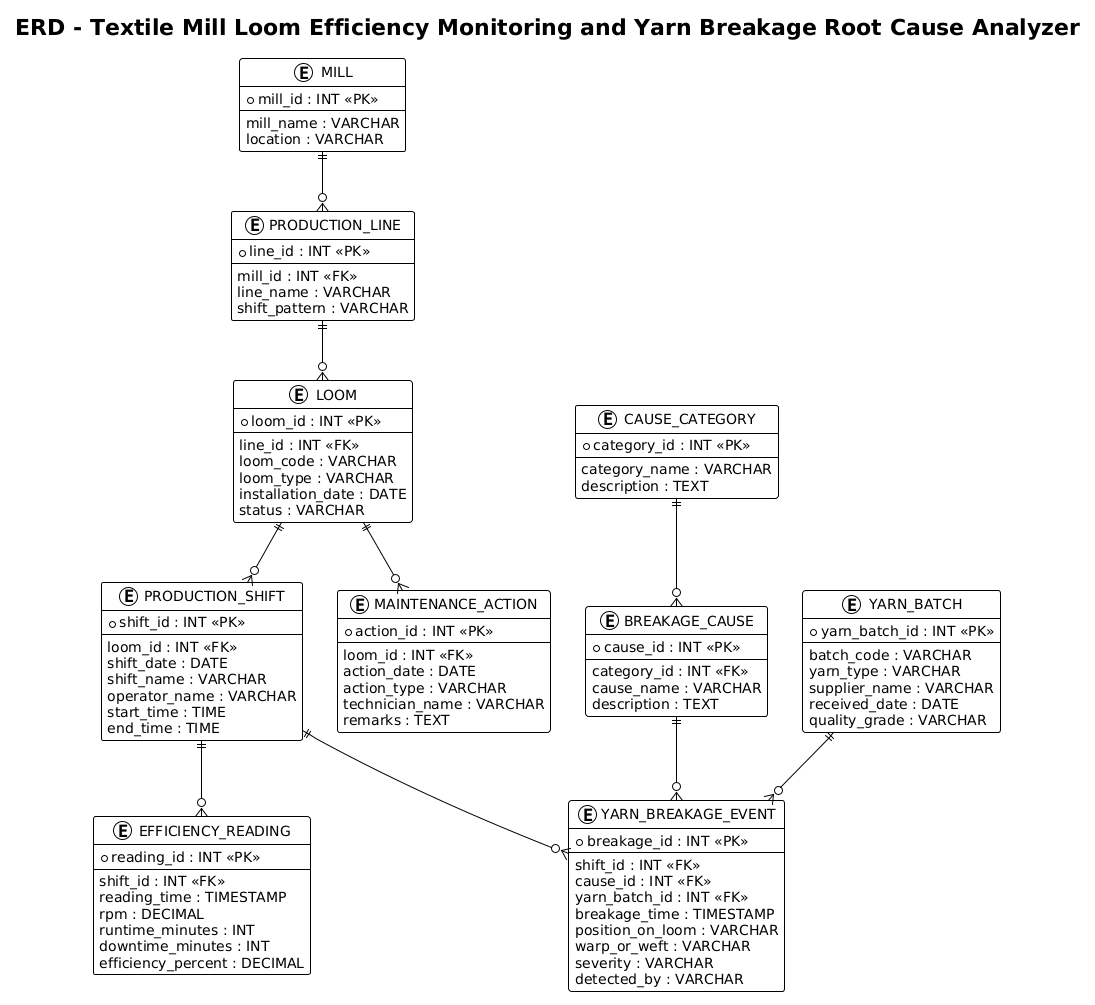
Below is the complete PlantUML source code. You can copy this directly into the VPasCode editor to see the live rendering and experiment with the design.
@startuml
/'
ERD for Textile Mill Loom Efficiency Monitoring and Yarn Breakage Root Cause Analyzer.

This diagram models the data foundation of a system that tracks loom performance on a textile mill floor and investigates why yarn breaks occur.
A Mill contains many Production Lines, each Line operates many Looms, and each Loom runs many Production Shifts.
During a shift, the loom is monitored through Efficiency Readings and may experience zero or more Yarn Breakage Events.
Each Yarn Breakage Event is linked to exactly one Breakage Cause, which is classified under a Cause Category.
Root cause analysis is supported by Maintenance Actions performed on looms and by Yarn Batch assignments, so breakages can be correlated with machine condition, operator, and raw material batch.
'/
!theme plain

title ERD - Textile Mill Loom Efficiency Monitoring and Yarn Breakage Root Cause Analyzer

entity "MILL" as mill {
  * mill_id : INT <<PK>>
  --
  mill_name : VARCHAR
  location : VARCHAR
}

entity "PRODUCTION_LINE" as line {
  * line_id : INT <<PK>>
  --
  mill_id : INT <<FK>>
  line_name : VARCHAR
  shift_pattern : VARCHAR
}

entity "LOOM" as loom {
  * loom_id : INT <<PK>>
  --
  line_id : INT <<FK>>
  loom_code : VARCHAR
  loom_type : VARCHAR
  installation_date : DATE
  status : VARCHAR
}

entity "PRODUCTION_SHIFT" as shift {
  * shift_id : INT <<PK>>
  --
  loom_id : INT <<FK>>
  shift_date : DATE
  shift_name : VARCHAR
  operator_name : VARCHAR
  start_time : TIME
  end_time : TIME
}

entity "EFFICIENCY_READING" as eff {
  * reading_id : INT <<PK>>
  --
  shift_id : INT <<FK>>
  reading_time : TIMESTAMP
  rpm : DECIMAL
  runtime_minutes : INT
  downtime_minutes : INT
  efficiency_percent : DECIMAL
}

entity "YARN_BREAKAGE_EVENT" as brk {
  * breakage_id : INT <<PK>>
  --
  shift_id : INT <<FK>>
  cause_id : INT <<FK>>
  yarn_batch_id : INT <<FK>>
  breakage_time : TIMESTAMP
  position_on_loom : VARCHAR
  warp_or_weft : VARCHAR
  severity : VARCHAR
  detected_by : VARCHAR
}

entity "BREAKAGE_CAUSE" as cause {
  * cause_id : INT <<PK>>
  --
  category_id : INT <<FK>>
  cause_name : VARCHAR
  description : TEXT
}

entity "CAUSE_CATEGORY" as cat {
  * category_id : INT <<PK>>
  --
  category_name : VARCHAR
  description : TEXT
}

entity "YARN_BATCH" as batch {
  * yarn_batch_id : INT <<PK>>
  --
  batch_code : VARCHAR
  yarn_type : VARCHAR
  supplier_name : VARCHAR
  received_date : DATE
  quality_grade : VARCHAR
}

entity "MAINTENANCE_ACTION" as maint {
  * action_id : INT <<PK>>
  --
  loom_id : INT <<FK>>
  action_date : DATE
  action_type : VARCHAR
  technician_name : VARCHAR
  remarks : TEXT
}

mill ||--o{ line
line ||--o{ loom
loom ||--o{ shift
shift ||--o{ eff
shift ||--o{ brk
cat ||--o{ cause
cause ||--o{ brk
batch ||--o{ brk
loom ||--o{ maint

@endumlStep-by-Step Architectural Walkthrough
Phase 1: Canvas Configuration & Layout Directives
Every PlantUML diagram begins with configuration directives that set the stage for the rendering engine. In this manufacturing ERD, we want a clean, professional look that emphasizes the data structure without visual clutter.
We start by declaring the diagram type with @startuml. Immediately following this, we include a multi-line comment block to document the diagram’s purpose. This is best practice for living documentation, ensuring that anyone reading the code understands the context without needing to render it first. We then apply the !theme plain directive, which strips away default colors and shadows, giving the diagram a crisp, technical appearance suitable for engineering specifications.
@startuml
/'
ERD for Textile Mill Loom Efficiency Monitoring and Yarn Breakage Root Cause Analyzer.
... (comment content) ...
'/
!theme plain
Phase 2: Declaring Core Entities, Actors, and Boundaries
The backbone of an ERD is the Entity. In PlantUML, we define entities using the entity keyword. We assign a readable label (e.g., “MILL”) and an alias (e.g., as mill) to simplify relationship definitions later.
Inside the entity block, we define attributes. Primary Keys (PK) are marked with *, and Foreign Keys (FK) are marked with <<FK>>. This visual distinction is crucial for database architects, as it immediately identifies the unique identifiers and the links between tables. For example, the LOOM entity includes a line_id FK, indicating it belongs to a specific production line.
entity "MILL" as mill {
* mill_id : INT <>
--
mill_name : VARCHAR
location : VARCHAR
}
entity "LOOM" as loom {
* loom_id : INT < >
--
line_id : INT <>
loom_code : VARCHAR
status : VARCHAR
}
Phase 3: Mapping Data Flows & Key Interactions
Once the entities are defined, we must establish how they relate. In manufacturing, data flows hierarchically: a Mill contains Lines, Lines contain Looms, and Looms run Shifts. We use the ||--o{ syntax to represent these relationships.
The || indicates mandatory participation (a Line must belong to a Mill), and the o{ indicates optional participation (a Mill can have zero or more Lines). This specific syntax, known as Crow’s Foot notation, is standard in database design. We map the critical path for breakage analysis: a SHIFT can have many EFFICIENCY_READINGs and many YARN_BREAKAGE_EVENTs. This ensures that every moment of operation is recorded and that any anomaly can be traced back to the specific shift and loom.
mill ||--o{ line
line ||--o{ loom
loom ||--o{ shift
shift ||--o{ eff
shift ||--o{ brk
Phase 4: Grouping, Annotations & Visual Polish
To complete the root cause analysis model, we introduce the dimension of quality and maintenance. We link YARN_BREAKAGE_EVENT to YARN_BATCH and BREAKAGE_CAUSE. This allows the system to answer: “Did breakages increase after a new supplier batch arrived?” or “Is a specific type of breakage (e.g., ‘Warp Break’) recurring on specific looms?”.
We also link MAINTENANCE_ACTION to LOOM. This creates a historical record of repairs. By visually connecting these entities, the diagram tells a complete story: from the raw material entering the mill, to the machine running, to the failure occurring, and finally to the maintenance action taken.
cat ||--o{ cause
cause ||--o{ brk
batch ||--o{ brk
loom ||--o{ maint
Syntax & Keyword Deep Dive
Understanding the specific PlantUML syntax used in this ERD is essential for customizing and extending the model.
entity: Defines a table or class. The syntaxentity "Label" as alias { ... }allows you to set a display name and a short variable name for use in relationships.*(Asterisk): Precedes an attribute to denote a Primary Key. This is the unique identifier for the row (e.g.,* mill_id).<<FK>>(Stereotype): A PlantUML stereotype used to mark a Foreign Key. It visually distinguishes linking columns from regular data columns.--(Separator): A horizontal line used within an entity block to separate keys from other attributes, improving readability.||--o{(Cardinality): The “Crow’s Foot” notation.||means “one and only one” (mandatory), ando{means “zero or more” (optional). This defines the cardinality of the relationship between two entities.!theme: A directive to apply a global visual theme.!theme plainremoves default styling for a cleaner, technical look.
Best Practices & Pitfalls to Avoid
When modeling complex manufacturing systems, clarity is paramount. Follow these best practices to ensure your ERD remains maintainable and useful.
- Consistent Naming Conventions: Use uppercase for entity names (e.g.,
LOOM) and camelCase for attributes (e.g.,loom_id) to distinguish between the table and the column. This reduces cognitive load when reading the diagram. - Modularize Complex Entities: If an entity like
YARN_BREAKAGE_EVENTbecomes too crowded with attributes, consider breaking it into a parent-child relationship or using notes to group related fields. Keep the visual density manageable. - Document Cardinality Explicitly: Always use the
||--o{syntax rather than simple lines. Ambiguous relationships lead to database design errors where referential integrity cannot be enforced. - Use Aliases for Clarity: Always define an alias (e.g.,
as loom) for your entities. This prevents long entity names from cluttering the relationship lines and makes the code easier to read.
Start Building Manufacturing ERDs Faster with VPasCode
Design complex textile mill data models instantly in your browser with VPasCode, the free PlantUML editor that renders your diagrams live without any installation.