


In the high-precision world of tire manufacturing, the curing press is the heart of production. It is where raw, green tires are transformed into finished products under specific temperature and pressure conditions. However, the efficiency of this process is rarely linear; it is heavily dictated by the availability of molds, the consistency of cycle times, and the critical downtime required for changeovers between different tire patterns. When a factory manager needs to optimize production schedules, they are not just looking at a single machine’s output; they are navigating a complex web of data relationships involving equipment status, operator shifts, historical performance metrics, and strict production deadlines.

Without a clear, unified data model, managing these variables becomes a chaotic exercise in spreadsheets and disconnected logs. A robust Entity Relationship Diagram (ERD) serves as the blueprint for the database that powers these scheduling systems. It defines how a Curing Press relates to a Mold, how a Cycle Time is recorded against a specific Production Order, and how a Mold Changeover Event impacts the availability of the press for the next job. By visualizing these connections, architects can ensure that the resulting software accurately captures the constraints of the physical world, such as ensuring a press cannot be assigned to two orders simultaneously or that a mold changeover duration is strictly tracked.
This tutorial demonstrates how to build a comprehensive ERD for a tire manufacturing curing press system using PlantUML. We will leverage VPasCode, a free, browser-based diagram-as-code editor, to design, render, and refine this model. Unlike traditional drag-and-drop tools, writing the diagram as code allows for versioning, easy modification of complex relationships, and instant collaboration. You will learn to structure entities for manufacturing operations, define the cardinality of relationships between presses and molds, and annotate the diagram with context-specific comments to create a living document for your engineering team.
Understanding the Model: Purpose, Scope & Problem Framing
The diagram you are about to build is not merely a list of database tables; it is a functional abstraction of the tire curing workflow. In this specific domain, the primary challenge is balancing throughput with flexibility. The Curing Press is the central resource, but it is not a static entity. Its utility changes based on the Mold attached to it, the Tire Specification being cured, and the Operator running it. The model must capture the temporal aspect of this process—when a cycle starts, when it ends, and how long a changeover takes.
Diagram Abstraction & Representation
In this ERD, we represent the physical assets and operational events as distinct entities. The Curing Press and Mold are static resources, while Cycle Time Records and Mold Changeover Events are temporal events that occur over time. The relationships between them are critical: a press performs a cycle, a mold is used in a cycle, and an operator executes a changeover. By using PlantUML’s entity-relationship syntax, we can explicitly define these interactions and their cardinalities (e.g., one press performs many cycles).
Target Domain Scope & Scenario
This model focuses specifically on the Curing Department of a tire plant. It excludes upstream processes like mixing or extrusion and downstream processes like inspection or shipping. The scope is strictly limited to the scheduling logic: assigning orders to presses, tracking the time taken for curing cycles, and logging the downtime caused by changing molds. This allows the database schema to be optimized for high-frequency write operations (recording cycle times) and complex read queries (scheduling availability).
Key Takeaways & Educational Insights
By the end of this guide, you will understand how to model a manufacturing system where resources are shared and constrained. You will learn to link historical data (cycle times) to current operations (orders) and to track the administrative overhead of changeovers. This level of detail is essential for building analytics dashboards that can predict bottlenecks or optimize shift schedules.
Complete Diagram & Full Source Code
Below is the complete Entity Relationship Diagram for the Tire Manufacturing Curing Press system. This diagram includes eight core entities, detailed attributes with data types, and the relationships that bind them together.
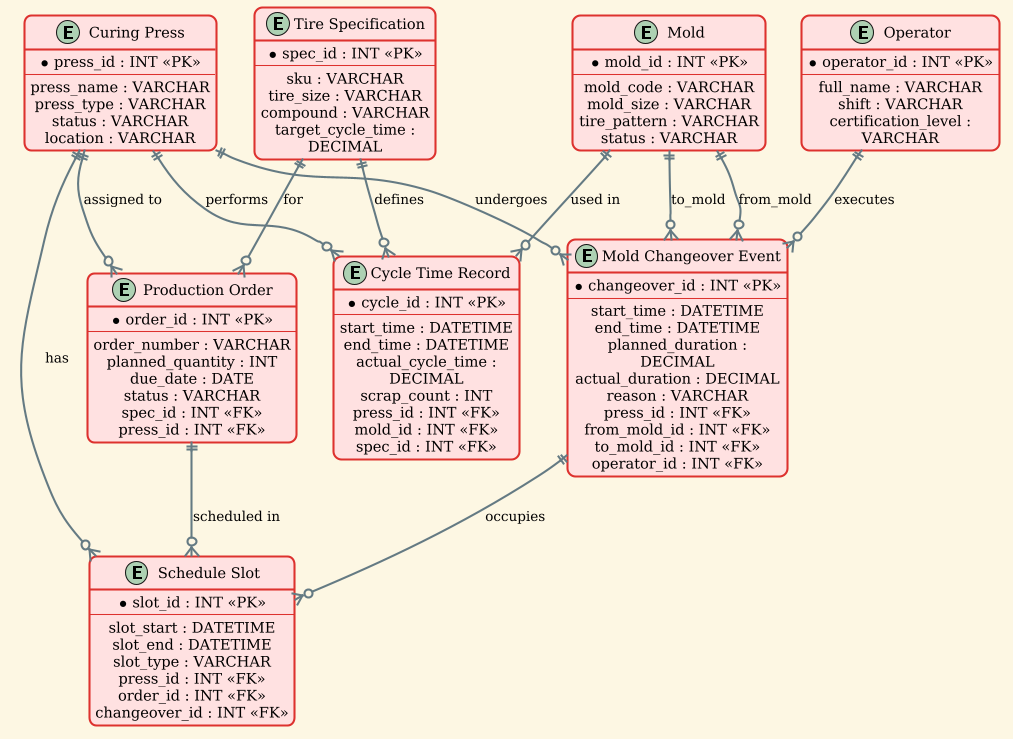
The following code block contains the full PlantUML source code. You can copy this entire block, paste it into the VPasCode editor, and see the diagram render instantly.
@startuml
/'
Diagram Context:
This ERD models the core data structures for scheduling curing press operations in a tire manufacturing plant.
The central entity is the Curing Press, which processes green tires using a specific Mold. Each Curing Press
has a history of Cycle Times (curing cycles) that depend on the tire specification and mold used. Mold changes
are a critical bottleneck, so Changeover Events track when a press switches from one mold to another, including
planned and actual durations, reasons, and responsible operators. The system also manages production orders
that assign tires to presses, linking to specifications (Tire SKU) and molds. Scheduling constraints such as
press availability, mold availability, and operator shifts are inferred through related entities. The goal is
to minimize changeover downtime while meeting cure cycle time requirements for each tire type.
'/
!theme sunlust

entity "Curing Press" as press {
  * press_id : INT <<PK>>
  --
  press_name : VARCHAR
  press_type : VARCHAR
  status : VARCHAR
  location : VARCHAR
}

entity "Mold" as mold {
  * mold_id : INT <<PK>>
  --
  mold_code : VARCHAR
  mold_size : VARCHAR
  tire_pattern : VARCHAR
  status : VARCHAR
}

entity "Tire Specification" as tirespec {
  * spec_id : INT <<PK>>
  --
  sku : VARCHAR
  tire_size : VARCHAR
  compound : VARCHAR
  target_cycle_time : DECIMAL
}

entity "Cycle Time Record" as cycle {
  * cycle_id : INT <<PK>>
  --
  start_time : DATETIME
  end_time : DATETIME
  actual_cycle_time : DECIMAL
  scrap_count : INT
  press_id : INT <<FK>>
  mold_id : INT <<FK>>
  spec_id : INT <<FK>>
}

entity "Mold Changeover Event" as changeover {
  * changeover_id : INT <<PK>>
  --
  start_time : DATETIME
  end_time : DATETIME
  planned_duration : DECIMAL
  actual_duration : DECIMAL
  reason : VARCHAR
  press_id : INT <<FK>>
  from_mold_id : INT <<FK>>
  to_mold_id : INT <<FK>>
  operator_id : INT <<FK>>
}

entity "Operator" as operator {
  * operator_id : INT <<PK>>
  --
  full_name : VARCHAR
  shift : VARCHAR
  certification_level : VARCHAR
}

entity "Production Order" as order {
  * order_id : INT <<PK>>
  --
  order_number : VARCHAR
  planned_quantity : INT
  due_date : DATE
  status : VARCHAR
  spec_id : INT <<FK>>
  press_id : INT <<FK>>
}

entity "Schedule Slot" as schedule {
  * slot_id : INT <<PK>>
  --
  slot_start : DATETIME
  slot_end : DATETIME
  slot_type : VARCHAR
  press_id : INT <<FK>>
  order_id : INT <<FK>>
  changeover_id : INT <<FK>>
}

' Relationships
press ||--o{ cycle : "performs"
mold ||--o{ cycle : "used in"
tirespec ||--o{ cycle : "defines"

press ||--o{ changeover : "undergoes"
mold ||--o{ changeover : "from_mold"
mold ||--o{ changeover : "to_mold"
operator ||--o{ changeover : "executes"

tirespec ||--o{ order : "for"
press ||--o{ order : "assigned to"

press ||--o{ schedule : "has"
order ||--o{ schedule : "scheduled in"
changeover ||--o{ schedule : "occupies"

@endumlStep-by-Step Architectural Walkthrough
Building a robust ERD requires a structured approach. We will break down the construction of this diagram into four logical phases: layout configuration, entity declaration, relationship mapping, and visual refinement.
Phase 1: Canvas Configuration & Layout Directives
Before defining any entities, we must set the stage for the diagram. In PlantUML, this is done using directives at the very top of the file. We begin with the @startuml tag to initialize the diagram.
Crucially, we apply the !theme sunlust directive. This applies a specific color palette and styling to the entire diagram, ensuring it looks professional and consistent with modern documentation standards. We also include a comment block using /' and '/ to document the purpose of the diagram. This is best practice for maintaining documentation, as it allows future developers to understand the context without reading the code logic immediately.
@startuml
/'
Diagram Context:
This ERD models the core data structures...
'/
!theme sunlust
Phase 2: Declaring Core Entities, Actors, and Boundaries
The foundation of any ERD is the entity definition. In PlantUML, we use the entity keyword followed by the entity name in quotes. We use the as keyword to assign a short alias (like press or mold) to make relationship lines cleaner.
Inside the entity block, we define attributes. Primary Keys (PK) are marked with *, and Foreign Keys (FK) are marked with <<FK>>. This notation helps the database schema generator understand the data integrity rules.
entity "Curing Press" as press {
  * press_id : INT <>
  --
  press_name : VARCHAR
  status : VARCHAR
}
We repeat this for all critical manufacturing entities: Mold, Tire Specification, Cycle Time Record, Mold Changeover Event, Operator, Production Order, and Schedule Slot. Note how Cycle Time Record and Mold Changeover Event act as transactional tables, linking the static resources (Press, Mold, Operator) with temporal data.
Phase 3: Mapping Data Flows & Key Interactions
Once entities are declared, we define how they interact using relationship arrows. The syntax entity1 ||--o{ entity2 : "label" is used here. The || indicates a mandatory one-to-one or one-to-many relationship on the left side, while the o{ indicates an optional many relationship on the right side.
For example, a Curing Press can perform many Cycle Time Records, but a single cycle record belongs to exactly one press. We also handle complex relationships, such as the Mold Changeover Event, which involves a from_mold and a to_mold. This requires the Mold entity to connect to the changeover entity twice, with different relationship labels to clarify the direction of the change.
press ||--o{ cycle : "performs"
mold ||--o{ changeover : "from_mold"
mold ||--o{ changeover : "to_mold"
operator ||--o{ changeover : "executes"
Phase 4: Grouping, Annotations & Visual Polish
Finally, we ensure the diagram is readable. The !theme sunlust directive handles the bulk of the visual polish, but we also rely on the logical grouping of entities. By placing related entities near each other in the code (though PlantUML’s automatic layout engine handles the positioning), we help the reader mentally group the data. The use of comments (lines starting with ') allows us to separate sections of the code, such as the relationships block, making the file easier to navigate and edit.
Syntax & Keyword Deep Dive
To master PlantUML for manufacturing diagrams, it is essential to understand the specific syntax used in this ERD. Here are the key keywords and conventions:
entity "Name" as alias: Defines a new table or entity. Theas aliaspart is crucial for creating concise relationship lines later.* attribute : TYPE: The asterisk*denotes a Primary Key. TheTYPE(e.g., INT, VARCHAR, DATETIME) defines the data structure.<<FK>>: This stereotype explicitly marks a Foreign Key attribute, indicating a link to another entity’s Primary Key.--: A separator line within an entity block, often used to visually separate keys from other attributes.||--o{: This is the cardinality notation.||means “one and only one” (mandatory), ando{means “zero or many” (optional). This is standard for ERD modeling."label": The text inside quotes on a relationship line defines the semantic meaning of the connection (e.g., “performs”, “undergoes”)./' ... '/: Multi-line comment block syntax used for documentation within the code.
Best Practices & Pitfalls to Avoid
When modeling complex manufacturing systems, clarity is paramount. Follow these best practices to ensure your PlantUML diagrams remain maintainable:
- Consistent Naming Conventions: Always use the
as aliassyntax for entity names. It makes the relationship lines much shorter and easier to read than repeating full entity names likeentity "Curing Press" as pressinstead ofpress ||--o{ cycle. - Separate Static and Dynamic Data: Clearly distinguish between resource entities (like
MoldorOperator) and event entities (likeCycle Time Record). This helps in understanding the schema’s performance characteristics. - Document Cardinality Explicitly: Don’t rely on the visual arrow alone. Always use the
||--o{syntax to explicitly state the cardinality. This prevents ambiguity about whether a changeover is mandatory or optional. - Use Descriptive Labels: The relationship labels (e.g., “assigned to”, “undergoes”) should read like natural language sentences when combined with the entity names. This makes the diagram self-documenting.
Start Building Manufacturing ERDs Faster with VPasCode
Design and refine complex tire manufacturing data models instantly in your browser with VPasCode, the free PlantUML editor for software architects.