


When designing robust database architectures for complex domains like hospitality, visualizing relationships clearly is critical. Whether you are mapping customer profiles, tracking room inventories, or managing billing, a well-structured Entity Relationship Diagram (ERD) saves countless hours during development. In this masterclass, I will walk you through how I built a comprehensive Hotel Management ERD from scratch using PlantUML inside the free PlantUML editor, VPasCode.
1. Initializing the PlantUML Environment
I start by setting up the foundational structure of the script. When working with complex schemas containing numerous attributes, layout readability is paramount. I configure PlantUML to hide unnecessary clutter and optimize the diagram layout direction:
@startuml
title Hotel Management ERD

hide circle
left to right direction
Why this approach? Hiding the default attribute circles keeps the entity boxes clean and modern. Setting the direction to left to right direction helps prevent wide ERDs from becoming vertically unmanageable, spreading out multi-table relationships logically.
2. Defining Core Entities and Attributes
Next, I need to define the core entities representing our business domain. I structure each entity with its primary keys, unique constraints, and typed attributes. Let’s look at how I set up the core Customer and RoomType entities:
entity "Customer" as customer {
  * customer_id : UUID <<PK>>
  --
  first_name : VARCHAR(50)
  last_name : VARCHAR(50)
  email : VARCHAR(100) <<UK>>
  phone : VARCHAR(20)
  address : TEXT
  loyalty_points : INTEGER
  total_stays : INTEGER
  date_registered : TIMESTAMP
  date_of_birth : DATE
  nationality : VARCHAR(50)
}

entity "RoomType" as roomtype {
  * room_type_id : UUID <<PK>>
  --
  type_name : VARCHAR(50) <<UK>>
  description : TEXT
  standard_capacity : INTEGER
  base_price : DECIMAL(10,2)
  extra_bed_charge : DECIMAL(10,2)
  has_kitchenette : BOOLEAN
  has_balcony : BOOLEAN
}
By defining explicit markers like <<PK>> and <<UK>>, anyone reviewing the code instantly understands the indexing and uniqueness rules before the database migration scripts are even written.
3. Mapping Operational Entities (Rooms, Reservations, and Staff)
With our reference data in place, I move on to the transactional heart of the hotel management system: rooms, reservations, and staff workflows. Each entity links back to our foundational tables using foreign keys:
entity "Room" as room {
  * room_id : UUID <<PK>>
  --
  room_number : VARCHAR(10) <<UK>>
  floor_number : INTEGER
  room_type_id : UUID <<FK>>
  capacity : INTEGER
  base_price : DECIMAL(10,2)
  is_available : BOOLEAN
  has_view : BOOLEAN
  square_feet : INTEGER
  last_renovated : DATE
}

entity "Reservation" as reservation {
  * reservation_id : UUID <<PK>>
  --
  customer_id : UUID <<FK>>
  room_id : UUID <<FK>>
  check_in_date : DATE
  check_out_date : DATE
  number_of_guests : INTEGER
  total_amount : DECIMAL(10,2)
  status : VARCHAR(20)
  special_requests : TEXT
  created_at : TIMESTAMP
  updated_at : TIMESTAMP
  confirmation_code : VARCHAR(20) <<UK>>
}
4. Establishing Financial and Service Relationships
To wrap up the architecture, I map out the billing records (Payments and Invoices) along with auxiliary services like Room Service handled by hotel staff. To connect everything together, I explicitly define the cardinality using standard PlantUML notation:
' Relationships
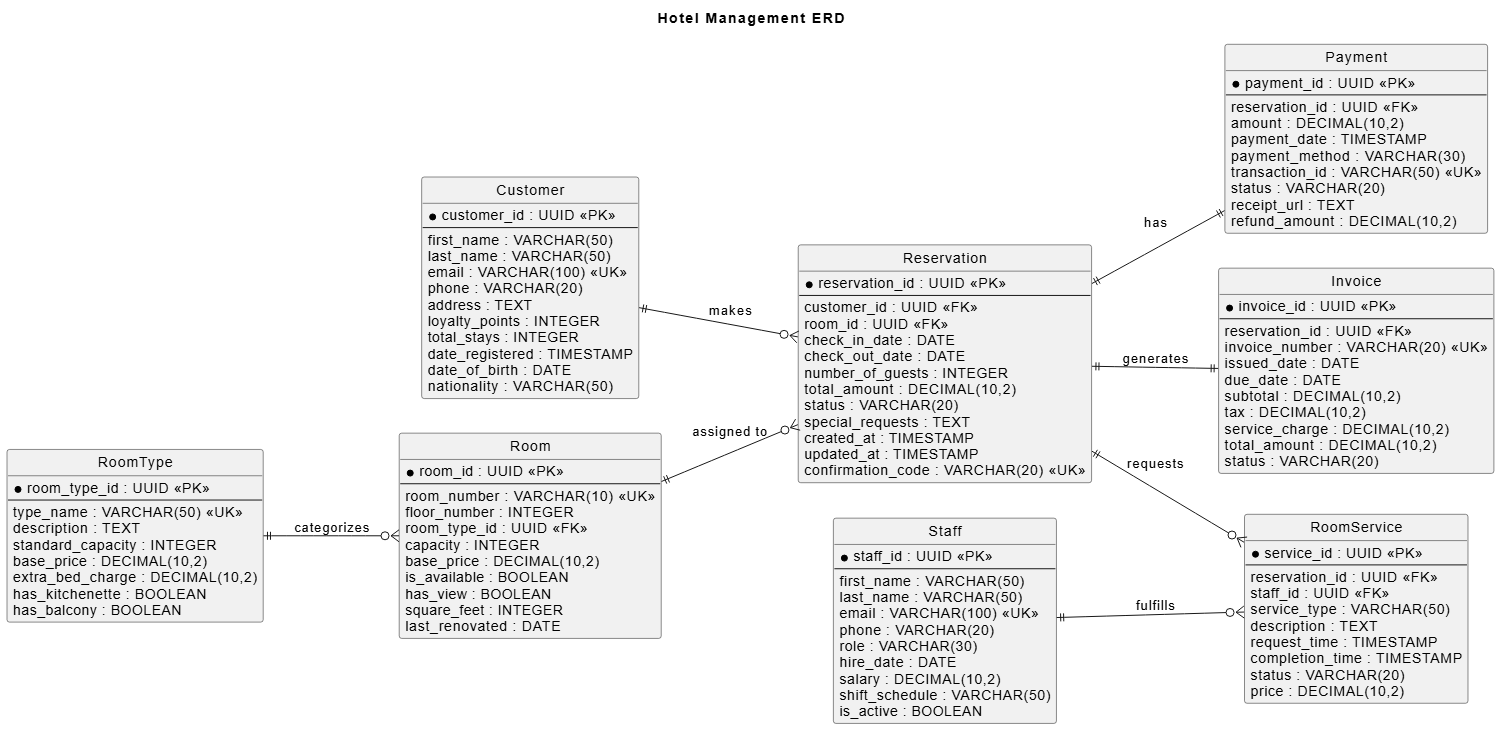
customer ||--o{ reservation : "makes"
room ||--o{ reservation : "assigned to"
reservation ||--|| payment : "has"
reservation ||--|| invoice : "generates"
reservation ||--o{ roomservice : "reuests"
staff ||--o{ roomservice : "fulfills"
roomtype ||--o{ room : "categorizes"

@enduml
Design Choice: Using precise crow’s foot notation (such as ||--o{ for mandatory-to-optional one-to-many relationships) ensures the business logic rules—like a reservation requiring a customer, but a customer potentially having multiple or zero active bookings—are accurately modeled.
The Complete PlantUML Script
Here is the full, assembled source code for our hotel management ERD. You can copy and paste this code directly into your favorite free PlantUML editor to edit or render vector graphics:
@startuml

title Hotel Management ERD

hide circle
left to right direction

' Define entities with attributes
entity "Customer" as customer {
  * customer_id : UUID <>
  --
  first_name : VARCHAR(50)
  last_name : VARCHAR(50)
  email : VARCHAR(100) <>
  phone : VARCHAR(20)
  address : TEXT
  loyalty_points : INTEGER
  total_stays : INTEGER
  date_registered : TIMESTAMP
  date_of_birth : DATE
  nationality : VARCHAR(50)
}

entity "Room" as room {
  * room_id : UUID <>
  --
  room_number : VARCHAR(10) <>
  floor_number : INTEGER
  room_type_id : UUID <>
  capacity : INTEGER
  base_price : DECIMAL(10,2)
  is_available : BOOLEAN
  has_view : BOOLEAN
  square_feet : INTEGER
  last_renovated : DATE
}

entity "RoomType" as roomtype {
  * room_type_id : UUID <>
  --
  type_name : VARCHAR(50) <>
  description : TEXT
  standard_capacity : INTEGER
  base_price : DECIMAL(10,2)
  extra_bed_charge : DECIMAL(10,2)
  has_kitchenette : BOOLEAN
  has_balcony : BOOLEAN
}

entity "Reservation" as reservation {
  * reservation_id : UUID <>
  --
  customer_id : UUID <>
  room_id : UUID <>
  check_in_date : DATE
  check_out_date : DATE
  number_of_guests : INTEGER
  total_amount : DECIMAL(10,2)
  status : VARCHAR(20)
  special_requests : TEXT
  created_at : TIMESTAMP
  updated_at : TIMESTAMP
  confirmation_code : VARCHAR(20) <>
}

entity "Payment" as payment {
  * payment_id : UUID <>
  --
  reservation_id : UUID <>
  amount : DECIMAL(10,2)
  payment_date : TIMESTAMP
  payment_method : VARCHAR(30)
  transaction_id : VARCHAR(50) <>
  status : VARCHAR(20)
  receipt_url : TEXT
  refund_amount : DECIMAL(10,2)
}

entity "Invoice" as invoice {
  * invoice_id : UUID <>
  --
  reservation_id : UUID <>
  invoice_number : VARCHAR(20) <>
  issued_date : DATE
  due_date : DATE
  subtotal : DECIMAL(10,2)
  tax : DECIMAL(10,2)
  service_charge : DECIMAL(10,2)
  total_amount : DECIMAL(10,2)
  status : VARCHAR(20)
}

entity "Staff" as staff {
  * staff_id : UUID <>
  --
  first_name : VARCHAR(50)
  last_name : VARCHAR(50)
  email : VARCHAR(100) <>
  phone : VARCHAR(20)
  role : VARCHAR(30)
  hire_date : DATE
  salary : DECIMAL(10,2)
  shift_schedule : VARCHAR(50)
  is_active : BOOLEAN
}

entity "RoomService" as roomservice {
  * service_id : UUID <>
  --
  reservation_id : UUID <>
  staff_id : UUID <>
  service_type : VARCHAR(50)
  description : TEXT
  request_time : TIMESTAMP
  completion_time : TIMESTAMP
  status : VARCHAR(20)
  price : DECIMAL(10,2)
}

' Relationships
customer ||--o{ reservation : "makes"
room ||--o{ reservation : "assigned to"
reservation ||--|| payment : "has"
reservation ||--|| invoice : "generates"
reservation ||--o{ roomservice : "requests"
staff ||--o{ roomservice : "fulfills"
roomtype ||--o{ room : "categorizes"

@enduml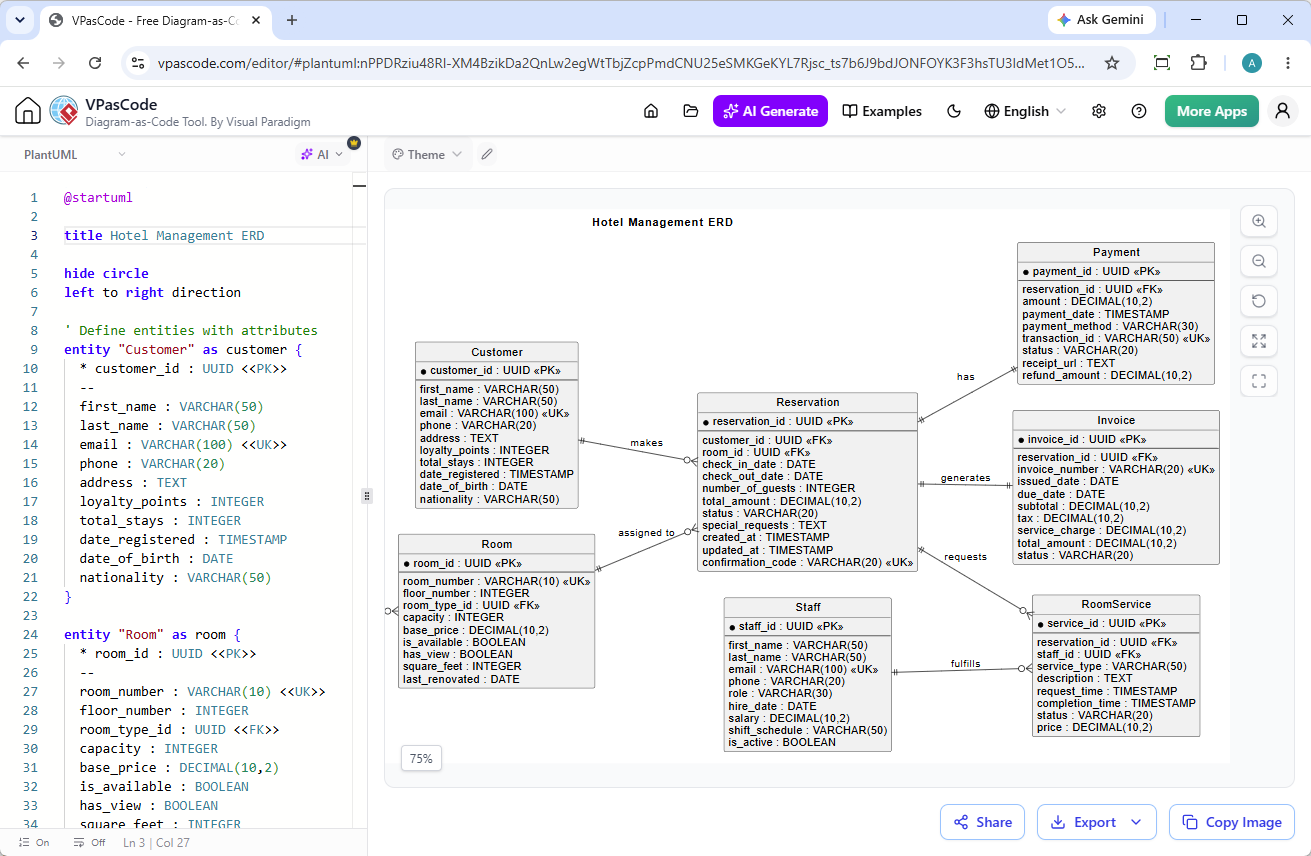
Building complex database models doesn’t have to mean wrestling with clumsy drag-and-drop user interfaces. By leveraging a diagram-as-code approach, your architecture stays version-controlled, clean, and effortlessly maintainable.
Ready to try building your own system architectures? Head over to VPasCode to experience real-time rendering, automatic format detection, and seamless exports for your technical documentation today!