


Introduction
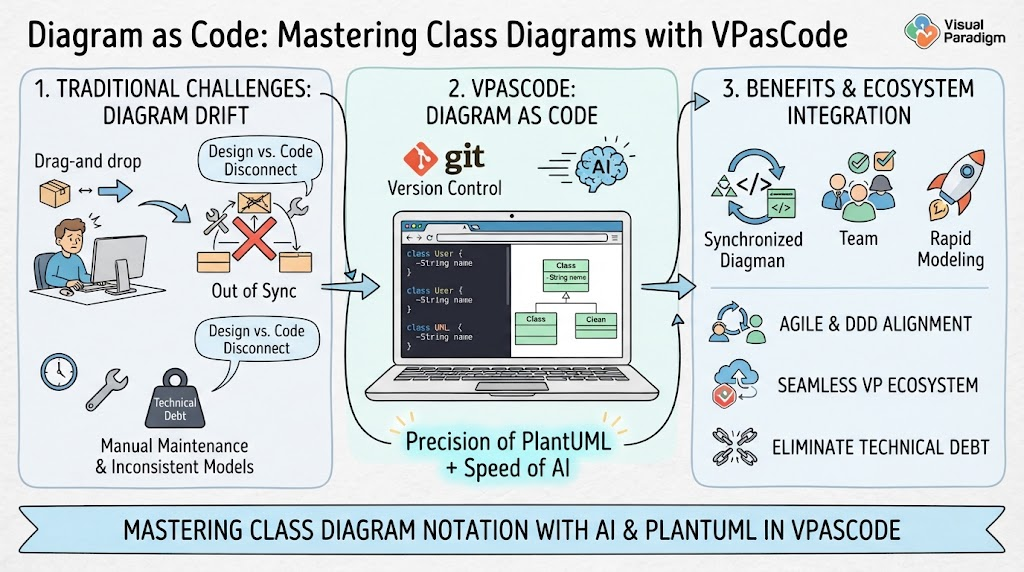
Class diagrams are the backbone of object-oriented design, providing a static view of a system’s structure. However, maintaining these diagrams in traditional drag-and-drop tools often leads to “diagram drift,” where the visual model falls out of sync with the actual codebase. For Agile teams practicing Domain-Driven Design (DDD) or rapid prototyping, this disconnect can cause significant technical debt.
“Diagram as Code” offers a solution by treating class structures as version-controlled text. VPasCode, Visual Paradigm’s browser-based platform, elevates this practice by combining the precision of PlantUML with the speed of AI. This guide focuses specifically on mastering Class Diagram notation using PlantUML within the VPasCode environment, demonstrating how to leverage AI for rapid modeling and seamless integration with the broader Visual Paradigm ecosystem.
Why Visual Paradigm & VPasCode for Class Modeling?
While many tools support PlantUML, Visual Paradigm’s VPasCode offers distinct advantages for structural modeling:
-
Instant Syntax Validation: As you type PlantUML class definitions, the real-time renderer immediately highlights syntax errors, preventing common mistakes like missing braces or incorrect relationship arrows.
-
AI-Assisted Structure Generation: Describe your domain entities in natural language, and the AI Chatbot will generate the initial class skeleton, including attributes, methods, and basic relationships. This accelerates the initial design phase significantly.
-
Multi-Engine Context: While focusing on PlantUML for UML standards, you can simultaneously view related data flows in Mermaid or entity relationships in Graphviz within the same workspace, providing a holistic view of your system.
-
Seamless Transition to Deep Modeling: Once your high-level class diagram is stable in VPasCode, you can sync it with Visual Paradigm Desktop for detailed attribute typing, constraint definition, and code engineering (forward/reverse engineering).
-
Collaborative Review: Share live links with team members during design reviews. Stakeholders can see updates in real-time without needing to install any software, facilitating faster feedback loops.
Usage Cases for Agile Teams
1. Domain-Driven Design (DDD) Workshops
During event storming or domain modeling sessions, teams can rapidly sketch out Aggregates, Entities, and Value Objects. Using the AI Chatbot, participants can describe business rules, and the tool generates the corresponding class structure, allowing the team to focus on business logic rather than drawing boxes.
2. API Contract Definition
Backend developers can define the data models for REST or GraphQL APIs using class diagrams. These diagrams serve as living documentation that can be exported to OpenDocs or shared with frontend teams to ensure alignment on data structures before coding begins.
3. Legacy Code Understanding
When onboarding to a legacy codebase, engineers can use reverse-engineering concepts (or manually map key classes) in VPasCode to visualize complex inheritance hierarchies and dependencies. The clarity of PlantUML helps untangle spaghetti code structures.
4. Database Schema Prototyping
Although Entity-Relationship diagrams are specific, class diagrams are often used as a precursor to database design. Teams can model persistent objects with their attributes and associations, then use the VPasCode Bridge to convert these models into JSON schemas or SQL DDL statements via AI assistance.
PlantUML Class Diagram Notation Guide
Below is a comprehensive guide to common Class Diagram elements in PlantUML, with examples ready for VPasCode.
1. Basic Class Structure
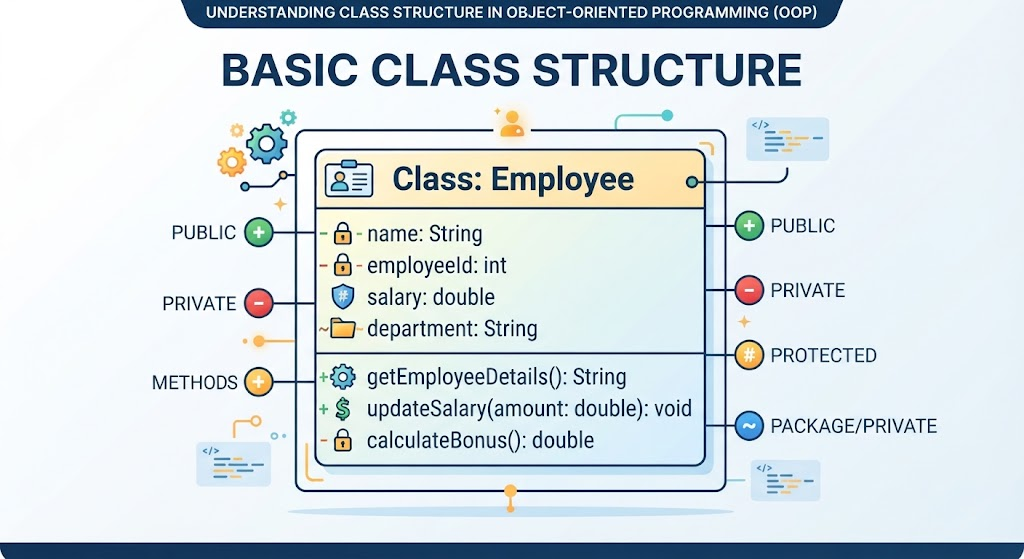
Define a class with its name, attributes, and methods. Use visibility markers: + (public), - (private), # (protected), ~ (package/private).
@startuml
class User {
    +String username
    -String passwordHash
    #Email email
    ~Int lastLoginTimestamp

    +login(): Boolean
    -hashPassword(raw: String): String
    +updateProfile(data: Map): void
}
@enduml
2. Relationships: Association, Aggregation, Composition
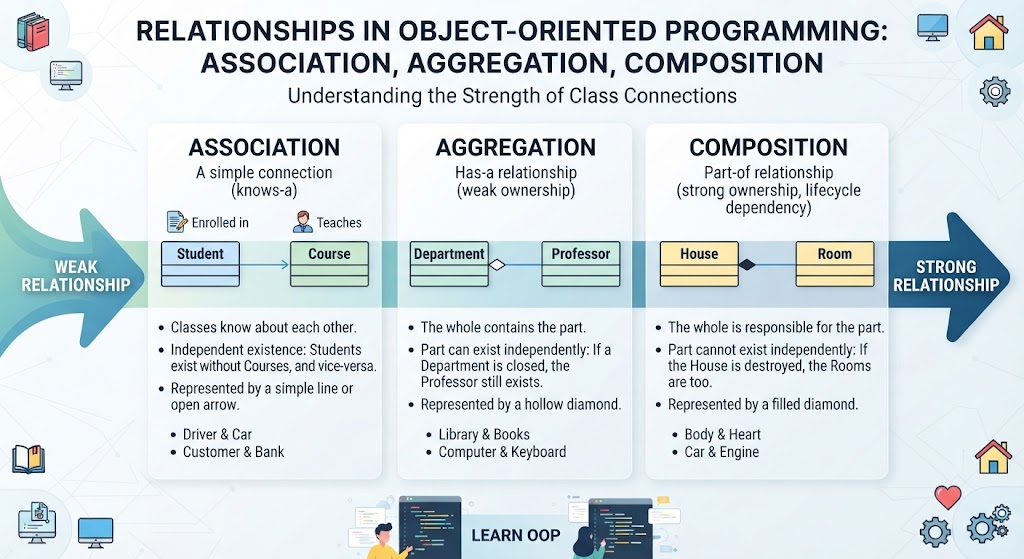
Understand the strength of relationships between classes.
-
Association: A simple connection.
-
Aggregation: “Has-a” relationship (weak ownership).
-
Composition: “Part-of” relationship (strong ownership, lifecycle dependency).
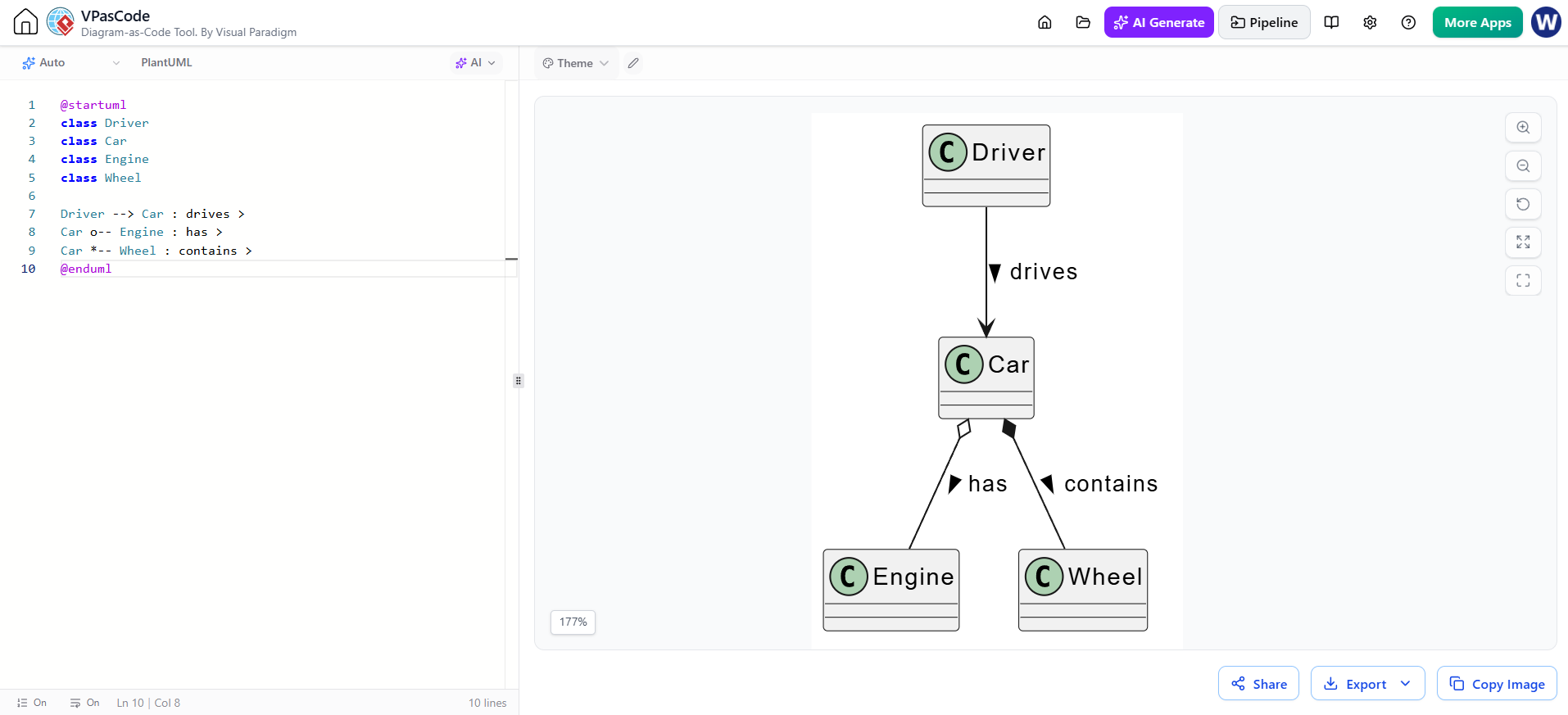
@startuml
class Driver
class Car
class Engine
class Wheel

Driver --> Car : drives >
Car o-- Engine : has >
Car *-- Wheel : contains >
@enduml
3. Inheritance and Realization
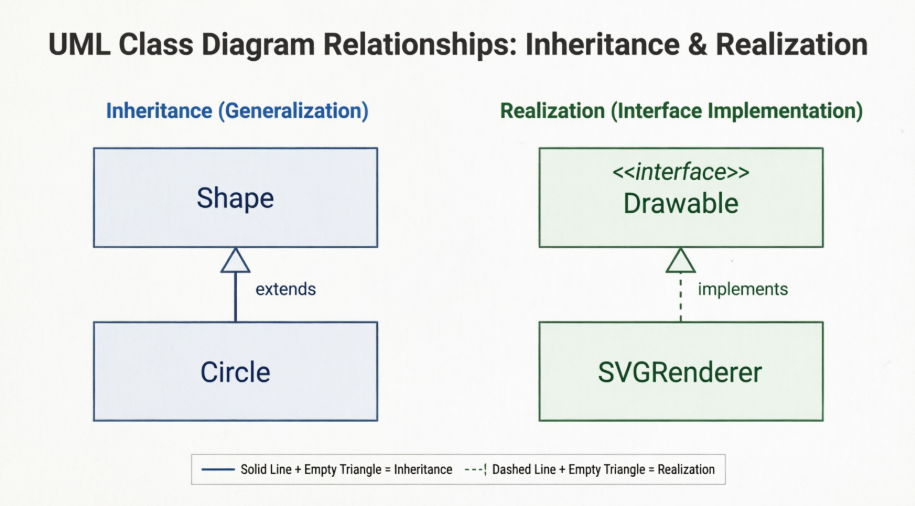
Model generalization (inheritance) and interface implementation.
-
Inheritance: Empty triangle arrow.
-
Realization: Dashed line with empty triangle.
@startuml
abstract class Shape {
    +draw(): void
}

class Circle extends Shape {
    +radius: Double
}

interface Drawable {
    +render(): void
}

class SVGRenderer implements Drawable {
    +render(): void
}

@enduml
4. Multiplicity and Roles
Specify how many instances of one class relate to another.
@startuml
class Order
class OrderItem

Order "1" -- "*" OrderItem : contains >
note right of OrderItem
  Each OrderItem belongs to exactly one Order
  An Order can have multiple Items
end note
@enduml
5. Packages and Namespaces
Organize classes into logical groups or modules.
@startuml
package "com.example.auth" {
    class AuthService
    class TokenManager
}

package "com.example.user" {
    class UserProfile
    class Preferences
}

AuthService ..> TokenManager : uses >
UserProfile ..> Preferences : has >
@enduml
6. Enums and Annotations
Define enumerations and add stereotypes or notes.
@startuml
enum Status {
    ACTIVE
    INACTIVE
    SUSPENDED
}

class Account {
    +Status status
    +activate(): void
}

Account --> Status

note top of Account
  <<Entity>>
  Represents a user account
end note
@enduml
7. Advanced: Interfaces, Abstract Classes, and Notes
Combine various elements for a complete model.
@startuml
interface PaymentGateway {
    +process(amount: Double): Transaction
}

abstract class BasePayment {
    #validate(): Boolean
}

class CreditCardPayment extends BasePayment implements PaymentGateway {
    +cardNumber: String
    +expiry: Date
}

class PayPalPayment extends BasePayment implements PaymentGateway {
    +email: String
}

BasePayment <|-- CreditCardPayment
BasePayment <|-- PayPalPayment
PaymentGateway <|.. CreditCardPayment
PaymentGateway <|.. PayPalPayment

note bottom of CreditCardPayment
  Requires PCI Compliance
end note
@enduml
Leveraging AI for Class Diagramming
The AI Chatbot in VPasCode transforms how you create class diagrams:
-
From Text to Class Skeleton: Prompt: “Create a class diagram for a library system with Books, Members, and Loans. Include attributes and basic methods.” The AI generates the full PlantUML code.
-
Refining Relationships: If your initial diagram lacks clear ownership, ask: “Change the relationship between Library and Book to composition, and between Member and Loan to aggregation.” The AI updates the syntax accordingly.
-
Generating from JSON: Paste a JSON object representing a user profile and ask: “Convert this JSON into a PlantUML class diagram with appropriate data types.” The VPasCode Bridge facilitates this conversion instantly.
-
Syntax Correction: If you’re unsure about the arrow type for an interface, ask: “What is the correct PlantUML syntax for a class implementing an interface?” The AI provides the exact code snippet.
Conclusion
Mastering Class Diagrams with PlantUML in VPasCode empowers Agile teams to create precise, maintainable, and collaborative structural models. By leveraging AI for rapid prototyping and Visual Paradigm’s robust ecosystem for deeper analysis, you ensure that your design documentation remains a valuable asset rather than a outdated artifact. Start by modeling your core domain entities, use AI to accelerate the process, and integrate these diagrams into your development workflow for clearer communication and better software architecture.
Recommended Reading & Resources
-
Introducing VPasCode: The Ultimate Unified Text-to-Diagram Platform: Official release announcement detailing the core features and multi-engine support of VPasCode.
-
The Ultimate Text-Based UML Tool: How VPasCode is Redefining Diagram as Code in 2026: In-depth blog post exploring the evolution of diagramming tools and VPasCode’s role in modern development workflows.
-
Revolutionize Your Workflow: Introducing Native AI Diagram Generation in VPasCode: Guide on using the integrated AI Chatbot to generate and edit diagrams using natural language prompts.
-
Mastering VPasCode: The Ultimate Guide to AI-Powered Diagram as Code with Multi-Engine Support: Comprehensive tutorial covering best practices for using PlantUML, Mermaid, and other engines within VPasCode.
-
Generate & Visualize JSON with AI Chatbot & VPasCode: Tutorial on converting JSON data structures into visual diagrams using AI and the VPasCode Bridge.
-
AI Diagramming for Software Engineers & Developers: Resource focused on how developers can use AI-driven diagramming to streamline coding and architecture tasks.
-
From Code to Clarity: A Beginner’s Guide to Seamless Diagramming with VPasCode and OpenDocs: Step-by-step guide for beginners on integrating VPasCode with OpenDocs for collaborative documentation.