


In the high-stakes environment of international finance, clarity is currency. When a customer initiates a cross-border payment, the underlying architecture involves multiple institutions, regulatory checks, and complex messaging protocols. A single miscommunication between the Originating Bank and the Beneficiary Bank can result in failed transactions, compliance breaches, or financial loss.

Visual modeling is critical here. Traditional documentation often fails to capture the temporal sequence of events required for a Swift Payment System. By using diagram-as-code with PlantUML in VPasCode, architects can rapidly prototype, validate, and document these workflows. This approach enhances architectural clarity, ensures compliance logic is visually explicit, and serves as living technical documentation that stays in sync with the codebase.
VPasCode offers a free, browser-based environment where you can write PlantUML code and see the sequence diagram render instantly. There is no need for local Java installations or complex configuration. This masterclass demonstrates how to build a professional-grade International Wire Transfer sequence diagram, complete with compliance checks and alternative flows.
Understanding the Model: Purpose, Scope & Problem Framing
Diagram Abstraction & Representation
This model utilizes a Sequence Diagram to represent the time-ordered interactions between system participants. Unlike a static flowchart, a sequence diagram emphasizes the when and how of the transaction. It captures:
- Lifelines: The vertical lines representing the Sender, Banks, and Network, showing their existence over time.
- Messages: The horizontal arrows indicating data packets (like MT103 messages) or API calls moving between entities.
- Activation Bars: The rectangular bars on lifelines showing when a participant is actively processing a request.
This visual abstraction is the right tool for financial workflows because it exposes bottlenecks and decision points (such as the Sanctions Check) that must happen before funds can move.
Target Domain Scope & Scenario
This diagram specifically models the International Wire Transfer scenario within a Swift Payment System. The scope includes:
- Initiation: The Sender submitting instructions.
- Compliance: The mandatory screening against a Sanctions Database.
- Routing: The path through the SWIFT Network and a Correspondent Bank.
- Settlement: The final credit to the Beneficiary Bank.
Dependencies are strictly defined: the SWIFT Network cannot route without a cleared compliance check, and the Correspondent Bank acts as an intermediary that must confirm receipt before the transaction is marked complete.
Key Takeaways & Educational Insights
By constructing this model, you will gain insights into:
- How to represent synchronous vs. asynchronous messaging in finance.
- How to visualize conditional logic (Sanctions Clear vs. Hit) using combined fragments.
- How to maintain a clean, readable diagram using the
!theme plaindirective in VPasCode.
Complete Diagram & Full Source Code
Below is the finalized blueprint for the International Wire Transfer system. You can view the rendered diagram immediately using the interactive code block below.
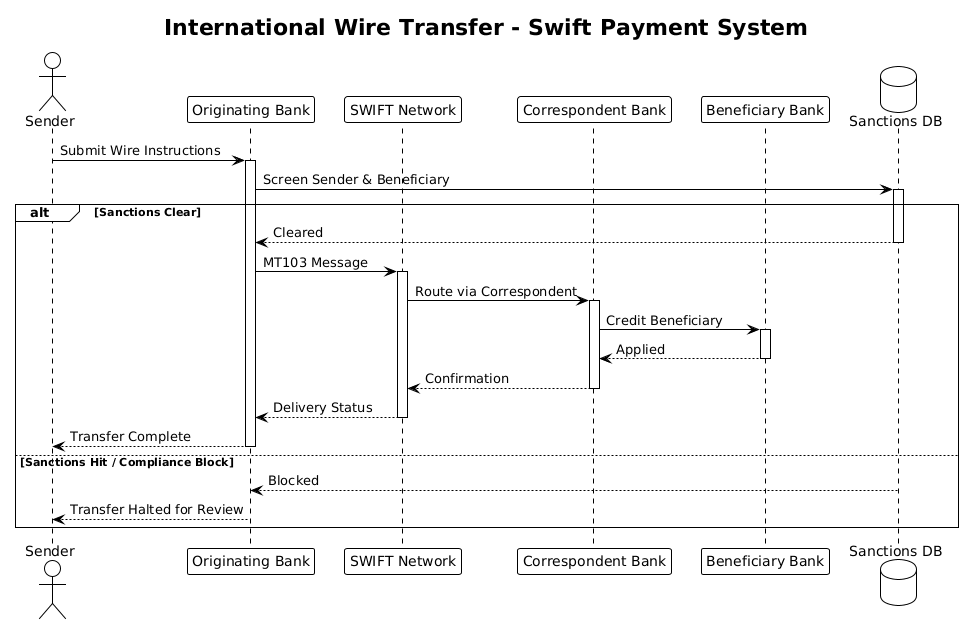
@startuml
!theme plain

title International Wire Transfer - Swift Payment System

actor Sender
participant "Originating Bank" as OB
participant "SWIFT Network" as SWIFT
participant "Correspondent Bank" as CB
participant "Beneficiary Bank" as BB
database "Sanctions DB" as Sanctions

Sender -> OB ++ : Submit Wire Instructions
OB -> Sanctions ++ : Screen Sender & Beneficiary
alt Sanctions Clear
    Sanctions --> OB -- : Cleared
    OB -> SWIFT ++ : MT103 Message
    SWIFT -> CB ++ : Route via Correspondent
    CB -> BB ++ : Credit Beneficiary
    BB --> CB -- : Applied
    CB --> SWIFT -- : Confirmation
    SWIFT --> OB -- : Delivery Status
    OB --> Sender -- : Transfer Complete
else Sanctions Hit / Compliance Block
    Sanctions --> OB -- : Blocked
    OB --> Sender -- : Transfer Halted for Review
end

@endumlStep-by-Step Architectural Walkthrough
Phase 1: Canvas Configuration & Layout Directives
Before defining entities, we set the stage for the diagram’s appearance and behavior. In VPasCode, we start with the @startuml directive to open the sequence diagram context.
We apply the !theme plain directive to ensure a clean, professional look without distracting background colors. This is crucial for financial documentation where readability is paramount.
@startuml
!theme plain

title International Wire Transfer - Swift Payment System
Phase 2: Declaring Core Entities, Actors, and Boundaries
Next, we define the participants. In a sequence diagram, every vertical line (lifeline) must be declared. We use specific keywords to denote the type of participant:
actor: Represents the human user initiating the process (Sender).participant: Represents system components or external banks (Originating, SWIFT, Correspondent, Beneficiary).database: Represents a data store (Sanctions DB).
We also assign aliases (e.g., as OB) to keep message labels concise.
actor Sender
participant "Originating Bank" as OB
participant "SWIFT Network" as SWIFT
participant "Correspondent Bank" as CB
participant "Beneficiary Bank" as BB
database "Sanctions DB" as Sanctions
Phase 3: Mapping Data Flows & Key Interactions
Now we map the chronological flow. We use arrows to represent messages. The ++ suffix indicates a synchronous message (blocking), while -- indicates a return message.
The flow begins with the Sender submitting instructions to the Originating Bank (OB). Crucially, the OB must check the Sanctions Database before proceeding.
Sender -> OB ++ : Submit Wire Instructions
OB -> Sanctions ++ : Screen Sender & Beneficiary
Phase 4: Grouping, Annotations & Visual Polish
Financial workflows often have alternative paths. Here, we use the alt and else combined fragments to handle the compliance logic. If the Sanctions DB returns “Cleared”, the money flows. If it returns “Hit”, the process halts.
This structure ensures that the diagram explicitly documents the compliance requirements, which is vital for audit trails.
alt Sanctions Clear
    ...
else Sanctions Hit / Compliance Block
    ...
end
Syntax & Keyword Deep Dive
Understanding the specific PlantUML syntax is essential for maintaining and extending your diagrams. Here is a breakdown of the key features used in this model:
actor: Defines an external human user. In this case, theSenderinitiating the transfer.participant: Defines a system component or organization. Used for the banks and the SWIFT network.database: Specifically renders the lifeline with a database cylinder icon. Used for theSanctions DB.->(Solid Arrow): Represents a synchronous message. The sender waits for a response.-->(Dashed Arrow): Represents a return message or response.++(Arrow Suffix): Forces the activation bar to extend, visually indicating the duration of the task.alt/else/end: Defines a combined fragment. This creates a branching path in the diagram, essential for error handling and compliance checks.!theme plain: A directive to override default styling with a minimalist, high-contrast theme.
Best Practices & Pitfalls to Avoid
When modeling financial systems in VPasCode, adhere to these best practices to ensure your diagrams remain effective:
- Maintain Temporal Accuracy: Ensure the order of messages reflects the actual execution order. In banking, a credit cannot happen before the funds are verified.
- Use Clear Aliases: Use short aliases (like
OB,CB) in message labels to prevent horizontal scrolling, but define full names in the participant declaration for clarity. - Visualize Compliance Explicitly: Do not hide compliance checks in the background. Use
altblocks to show where the process might fail or stop, as this is critical for risk management. - Keep Diagrams Modular: If the workflow becomes too complex, consider splitting it into multiple diagrams (e.g., one for Initiation, one for Settlement) rather than one massive sequence.
Try It Yourself with VPasCode
Start Building Financial Sequence Diagrams Faster with VPasCode
Instantly render and customize your Swift Payment System workflows in your browser without installing any tools or configuring environments.