


Architecting the Backbone of Telecom Revenue: The Subscriber Billing System
In the telecommunications industry, the billing system is not just a backend utility; it is the financial heartbeat of the entire organization. It dictates customer retention, revenue assurance, and operational compliance. For software architects and domain experts, translating this complex business logic into a clear, maintainable software model is critical. A well-structured class diagram serves as the blueprint for the entire application, defining how subscribers interact with accounts, how usage is translated into charges, and how financial transactions are settled.

This tutorial demonstrates how to model a Subscriber Billing System using PlantUML. By leveraging VPasCode, a free, browser-based diagram-as-code editor, you can rapidly prototype, visualize, and document these relationships without the friction of manual drawing tools. We will explore a domain containing over a dozen classes, encompassing generalization hierarchies (Prepaid vs. Postpaid), aggregations (Billing Cycles), and associations (Payments), all rendered instantly.
Understanding the Model: Purpose, Scope & Problem Framing
Diagram Abstraction & Representation
A class diagram in PlantUML abstracts the software structure by focusing on static relationships between entities. In this specific domain, the diagram models the core billing domain. It does not represent the user interface or the network infrastructure directly, but rather the data structures and business rules that govern money flow and service delivery.
Key abstractions include:
- Entities: Represented as classes (e.g.,
Subscriber,Invoice) containing attributes and methods. - Enumerations: Represented as
enumtypes (e.g.,AccountStatus,ServiceType) to enforce data integrity. - Inheritance: Represented by generalization arrows (
<|--) to show specialized billing plans likePrepaidPlanextendingTariffPlan.
Target Domain Scope & Scenario
This model is scoped to cover the end-to-end billing lifecycle for a telecom provider. It intentionally excludes external payment gateway integrations or detailed network usage collection protocols, focusing instead on the internal accounting logic. The scope covers:
- Subscriber Management: How users are identified and linked to accounts.
- Service & Tariff Logic: How different plans (Prepaid/Postpaid) calculate costs.
- Usage & Billing Cycles: How raw data is aggregated into billable invoices.
- Financial Settlement: How payments and adjustments are applied to accounts.
Key Takeaways & Educational Insights
By building this diagram, you will gain insights into:
- How to model one-to-many relationships between a Subscriber and their multiple Accounts.
- The distinction between Aggregation (
o--) and Composition (*--) in billing cycles. - How to organize inheritance hierarchies for extensible tariff plans.
- Best practices for naming conventions and attribute typing in enterprise-grade diagrams.
Complete Diagram & Full Source Code
Below is the complete PlantUML source code for the Subscriber Billing System. This diagram utilizes the Rose theme for a professional aesthetic and includes a comment block describing the domain context.
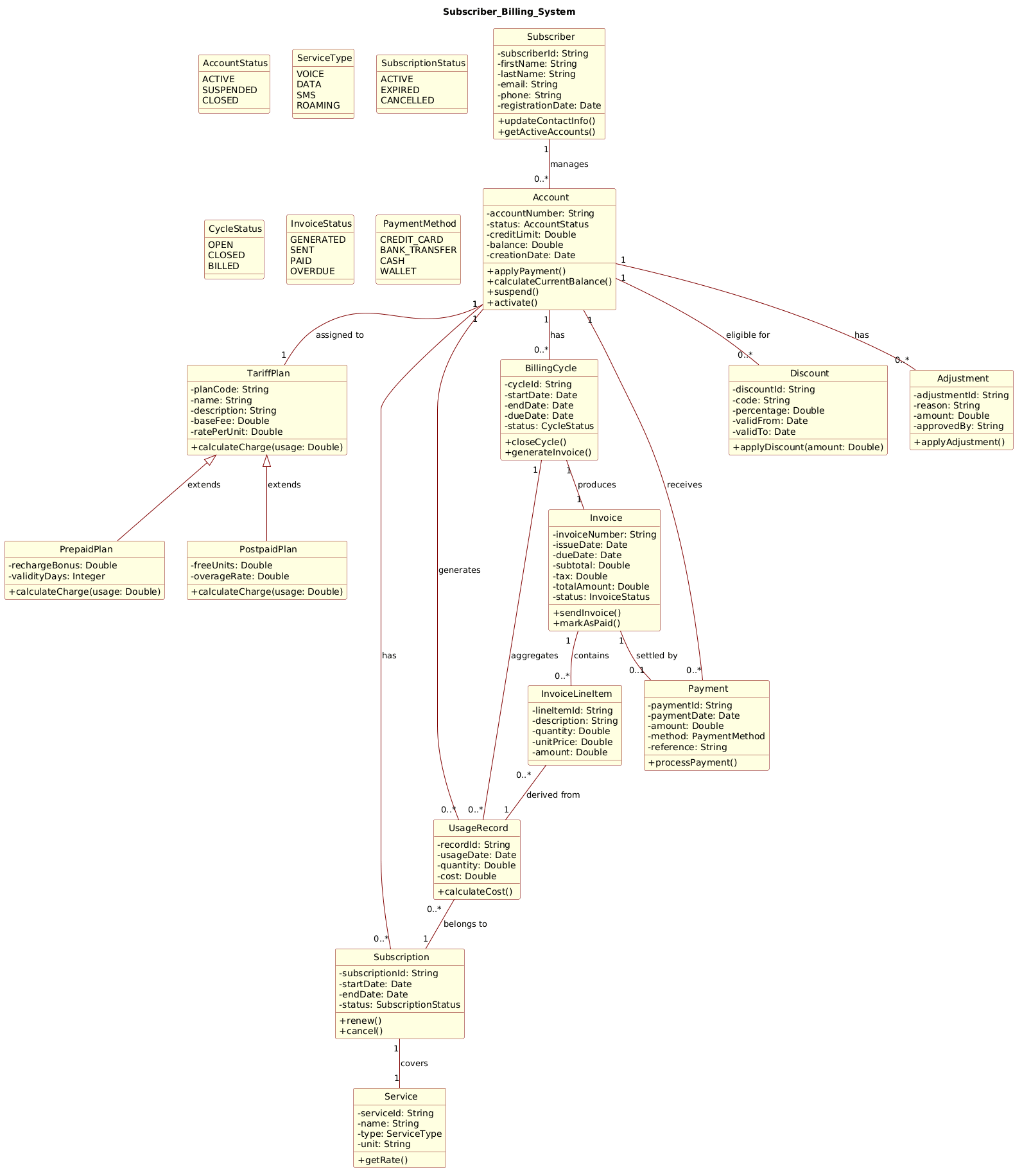
@startuml
!include https://static.visual-paradigm.com/web/resources/plantuml-stdlib/themes/rose.puml

title Subscriber_Billing_System

/'
This class diagram models the core domain of a subscriber billing system for a telecommunications or utility service provider.
The system manages subscriber accounts, tracks usage events, calculates charges based on tariff plans, generates invoices,
and processes payments. Key concepts include subscribers with multiple accounts, accounts having a specific tariff plan,
usage records aggregated into billing cycles, invoice generation with line items, payment tracking, and support for
discounts and adjustments. The diagram also captures the relationship between service subscriptions and the actual
services consumed, as well as the hierarchy of tariff plans (e.g., prepaid vs. postpaid, or different rate structures).
'/

class Subscriber {
  - subscriberId: String
  - firstName: String
  - lastName: String
  - email: String
  - phone: String
  - registrationDate: Date
  + updateContactInfo()
  + getActiveAccounts()
}

class Account {
  - accountNumber: String
  - status: AccountStatus
  - creditLimit: Double
  - balance: Double
  - creationDate: Date
  + applyPayment()
  + calculateCurrentBalance()
  + suspend()
  + activate()
}

enum AccountStatus {
  ACTIVE
  SUSPENDED
  CLOSED
}

class TariffPlan {
  - planCode: String
  - name: String
  - description: String
  - baseFee: Double
  - ratePerUnit: Double
  + calculateCharge(usage: Double)
}

class PrepaidPlan {
  - rechargeBonus: Double
  - validityDays: Integer
  + calculateCharge(usage: Double)
}

class PostpaidPlan {
  - freeUnits: Double
  - overageRate: Double
  + calculateCharge(usage: Double)
}

class Service {
  - serviceId: String
  - name: String
  - type: ServiceType
  - unit: String
  + getRate()
}

enum ServiceType {
  VOICE
  DATA
  SMS
  ROAMING
}

class Subscription {
  - subscriptionId: String
  - startDate: Date
  - endDate: Date
  - status: SubscriptionStatus
  + renew()
  + cancel()
}

enum SubscriptionStatus {
  ACTIVE
  EXPIRED
  CANCELLED
}

class UsageRecord {
  - recordId: String
  - usageDate: Date
  - quantity: Double
  - cost: Double
  + calculateCost()
}

class BillingCycle {
  - cycleId: String
  - startDate: Date
  - endDate: Date
  - dueDate: Date
  - status: CycleStatus
  + closeCycle()
  + generateInvoice()
}

enum CycleStatus {
  OPEN
  CLOSED
  BILLED
}

class Invoice {
  - invoiceNumber: String
  - issueDate: Date
  - dueDate: Date
  - subtotal: Double
  - tax: Double
  - totalAmount: Double
  - status: InvoiceStatus
  + sendInvoice()
  + markAsPaid()
}

enum InvoiceStatus {
  GENERATED
  SENT
  PAID
  OVERDUE
}

class InvoiceLineItem {
  - lineItemId: String
  - description: String
  - quantity: Double
  - unitPrice: Double
  - amount: Double
}

class Payment {
  - paymentId: String
  - paymentDate: Date
  - amount: Double
  - method: PaymentMethod
  - reference: String
  + processPayment()
}

enum PaymentMethod {
  CREDIT_CARD
  BANK_TRANSFER
  CASH
  WALLET
}

class Discount {
  - discountId: String
  - code: String
  - percentage: Double
  - validFrom: Date
  - validTo: Date
  + applyDiscount(amount: Double)
}

class Adjustment {
  - adjustmentId: String
  - reason: String
  - amount: Double
  - approvedBy: String
  + applyAdjustment()
}

' Relationships

Subscriber "1" -- "0..*" Account : manages
Account "1" -- "1" TariffPlan : assigned to
TariffPlan <|-- PrepaidPlan : extends
TariffPlan <|-- PostpaidPlan : extends

Account "1" -- "0..*" Subscription : has
Subscription "1" -- "1" Service : covers

Account "1" -- "0..*" UsageRecord : generates
UsageRecord "0..*" -- "1" Subscription : belongs to

Account "1" -- "0..*" BillingCycle : has
BillingCycle "1" -- "1" Invoice : produces

Invoice "1" -- "0..*" InvoiceLineItem : contains
InvoiceLineItem "0..*" -- "1" UsageRecord : derived from

Account "1" -- "0..*" Payment : receives
Invoice "1" -- "0..1" Payment : settled by

Account "1" -- "0..*" Discount : eligible for
Account "1" -- "0..*" Adjustment : has

BillingCycle "1" -- "0..*" UsageRecord : aggregates
@endumlStep-by-Step Architectural Walkthrough
Building a complex domain model like this requires a structured approach. We will construct this diagram in four logical phases: configuration, entity declaration, relationship mapping, and visual refinement.
Phase 1: Canvas Configuration & Layout Directives
Before defining classes, we set the stage. We begin by including the PlantUML standard library theme to ensure a consistent, professional look. We also define the diagram title and a descriptive comment block.
Copy the following directives to your editor:
!include https://static.visual-paradigm.com/web/resources/plantuml-stdlib/themes/rose.puml

title Subscriber_Billing_System

/'
This class diagram models the core domain of a subscriber billing system...
'/
The !include directive pulls in the Rose theme, which provides rounded corners and a modern color palette. The title directive sets the header, while the comment block (wrapped in /' and /') provides context for future readers without affecting the rendering.
Phase 2: Declaring Core Entities, Actors, and Boundaries
Next, we define the fundamental building blocks. In a billing system, the Subscriber is the root entity. We define it with private attributes (prefixed with -) and public methods (prefixed with +).
Example structure for the Subscriber class:
class Subscriber {
  - subscriberId: String
  - firstName: String
  - lastName: String
  - email: String
  - phone: String
  - registrationDate: Date
  + updateContactInfo()
  + getActiveAccounts()
}
We then proceed to define Account, TariffPlan, and Invoice. Note how we use enum to define constants like AccountStatus (ACTIVE, SUSPENDED, CLOSED). This enforces data integrity by restricting values to a predefined set.
Phase 3: Mapping Data Flows & Key Interactions
With entities defined, we establish relationships. This is where the domain logic becomes visible. We use different arrow types to signify the nature of the connection.
- Association:
Subscriber "1" -- "0..*" Account : managesindicates a one-to-many relationship. - Inheritance:
TariffPlan <|-- PrepaidPlan : extendsshows thatPrepaidPlanis a specialized type ofTariffPlan. - Composition:
BillingCycle "1" -- "0..*" UsageRecord : aggregatesimplies a strong lifecycle dependency.
Here is a snippet of the relationship section:
TariffPlan <|-- PrepaidPlan : extends
TariffPlan <|-- PostpaidPlan : extends

Account "1" -- "0..*" Subscription : has
Subscription "1" -- "1" Service : covers
Phase 4: Grouping, Annotations & Visual Polish
In this final phase, we ensure the diagram is readable. We add labels to relationships (e.g., : manages, : assigned to) to clarify the direction of the logic. We also ensure that the Invoice and Payment classes are correctly linked to show the settlement flow.
The diagram is now complete. It accurately reflects the complexity of a real-world telecom billing system, ready for code generation or documentation.
Syntax & Keyword Deep Dive
To master PlantUML class diagrams, you must understand the specific syntax used to define structure and relationships.
class Name: Defines a class. Attributes are listed inside, prefixed with visibility modifiers (-for private,+for public).enum Name: Defines an enumeration. Each value is listed on a new line.--: A standard association line connecting two classes.<|--: A generalization arrow pointing from the child class to the parent class (inheritance).o--: An aggregation relationship, indicating a "has-a" relationship where the parts can exist independently.*--: A composition relationship, indicating a strong "owns-a" relationship where parts cannot exist without the whole.: Label: Text appended to a relationship line to describe the nature of the connection."1" -- "0..*": Multiplicity constraints.1means exactly one,0..*means zero or more.
Best Practices & Pitfalls to Avoid
When modeling complex systems like billing architectures, follow these guidelines to maintain clarity:
- Maintain Domain Consistency: Use terminology that matches your business glossary. If the business calls it a "Subscription," do not name the class "ServicePlan" unless there is a clear distinction.
- Limit Class Width: If a class has too many attributes, consider splitting it into a "Core" class and a "Details" class, or use a separate database schema diagram.
- Use Enums for Status: Never use string literals for statuses (e.g., "ACTIVE"). Use
enumtypes likeAccountStatusto prevent typos and ensure type safety. - Visual Hierarchy: Group related classes logically in the layout. In VPasCode, you can drag classes to organize them visually before rendering.
Start Building PlantUML Class Diagrams Faster with VPasCode
Instantly render, edit, and export your Subscriber Billing System diagrams online in VPasCode without installing any tools.