


In the modern entertainment industry, the backbone of digital consumption lies in robust streaming media infrastructure. Whether delivering live sports, on-demand movies, or interactive video content, the underlying system must handle massive concurrency, adaptive bitrate switching, and secure content delivery. For software architects and engineers, documenting these complex interactions is not merely a bureaucratic exercise; it is a critical step in ensuring system reliability and scalability.
Class diagrams serve as the blueprint for object-oriented systems, defining the static structure of the software. However, maintaining these diagrams alongside evolving codebases can be challenging. This is where VPasCode transforms the workflow. As a free, web-based diagram-as-code tool, VPasCode allows architects to write PlantUML code directly in the browser and see the rendering instantly. This tutorial guides you through building a professional Class Diagram for a Streaming Media Delivery System, demonstrating how to model domain entities like MediaAssets, Users, and EdgeServers without installing any local dependencies.
Understanding the Model: Purpose, Scope & Problem Framing
Diagram Abstraction & Representation
A Class Diagram in PlantUML is the ideal tool for this scenario because it focuses on the structural relationships between key system components. Unlike sequence diagrams that focus on temporal flow, a class diagram clarifies the ownership, aggregation, and inheritance hierarchies that define the system’s data model. In the context of streaming media, we need to distinguish between the raw input (RawVideo), the processed output (EncodedVariant), and the delivery mechanism (EdgeServer). This abstraction allows developers to understand how data flows from ingestion to playback without getting bogged down in implementation details.
Target Domain Scope & Scenario
This model specifically targets the core domain of a streaming platform. It encompasses the lifecycle of a media asset from ingestion to delivery. The scope includes:
- Content Management: Handling VideoOnDemand and LiveStream assets.
- Processing: Encoding profiles that determine quality and format.
- Delivery: EdgeServers and ContentDeliveryPolicies that manage access.
- Interaction: User sessions and QoE (Quality of Experience) metrics.
It intentionally excludes external payment gateways or third-party CDN configurations, focusing instead on the internal logical structure required to orchestrate the streaming service.
Key Takeaways & Educational Insights
By following this tutorial, you will gain insights into:
- How to structure inheritance hierarchies for media types (Generalization).
- The difference between aggregation and composition in a streaming context.
- How to document constraints like geo-restrictions and subscription tiers directly in the model.
- Using VPasCode to iterate on diagram structure rapidly.
Complete Diagram & Full Source Code
Before diving into the construction phases, review the complete blueprint below. This diagram illustrates the full scope of the Streaming Media Delivery System, including 13 distinct classes and their interrelationships.
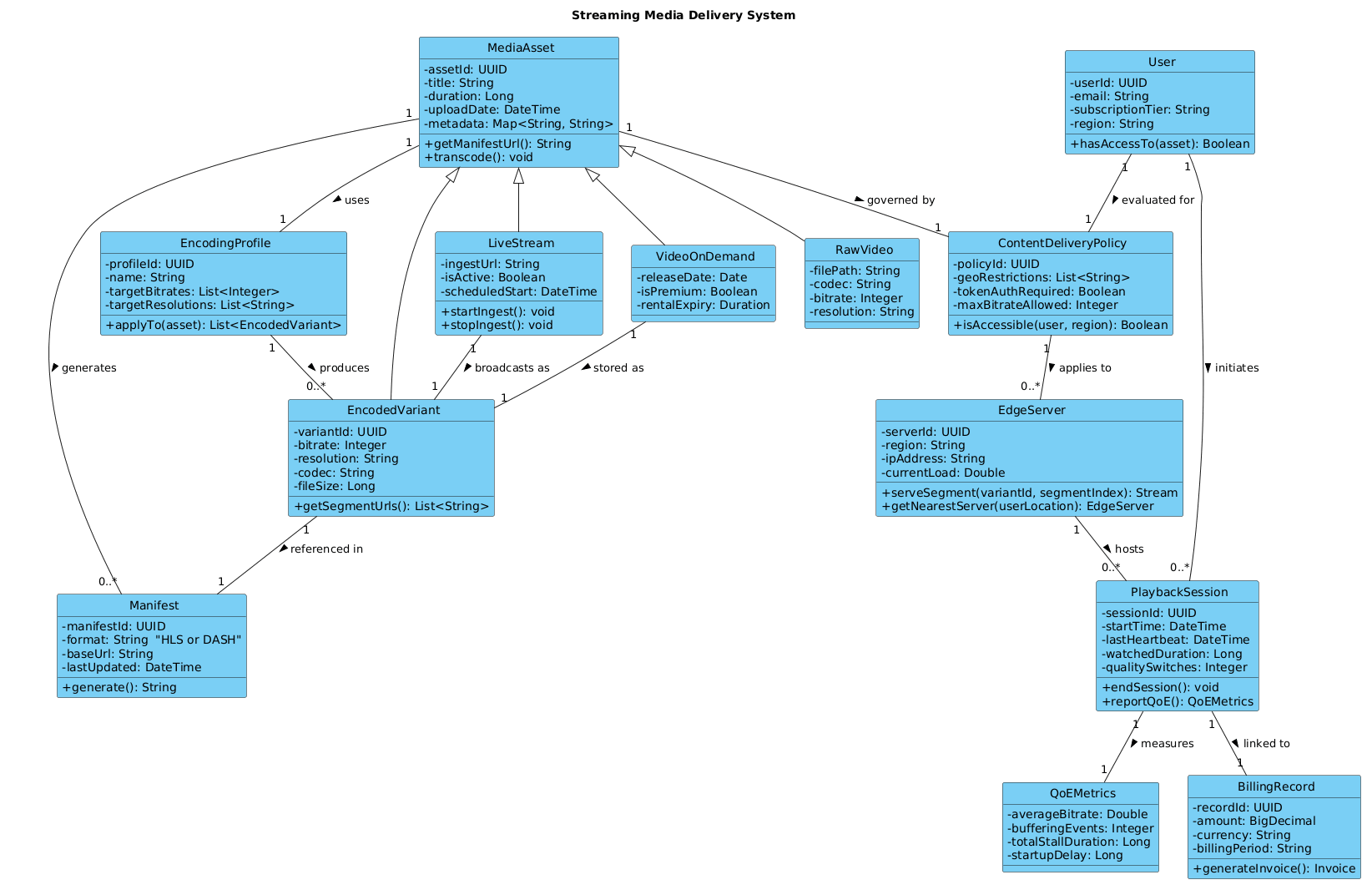
Copy the following source code to test it in the VPasCode editor:
@startuml
!include https://static.visual-paradigm.com/web/resources/plantuml-stdlib/themes/vp.puml

title Streaming Media Delivery System

/'
This diagram models the core domain of a streaming media delivery system that handles on-demand and live video content.
It captures the relationships between content assets, encoding profiles, delivery policies, and client playback sessions.
The system ingests raw media, transcodes it into multiple adaptive bitrate formats, and distributes streams via edge servers.
User interactions, subscription tiers, and geographic availability influence which renditions are served to each client.
The model also tracks session metrics for quality of experience monitoring and billing purposes.
The context focuses on content lifecycle, delivery orchestration, and client-server interactions during a streaming session.
'/

class MediaAsset {
  - assetId: UUID
  - title: String
  - duration: Long
  - uploadDate: DateTime
  - metadata: Map<String, String>
  + getManifestUrl(): String
  + transcode(): void
}

class RawVideo {
  - filePath: String
  - codec: String
  - bitrate: Integer
  - resolution: String
}

class EncodedVariant {
  - variantId: UUID
  - bitrate: Integer
  - resolution: String
  - codec: String
  - fileSize: Long
  + getSegmentUrls(): List<String>
}

class Manifest {
  - manifestId: UUID
  - format: String  "HLS or DASH"
  - baseUrl: String
  - lastUpdated: DateTime
  + generate(): String
}

class EncodingProfile {
  - profileId: UUID
  - name: String
  - targetBitrates: List<Integer>
  - targetResolutions: List<String>
  + applyTo(asset): List<EncodedVariant>
}

class ContentDeliveryPolicy {
  - policyId: UUID
  - geoRestrictions: List<String>
  - tokenAuthRequired: Boolean
  - maxBitrateAllowed: Integer
  + isAccessible(user, region): Boolean
}

class EdgeServer {
  - serverId: UUID
  - region: String
  - ipAddress: String
  - currentLoad: Double
  + serveSegment(variantId, segmentIndex): Stream
  + getNearestServer(userLocation): EdgeServer
}

class User {
  - userId: UUID
  - email: String
  - subscriptionTier: String
  - region: String
  + hasAccessTo(asset): Boolean
}

class PlaybackSession {
  - sessionId: UUID
  - startTime: DateTime
  - lastHeartbeat: DateTime
  - watchedDuration: Long
  - qualitySwitches: Integer
  + endSession(): void
  + reportQoE(): QoEMetrics
}

class QoEMetrics {
  - averageBitrate: Double
  - bufferingEvents: Integer
  - totalStallDuration: Long
  - startupDelay: Long
}

class BillingRecord {
  - recordId: UUID
  - amount: BigDecimal
  - currency: String
  - billingPeriod: String
  + generateInvoice(): Invoice
}

class LiveStream {
  - ingestUrl: String
  - isActive: Boolean
  - scheduledStart: DateTime
  + startIngest(): void
  + stopIngest(): void
}

class VideoOnDemand {
  - releaseDate: Date
  - isPremium: Boolean
  - rentalExpiry: Duration
}

MediaAsset <|-- RawVideo
MediaAsset <|-- EncodedVariant
MediaAsset <|-- LiveStream
MediaAsset <|-- VideoOnDemand

MediaAsset "1" -- "0..*" Manifest : generates >
EncodingProfile "1" -- "0..*" EncodedVariant : produces >
MediaAsset "1" -- "1" ContentDeliveryPolicy : governed by >
EdgeServer "1" -- "0..*" PlaybackSession : hosts >
User "1" -- "0..*" PlaybackSession : initiates >
PlaybackSession "1" -- "1" QoEMetrics : measures >
PlaybackSession "1" -- "1" BillingRecord : linked to >
ContentDeliveryPolicy "1" -- "0..*" EdgeServer : applies to >
User "1" -- "1" ContentDeliveryPolicy : evaluated for >

EncodedVariant "1" -- "1" Manifest : referenced in >
LiveStream "1" -- "1" EncodedVariant : broadcasts as >
VideoOnDemand "1" -- "1" EncodedVariant : stored as >

MediaAsset "1" -- "1" EncodingProfile : uses >
@endumlStep-by-Step Architectural Walkthrough
Building this diagram in VPasCode follows a logical progression from configuration to relationship mapping. Follow these phases to replicate the architecture.
Phase 1: Canvas Configuration & Layout Directives
Every professional PlantUML diagram starts with setup. We begin by including the Visual Paradigm theme to ensure consistent styling across all class boxes. This ensures the diagram looks modern and clean immediately.
!include https://static.visual-paradigm.com/web/resources/plantuml-stdlib/themes/vp.puml

title Streaming Media Delivery System
Following the theme, we add a comment block using /' and '/. This provides context for future maintainers without affecting the rendering. It describes the system’s purpose, such as handling on-demand and live content.
Phase 2: Declaring Core Entities, Actors, and Boundaries
The heart of the model lies in the class definitions. We start with the central entity, MediaAsset. This acts as the base for all content types.
class MediaAsset {
  - assetId: UUID
  - title: String
  - duration: Long
  + getManifestUrl(): String
  + transcode(): void
}
Next, we define specific content types like RawVideo and VideoOnDemand. Notice the use of private attributes (prefixed with -) and public methods (prefixed with +). This encapsulation is standard for class modeling.
Phase 3: Mapping Data Flows & Key Interactions
Relationships define how the system behaves. We use generalization (inheritance) to show that RawVideo is a type of MediaAsset.
MediaAsset <|-- RawVideoWe also define associations. For example, a User initiates a PlaybackSession. The cardinality "1" to "0..*" indicates that one user can have multiple sessions over time.
User "1" -- "0..*" PlaybackSession : initiates >Phase 4: Grouping, Annotations & Visual Polish
To finalize the diagram, ensure all critical metrics are captured. The QoEMetrics class is linked to PlaybackSession to track quality data like buffering events. This ensures the model is not just structural but operational, reflecting real-world monitoring requirements.
Syntax & Keyword Deep Dive
Understanding the specific PlantUML syntax used in this diagram is crucial for extending it later.
class: Defines a new entity. The name follows PascalCase conventions.-and+: Denote visibility.-is private,+is public.<|--: Represents Generalization (Inheritance). The arrow points from the child to the parent.--: Represents a standard Association link between two classes.:Labeling: The text after the colon (e.g.,: initiates >) describes the nature of the relationship./'and'/: Used for multi-line comments that are ignored by the renderer but visible in the source.
Best Practices & Pitfalls to Avoid
When modeling complex systems like streaming platforms, keep these guidelines in mind:
- Modularize Your Classes: Avoid dumping all attributes into one class. Split
PlaybackSessionfromQoEMetricsto keep responsibilities distinct. - Use Meaningful Cardinalities: Be precise with "1" vs "0..*". A
MediaAssetmight have manyManifestfiles, but aPlaybackSessiontypically links to exactly oneBillingRecordper period. - Keep it Readable: Use VPasCode's live preview to check if lines cross unnecessarily. Adjust the layout by adding
left to right directionif the diagram becomes too tall. - Document Constraints: Use comments to explain business rules (e.g., geo-restrictions) that might not be obvious from the class name alone.
Try It Yourself with VPasCode
Start Building PlantUML Class Diagrams Faster with VPasCode
Test, preview, and customize this Streaming Media Delivery System diagram instantly in your browser with zero installation required.