


In the rapidly evolving fintech landscape, Peer-to-Peer (P2P) lending platforms serve as critical intermediaries connecting borrowers seeking capital with investors looking for yield. However, the underlying transaction logic is complex, involving multiple actors, conditional risk assessments, and parallel funding streams. Misalignment in these workflows can lead to compliance issues, funding delays, or financial losses.

This tutorial demonstrates how to model a Loan Matching Process using PlantUML Activity Diagrams within VPasCode. By visualizing the interaction between the Borrower, Lender, and System, architects can ensure that the logic for credit validation, fund reservation, and loan disbursement is robust before a single line of production code is written. Using VPasCode, you can prototype these complex financial flows instantly in your browser without installing any local dependencies.
Understanding the Model: Purpose, Scope & Problem Framing
Diagram Abstraction & Representation
An Activity Diagram is the ideal tool for modeling workflows where the focus is on the sequence of actions and the conditions under which they occur. In this specific context, the diagram abstracts the financial transaction lifecycle into a visual flowchart. It uses swimlanes to assign responsibility to specific actors (Borrower, Lender, System), ensuring that every step is attributed to the correct entity.
Target Domain Scope & Scenario
This model focuses specifically on the Loan Matching phase of a P2P platform. It covers the journey from the initial loan request submission to the final disbursement or rejection. It intentionally excludes the post-loan servicing phases (repayment tracking) to maintain clarity on the origination workflow. The scope includes:
- Borrower Actions: Submission of loan requests with specific terms.
- Lender Actions: Reviewing requests and committing funds.
- System Actions: Credit validation, matching logic, and status updates.
Key Takeaways & Educational Insights
By building this diagram, you will gain clarity on:
- Concurrency: How to model parallel processes where lenders review requests while the system validates credit scores.
- Decision Logic: Handling conditional paths (e.g., credit score acceptance vs. rejection).
- State Transitions: Moving a loan from “Open” to “Active” or “Rejected” based on funding status.
Complete Diagram & Full Source Code
Below is the complete blueprint for the P2P Lending Loan Matching process. This diagram utilizes the aws-orange theme for a professional financial look and leverages swimlanes to separate responsibilities.
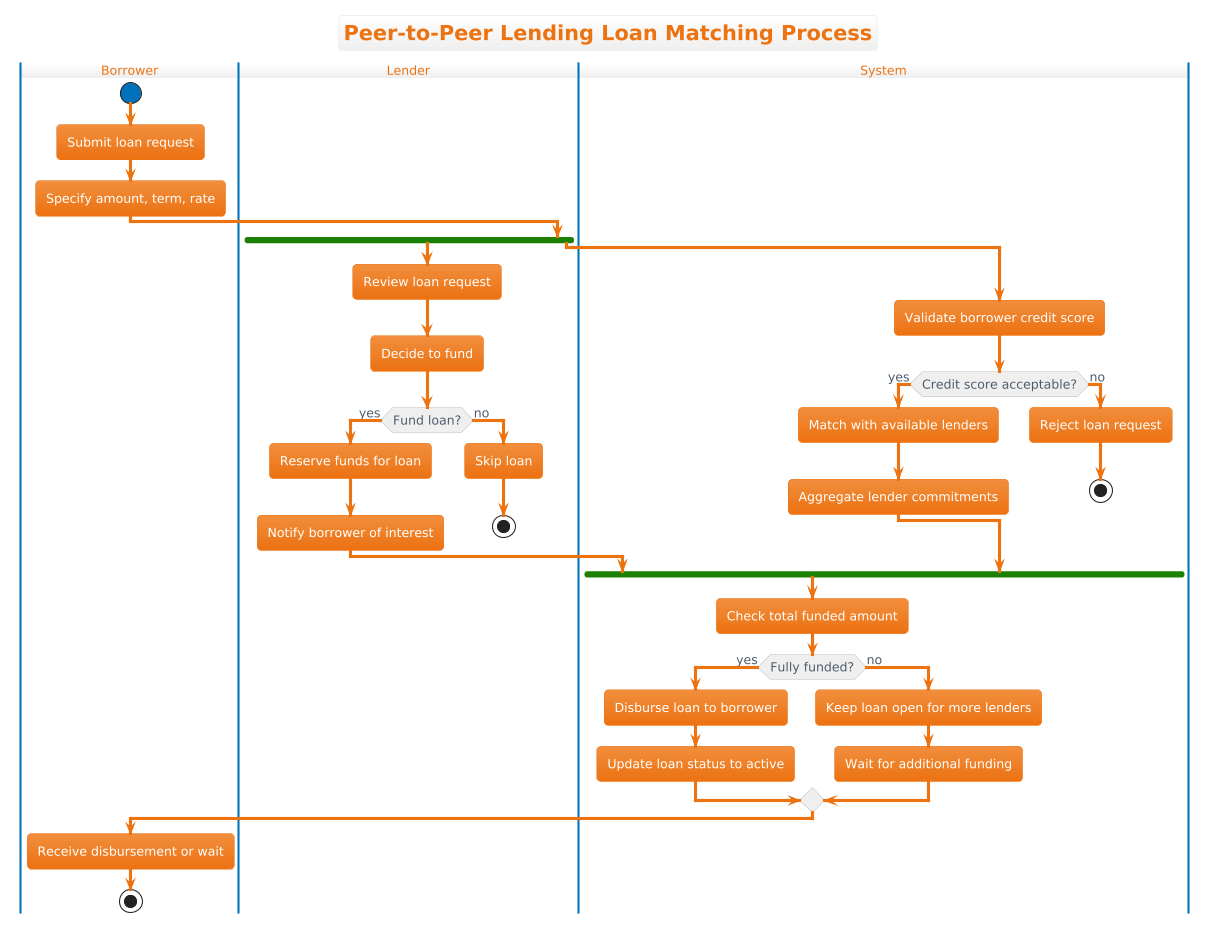
@startuml
!theme aws-orange
title Peer-to-Peer Lending Loan Matching Process

|Borrower|
start
:Submit loan request;
:Specify amount, term, rate;

|Lender|
fork
:Review loan request;
:Decide to fund;
if (Fund loan?) then (yes)
  :Reserve funds for loan;
  :Notify borrower of interest;
else (no)
  :Skip loan;
  stop
endif

|System|
fork again
:Validate borrower credit score;
if (Credit score acceptable?) then (yes)
  :Match with available lenders;
  :Aggregate lender commitments;
else (no)
  :Reject loan request;
  stop
endif

|System|
end fork
:Check total funded amount;

if (Fully funded?) then (yes)
  :Disburse loan to borrower;
  :Update loan status to active;
else (no)
  :Keep loan open for more lenders;
  :Wait for additional funding;
endif

|Borrower|
:Receive disbursement or wait;
stop
@endumlStep-by-Step Architectural Walkthrough
Building this diagram in VPasCode is an iterative process. We will break down the construction into four logical phases, moving from global configuration to specific logic implementation.
Phase 1: Canvas Configuration & Layout Directives
Every PlantUML diagram begins with setup directives that define the look and feel. We start by declaring the theme to match our financial branding requirements.
@startuml
!theme aws-orange
title Peer-to-Peer Lending Loan Matching Process
The @startuml tag marks the beginning of the source code. The !theme aws-orange directive applies a pre-defined color palette that is visually distinct and professional, suitable for fintech documentation. The title directive adds a clear header to the rendered diagram.
Phase 2: Declaring Core Entities, Actors, and Boundaries
To organize the workflow, we define swimlanes. Each lane represents a distinct actor responsible for specific actions. This separation is crucial for understanding system boundaries.
|Borrower|
start
:Submit loan request;
:Specify amount, term, rate;

|Lender|
fork
:Review loan request;
:Decide to fund;
Here, |Borrower| and |Lender| create the vertical lanes. The workflow begins in the Borrower lane with the start node (a filled circle). The actions are defined using colons, such as :Submit loan request;.
Phase 3: Mapping Data Flows & Key Interactions
This phase introduces the most complex logic: parallel processing and conditional branching. In P2P lending, the system validates credit while lenders review the request simultaneously.
fork
:Review loan request;
:Decide to fund;
if (Fund loan?) then (yes)
  :Reserve funds for loan;
else (no)
  :Skip loan;
  stop
endif

|System|
fork again
:Validate borrower credit score;
The fork keyword splits the flow into parallel paths. The if (Condition) syntax creates decision diamonds. Notice how the else path leads to a stop node, terminating that specific branch of the workflow.
Phase 4: Grouping, Annotations & Visual Polish
The final phase ensures all parallel threads converge correctly and the diagram ends cleanly. We use end fork to merge the parallel streams back into a single flow before the final funding check.
|System|
end fork
:Check total funded amount;

if (Fully funded?) then (yes)
  :Disburse loan to borrower;
  :Update loan status to active;
else (no)
  :Keep loan open for more lenders;
  :Wait for additional funding;
endif

|Borrower|
:Receive disbursement or wait;
stop
@enduml
The end fork directive ensures that the system waits for both the lender review and credit validation to complete before checking the total funding. The diagram concludes with a final stop node in the Borrower lane, representing the end of the interaction.
Syntax & Keyword Deep Dive
Understanding the specific PlantUML syntax is essential for mastering diagram-as-code. Here are the key keywords used in this P2P lending model:
fork: Initiates parallel flows. In this diagram, it allows the Lender and System to operate simultaneously without blocking each other.if (condition) then (yes) else (no) endif: Creates conditional logic branches. This is critical for decision points like “Credit score acceptable?” or “Fully funded?”.|Lane Name|: Defines swimlanes. This visual grouping assigns responsibility and keeps the diagram organized.start/stop: Marks the entry and exit points of the workflow. Every valid activity diagram must have exactly one start and one stop node.!theme: A directive to apply a specific visual style to the entire diagram instantly.
Best Practices & Pitfalls to Avoid
When modeling financial workflows, clarity is paramount. Follow these guidelines to ensure your PlantUML diagrams remain maintainable and readable:
- Limit Swimlane Depth: Do not create too many swimlanes. If you have more than 4-5 actors, consider grouping them into broader categories (e.g., “External Parties” vs. “Internal System”).
- Keep Logic Linear: Avoid deep nesting of
ifstatements. If a decision path becomes too complex, consider splitting the diagram into multiple sub-diagrams or using state machines. - Consistent Naming: Use clear, imperative verbs for actions (e.g., “Disburse loan” instead of “Disbursement”). This makes the diagram read like a process document.
- Validate Convergence: Always ensure that
forkblocks are properly closed withend fork. Unbalanced forks often lead to rendering errors or confusing visual paths.
Start Building Activity Diagrams Faster with VPasCode
Instantly prototype, preview, and customize your financial workflow diagrams online in VPasCode without installing any tools.