


In the modern entertainment and media landscape, Digital Asset Management (DAM) systems serve as the backbone for organizing, storing, and distributing vast libraries of digital content. From high-resolution video files to complex graphic design assets, the sheer volume of data requires a robust architectural model to ensure integrity, accessibility, and diagram-as-code modeling.

A well-designed Class Diagram is critical for software architects and developers working on DAM solutions. It provides a static view of the system, defining the core entities, their attributes, methods, and the relationships that bind them together. By modeling the domain early, teams can align on data structures, access control mechanisms, and lifecycle management before writing a single line of application code.
In this masterclass, we will construct a comprehensive PlantUML class diagram for a Digital Asset Management System using VPasCode. This free, web-based diagram-as-code tool allows you to prototype complex domain models instantly in your browser, without installing Java or configuring local environments. We will explore how to model inheritance, composition, aggregation, and associations to create a living blueprint of your system.
Understanding the Model: Purpose, Scope & Problem Framing
Diagram Abstraction & Representation
A Class Diagram is the structural blueprint of an object-oriented system. In the context of a DAM system, it answers fundamental questions: What are the core objects? How do they relate? What data does each object hold? Unlike sequence diagrams that focus on runtime behavior, class diagrams define the static architecture. They map out the “nouns” of your system (Users, Assets, Folders) and the “verbs” that connect them (Uploads, Assigns, Groups).
Target Domain Scope & Scenario
This model focuses on the core domain entities of a DAM system. It intentionally covers the lifecycle of an asset from creation to archiving, the hierarchical organization of files via folders and collections, and the security layer involving users, roles, and permissions. It excludes transient UI components or external API integrations, focusing strictly on the persistent domain model.
Key Takeaways & Educational Insights
- Relationship Semantics: Learn the difference between Composition (strong ownership, e.g., Asset contains Versions) and Aggregation (weak ownership, e.g., Collection groups Assets).
- Domain Modeling: Understand how to translate business requirements (e.g., “Assets need versioning”) into structural code.
- Visual Clarity: Use themes and notes to make complex diagrams readable for stakeholders.
Complete Diagram & Full Source Code
Before diving into the construction phases, review the complete, finalized architecture below. This diagram encapsulates the core entities, their attributes, methods, and the intricate web of relationships that define a robust DAM system.
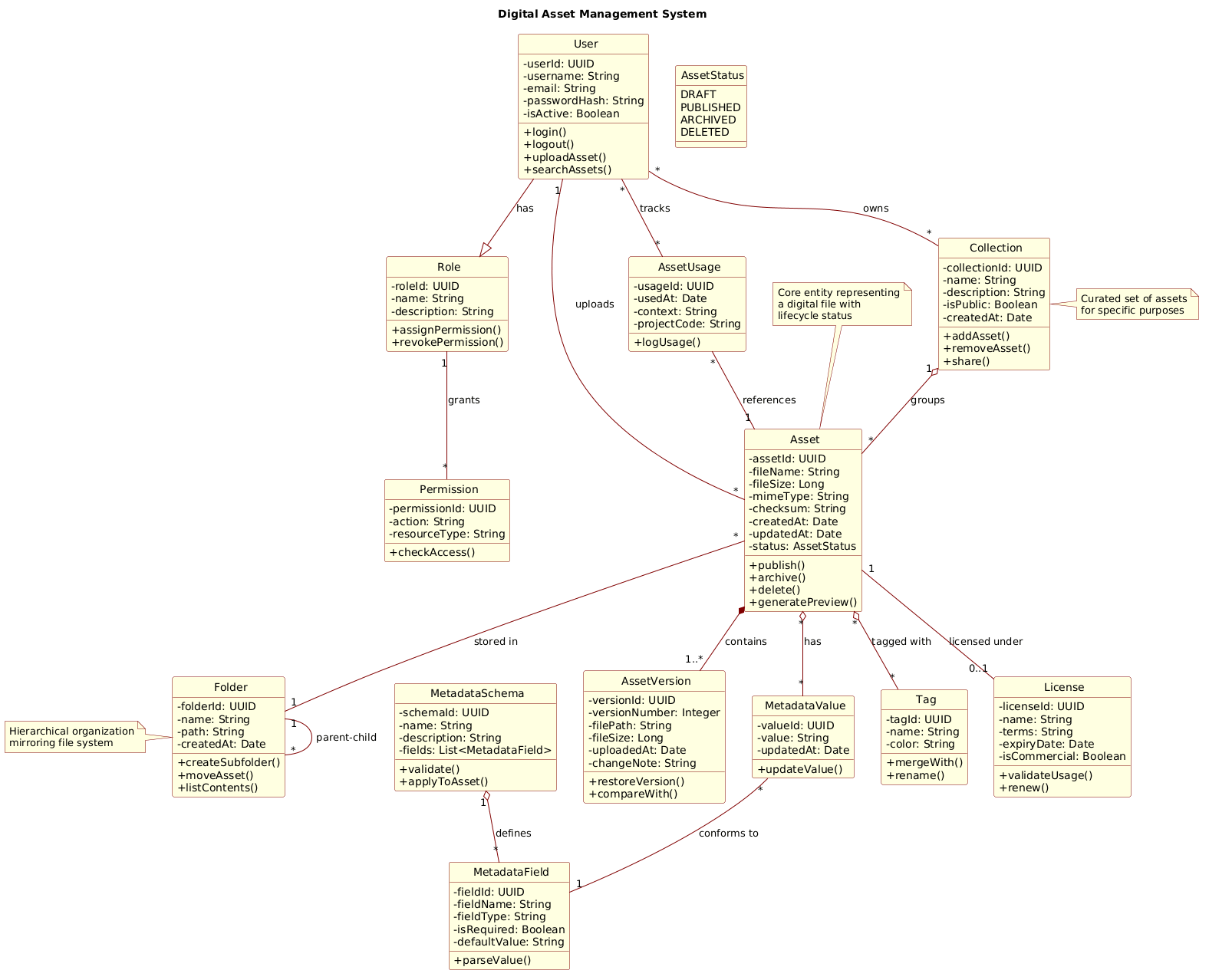
Copy the complete source code below to explore the full implementation. You can paste this directly into the VPasCode Editor to render it instantly.
@startuml
!include https://static.visual-paradigm.com/web/resources/plantuml-stdlib/themes/rose.puml

title Digital Asset Management System

/'
This diagram models the core domain entities and relationships in a Digital Asset Management (DAM) system.
The system organizes digital files (assets) into collections, supports versioning, metadata, and tagging,
and manages user access with roles and permissions. Key concepts include assets, folders, collections,
users, roles, metadata schemas, tags, and usage licenses. The diagram shows how assets are composed
of versions, how folders hierarchically organize assets, how collections group assets for curation,
and how users interact with assets through access control and workflow actions.
'/

class User {
  - userId: UUID
  - username: String
  - email: String
  - passwordHash: String
  - isActive: Boolean
  + login()
  + logout()
  + uploadAsset()
  + searchAssets()
}

class Role {
  - roleId: UUID
  - name: String
  - description: String
  + assignPermission()
  + revokePermission()
}

class Permission {
  - permissionId: UUID
  - action: String
  - resourceType: String
  + checkAccess()
}

class Asset {
  - assetId: UUID
  - fileName: String
  - fileSize: Long
  - mimeType: String
  - checksum: String
  - createdAt: Date
  - updatedAt: Date
  - status: AssetStatus
  + publish()
  + archive()
  + delete()
  + generatePreview()
}

enum AssetStatus {
  DRAFT
  PUBLISHED
  ARCHIVED
  DELETED
}

class AssetVersion {
  - versionId: UUID
  - versionNumber: Integer
  - filePath: String
  - fileSize: Long
  - uploadedAt: Date
  - changeNote: String
  + restoreVersion()
  + compareWith()
}

class Folder {
  - folderId: UUID
  - name: String
  - path: String
  - createdAt: Date
  + createSubfolder()
  + moveAsset()
  + listContents()
}

class Collection {
  - collectionId: UUID
  - name: String
  - description: String
  - isPublic: Boolean
  - createdAt: Date
  + addAsset()
  + removeAsset()
  + share()
}

class MetadataSchema {
  - schemaId: UUID
  - name: String
  - description: String
  - fields: List<MetadataField>
  + validate()
  + applyToAsset()
}

class MetadataField {
  - fieldId: UUID
  - fieldName: String
  - fieldType: String
  - isRequired: Boolean
  - defaultValue: String
  + parseValue()
}

class MetadataValue {
  - valueId: UUID
  - value: String
  - updatedAt: Date
  + updateValue()
}

class Tag {
  - tagId: UUID
  - name: String
  - color: String
  + mergeWith()
  + rename()
}

class License {
  - licenseId: UUID
  - name: String
  - terms: String
  - expiryDate: Date
  - isCommercial: Boolean
  + validateUsage()
  + renew()
}

class AssetUsage {
  - usageId: UUID
  - usedAt: Date
  - context: String
  - projectCode: String
  + logUsage()
}

' Generalization (inheritance)
User --|> Role : has
Role "1" -- "*" Permission : grants

' Composition (strong lifecycle)
Asset *-- "1..*" AssetVersion : contains
Asset "*" -- "1" Folder : stored in
Folder "1" -- "*" Folder : parent-child

' Aggregation (weak lifecycle)
Collection "1" o-- "*" Asset : groups
Asset "*" o-- "*" Tag : tagged with
Asset "*" o-- "*" MetadataValue : has
MetadataSchema "1" o-- "*" MetadataField : defines
MetadataValue "*" -- "1" MetadataField : conforms to

' Association (usage)
User "1" -- "*" Asset : uploads
User "*" -- "*" Collection : owns
User "*" -- "*" AssetUsage : tracks
Asset "1" -- "0..1" License : licensed under
AssetUsage "*" -- "1" Asset : references

' Additional notes
note top of Asset : Core entity representing\na digital file with\nlifecycle status
note right of Collection : Curated set of assets\nfor specific purposes
note left of Folder : Hierarchical organization\nmirroring file system
@endumlStep-by-Step Architectural Walkthrough
Now, let’s deconstruct how this diagram was built. We will walk through the process in four distinct phases, from setting up the canvas to defining complex relationships.
Phase 1: Canvas Configuration & Layout Directives
Every professional diagram starts with configuration. We begin by including the rose.puml theme to give the diagram a polished, consistent look. This theme handles colors, fonts, and box styling automatically.
!include https://static.visual-paradigm.com/web/resources/plantuml-stdlib/themes/rose.pumlNext, we define the diagram title and add a comment block. In PlantUML, comments start with a single quote '. We use a block comment /' ... '/ to describe the diagram’s context, which is helpful for future maintainers.
title Digital Asset Management System

/'
This diagram models the core domain entities...
'/
Phase 2: Declaring Core Entities, Actors, and Boundaries
The foundation of a class diagram is the class definition. We define the core entities first, starting with User, Asset, and Folder. Each class box is defined using the class keyword, followed by the name, a block, and then the attributes and methods.
class Asset {
  - assetId: UUID
  - fileName: String
  - fileSize: Long
  + publish()
  + archive()
}
Note the access modifiers: - for private attributes and + for public methods. This distinction is crucial for understanding encapsulation in your architecture.
Phase 3: Mapping Data Flows & Key Interactions
Once entities are defined, we connect them using relationship arrows. PlantUML supports several types of lines, each with a specific semantic meaning:
- Composition (
*--): Represents strong ownership. If the parent dies, the child dies. We use this forAssetcontainingAssetVersion. - Aggregation (
o--): Represents weak ownership. The child can exist independently. We use this forCollectiongroupingAssets. - Association (
--): A generic link between two objects, often representing usage or interaction.
Asset *-- "1..*" AssetVersion : contains
Collection "1" o-- "*" Asset : groups
Phase 4: Grouping, Annotations & Visual Polish
To make the diagram readable, we add notes and use the enum keyword for status values. Annotations provide context without cluttering the code with logic.
note top of Asset : Core entity representing
a digital file with
lifecycle status
Syntax & Keyword Deep Dive
Understanding the specific PlantUML syntax is key to mastering diagram-as-code. Here are the critical keywords used in this Digital Asset Management model:
class: Defines a standard class with attributes and methods. Syntax:class ClassName { - attr; + method() }.enum: Defines an enumeration for fixed sets of values, such asAssetStatus(DRAFT, PUBLISHED).--|>: Represents Generalization (Inheritance). Used here to show aUserhaving aRole.*--: Represents Composition. The filled diamond indicates strong lifecycle dependency.o--: Represents Aggregation. The hollow diamond indicates weak lifecycle dependency."1..*": Multiplicity notation. Defines cardinality, such as “One to Many” relationships betweenAssetandAssetVersion.note: Adds text boxes to the diagram to explain specific classes or relationships.
Best Practices & Pitfalls to Avoid
When building class diagrams for complex systems like DAMs, follow these guidelines to maintain clarity:
- Keep Diagrams Modular: If a diagram becomes too crowded, consider splitting it into multiple diagrams (e.g., one for Security, one for Core Assets). However, for this scope, keeping it unified helps visualize the full domain.
- Use Clear Naming Conventions: Class names should be singular nouns (e.g.,
Asset, notAssets). Attribute names should follow camelCase or snake_case consistently. - Respect Relationship Semantics: Do not confuse Aggregation with Composition. If an
AssetVersioncannot exist without its parentAsset, use Composition (*--). If aTagcan exist independently of anAsset, use Aggregation (o--). - Leverage Themes: Always include a theme (like
rose.puml) to ensure your diagrams look professional and consistent across different documentation pages.
Try It Yourself with VPasCode
Start Building PlantUML Class Diagrams Faster with VPasCode
Instantly prototype, preview, and customize your Digital Asset Management architecture online in VPasCode without installing any tools.