


In the high-stakes environment of modern finance, the Automated Clearing House (ACH) network serves as the backbone for electronic money transfers between financial institutions. For software architects and financial engineers, accurately modeling these complex workflows is not merely a documentation exercise; it is a critical requirement for compliance, risk management, and system reliability. The batch settlement process involves intricate validation, parallel calculation of debit and credit positions, and strict liquidity checks before funds are moved.
Traditional drag-and-drop diagramming tools often struggle to maintain consistency when modeling these multi-step, conditional financial flows. Diagram-as-code approaches, specifically using PlantUML within the VPasCode editor, offer a superior alternative. By defining the workflow in text, architects ensure that every conditional branch, parallel fork, and swimlane responsibility is explicitly defined and versioned in the source. This approach enhances architectural clarity, reduces visual ambiguity, and allows for rapid prototyping of complex financial logic directly in the browser.
This masterclass demonstrates how to build a professional activity diagram for an ACH Batch Settlement process. We will leverage VPasCode‘s instant rendering capabilities to visualize swimlanes, decision points, and parallel processing flows without requiring any local Java installations or complex environment setup.
Understanding the Model: Purpose, Scope & Problem Framing
Diagram Abstraction & Representation
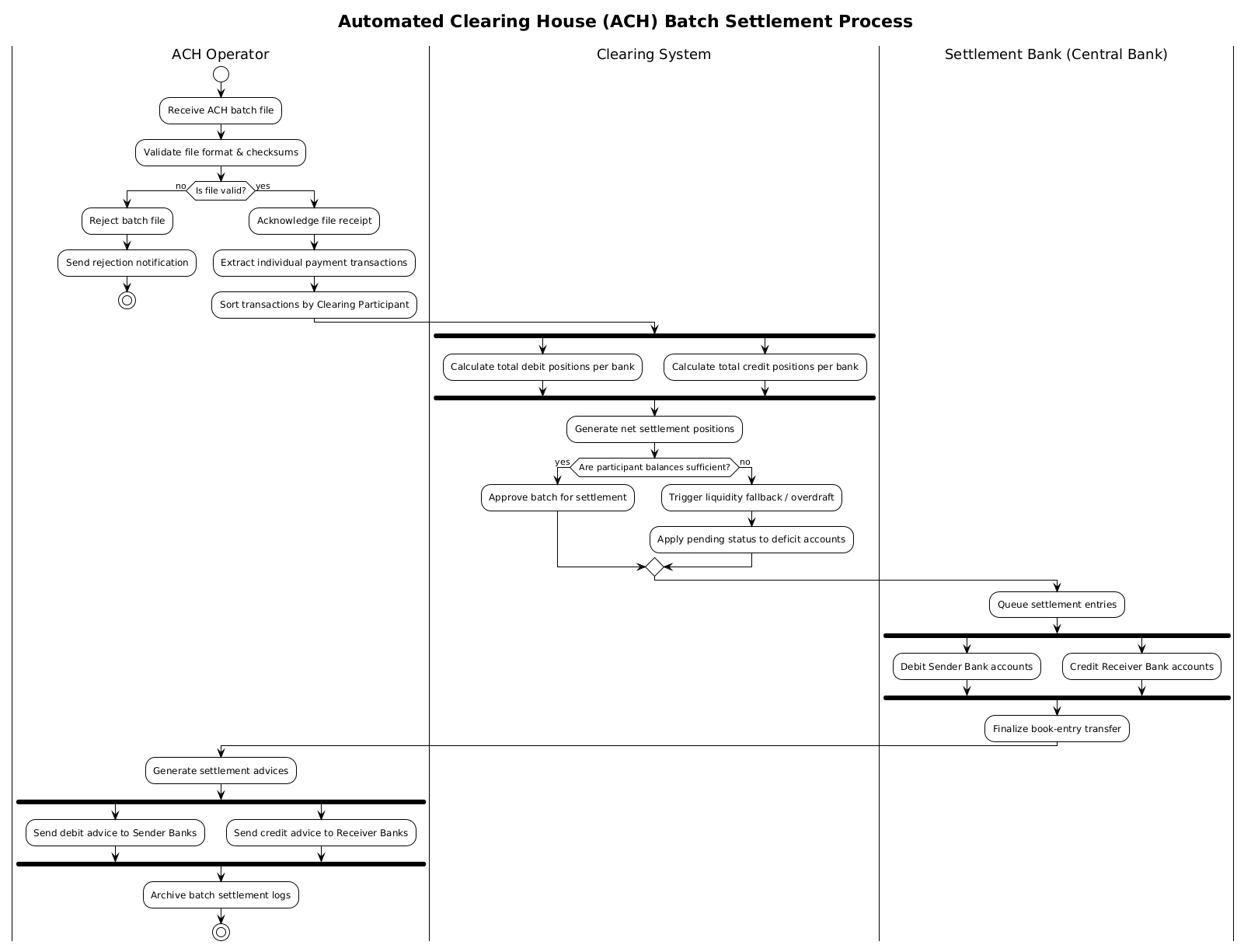
An Activity Diagram in PlantUML is the ideal notation for modeling the dynamic behavior of a system, particularly when the focus is on the flow of control and data rather than static structure. In the context of finance, this diagram represents the lifecycle of a transaction batch from ingestion to final settlement. It abstracts away the underlying database queries or API calls, focusing instead on the logical sequence of operations.
Key modeling abstractions include:
- Swimlanes: These partition the diagram by organizational responsibility. For example, separating the ACH Operator from the Settlement Bank clarifies who is accountable for each step (validation vs. fund transfer).
- Forking & Joining: Financial systems often need to perform calculations in parallel to optimize throughput. PlantUML allows us to model simultaneous debit and credit calculations efficiently.
- Conditional Logic: The diagram must explicitly handle failure paths, such as rejected files or insufficient liquidity, ensuring the system state is correctly managed.
Target Domain Scope & Scenario
This model focuses strictly on the Batch Settlement phase. It does not cover the initial submission of files by member banks or the final reconciliation of accounts. The boundaries are set as follows:
- Input: A validated ACH batch file received by the operator.
- Process: Validation, extraction, sorting, position calculation, liquidity checks, and fund movement.
- Output: Settlement advices sent to participating banks and archival logs.
By narrowing the scope, we ensure the diagram remains readable and serves its primary purpose: communicating the settlement logic to stakeholders.
Key Takeaways & Educational Insights
By completing this tutorial, you will gain the ability to:
- Model complex financial workflows using swimlanes to denote responsibility.
- Implement parallel processing logic using
forkandend forkblocks. - Handle conditional branching for validation and liquidity checks.
- Utilize VPasCode to instantly visualize and refine your financial architecture diagrams.
Complete Diagram & Full Source Code
Below is the finished blueprint for the ACH Batch Settlement process. This diagram encapsulates the entire workflow from file receipt to final archival, utilizing the !theme plain directive for a clean, professional appearance.
@startuml
!theme plain

title Automated Clearing House (ACH) Batch Settlement Process

| ACH Operator |
start
:Receive ACH batch file;
:Validate file format & checksums;

if (Is file valid?) then (no)
  :Reject batch file;
  :Send rejection notification;
  stop
else (yes)
  :Acknowledge file receipt;
  :Extract individual payment transactions;
  :Sort transactions by Clearing Participant;
endif

| Clearing System |
fork
  :Calculate total debit positions per bank;
fork again
  :Calculate total credit positions per bank;
end fork

:Generate net settlement positions;

if (Are participant balances sufficient?) then (yes)
  :Approve batch for settlement;
else (no)
  :Trigger liquidity fallback / overdraft;
  :Apply pending status to deficit accounts;
endif

| Settlement Bank (Central Bank) |
:Queue settlement entries;
fork
  :Debit Sender Bank accounts;
fork again
  :Credit Receiver Bank accounts;
end fork

:Finalize book-entry transfer;

| ACH Operator |
:Generate settlement advices;
fork
  :Send debit advice to Sender Banks;
fork again
  :Send credit advice to Receiver Banks;
end fork

:Archive batch settlement logs;
stop
@endumlStep-by-Step Architectural Walkthrough
Building this diagram in VPasCode is a structured process. We will break the construction down into four logical phases to ensure clarity and maintainability.
Phase 1: Canvas Configuration & Layout Directives
Before defining any logic, we must set the stage. We begin by initializing the diagram with the @startuml directive. To ensure a clean, professional look suitable for financial documentation, we apply the !theme plain directive. This removes heavy styling and focuses on the structural information.
Next, we define the diagram title using the title keyword. This provides immediate context for anyone viewing the rendered diagram.
@startuml
!theme plain

title Automated Clearing House (ACH) Batch Settlement Process
Phase 2: Declaring Core Entities, Actors, and Boundaries
The core of the activity diagram lies in its swimlanes. Swimlanes visually separate responsibilities. We start with the ACH Operator lane, which handles the initial ingestion and validation.
We use the pipe syntax | Lane Name | to declare a new lane. Inside this lane, we define the start node start and the initial actions using the colon syntax :Action Name;.
| ACH Operator |
start
:Receive ACH batch file;
:Validate file format & checksums;
We continue by declaring the Clearing System and Settlement Bank lanes as the workflow progresses. This ensures the reader understands which entity performs each step.
Phase 3: Mapping Data Flows & Key Interactions
Once the lanes are established, we map the logic flow. The most complex part of the ACH process is the parallel calculation of positions. We use the fork keyword to split the flow into two simultaneous paths.
In the Clearing System lane, we need to calculate both debits and credits simultaneously. We use fork for the first path and fork again for the second, then join them with end fork.
| Clearing System |
fork
  :Calculate total debit positions per bank;
fork again
  :Calculate total credit positions per bank;
end fork

:Generate net settlement positions;
Similarly, we implement conditional logic using if (condition) then (path) else (path) blocks to handle validation failures or liquidity shortfalls.
Phase 4: Grouping, Annotations & Visual Polish
The final phase involves closing the workflow. We ensure that the Settlement Bank lane completes the fund transfer and returns control to the ACH Operator for final notifications. The process concludes with the stop node after archiving logs.
We also ensure the final fork for sending advices is properly closed with end fork to prevent rendering errors. This completes the architectural loop.
Syntax & Keyword Deep Dive
To master PlantUML activity diagrams, you must understand the specific syntax keywords used in this financial model.
start/stop: These define the entry and exit points of the workflow. Every valid activity diagram must have a single start and at least one stop.| Lane Name |: This creates a swimlane. It scopes all subsequent actions until a new lane is declared. This is critical for separating system responsibilities.if (Condition) then (Path) else (Path): This implements decision logic. Theifblock splits the flow based on a boolean condition, such as file validation or balance sufficiency.fork/fork again/end fork: These keywords enable parallel processing.forkstarts a new branch,fork againadds another concurrent branch, andend forkjoins them back to the main flow.:Action;: This defines a specific activity or process step. The colon prefix is required for actions in PlantUML.!theme plain: This directive applies a minimalistic theme, removing default borders and colors to focus on the logic.
Best Practices & Pitfalls to Avoid
When creating financial workflow diagrams, adherence to best practices ensures long-term maintainability and clarity.
- Maintain Swimlane Consistency: Ensure that actions within a lane logically belong to that entity. For instance, the Settlement Bank should not be responsible for validating file checksums; that is the ACH Operator‘s role.
- Limit Fork Complexity: While parallel flows are powerful, avoid nesting too many
forkblocks. If a workflow becomes too complex to follow visually, consider breaking it into multiple sub-activity diagrams. - Use Descriptive Labels: In finance, ambiguity is costly. Instead of
:Process Payment, use:Calculate total debit positions per bank. Precise naming reduces the need for external documentation. - Validate Logic Paths: Always ensure that every
ifstatement has both athenandelsepath defined, and that everyforkhas a correspondingend fork. VPasCode will highlight syntax errors in real-time, allowing you to fix them instantly.
Start Building ACH Activity Diagrams Faster with VPasCode
Instantly visualize and customize your financial workflow diagrams in the browser with zero local installation required.