


In the fast-paced world of digital entertainment, the user experience of purchasing tickets is the critical friction point between a fan and a live event. For software architects and backend engineers designing a Ticketing Platform, clarity regarding the transactional flow is paramount. A single point of failure in seat allocation or payment processing can lead to significant revenue loss and customer dissatisfaction.

Visual modeling provides the necessary architectural blueprint to validate these complex workflows before a single line of production code is written. By utilizing PlantUML activity diagrams within VPasCode, teams can rapidly prototype, validate, and document the logic governing seat selection, availability checks, and payment verification. This approach transforms abstract requirements into a concrete, visual standard that bridges the gap between business stakeholders and technical implementation.
VPasCode offers an instant, browser-based environment for this modeling. Unlike traditional desktop tools, it allows you to write code and see the rendered diagram in real-time without installing Java or Graphviz binaries. This tutorial serves as a masterclass in constructing a professional-grade activity diagram that handles concurrency, conditional branching, and multi-party interactions.
Understanding the Model: Purpose, Scope & Problem Framing
Before diving into the syntax, it is essential to understand the architectural abstraction we are building. An activity diagram is not merely a flowchart; it is a behavioral model that describes the flow of control from one activity to another.
Diagram Abstraction & Representation
In this specific model, we are representing a Transactional Workflow. The diagram maps the lifecycle of a single purchase transaction. We use swimlanes to partition responsibilities between the Customer (the external actor) and the System (the backend logic). This separation is crucial for identifying where the system must enforce constraints (like seat locking) versus where user input is required.
Target Domain Scope & Scenario
The scope of this diagram covers the end-to-end process from event selection to confirmation. It intentionally excludes user authentication or account creation to focus purely on the transactional core. The diagram addresses two critical technical challenges:
- Concurrency: Multiple users might attempt to buy the same seat simultaneously. We model this using a
forknode to simulate parallel processes (timer and database reservation). - Conditional Logic: The flow must handle success paths (payment success) and failure paths (sold out, payment declined) gracefully.
Key Takeaways & Educational Insights
By constructing this model, you will gain insights into managing state transitions in a high-concurrency environment. You will learn how to visually represent the “Hold” state, ensuring that seats are reserved temporarily while payment is processed, and how to visualize the rollback mechanism if that payment fails.
Complete Diagram & Full Source Code
Below is the finalized blueprint for the Concert Ticket Purchase Activity Diagram. This model utilizes the rose theme for professional styling and strictly follows PlantUML syntax standards.
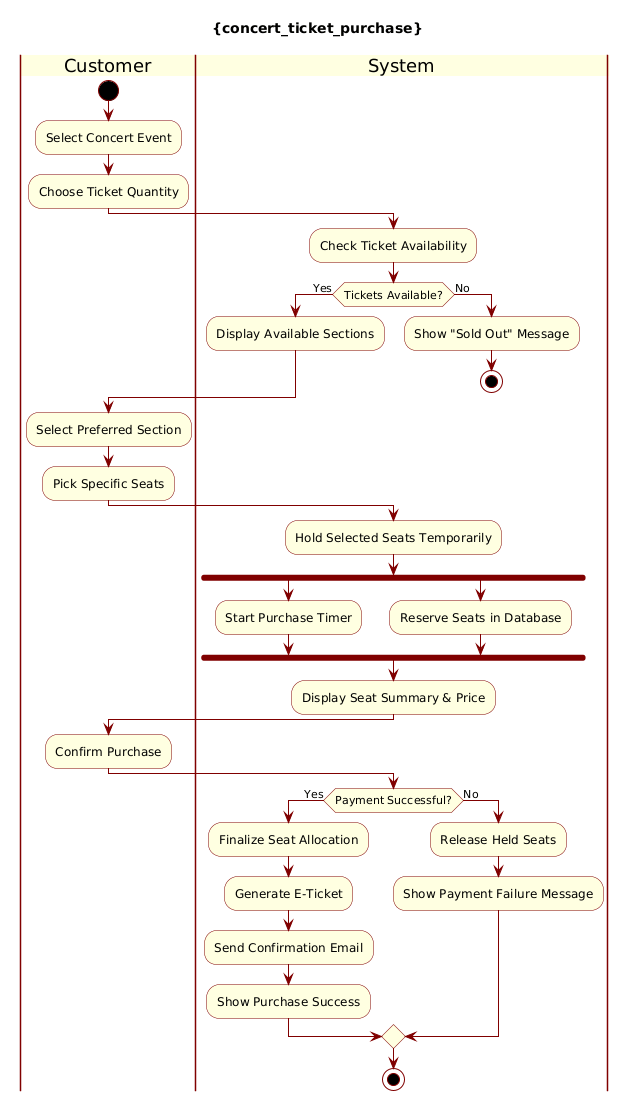
Copy the complete source code below to test it immediately in the VPasCode editor.
@startuml
!include https://static.visual-paradigm.com/web/resources/plantuml-stdlib/themes/rose.puml

title {concert_ticket_purchase}

|Customer|
start
:Select Concert Event;
:Choose Ticket Quantity;

|System|
:Check Ticket Availability;

if (Tickets Available?) then (Yes)
  :Display Available Sections;
else (No)
  :Show "Sold Out" Message;
  stop
endif

|Customer|
:Select Preferred Section;
:Pick Specific Seats;

|System|
:Hold Selected Seats Temporarily;

fork
  :Start Purchase Timer;
fork again
  :Reserve Seats in Database;
end fork

:Display Seat Summary & Price;

|Customer|
:Confirm Purchase;

|System|
if (Payment Successful?) then (Yes)
  :Finalize Seat Allocation;
  :Generate E-Ticket;
  :Send Confirmation Email;
  :Show Purchase Success;
else (No)
  :Release Held Seats;
  :Show Payment Failure Message;
endif

stop
@endumlStep-by-Step Architectural Walkthrough
We will now deconstruct the diagram construction into four logical phases. This methodical approach ensures that your diagrams remain maintainable and scalable as your system grows.
Phase 1: Canvas Configuration & Layout Directives
Every professional PlantUML diagram begins with configuration. We need to set the visual theme and the title. This ensures consistency across your documentation.
First, we include the rose theme library. This provides a modern, clean aesthetic without manual CSS tweaking.
!include https://static.visual-paradigm.com/web/resources/plantuml-stdlib/themes/rose.pumlNext, we define the diagram title. While optional, titles are critical for accessibility and clarity when sharing diagrams.
title {concert_ticket_purchase}Phase 2: Declaring Core Entities, Actors, and Boundaries
Here we establish the swimlanes. Swimlanes are the most powerful feature for activity diagrams involving multiple actors. They visually separate the responsibility of actions.
We declare the |Customer| lane first, representing the external user interface interactions.
|Customer|
start
:Select Concert Event;
:Choose Ticket Quantity;
Then we switch to the |System| lane to handle backend logic. Notice how the flow moves vertically from one lane to the other.
|System|
:Check Ticket Availability;
Phase 3: Mapping Data Flows & Key Interactions
This phase covers the decision logic and parallel processing. The most complex part of this architecture is the seat holding mechanism.
We implement an if statement to check availability. If the condition is false (No), we must stop the process immediately to prevent invalid states.
if (Tickets Available?) then (Yes)
  :Display Available Sections;
else (No)
  :Show "Sold Out" Message;
  stop
endif
For the reservation logic, we use a fork node. This indicates that two actions happen simultaneously: starting a timer to release the hold and reserving the seat in the database.
fork
  :Start Purchase Timer;
fork again
  :Reserve Seats in Database;
end fork
Phase 4: Grouping, Annotations & Visual Polish
The final phase handles the payment confirmation and termination. We use another if statement to handle payment success or failure. Crucially, the failure path includes a Release Held Seats action, which is vital for inventory management.
if (Payment Successful?) then (Yes)
  :Finalize Seat Allocation;
  :Generate E-Ticket;
  :Send Confirmation Email;
  :Show Purchase Success;
else (No)
  :Release Held Seats;
  :Show Payment Failure Message;
endif

stop
Syntax & Keyword Deep Dive
To master PlantUML activity diagrams, you must understand the specific keywords used in this model. Here is a breakdown of the critical syntax elements:
|LaneName|: Defines a swimlane. It changes the scope of subsequent actions until a new lane is declared. Essential for separating user actions from system logic.start/stop: Marks the entry and exit points of the workflow. Every valid activity diagram must have exactly one start and one or more stop points.if (Condition) then (Label) ... else (Label) ... endif: Implements conditional branching. The labels (Yes/No) appear on the arrows connecting to the decision diamond.fork/fork again/end fork: Creates parallel threads of execution. This is used to model concurrent operations like timers and database writes.title {Name}: Sets the header text for the diagram. The curly braces allow for specific formatting.
Best Practices & Pitfalls to Avoid
When building activity diagrams for complex systems like ticketing platforms, follow these architectural best practices to ensure your documentation remains useful over time.
- Maintain Swimlane Clarity: Do not overcrowd a single lane. If the System lane becomes too dense, consider splitting it into Backend and Database sub-lanes to better visualize data flow.
- Use Descriptive Labels: Avoid generic labels like “Process Data.” Instead, use specific actions like “Validate Payment Token.” This makes the diagram self-documenting.
- Handle Error Paths Explicitly: Never ignore the
elsebranch. In ticketing, failure paths (like payment rejection) are just as important as success paths for system reliability. - Limit Parallelism: Use
forknodes sparingly. Too many parallel threads can make the diagram difficult to read. Only use them where true concurrency is required.
Try It Yourself with VPasCode
Ready to visualize your own workflows? VPasCode allows you to write PlantUML code and see the diagram render instantly in your browser.
Start Building PlantUML Activity Diagrams Faster with VPasCode
Test, preview, and customize your workflow diagrams instantly in the browser with zero installation required.