


In the rapidly evolving landscape of fintech, ensuring that financial transactions are not only secure but also logically sound is paramount. A Mobile Banking App must handle complex workflows involving user input, system validation, and parallel backend processing. Without a clear visual model, developers risk overlooking edge cases like insufficient funds, failed transfers, or race conditions during parallel account updates.

Visual modeling using PlantUML within VPasCode allows architects to define these workflows precisely before a single line of application code is written. This approach enhances architectural clarity, facilitates rapid visual prototyping, and serves as living technical documentation that keeps development teams aligned on the business logic.
Understanding the Model: Purpose, Scope & Problem Framing
Diagram Abstraction & Representation
An Activity Diagram in PlantUML is the ideal tool for modeling the dynamic behavior of the fund transfer process. Unlike static class diagrams, activity diagrams capture the flow of control and data over time. They are particularly effective for visualizing:
- Sequential Logic: The step-by-step progression from opening the app to finalizing the transaction.
- Decision Points: Conditional branches such as
Same Bankvs.Other BankorBalance Sufficient?. - Parallel Processing: Using
forkandjoinstructures to model concurrent tasks like logging and notification sending.
Target Domain Scope & Scenario
This model focuses specifically on the Fund Transfer use case within a mobile banking ecosystem. The scope includes:
- Customer Actions: Inputting details, selecting transfer types, and confirming transactions.
- System Processing: Validation of accounts, balance checks, and execution of the actual transfer.
- Error Handling: Managing scenarios where funds are insufficient or the transfer fails.
Dependencies are managed through swimlanes, clearly separating responsibilities between the Customer and the System.
Key Takeaways & Educational Insights
By constructing this model, you will gain:
- Clarity on how to separate user interface logic from backend system logic using swimlanes.
- Understanding of how to model complex conditional flows (if/else) and parallel execution paths.
- Best practices for error handling, including rollback mechanisms for failed transactions.
Complete Diagram & Full Source Code
Below is the complete blueprint for the Mobile Banking App – Fund Transfer Process. You can copy this code directly into the VPasCode editor to see the live rendering.
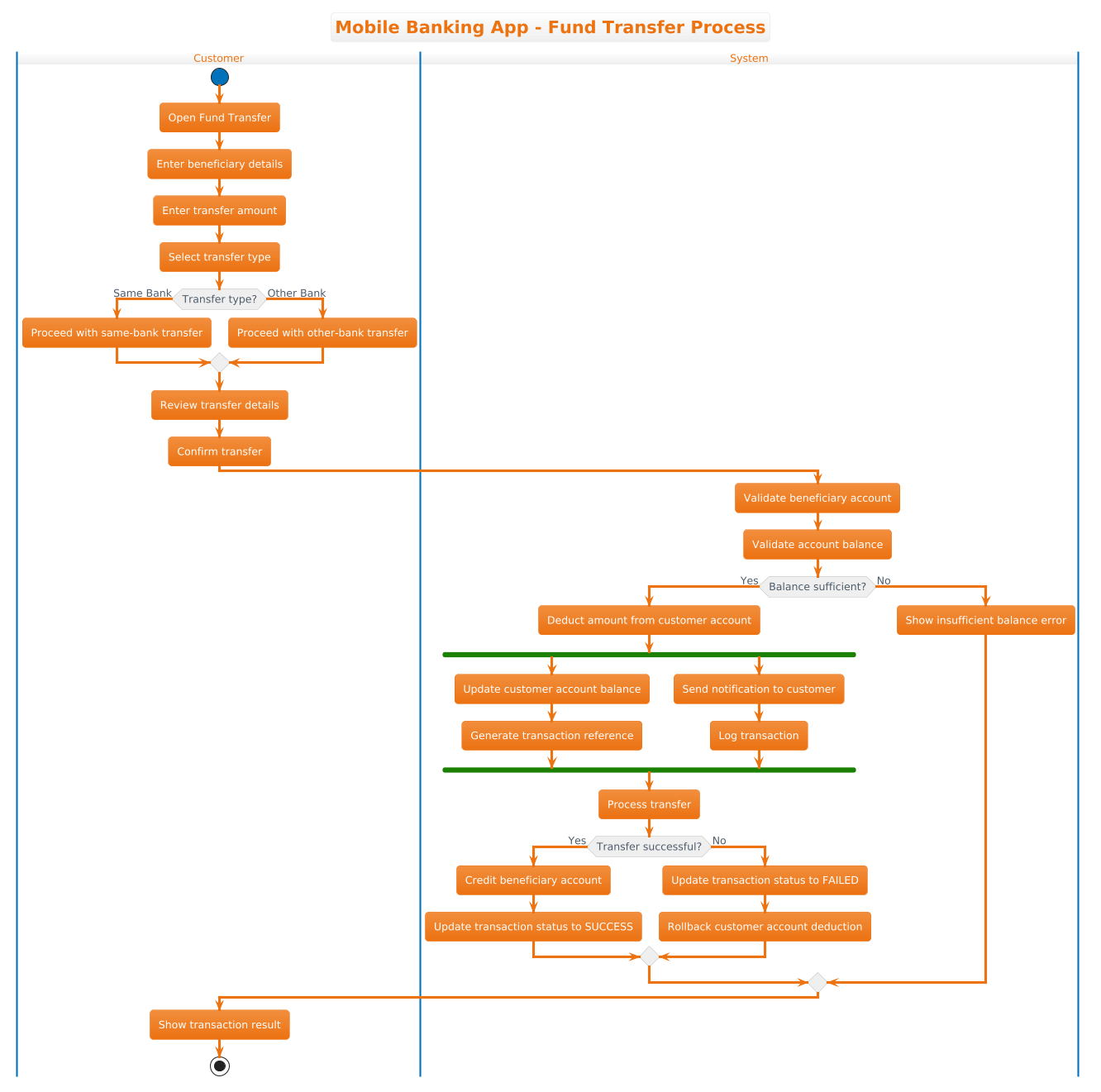
@startuml
!theme aws-orange

title Mobile Banking App - Fund Transfer Process

|Customer|
start
:Open Fund Transfer;
:Enter beneficiary details;
:Enter transfer amount;
:Select transfer type;

if (Transfer type?) then (Same Bank)
  :Proceed with same-bank transfer;
else (Other Bank)
  :Proceed with other-bank transfer;
endif

:Review transfer details;
:Confirm transfer;

|System|
:Validate beneficiary account;
:Validate account balance;

if (Balance sufficient?) then (Yes)
  :Deduct amount from customer account;
  fork
    :Update customer account balance;
    :Generate transaction reference;
  fork again
    :Send notification to customer;
    :Log transaction;
  end fork
  :Process transfer;

  if (Transfer successful?) then (Yes)
    :Credit beneficiary account;
    :Update transaction status to SUCCESS;
  else (No)
    :Update transaction status to FAILED;
    :Rollback customer account deduction;
  endif

else (No)
  :Show insufficient balance error;
endif

|Customer|
:Show transaction result;
stop
@endumlStep-by-Step Architectural Walkthrough
Building a professional activity diagram requires a structured approach. We will walk through the construction of this diagram in four distinct phases.
Phase 1: Canvas Configuration & Layout Directives
Every PlantUML diagram begins with setup directives that define the visual theme and the diagram’s identity. This phase ensures consistency and branding.
We start by specifying the theme. The !theme aws-orange directive applies a warm, professional color palette suitable for financial applications.
!theme aws-orange

title Mobile Banking App - Fund Transfer Process
The title directive provides a clear heading for the diagram, which is essential for documentation and sharing.
Phase 2: Declaring Core Entities, Actors, and Boundaries
To manage complexity, we use swimlanes. Swimlanes partition the diagram into logical areas, assigning specific responsibilities to different actors. In this scenario, we have two primary actors: the Customer and the System.
|Customer|
start
:Open Fund Transfer;
:Enter beneficiary details;
:Enter transfer amount;
:Select transfer type;
Notice how the |Customer| lane contains all user-initiated actions. The start node marks the entry point of the workflow. We then define the initial steps: opening the feature, entering details, and selecting the transfer type.
Phase 3: Mapping Data Flows & Key Interactions
This phase covers the core logic, including conditional branching and system validation. We move the focus to the |System| lane to handle backend operations.
|System|
:Validate beneficiary account;
:Validate account balance;

if (Balance sufficient?) then (Yes)
  :Deduct amount from customer account;
  fork
    :Update customer account balance;
    :Generate transaction reference;
  fork again
    :Send notification to customer;
    :Log transaction;
  end fork
Here, we implement a critical decision point using the if keyword. If the balance is insufficient, the flow branches to an error message. If sufficient, we use fork and fork again to model parallel processing. This allows the system to update the balance and generate a reference simultaneously with sending notifications and logging the transaction.
Phase 4: Grouping, Annotations & Visual Polish
The final phase ensures the workflow completes correctly, handling both success and failure scenarios, and returning control to the user.
if (Transfer successful?) then (Yes)
  :Credit beneficiary account;
  :Update transaction status to SUCCESS;
else (No)
  :Update transaction status to FAILED;
  :Rollback customer account deduction;
endif

|Customer|
:Show transaction result;
stop
We add a second decision point to handle the final status of the transfer. Crucially, we include a rollback mechanism in the else branch to ensure data integrity if the transfer fails after deduction. Finally, we return to the Customer lane to display the result and end the process with the stop node.
Syntax & Keyword Deep Dive
To master PlantUML activity diagrams, it is essential to understand the specific syntax features used in this model:
|LaneName|: Defines a swimlane. All nodes following this directive belong to that actor until a new lane is declared. This is critical for separating UI logic from backend logic.start/stop: Mark the beginning and end of the activity flow. Every valid activity diagram must have exactly one start and one stop node.if (...) then (...) else (...) endif: Creates conditional branching. The syntax allows you to label thethenandelsepaths explicitly for better readability.fork/fork again/end fork: These keywords define parallel threads of execution. The system will execute the tasks betweenforkandfork againsimultaneously, and the flow continues only after all parallel branches are complete.:Action;: The colon prefix denotes an activity or process step. The semicolon terminates the statement.
Best Practices & Pitfalls to Avoid
When designing financial workflows in VPasCode, adhere to these guidelines to ensure maintainability and clarity:
- Keep Swimlanes Logical: Do not create too many swimlanes. Group related responsibilities (e.g., Customer, System, Third-Party API) to avoid visual clutter.
- Handle Error Paths Explicitly: Never assume a transaction always succeeds. Always model the
elsebranches for validation and processing failures, including rollback logic. - Use Clear Labels: In decision nodes, label the branches clearly (e.g.,
(Yes)/(No)) to prevent confusion during code reviews. - Avoid Deep Nesting: If your diagram becomes too complex with nested
ifstatements, consider splitting it into multiple diagrams or sub-activities.
Try It Yourself with VPasCode
Start Building PlantUML Activity Diagrams Faster with VPasCode
Instantly prototype, preview, and customize your financial workflow diagrams online in VPasCode without installing any tools.