


In the fast-paced world of financial operations, clarity is currency. When designing accounting software, the complexity of invoice generation workflows can quickly become a source of ambiguity between development, finance, and customer success teams. Manual diagramming tools often fail to keep pace with iterative changes, leading to outdated documentation and misunderstood logic paths.

Diagramming-as-code with PlantUML within VPasCode transforms this challenge. By treating diagrams as versionable text, architects can rapidly prototype complex financial workflows, ensuring that every conditional branch, parallel process, and handoff is explicitly defined. This approach enhances architectural clarity, supports rapid visual prototyping, and creates living technical documentation that evolves alongside your software.
Understanding the Model: Purpose, Scope & Problem Framing
Diagram Abstraction & Representation
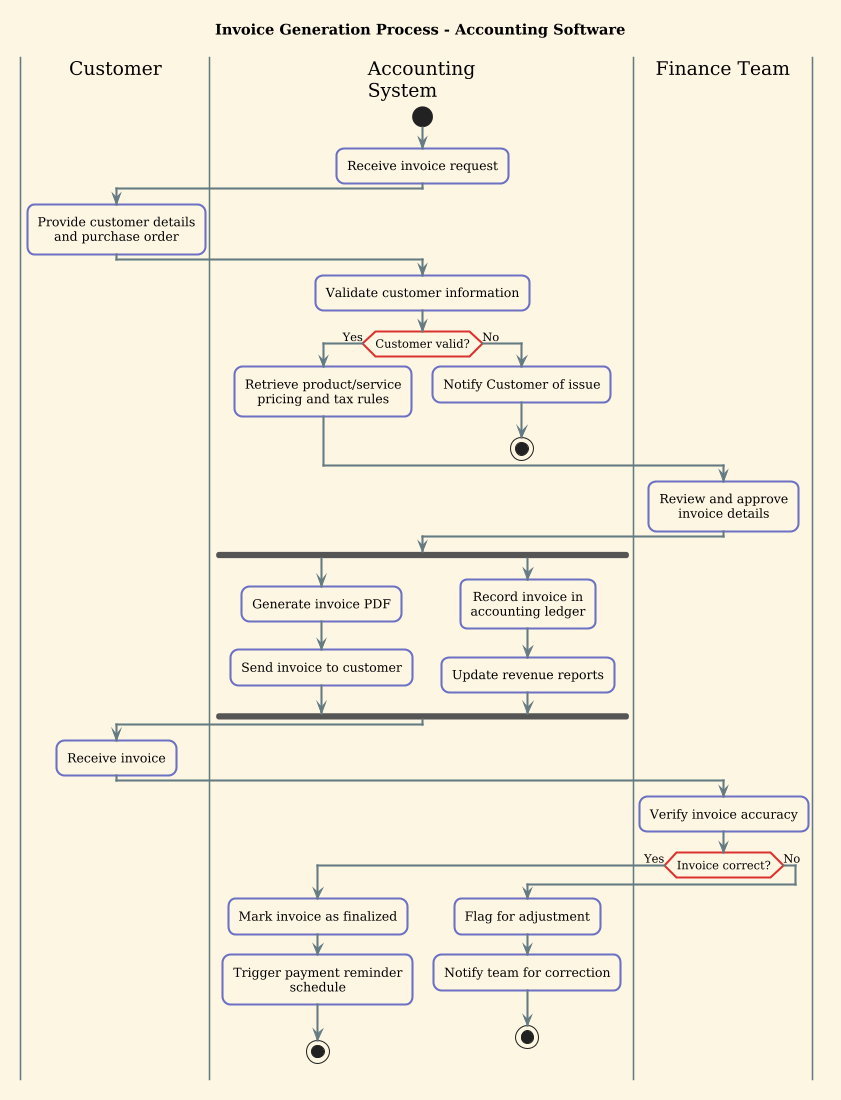
An Activity Diagram is the ideal tool for modeling the dynamic behavior of a system. In this context, it represents the flow of control from the initial request to the finalization of an invoice. The diagram uses swimlanes to partition responsibilities, ensuring that every actor (Customer, Accounting System, Finance Team) has a clearly defined domain of control. This abstraction is critical for identifying bottlenecks, error handling paths, and parallel processing opportunities.
Target Domain Scope & Scenario
This model focuses specifically on the core invoice generation lifecycle within an Accounting Software environment. It intentionally excludes peripheral processes like payment collection or tax calculation engines, focusing instead on the orchestration of data validation, document generation, and approval workflows. The scope covers the synchronous and asynchronous interactions required to move an invoice from a draft state to a finalized, delivered state.
Key Takeaways & Educational Insights
By constructing this model, you will gain a deeper understanding of:
- How to use swimlanes to delineate system vs. human responsibilities.
- Implementing conditional logic (if/else) for validation failures.
- Utilizing fork/join constructs to model parallel tasks like PDF generation and ledger updates.
- Establishing clear start and stop states for robust workflow boundaries.
Complete Diagram & Full Source Code
Below is the finished blueprint for the Invoice Generation Process. This diagram utilizes the sunlust theme for professional styling and demonstrates the power of the VPasCode editor.
@startuml
!theme sunlust

title Invoice Generation Process - Accounting Software

|Customer|
|Accounting System|
|Finance Team|

|Accounting System|
start
:Receive invoice request;

|Customer|
:Provide customer details
and purchase order;

|Accounting System|
:Validate customer information;

if (Customer valid?) then (Yes)
  :Retrieve product/service
  pricing and tax rules;
else (No)
  :Notify Customer of issue;
  stop
endif

|Finance Team|
:Review and approve
invoice details;

|Accounting System|
fork
  :Generate invoice PDF;
  :Send invoice to customer;
fork again
  :Record invoice in
  accounting ledger;
  :Update revenue reports;
end fork

|Customer|
:Receive invoice;

|Finance Team|
:Verify invoice accuracy;

if (Invoice correct?) then (Yes)
  |Accounting System|
  :Mark invoice as finalized;
  :Trigger payment reminder
  schedule;
  stop
else (No)
  |Accounting System|
  :Flag for adjustment;
  :Notify team for correction;
  stop
endif
@endumlStep-by-Step Architectural Walkthrough
Follow this chronological guide to reconstruct the diagram from scratch in the VPasCode editor.
Phase 1: Canvas Configuration & Layout Directives
Begin by setting the foundational theme and title. The !theme sunlust directive applies a modern, high-contrast color palette suitable for financial dashboards. We define the swimlanes immediately to establish the scope of actors involved.
!theme sunlust

title Invoice Generation Process - Accounting Software

|Customer|
|Accounting System|
|Finance Team|
Notice how we declare the swimlanes before the flow starts. This ensures that any activity node placed subsequently is automatically assigned to the correct lane based on context.
Phase 2: Declaring Core Entities, Actors, and Boundaries
Initialize the workflow with a start node. In PlantUML activity diagrams, this marks the entry point. We then define the first action within the Accounting System lane, as the system is the trigger for the process.
|Accounting System|
start
:Receive invoice request;
Next, switch context to the Customer lane to represent the external input. This transition highlights the handoff between the user and the system.
|Customer|
:Provide customer details
and purchase order;
Phase 3: Mapping Data Flows & Key Interactions
This phase involves the critical logic gates. We first validate the customer data using an if condition. If validation fails, the process terminates immediately.
|Accounting System|
:Validate customer information;

if (Customer valid?) then (Yes)
  :Retrieve product/service
  pricing and tax rules;
else (No)
  :Notify Customer of issue;
  stop
endif
After approval by the Finance Team, we introduce parallel processing using the fork and end fork directives. This allows the system to generate the PDF and update the ledger simultaneously, optimizing throughput.
|Accounting System|
fork
  :Generate invoice PDF;
  :Send invoice to customer;
fork again
  :Record invoice in
  accounting ledger;
  :Update revenue reports;
end fork
Phase 4: Grouping, Annotations & Visual Polish
Finally, we close the loop with a second validation check. If the invoice is incorrect, we flag it for adjustment. If correct, we mark it finalized and stop the process. This ensures the workflow ends cleanly in all scenarios.
if (Invoice correct?) then (Yes)
  |Accounting System|
  :Mark invoice as finalized;
  :Trigger payment reminder
  schedule;
  stop
else (No)
  |Accounting System|
  :Flag for adjustment;
  :Notify team for correction;
  stop
endif
Syntax & Keyword Deep Dive
Understanding the specific PlantUML syntax is essential for mastering this diagram type. Here are the key components utilized:
title: Defines the header text displayed at the top of the diagram for context.|Swimlane|: Declares a partition for the diagram. Actions following this tag belong to that specific actor until a new swimlane is declared.start&stop: Define the entry and exit points of the workflow. Every activity diagram must have a clear start and stop.fork/end fork: Creates parallel threads of execution.fork againallows for multiple parallel branches within the same block.if/else/endif: Implements conditional logic. Thethenandelsebranches determine the flow direction based on boolean outcomes.:Action;: The standard syntax for defining a process step or activity node.
Best Practices & Pitfalls to Avoid
To maintain high-quality diagrams in VPasCode, adhere to these modeling guidelines:
- Limit Swimlane Depth: Avoid nesting swimlanes too deeply. If a process becomes too complex for one layer of swimlanes, consider splitting it into multiple diagrams.
- Consistent Naming: Use verb-noun pairs for actions (e.g., “Validate Customer”) rather than single nouns to ensure the diagram describes behavior, not just state.
- Error Handling Paths: Never omit the
elsebranch in critical validation steps. A complete workflow must account for failure scenarios explicitly. - Visual Hierarchy: Use the
!themedirective to ensure consistent coloring across your documentation, making it easier for stakeholders to parse complex flows.
Start Building Finance Activity Diagrams Faster with VPasCode
Instantly prototype invoice workflows and validate logic with zero setup. Test, preview, and customize your PlantUML diagrams directly in your browser.