


In the rapidly evolving landscape of digital governance, the integrity of identity management systems is paramount. Government agencies worldwide are transitioning from legacy physical records to robust digital frameworks that ensure security, privacy, and accessibility for citizens. A well-architected Civic Identity Management System must handle complex relationships between individual citizens, organizational entities, credentials, and audit trails.

Visual modeling is not just about documentation; it is about clarity. Before writing a single line of backend code, architects must define the domain model. Using PlantUML within the VPasCode web editor allows architects to prototype these complex class structures instantly. This approach eliminates the friction of environment setup, enabling rapid iteration on relationships like inheritance, composition, and aggregation without the overhead of traditional IDEs.
Understanding the Model: Purpose, Scope & Problem Framing
Diagram Abstraction & Representation
A Class Diagram in this context serves as the blueprint for the object-oriented architecture. It defines the static structure of the system, detailing the attributes (data) and methods (behavior) of key entities. For a government system, this abstraction is critical for enforcing data integrity and access control policies.
Target Domain Scope & Scenario
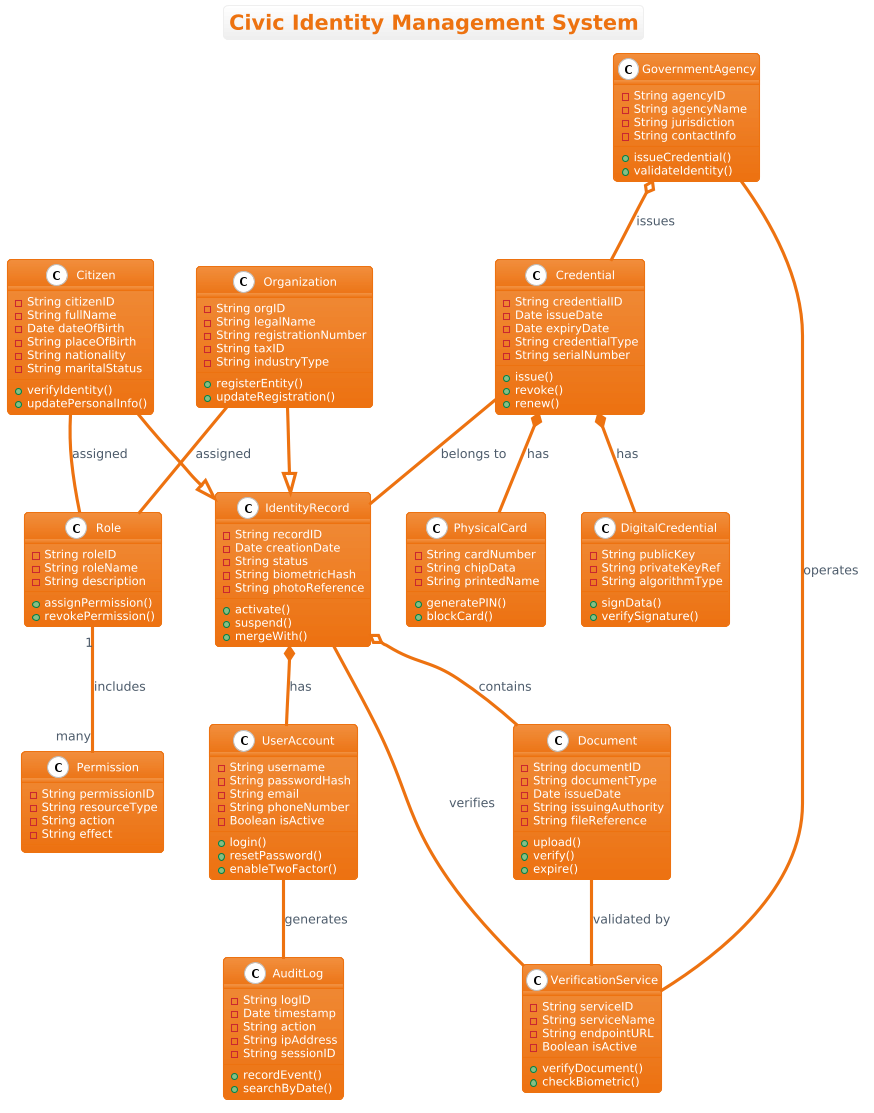
This diagram models the core domain of a Civic Identity Management System. It intentionally covers the lifecycle of identity from registration to verification. The scope includes individual Citizen records and Organization entities, their authentication UserAccount mechanisms, and the issuance of Credential objects (both physical and digital). It also incorporates the necessary security infrastructure through Role, Permission, and AuditLog classes.
Key Takeaways & Educational Insights
By constructing this model, you will gain insights into how to separate data ownership (IdentityRecord) from access control (UserAccount), how to model the lifecycle of a credential (Composition), and how to maintain a secure audit trail (Association). This structure supports scalable integration with external verification services while maintaining strict role-based access control.
Complete Diagram & Full Source Code
Below is the complete architectural blueprint. You can view the rendered diagram immediately by copying the code into the VPasCode editor.
@startuml
!theme aws-orange
title Civic Identity Management System

/'
This class diagram models the core domain of a Civic Identity Management System.
The system is designed to manage the lifecycle of citizen identities, including
registration, authentication, credential issuance, and audit tracking.
It supports both individual citizens and organizational entities, with a focus
on role-based access control and document verification.
The diagram illustrates the relationships between identity records, user accounts,
government agencies, issued credentials, and audit logs.
It addresses the need for a scalable and secure identity framework that can
integrate with various verification services and external registries.
'/

class Citizen {
  - String citizenID
  - String fullName
  - Date dateOfBirth
  - String placeOfBirth
  - String nationality
  - String maritalStatus
  + verifyIdentity()
  + updatePersonalInfo()
}

class Organization {
  - String orgID
  - String legalName
  - String registrationNumber
  - String taxID
  - String industryType
  + registerEntity()
  + updateRegistration()
}

class IdentityRecord {
  - String recordID
  - Date creationDate
  - String status
  - String biometricHash
  - String photoReference
  + activate()
  + suspend()
  + mergeWith()
}

class UserAccount {
  - String username
  - String passwordHash
  - String email
  - String phoneNumber
  - Boolean isActive
  + login()
  + resetPassword()
  + enableTwoFactor()
}

class Role {
  - String roleID
  - String roleName
  - String description
  + assignPermission()
  + revokePermission()
}

class Permission {
  - String permissionID
  - String resourceType
  - String action
  - String effect
}

class Credential {
  - String credentialID
  - Date issueDate
  - Date expiryDate
  - String credentialType
  - String serialNumber
  + issue()
  + revoke()
  + renew()
}

class PhysicalCard {
  - String cardNumber
  - String chipData
  - String printedName
  + generatePIN()
  + blockCard()
}

class DigitalCredential {
  - String publicKey
  - String privateKeyRef
  - String algorithmType
  + signData()
  + verifySignature()
}

class AuditLog {
  - String logID
  - Date timestamp
  - String action
  - String ipAddress
  - String sessionID
  + recordEvent()
  + searchByDate()
}

class VerificationService {
  - String serviceID
  - String serviceName
  - String endpointURL
  - Boolean isActive
  + verifyDocument()
  + checkBiometric()
}

class GovernmentAgency {
  - String agencyID
  - String agencyName
  - String jurisdiction
  - String contactInfo
  + issueCredential()
  + validateIdentity()
}

class Document {
  - String documentID
  - String documentType
  - Date issueDate
  - String issuingAuthority
  - String fileReference
  + upload()
  + verify()
  + expire()
}

' Inheritance / Generalization
Citizen --|> IdentityRecord
Organization --|> IdentityRecord

' Composition (strong lifecycle)
IdentityRecord *-- UserAccount : has
Credential *-- PhysicalCard : has
Credential *-- DigitalCredential : has

' Aggregation (shared)
GovernmentAgency o-- Credential : issues
IdentityRecord o-- Document : contains

' Association
Citizen -- Role : assigned
Organization -- Role : assigned
Role "1" -- "many" Permission : includes
UserAccount -- AuditLog : generates
VerificationService -- IdentityRecord : verifies
GovernmentAgency -- VerificationService : operates
Credential -- IdentityRecord : belongs to
Document -- VerificationService : validated by
@endumlStep-by-Step Architectural Walkthrough
Phase 1: Canvas Configuration & Layout Directives
Every professional diagram begins with context. In PlantUML, we set the visual theme and the title immediately. This ensures the diagram is instantly recognizable within a documentation suite.
We use the !theme aws-orange directive to apply a consistent color palette suitable for enterprise or government interfaces. The title command provides the diagram’s subject line, while the comment block (enclosed in /' ... '/) offers immediate context for stakeholders without cluttering the rendering engine.
!theme aws-orange
title Civic Identity Management System

/'
This class diagram models the core domain...
'/
Phase 2: Declaring Core Entities, Actors, and Boundaries
The foundation of the system lies in the IdentityRecord. This class acts as the central abstraction. Both Citizen and Organization inherit from it, demonstrating a clear generalization relationship. This design pattern allows the system to treat both individuals and entities uniformly for core identity operations while extending specific attributes for each type.
We define attributes using the - symbol (private) and methods using + (public). For example, the Citizen class holds sensitive personal data like dateOfBirth, while exposing methods like verifyIdentity().
class Citizen {
  - String citizenID
  + verifyIdentity()
}

class IdentityRecord {
  - String recordID
  + activate()
}
Phase 3: Mapping Data Flows & Key Interactions
Relationships define the architecture’s strength. We utilize Composition (*--) for strong lifecycle dependencies. For instance, a Credential cannot exist without its PhysicalCard or DigitalCredential components. If the Credential is revoked, these components are logically invalid.
Conversely, we use Aggregation (o--) for shared resources. A GovernmentAgency issues Credentials, but the Credential does not own the Agency. This distinction is vital for maintaining data integrity in government workflows.
Credential *-- PhysicalCard : has
GovernmentAgency o-- Credential : issues
Phase 4: Grouping, Annotations & Visual Polish
To ensure security compliance, we model the access control layer explicitly. The Role and Permission classes form the basis of RBAC (Role-Based Access Control). The AuditLog class is associated with UserAccount to track every login or data modification event. Finally, we connect external dependencies like VerificationService to ensure the system can validate documents against external registries.
Role "1" -- "many" Permission : includes
UserAccount -- AuditLog : generates
Syntax & Keyword Deep Dive
Understanding the specific PlantUML syntax is essential for maintaining clean diagrams. Below are the key conventions used in this masterclass:
class: Declares a new class definition block. It must be followed by the class name and curly braces for attributes and methods.--|>: Represents Generalization (Inheritance). The arrow points from the subclass (e.g.,Citizen) to the superclass (e.g.,IdentityRecord).*--: Represents Composition. The diamond is filled, indicating a strong “owns” relationship where the child cannot exist without the parent.o--: Represents Aggregation. The diamond is hollow, indicating a weak “uses” relationship where the child can exist independently.--: Represents Association. A standard line connecting two classes with no ownership semantics, often used for navigation paths./' ... '/: Defines a comment block that appears in the diagram but is not rendered as code.
Best Practices & Pitfalls to Avoid
When modeling complex government systems, adherence to best practices ensures long-term maintainability.
- Separation of Concerns: Do not mix authentication logic (
UserAccount) with identity data (IdentityRecord). Keep them distinct but linked to allow for flexible security policies. - Consistent Naming: Use PascalCase for classes and camelCase for methods. Prefix attributes with
-or+to indicate visibility clearly. - Manage Complexity: If the diagram becomes too large, consider splitting it into subsystems (e.g., “Identity Core” vs. “Credential Management”).
- Use Themes Wisely: Apply
!themedirectives early to ensure visual consistency across your documentation.
Start Building Government System Diagrams Faster with VPasCode
Instantly preview and customize this Civic Identity Management System class diagram online in VPasCode without installing any tools.