


In the high-stakes world of logistics and supply chain management, efficiency is not just a metric—it is the backbone of profitability. The last-mile delivery phase, where goods move from a distribution hub to the final customer, represents the most complex and costly segment of the journey. To manage this complexity, software architects must design systems that handle dynamic variables: traffic patterns, vehicle capacity, driver shifts, and strict delivery time windows.
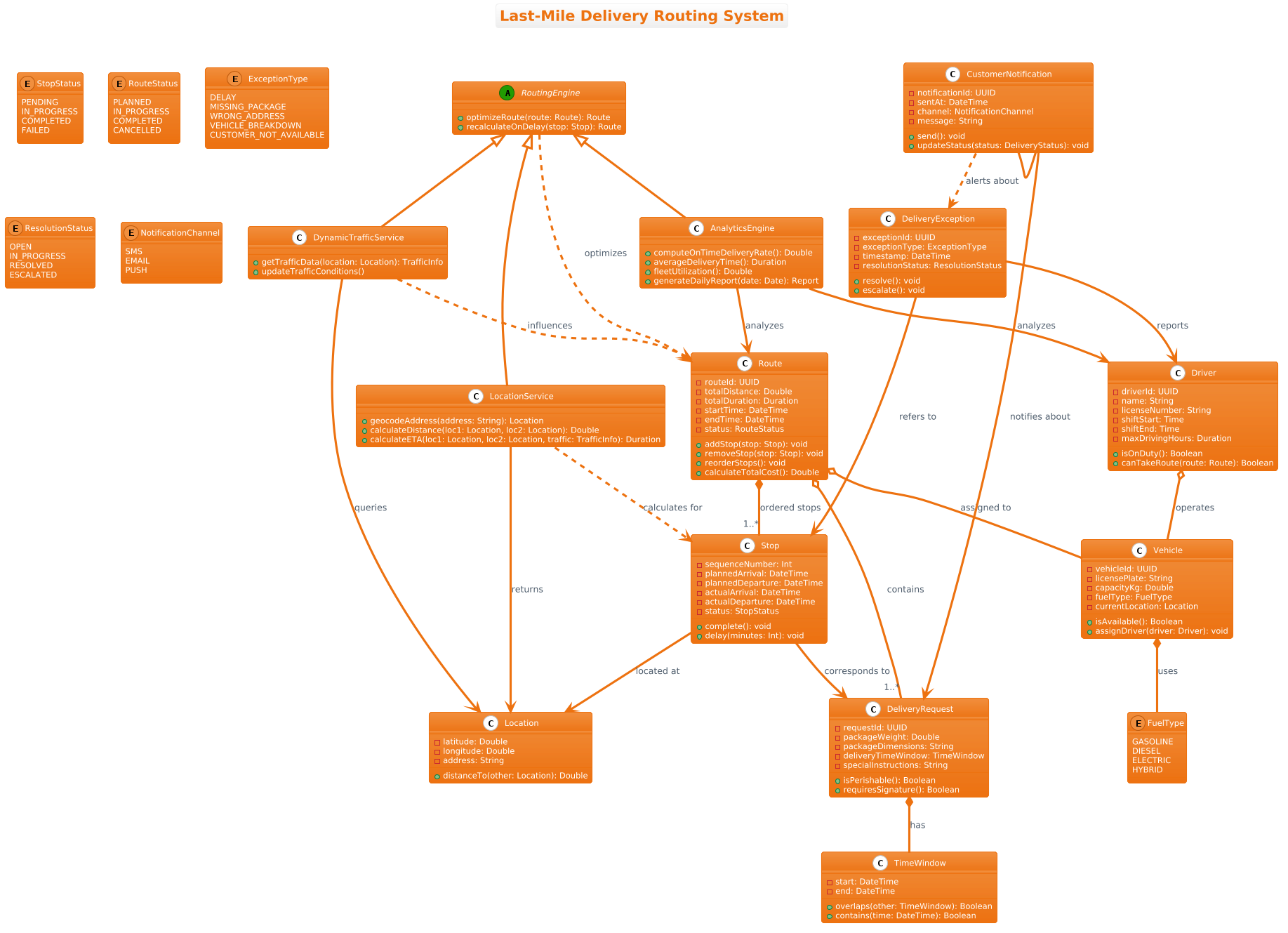
A class diagram is the foundational blueprint for this domain. It captures the static structure of the system, defining how entities like DeliveryRequest, Vehicle, and Route interact. By using PlantUML within VPasCode, architects can visualize these relationships instantly without the overhead of local environment setup. This approach transforms abstract requirements into concrete architectural models, ensuring that the codebase aligns with the business logic before a single line of production code is written.
Understanding the Model: Purpose, Scope & Problem Framing
Diagram Abstraction & Representation
This class diagram models the core domain of a Last-Mile Delivery Routing System. Unlike sequence diagrams that focus on temporal flow, a class diagram focuses on the structural contract of the system. It defines the data attributes (e.g., packageWeight, capacityKg) and the behavioral methods (e.g., optimizeRoute, assignDriver) that constitute the software’s backbone. The diagram clarifies ownership and lifecycle dependencies, distinguishing between a Route that is composed of Stops versus a Driver who operates a Vehicle.
Target Domain Scope & Scenario
The scope of this model is the operational layer of a logistics platform. It intentionally excludes user interface components or database persistence layers, focusing instead on the business logic that orchestrates delivery. Key boundaries include:
- Optimization Logic: How the system calculates routes based on constraints.
- Asset Management: Tracking vehicles, drivers, and their availability.
- Exception Handling: Managing delays, breakdowns, or customer unavailability.
Key Takeaways & Educational Insights
By studying this model, readers will gain insights into:
- Relationship Cardinality: Understanding when to use composition (strong lifecycle) versus aggregation (weak lifecycle).
- Domain-Driven Design: Identifying aggregates like Route and DeliveryRequest to maintain data consistency.
- Extensibility: How RoutingEngine can be extended via generalization to support different traffic services.
Complete Diagram & Full Source Code
Below is the finalized blueprint for the Last-Mile Delivery Routing System. You can view the rendered output immediately in the VPasCode editor.
@startuml
!theme aws-orange
title Last-Mile Delivery Routing System

/'
This class diagram models the core domain of a Last-Mile Delivery Routing System.
The system optimizes delivery routes for a fleet of vehicles, considering real-time constraints
such as traffic, time windows, package weights, and driver availability.
It captures key entities like DeliveryRequest, Vehicle, Driver, Route, and Stop,
along with supporting components for location tracking, traffic updates, and optimization engines.
The relationships show how routes are composed of ordered stops, vehicles are assigned to drivers,
and how the system adapts to dynamic conditions like traffic or delivery exceptions.
'/

abstract class RoutingEngine {
    + optimizeRoute(route: Route): Route
    + recalculateOnDelay(stop: Stop): Route
}

class DynamicTrafficService {
    + getTrafficData(location: Location): TrafficInfo
    + updateTrafficConditions()
}

class LocationService {
    + geocodeAddress(address: String): Location
    + calculateDistance(loc1: Location, loc2: Location): Double
    + calculateETA(loc1: Location, loc2: Location, traffic: TrafficInfo): Duration
}

class DeliveryRequest {
    - requestId: UUID
    - packageWeight: Double
    - packageDimensions: String
    - deliveryTimeWindow: TimeWindow
    - specialInstructions: String
    + isPerishable(): Boolean
    + requiresSignature(): Boolean
}

class TimeWindow {
    - start: DateTime
    - end: DateTime
    + overlaps(other: TimeWindow): Boolean
    + contains(time: DateTime): Boolean
}

class Location {
    - latitude: Double
    - longitude: Double
    - address: String
    + distanceTo(other: Location): Double
}

class Stop {
    - sequenceNumber: Int
    - plannedArrival: DateTime
    - plannedDeparture: DateTime
    - actualArrival: DateTime
    - actualDeparture: DateTime
    - status: StopStatus
    + complete(): void
    + delay(minutes: Int): void
}

enum StopStatus {
    PENDING
    IN_PROGRESS
    COMPLETED
    FAILED
}

class Route {
    - routeId: UUID
    - totalDistance: Double
    - totalDuration: Duration
    - startTime: DateTime
    - endTime: DateTime
    - status: RouteStatus
    + addStop(stop: Stop): void
    + removeStop(stop: Stop): void
    + reorderStops(): void
    + calculateTotalCost(): Double
}

enum RouteStatus {
    PLANNED
    IN_PROGRESS
    COMPLETED
    CANCELLED
}

class Vehicle {
    - vehicleId: UUID
    - licensePlate: String
    - capacityKg: Double
    - fuelType: FuelType
    - currentLocation: Location
    + isAvailable(): Boolean
    + assignDriver(driver: Driver): void
}

enum FuelType {
    GASOLINE
    DIESEL
    ELECTRIC
    HYBRID
}

class Driver {
    - driverId: UUID
    - name: String
    - licenseNumber: String
    - shiftStart: Time
    - shiftEnd: Time
    - maxDrivingHours: Duration
    + isOnDuty(): Boolean
    + canTakeRoute(route: Route): Boolean
}

class DeliveryException {
    - exceptionId: UUID
    - exceptionType: ExceptionType
    - timestamp: DateTime
    - resolutionStatus: ResolutionStatus
    + resolve(): void
    + escalate(): void
}

enum ExceptionType {
    DELAY
    MISSING_PACKAGE
    WRONG_ADDRESS
    VEHICLE_BREAKDOWN
    CUSTOMER_NOT_AVAILABLE
}

enum ResolutionStatus {
    OPEN
    IN_PROGRESS
    RESOLVED
    ESCALATED
}

class CustomerNotification {
    - notificationId: UUID
    - sentAt: DateTime
    - channel: NotificationChannel
    - message: String
    + send(): void
    + updateStatus(status: DeliveryStatus): void
}

enum NotificationChannel {
    SMS
    EMAIL
    PUSH
}

class AnalyticsEngine {
    + computeOnTimeDeliveryRate(): Double
    + averageDeliveryTime(): Duration
    + fleetUtilization(): Double
    + generateDailyReport(date: Date): Report
}

' Generalization
RoutingEngine <|-- DynamicTrafficService
RoutingEngine <|-- LocationService
RoutingEngine <|-- AnalyticsEngine

' Composition (strong lifecycle)
Route *-- "1..*" Stop : ordered stops
DeliveryRequest *-- TimeWindow : has
Vehicle *-- FuelType : uses

' Aggregation (weaker lifecycle)
Route o-- "1..*" DeliveryRequest : contains
Route o-- Vehicle : assigned to
Driver o-- Vehicle : operates

' Association (usage)
Stop --> Location : located at
Stop --> DeliveryRequest : corresponds to
DynamicTrafficService --> Location : queries
LocationService --> Location : returns
DeliveryException --> Stop : refers to
DeliveryException --> Driver : reports
CustomerNotification --> DeliveryRequest : notifies about
AnalyticsEngine --> Route : analyzes
AnalyticsEngine --> Driver : analyzes

' Dependency (transient)
DynamicTrafficService ..> Route : influences
LocationService ..> Stop : calculates for
RoutingEngine ..> Route : optimizes
CustomerNotification ..> DeliveryException : alerts about
@endumlStep-by-Step Architectural Walkthrough
Phase 1: Canvas Configuration & Layout Directives
The first step in any PlantUML project is setting the visual theme and metadata. In VPasCode, you start by defining the global style. Here, we use the !theme aws-orange directive to apply a professional, warm color palette suitable for logistics dashboards. We also define the diagram title for clarity.
!theme aws-orange
title Last-Mile Delivery Routing System
Immediately following the title, we add a comment block to document the context. This is crucial for team collaboration, ensuring anyone reading the code understands the diagram’s scope without needing to decode the syntax.
/'
This class diagram models the core domain of a Last-Mile Delivery Routing System.
... (comment text) ...
'/
Phase 2: Declaring Core Entities, Actors, and Boundaries
Next, we define the fundamental classes of the domain. We start with the primary transactional object, DeliveryRequest, which holds package details and constraints. We also define supporting entities like TimeWindow and Location.
class DeliveryRequest {
    - requestId: UUID
    - packageWeight: Double
    - deliveryTimeWindow: TimeWindow
    + isPerishable(): Boolean
}
We then introduce the physical assets: Vehicle and Driver. Notice the use of private attributes (prefixed with -) and public methods (prefixed with +) to encapsulate data integrity.
class Vehicle {
    - capacityKg: Double
    - currentLocation: Location
    + isAvailable(): Boolean
}
Phase 3: Mapping Data Flows & Key Interactions
The heart of a class diagram is the relationship. We use composition (filled diamond) for strong lifecycle dependencies. A Route cannot exist without its Stops; if the route is deleted, the stops are logically deleted with it.
Route *-- "1..*" Stop : ordered stopsConversely, we use aggregation (hollow diamond) for weaker relationships. A Route contains DeliveryRequests, but those requests might exist independently in the database before being assigned to a route.
Route o-- "1..*" DeliveryRequest : containsPhase 4: Grouping, Annotations & Visual Polish
Finally, we add the service layer and exception handling. We define RoutingEngine as an abstract class, allowing for multiple implementations like DynamicTrafficService. We also map associations between services and data, such as how DynamicTrafficService queries Location data to update routes.
' Generalization
RoutingEngine <|-- DynamicTrafficService

' Association
DynamicTrafficService --> Location : queries
Syntax & Keyword Deep Dive
Understanding the specific PlantUML keywords is essential for building robust diagrams in VPasCode.
!theme: Sets the global color scheme and font style for the entire diagram.abstract class: Defines a class that cannot be instantiated directly, serving as a base for other classes.enum: Declares a set of named constants, such asStopStatusorFuelType, to enforce data integrity.*--(Composition): A filled diamond indicating strong ownership where the child’s lifecycle depends on the parent.o--(Aggregation): A hollow diamond indicating a “has-a” relationship where the child can exist independently.-->(Association): A standard line indicating a relationship between two classes, often implying usage...>(Dependency): A dashed line indicating that one class relies on another but does not own it.<|--(Generalization): Indicates inheritance, where a child class extends the parent.
Best Practices & Pitfalls to Avoid
To maintain a clean and scalable architecture model, adhere to these guidelines:
- Separation of Concerns: Keep business logic classes (e.g.,
Route) separate from infrastructure services (e.g.,LocationService). This prevents the diagram from becoming a tangled mess of dependencies. - Consistent Naming: Use clear, domain-specific names. Instead of
Obj1, useDeliveryRequest. This makes the diagram self-documenting. - Lifecycle Awareness: Be precise with composition vs. aggregation. If a
Stopis part of aRoute, use composition. If aVehicleis assigned to aRoute, use aggregation. - Visual Hierarchy: Group related classes logically in the layout. In VPasCode, you can use
left to right directiondirectives to organize the flow from services to data entities.
Start Building Class Diagrams Faster with VPasCode
Test your logistics architecture instantly with zero installation. Write PlantUML code and preview your class diagrams in real-time within your browser.