


In the rapidly evolving landscape of fintech and wealth management, the integrity of data structures is paramount. Whether you are building a personal finance dashboard or a sophisticated institutional trading platform, the underlying object model determines the scalability and reliability of your application. A well-structured class diagram serves as the blueprint for this architecture, clarifying how investors, portfolios, and market data interact.

Visual modeling is critical for aligning technical implementation with business requirements. By using PlantUML within the VPasCode editor, software architects can rapidly prototype these financial models without the friction of traditional IDE setup. This approach enhances architectural clarity, allowing teams to visualize inheritance hierarchies (like Stock vs. Bond) and data flows (like MarketDataService) instantly in the browser.
This masterclass demonstrates how to construct a robust Investment Portfolio Tracker class diagram. We will leverage the VPasCode free web editor to define entities, relationships, and logic, ensuring your documentation is as dynamic as the code it describes.
Understanding the Model: Purpose, Scope & Problem Framing
Before writing a single line of code, it is essential to understand the abstraction we are modeling. A Class Diagram in PlantUML is not merely a drawing; it is a contract of the system’s static structure.
Diagram Abstraction & Representation
This diagram models the core domain entities of a portfolio management system. It focuses on:
- Entities: Concrete objects like
Investor,Portfolio, andHoldingthat store state. - Services: Functional components like
MarketDataServiceandPerformanceAnalyzerthat provide behavior. - Relationships: How these entities connect, such as an Investor owning multiple Portfolios or a Portfolio containing various Holdings.
Target Domain Scope & Scenario
The scope is strictly limited to the financial core. We are modeling the lifecycle of an investment account from creation to performance analysis. The boundaries include:
- Investor Management: Tracking user profiles and risk tolerance.
- Asset Management: Handling Stocks, Bonds, and ETFs through a unified
Holdingbase class. - Transaction Processing: Recording buys, sells, and dividends.
Key Takeaways & Educational Insights
By following this guide, you will gain:
- Understanding of inheritance in financial modeling (e.g.,
StockextendsHolding). - Clarity on aggregation vs. composition (e.g., a Portfolio contains Holdings).
- Best practices for separating domain logic from service logic using
PlantUMLin VPasCode.
Complete Diagram & Full Source Code
Below is the complete, finalized blueprint for the Investment Portfolio Tracker. You can copy this code directly into the VPasCode editor to see the live rendering.
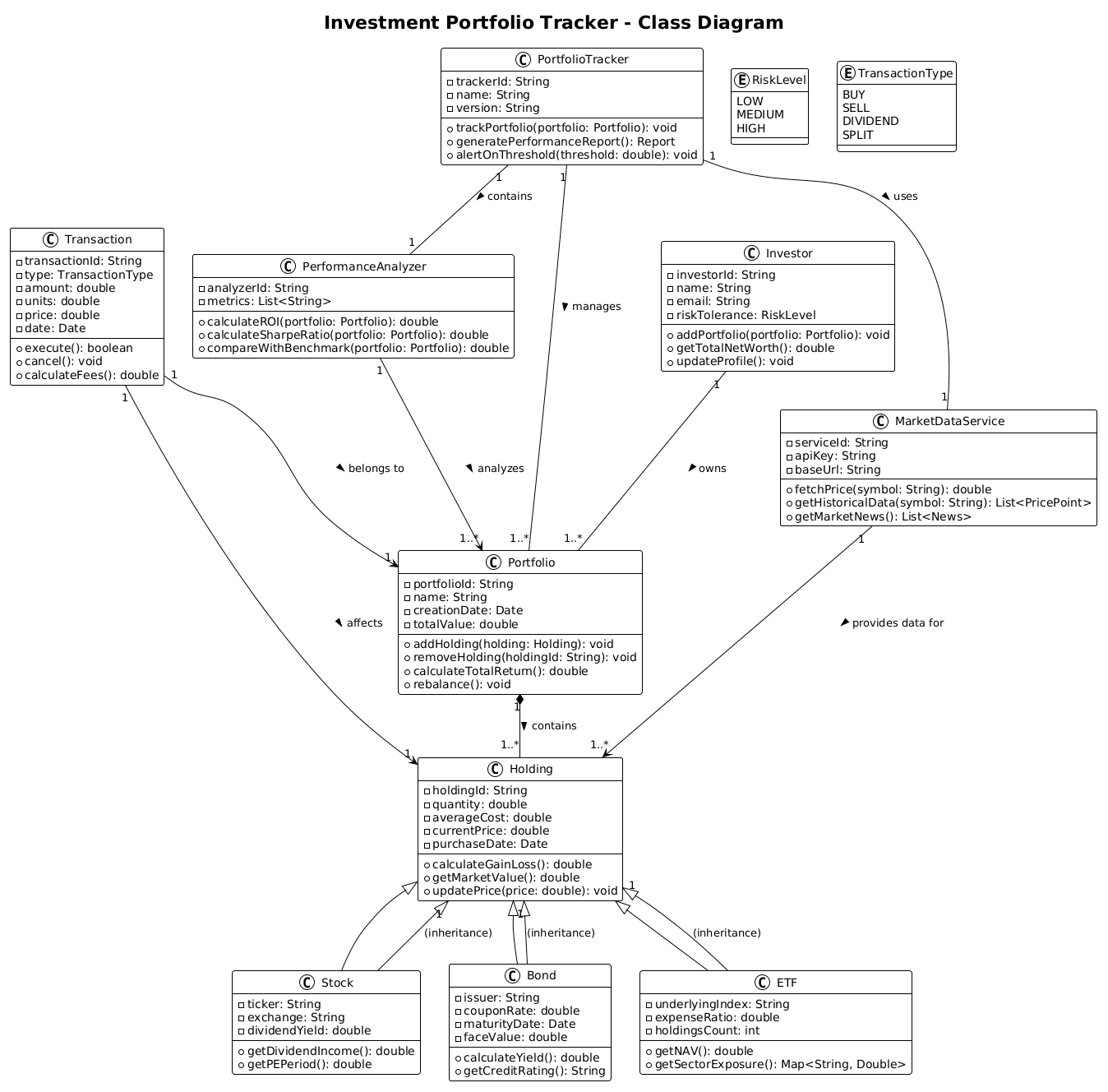
@startuml
!theme plain
title Investment Portfolio Tracker - Class Diagram

class PortfolioTracker {
  - trackerId: String
  - name: String
  - version: String
  + trackPortfolio(portfolio: Portfolio): void
  + generatePerformanceReport(): Report
  + alertOnThreshold(threshold: double): void
}

class Investor {
  - investorId: String
  - name: String
  - email: String
  - riskTolerance: RiskLevel
  + addPortfolio(portfolio: Portfolio): void
  + getTotalNetWorth(): double
  + updateProfile(): void
}

class Portfolio {
  - portfolioId: String
  - name: String
  - creationDate: Date
  - totalValue: double
  + addHolding(holding: Holding): void
  + removeHolding(holdingId: String): void
  + calculateTotalReturn(): double
  + rebalance(): void
}

class Holding {
  - holdingId: String
  - quantity: double
  - averageCost: double
  - currentPrice: double
  - purchaseDate: Date
  + calculateGainLoss(): double
  + getMarketValue(): double
  + updatePrice(price: double): void
}

class Stock extends Holding {
  - ticker: String
  - exchange: String
  - dividendYield: double
  + getDividendIncome(): double
  + getPEPeriod(): double
}

class Bond extends Holding {
  - issuer: String
  - couponRate: double
  - maturityDate: Date
  - faceValue: double
  + calculateYield(): double
  + getCreditRating(): String
}

class ETF extends Holding {
  - underlyingIndex: String
  - expenseRatio: double
  - holdingsCount: int
  + getNAV(): double
  + getSectorExposure(): Map<String, Double>
}

class Transaction {
  - transactionId: String
  - type: TransactionType
  - amount: double
  - units: double
  - price: double
  - date: Date
  + execute(): boolean
  + cancel(): void
  + calculateFees(): double
}

class MarketDataService {
  - serviceId: String
  - apiKey: String
  - baseUrl: String
  + fetchPrice(symbol: String): double
  + getHistoricalData(symbol: String): List<PricePoint>
  + getMarketNews(): List<News>
}

class PerformanceAnalyzer {
  - analyzerId: String
  - metrics: List<String>
  + calculateROI(portfolio: Portfolio): double
  + calculateSharpeRatio(portfolio: Portfolio): double
  + compareWithBenchmark(portfolio: Portfolio): double
}

Investor "1" -- "1..*" Portfolio : owns >
Portfolio "1" *-- "1..*" Holding : contains >
Holding "1" <|-- Stock : (inheritance)
Holding "1" <|-- Bond : (inheritance)
Holding "1" <|-- ETF : (inheritance)

PortfolioTracker "1" -- "1..*" Portfolio : manages >
PortfolioTracker "1" -- "1" MarketDataService : uses >
PortfolioTracker "1" -- "1" PerformanceAnalyzer : contains >

Transaction "1" --> "1" Holding : affects >
Transaction "1" --> "1" Portfolio : belongs to >

MarketDataService "1" --> "1..*" Holding : provides data for >
PerformanceAnalyzer "1" --> "1..*" Portfolio : analyzes >

enum RiskLevel {
  LOW
  MEDIUM
  HIGH
}

enum TransactionType {
  BUY
  SELL
  DIVIDEND
  SPLIT
}

@endumlStep-by-Step Architectural Walkthrough
Building this diagram in VPasCode is a structured process. We will break down the creation into four logical phases to ensure clarity and maintainability.
Phase 1: Canvas Configuration & Layout Directives
Every PlantUML diagram begins with configuration. We start by setting the visual theme and the diagram type.
@startuml
!theme plain
title Investment Portfolio Tracker - Class Diagram
The @startuml directive tells the engine we are building a UML diagram. The !theme plain directive ensures a clean, minimalistic look that is ideal for professional documentation. The title directive adds a header to the rendered image.
Phase 2: Declaring Core Entities, Actors, and Boundaries
Next, we define the primary actors and containers. The Investor class represents the user, while PortfolioTracker acts as the system controller.
class Investor {
  - investorId: String
  - name: String
  - email: String
  - riskTolerance: RiskLevel
  + addPortfolio(portfolio: Portfolio): void
  + getTotalNetWorth(): double
  + updateProfile(): void
}

class PortfolioTracker {
  - trackerId: String
  - name: String
  - version: String
  + trackPortfolio(portfolio: Portfolio): void
  + generatePerformanceReport(): Report
  + alertOnThreshold(threshold: double): void
}
Notice the use of - for private attributes and + for public methods. This encapsulation is vital for financial security and logical separation.
Phase 3: Mapping Data Flows & Key Interactions
We now model the financial instruments. Instead of creating separate classes for every asset type, we use inheritance to create a unified Holding structure.
class Holding {
  - holdingId: String
  - quantity: double
  - averageCost: double
  - currentPrice: double
  - purchaseDate: Date
  + calculateGainLoss(): double
  + getMarketValue(): double
  + updatePrice(price: double): void
}

class Stock extends Holding {
  - ticker: String
  - exchange: String
  - dividendYield: double
  + getDividendIncome(): double
  + getPEPeriod(): double
}
The extends keyword establishes that a Stock is a specialized type of Holding. This reduces redundancy and enforces common behaviors like getMarketValue().
Phase 4: Grouping, Annotations & Visual Polish
Finally, we define the relationships and external dependencies. This includes how the tracker uses services and how transactions affect holdings.
PortfolioTracker "1" -- "1..*" Portfolio : manages >
PortfolioTracker "1" -- "1" MarketDataService : uses >

enum RiskLevel {
  LOW
  MEDIUM
  HIGH
}
Relationships like -- (association) and <|-- (inheritance) connect the classes. We also define enum types to restrict values for risk tolerance and transaction types, ensuring data integrity.
Syntax & Keyword Deep Dive
To master PlantUML in VPasCode, you must understand the specific syntax used in this financial model.
class: Declares a new class with its attributes and methods.extends: Defines inheritance (e.g.,Stock extends Holding).--: Creates a standard association line between classes.*--: Indicates composition (strong ownership), meaning aPortfoliocannot exist without itsHoldings.-->: Represents a dependency, where one class relies on another (e.g.,Transactiondepends onHolding).enum: Defines an enumeration of constant values, such asRiskLevel."1"/"1..*": Defines cardinality (multiplicity), specifying that one Investor can own many Portfolios.
Best Practices & Pitfalls to Avoid
When modeling complex systems like financial trackers, follow these guidelines to maintain clarity.
- Modularize Your Code: Group related classes (like
Stock,Bond,ETF) logically. In VPasCode, you can use packages to organize large diagrams. - Consistent Naming Conventions: Use clear, capitalized names for classes (e.g.,
MarketDataService) and lowercase for attributes (e.g.,apiKey) to match standard coding conventions. - Limit Scope: Do not try to model every single method. Focus on the core relationships and high-level operations that define the system's architecture.
- Use Inheritance Wisely: Only use inheritance when there is a true "is-a" relationship. Do not force unrelated classes into a hierarchy.
Start Building Financial Class Diagrams Faster with VPasCode
Model your investment architecture instantly in the browser with zero setup. Test, preview, and customize your PlantUML diagrams online in VPasCode today.