


In the rapidly evolving world of decentralized finance and digital asset trading, architectural clarity is paramount. A cryptocurrency exchange is not merely a website; it is a complex distributed system handling high-frequency transactions, secure asset custody, and real-time market data. For software architects and developers, visualizing these intricate data relationships and system boundaries is critical before writing a single line of production code.

Traditional drag-and-drop diagramming tools often struggle with the versioning and complexity of large-scale financial schemas. This is where diagram-as-code shines. By using PlantUML within the VPasCode editor, you can define your entire system architecture in text. This approach ensures your diagrams remain synchronized with your codebase, easy to version manually, and instantly renderable.
This masterclass guides you through building a comprehensive Cryptocurrency Exchange Class Diagram. We will model the core entities—from CryptoAsset inheritance hierarchies to TradingEngine logic—demonstrating how to manage cardinality, composition, and aggregation in a high-stakes financial environment.
Understanding the Model: Purpose, Scope & Problem Framing
Diagram Abstraction & Representation
This diagram represents a Class Diagram, a static structure diagram in the Unified Modeling Language (UML). Its primary purpose is to describe the system’s structure by defining its classes, their attributes, operations, and the relationships among objects. In the context of a cryptocurrency exchange, this abstraction is vital for:
- Data Integrity: Defining how user assets map to blockchain transactions.
- Security Boundaries: Visualizing how
SecurityManagerinteracts with sensitiveWalletdata. - Performance Logic: Outlining the flow between the
TradingEngineand theOrderBook.
Target Domain Scope & Scenario
The scope of this model covers the core backend architecture of a centralized exchange (CEX). It intentionally excludes front-end UI components to focus on the server-side data models. Key domains include:
- Asset Management: Handling diverse token types (Bitcoin, Ethereum, Stablecoins) via polymorphism.
- Account Management: User lifecycle, KYC status, and wallet generation.
- Order Processing: The lifecycle from order placement to trade settlement.
Key Takeaways & Educational Insights
By constructing this diagram, you will gain insights into:
- How to model inheritance using abstract base classes for different asset types.
- The distinction between Composition (strong ownership) and Aggregation (weak ownership) in financial data structures.
- How to organize complex systems using the
!theme aws-orangedirective for visual consistency in VPasCode.
Complete Diagram & Full Source Code
Below is the complete blueprint for the Cryptocurrency Exchange Class Diagram. This code defines 14 distinct classes and maps their inter-relationships using standard PlantUML syntax. You can copy this directly into the VPasCode editor to see the live rendering.
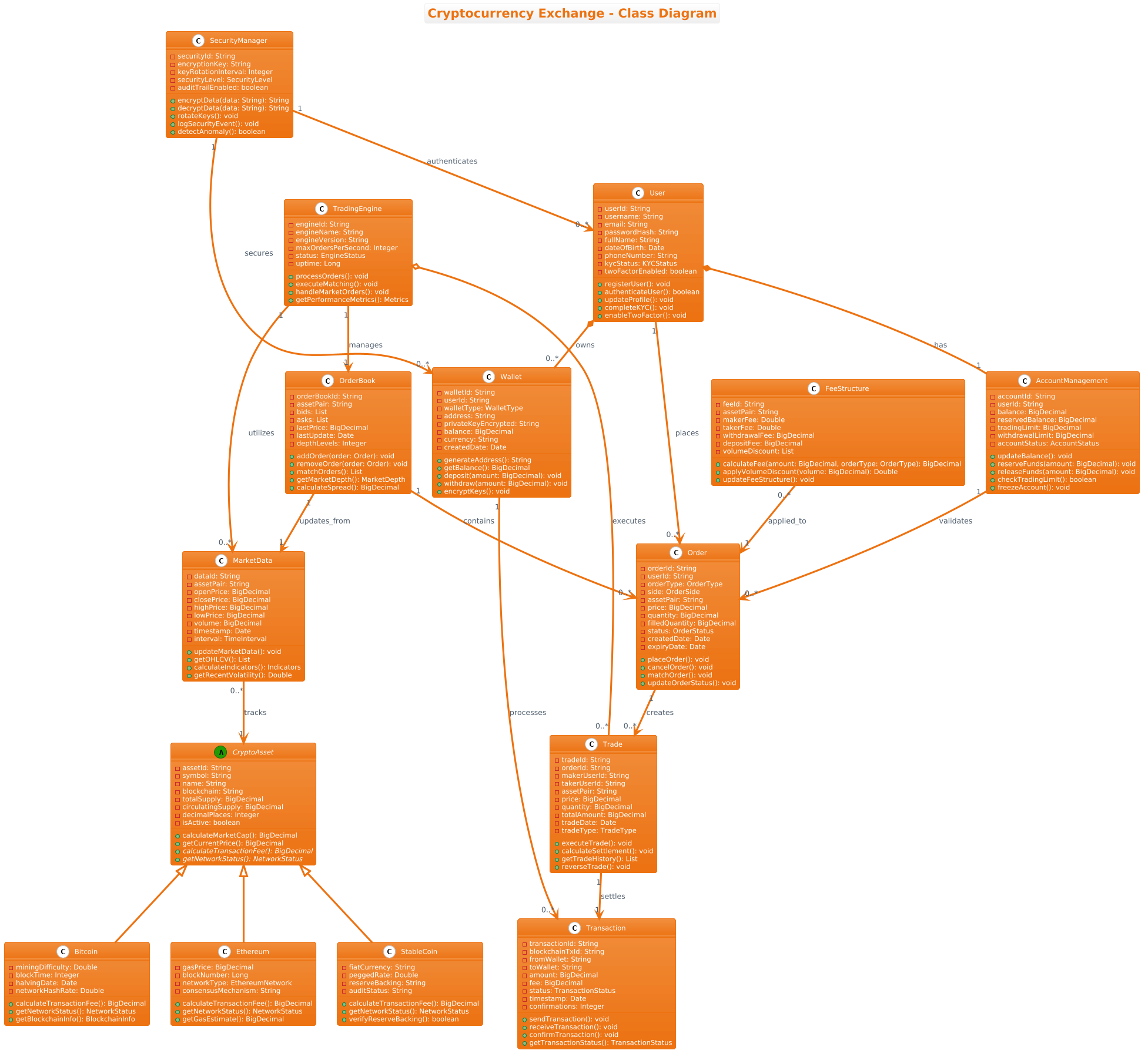
@startuml

!theme aws-orange
title Cryptocurrency Exchange - Class Diagram

' Abstract base class
abstract class CryptoAsset {
  - assetId: String
  - symbol: String
  - name: String
  - blockchain: String
  - totalSupply: BigDecimal
  - circulatingSupply: BigDecimal
  - decimalPlaces: Integer
  - isActive: boolean
  + calculateMarketCap(): BigDecimal
  + getCurrentPrice(): BigDecimal
  + {abstract} calculateTransactionFee(): BigDecimal
  + {abstract} getNetworkStatus(): NetworkStatus
}

' Derived classes from CryptoAsset
class Bitcoin {
  - miningDifficulty: Double
  - blockTime: Integer
  - halvingDate: Date
  - networkHashRate: Double
  + calculateTransactionFee(): BigDecimal
  + getNetworkStatus(): NetworkStatus
  + getBlockchainInfo(): BlockchainInfo
}

class Ethereum {
  - gasPrice: BigDecimal
  - blockNumber: Long
  - networkType: EthereumNetwork
  - consensusMechanism: String
  + calculateTransactionFee(): BigDecimal
  + getNetworkStatus(): NetworkStatus
  + getGasEstimate(): BigDecimal
}

class StableCoin {
  - fiatCurrency: String
  - peggedRate: Double
  - reserveBacking: String
  - auditStatus: String
  + calculateTransactionFee(): BigDecimal
  + getNetworkStatus(): NetworkStatus
  + verifyReserveBacking(): boolean
}

' User class
class User {
  - userId: String
  - username: String
  - email: String
  - passwordHash: String
  - fullName: String
  - dateOfBirth: Date
  - phoneNumber: String
  - kycStatus: KYCStatus
  - twoFactorEnabled: boolean
  + registerUser(): void
  + authenticateUser(): boolean
  + updateProfile(): void
  + completeKYC(): void
  + enableTwoFactor(): void
}

' Wallet class
class Wallet {
  - walletId: String
  - userId: String
  - walletType: WalletType
  - address: String
  - privateKeyEncrypted: String
  - balance: BigDecimal
  - currency: String
  - createdDate: Date
  + generateAddress(): String
  + getBalance(): BigDecimal
  + deposit(amount: BigDecimal): void
  + withdraw(amount: BigDecimal): void
  + encryptKeys(): void
}

' Order class
class Order {
  - orderId: String
  - userId: String
  - orderType: OrderType
  - side: OrderSide
  - assetPair: String
  - price: BigDecimal
  - quantity: BigDecimal
  - filledQuantity: BigDecimal
  - status: OrderStatus
  - createdDate: Date
  - expiryDate: Date
  + placeOrder(): void
  + cancelOrder(): void
  + matchOrder(): void
  + updateOrderStatus(): void
}

' Trade class
class Trade {
  - tradeId: String
  - orderId: String
  - makerUserId: String
  - takerUserId: String
  - assetPair: String
  - price: BigDecimal
  - quantity: BigDecimal
  - totalAmount: BigDecimal
  - tradeDate: Date
  - tradeType: TradeType
  + executeTrade(): void
  + calculateSettlement(): void
  + getTradeHistory(): List
  + reverseTrade(): void
}

' OrderBook class
class OrderBook {
  - orderBookId: String
  - assetPair: String
  - bids: List
  - asks: List
  - lastPrice: BigDecimal
  - lastUpdate: Date
  - depthLevels: Integer
  + addOrder(order: Order): void
  + removeOrder(order: Order): void
  + matchOrders(): List
  + getMarketDepth(): MarketDepth
  + calculateSpread(): BigDecimal
}

' Transaction class
class Transaction {
  - transactionId: String
  - blockchainTxId: String
  - fromWallet: String
  - toWallet: String
  - amount: BigDecimal
  - fee: BigDecimal
  - status: TransactionStatus
  - timestamp: Date
  - confirmations: Integer
  + sendTransaction(): void
  + receiveTransaction(): void
  + confirmTransaction(): void
  + getTransactionStatus(): TransactionStatus
}

' AccountManagement class
class AccountManagement {
  - accountId: String
  - userId: String
  - balance: BigDecimal
  - reservedBalance: BigDecimal
  - tradingLimit: BigDecimal
  - withdrawalLimit: BigDecimal
  - accountStatus: AccountStatus
  + updateBalance(): void
  + reserveFunds(amount: BigDecimal): void
  + releaseFunds(amount: BigDecimal): void
  + checkTradingLimit(): boolean
  + freezeAccount(): void
}

' TradingEngine class
class TradingEngine {
  - engineId: String
  - engineName: String
  - engineVersion: String
  - maxOrdersPerSecond: Integer
  - status: EngineStatus
  - uptime: Long
  + processOrders(): void
  + executeMatching(): void
  + handleMarketOrders(): void
  + getPerformanceMetrics(): Metrics
}

' MarketData class
class MarketData {
  - dataId: String
  - assetPair: String
  - openPrice: BigDecimal
  - closePrice: BigDecimal
  - highPrice: BigDecimal
  - lowPrice: BigDecimal
  - volume: BigDecimal
  - timestamp: Date
  - interval: TimeInterval
  + updateMarketData(): void
  + getOHLCV(): List
  + calculateIndicators(): Indicators
  + getRecentVolatility(): Double
}

' SecurityManager class
class SecurityManager {
  - securityId: String
  - encryptionKey: String
  - keyRotationInterval: Integer
  - securityLevel: SecurityLevel
  - auditTrailEnabled: boolean
  + encryptData(data: String): String
  + decryptData(data: String): String
  + rotateKeys(): void
  + logSecurityEvent(): void
  + detectAnomaly(): boolean
}

' FeeStructure class
class FeeStructure {
  - feeId: String
  - assetPair: String
  - makerFee: Double
  - takerFee: Double
  - withdrawalFee: BigDecimal
  - depositFee: BigDecimal
  - volumeDiscount: List
  + calculateFee(amount: BigDecimal, orderType: OrderType): BigDecimal
  + applyVolumeDiscount(volume: BigDecimal): Double
  + updateFeeStructure(): void
}

' ============ Relationships ============

' Generalization (Inheritance)
CryptoAsset <|-- Bitcoin
CryptoAsset <|-- Ethereum
CryptoAsset <|-- StableCoin

' Composition (User - Wallet) - Strong ownership
User *-- "0..*" Wallet : owns

' Composition (User - AccountManagement) - Strong ownership
User *-- "1" AccountManagement : has

' Association (Wallet - Transaction) - One-to-Many
Wallet "1" --> "0..*" Transaction : processes

' Association (User - Order) - One-to-Many
User "1" --> "0..*" Order : places

' Association (Order - Trade) - One-to-Many
Order "1" --> "0..*" Trade : creates

' Association (OrderBook - Order) - One-to-Many
OrderBook "1" --> "0..*" Order : contains

' Association (Trade - Transaction) - One-to-One
Trade "1" --> "1" Transaction : settles

' Association (TradingEngine - OrderBook) - One-to-One
TradingEngine "1" --> "1" OrderBook : manages

' Aggregation (TradingEngine - Trade) - Weak ownership
TradingEngine o-- "0..*" Trade : executes

' Association (MarketData - CryptoAsset) - Many-to-One
MarketData "0..*" --> "1" CryptoAsset : tracks

' Association (TradingEngine - MarketData) - One-to-Many
TradingEngine "1" --> "0..*" MarketData : utilizes

' Association (FeeStructure - Order) - Many-to-One
FeeStructure "0..*" --> "1" Order : applied_to

' Association (SecurityManager - Wallet) - One-to-Many
SecurityManager "1" --> "0..*" Wallet : secures

' Association (SecurityManager - User) - One-to-Many
SecurityManager "1" --> "0..*" User : authenticates

' Association (AccountManagement - Order) - One-to-Many
AccountManagement "1" --> "0..*" Order : validates

' Association (OrderBook - MarketData) - One-to-One
OrderBook "1" --> "1" MarketData : updates_from

@endumlStep-by-Step Architectural Walkthrough
Building a complex diagram like this requires a structured approach. We will break the construction down into four logical phases to ensure clarity and maintainability.
Phase 1: Canvas Configuration & Layout Directives
Every PlantUML diagram begins with configuration directives that set the visual tone. For a financial application, we want a clean, professional look. We start by setting the theme and adding a title.
In the code above, we use the following directives:
@startuml
!theme aws-orange
title Cryptocurrency Exchange - Class Diagram
The !theme aws-orange directive applies a specific color palette optimized for readability, ensuring the diagram stands out in technical documentation. The @startuml and @enduml tags wrap the entire script, signaling the parser where the diagram begins and ends.
Phase 2: Declaring Core Entities, Actors, and Boundaries
Next, we define the classes. In a crypto exchange, the hierarchy of assets is critical. We start with an abstract base class to enforce polymorphism.
abstract class CryptoAsset {
  - assetId: String
  + {abstract} calculateTransactionFee(): BigDecimal
}
By marking CryptoAsset as abstract, we signal that this class cannot be instantiated directly; it serves only as a blueprint for specific assets like Bitcoin or Ethereum. This mirrors real-world database schemas where a base table might exist for all tokens, but specific logic varies.
We then define the User and Wallet classes. Notice the use of privacy markers like - for private attributes (e.g., passwordHash) and + for public methods (e.g., registerUser).
Phase 3: Mapping Data Flows & Key Interactions
The heart of this diagram lies in the relationships between classes. We use specific UML arrows to denote how data flows and owns relationships.
- Composition (
*--): Used betweenUserandWallet. This implies strong ownership; if the User is deleted, the Wallet should logically cease to exist. - Association (
-->): Used for dependencies likeOrderandTrade. An Order creates a Trade, but the Trade is not strictly owned by the Order in the same way a child is owned by a parent. - Aggregation (
o--): Used betweenTradingEngineandTrade. The engine executes trades, but the trade data persists independently of the engine’s lifecycle.
Phase 4: Grouping, Annotations & Visual Polish
To make the diagram readable, we include comments (lines starting with ') and ensure consistent naming. We also define cardinality constraints, such as "0..*" (zero to many) or "1" (exactly one), directly on the relationship lines.
For example, the relationship between TradingEngine and OrderBook is defined as "1" --> "1", indicating a strict one-to-one management relationship essential for system stability.
Syntax & Keyword Deep Dive
Understanding the specific PlantUML syntax used in this diagram allows you to adapt this pattern for other financial systems. Here is a breakdown of the key keywords and conventions:
abstract class: Declares a class that cannot be instantiated directly, forcing subclasses to implement specific methods.class Name: Standard declaration for a concrete class with attributes and methods.<|--: The generalization arrow (inheritance). Used to show thatBitcoinis a type ofCryptoAsset.*--: The composition arrow. Represents strong ownership (part cannot exist without the whole).o--: The aggregation arrow. Represents weak ownership (parts can exist independently of the whole).-->: The association arrow. Represents a generic link between classes.: label: Used after the arrow to describe the nature of the relationship (e.g.,: owns,: processes)."cardinality": Strings placed next to class names on relationship lines to define multiplicity (e.g.,"1","0..*").
Best Practices & Pitfalls to Avoid
When modeling financial architectures with VPasCode and PlantUML, adhering to these best practices ensures your diagrams remain maintainable:
- Maintain Abstraction Levels: Do not mix high-level business entities (like
User) with low-level technical implementation details (like database connection strings) in the same diagram. Keep the focus on domain logic. - Consistent Naming Conventions: Use PascalCase for class names and camelCase for attributes. This improves readability significantly when the diagram scales to 50+ classes.
- Manage Visual Complexity: If the diagram becomes too crowded, consider splitting it into subsystem diagrams (e.g., one for "Asset Management" and another for "Order Processing").
- Validate Cardinality: Always double-check your relationship arrows. A
1:1relationship between aTradingEngineand anOrderBookis critical for consistency; a mistake here could imply a system flaw.
Start Building PlantUML Class Diagrams Faster with VPasCode
Design complex financial architectures instantly with live browser preview. Test your PlantUML syntax, customize themes, and export diagrams without installing any local tools.