


Introduction: The Architecture of Omnichannel Retail
In the modern retail landscape, the distinction between physical and digital commerce has blurred. Omnichannel inventory systems are the backbone of this ecosystem, ensuring that a customer sees accurate stock levels whether they are browsing a mobile app, visiting a website, or walking into a physical store. However, maintaining data consistency across these disparate channels introduces significant complexity. Race conditions, network latency, and system downtime can easily lead to overselling or inventory discrepancies.

To manage this complexity, software architects rely on visual modeling to document critical workflows. An activity diagram provides a clear, sequential view of the system’s logic, highlighting decision points and parallel processing paths. By using VPasCode, a free web-based diagram-as-code editor, architects can prototype these workflows instantly without the friction of desktop installation or environment configuration. This tutorial demonstrates how to model a robust stock synchronization process using PlantUML, ensuring your team has a single source of truth for system behavior.
Understanding the Model: Purpose, Scope & Problem Framing
Before diving into the syntax, it is crucial to understand the architectural abstraction being modeled. This diagram represents the lifecycle of an inventory update triggered by a customer order.
Diagram Abstraction & Representation
An Activity Diagram is the ideal tool for this scenario because it focuses on control flow rather than static structure. It answers the question: “What happens next?” In the context of inventory management, the diagram must capture:
- Sequential Actions: The linear steps from order receipt to customer notification.
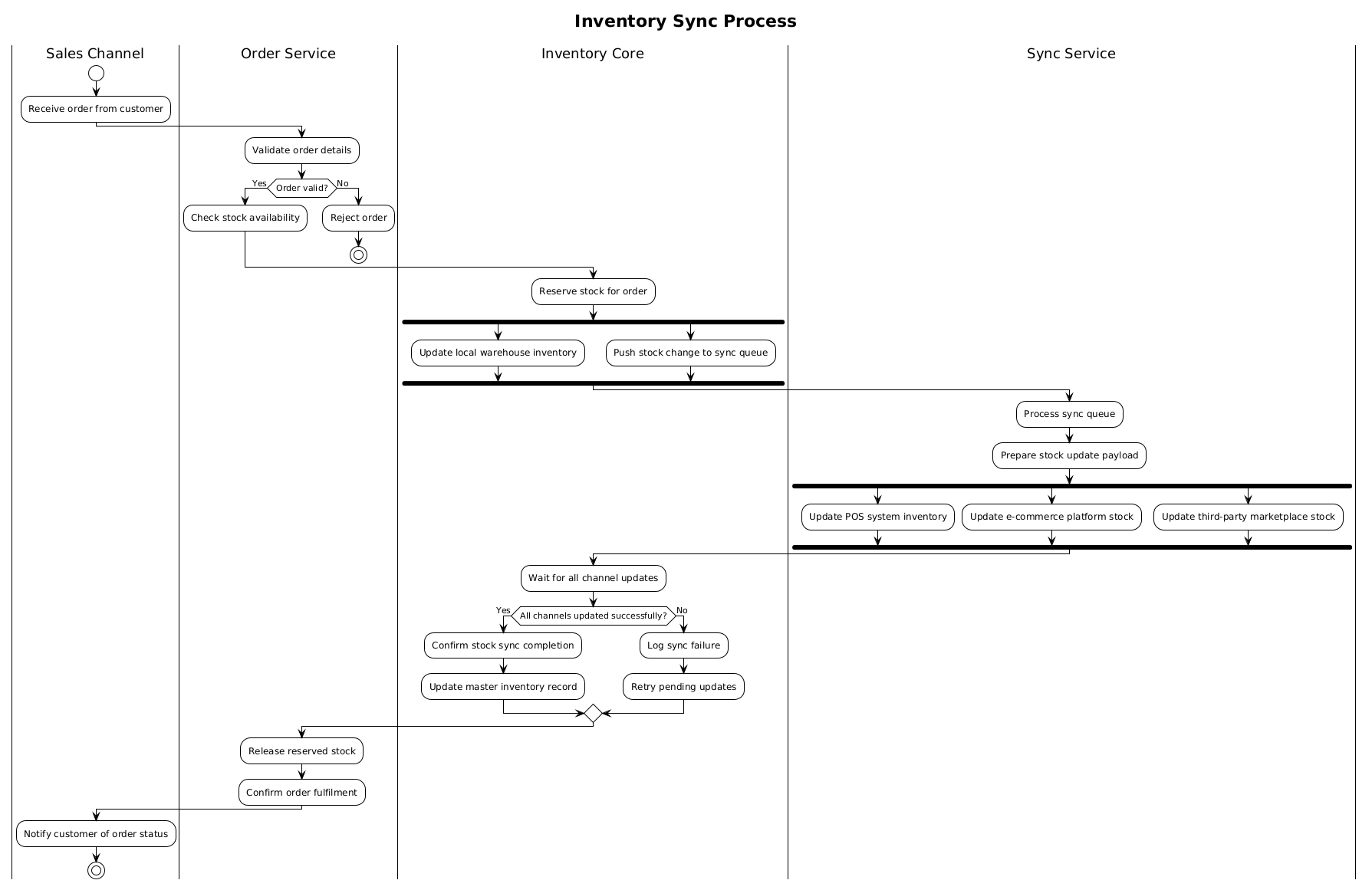
- Decision Points: Critical validation checks (e.g., Is the order valid? Are all channels updated?).
- Parallelism: The necessity of updating multiple systems (POS, E-commerce, Marketplaces) simultaneously to ensure real-time accuracy.
Target Domain Scope & Scenario
The scope of this model is bounded by the Order Service triggering the process and the Sales Channel receiving the final notification. It explicitly excludes the payment gateway or shipping logistics, focusing strictly on the integrity of the inventory data. The swimlanes divide responsibility among four distinct architectural layers:
- Sales Channel: The user interface and entry point.
- Order Service: Business logic validation.
- Inventory Core: The source of truth for stock levels.
- Sync Service: The middleware responsible for propagating changes.
Key Takeaways & Educational Insights
By constructing this diagram, you will gain clarity on how to handle failure scenarios (such as a sync failure) and how to enforce atomicity in distributed systems. You will learn how to visually represent the fork mechanism, which is essential for high-performance architectures where waiting for one update shouldn’t block others.
Complete Diagram & Full Source Code
Below is the finished blueprint for the Omnichannel Inventory Sync Process. You can view the rendered diagram immediately by pasting the code into the VPasCode editor.
@startuml
!theme plain
title Inventory Sync Process

|Sales Channel|
start
:Receive order from customer;

|Order Service|
:Validate order details;
if (Order valid?) then (Yes)
  :Check stock availability;
else (No)
  :Reject order;
  stop
endif

|Inventory Core|
:Reserve stock for order;

fork
  :Update local warehouse inventory;
fork again
  :Push stock change to sync queue;
end fork

|Sync Service|
:Process sync queue;
:Prepare stock update payload;

fork
  :Update POS system inventory;
fork again
  :Update e-commerce platform stock;
fork again
  :Update third-party marketplace stock;
end fork

|Inventory Core|
:Wait for all channel updates;

if (All channels updated successfully?) then (Yes)
  :Confirm stock sync completion;
  :Update master inventory record;
else (No)
  :Log sync failure;
  :Retry pending updates;
endif

|Order Service|
:Release reserved stock;
:Confirm order fulfilment;

|Sales Channel|
:Notify customer of order status;
stop
@endumlStep-by-Step Architectural Walkthrough
Building a professional diagram requires a structured approach. We will construct this model in four logical phases, starting with the canvas setup and ending with the final flow logic.
Phase 1: Canvas Configuration & Layout Directives
Every PlantUML diagram begins with configuration directives that define its visual identity. In this model, we prioritize clarity over decoration, suitable for technical documentation.
First, we set the visual theme to plain. This removes heavy styling, allowing the logic to stand out without visual noise. Second, we define the diagram’s title to provide immediate context for stakeholders viewing the documentation.
!theme plain
title Inventory Sync Process
Phase 2: Declaring Core Entities, Actors, and Boundaries
The swimlane notation is critical for defining ownership. In VPasCode, you declare a swimlane by placing the name between vertical bars (|). This creates a horizontal band where all subsequent actions belong to that specific actor until a new lane is declared.
We begin with the entry point in the Sales Channel and move to the Order Service for validation. This separation ensures that business logic is clearly distinguished from the user interface.
|Sales Channel|
start
:Receive order from customer;

|Order Service|
:Validate order details;
Phase 3: Mapping Data Flows & Key Interactions
Here we introduce the core logic of the system: decision-making and parallel processing. The if statement handles the validation gate. If the order is invalid, the process stops immediately to prevent downstream errors.
Once stock is reserved in the Inventory Core, the system must update multiple endpoints. This is where the fork keyword becomes essential. It instructs the renderer to branch the flow into parallel paths, simulating concurrent API calls to different systems.
|Inventory Core|
:Reserve stock for order;

fork
  :Update local warehouse inventory;
fork again
  :Push stock change to sync queue;
end fork
Phase 4: Grouping, Annotations & Visual Polish
The final phase ensures robustness. After the parallel updates, the flow converges at the Inventory Core again to verify success. A second if statement handles error recovery (logging and retrying). Finally, the process releases the reserved stock and notifies the customer before reaching the stop state.
Using VPasCode, you can adjust the skinparam settings to tweak colors or fonts, but the logic remains the source of truth. This modularity allows you to test changes to the flow without breaking the entire diagram.
Syntax & Keyword Deep Dive
Understanding the specific PlantUML keywords used in this retail workflow is key to mastering diagram-as-code. Below are the essential elements that make this model function.
startandstop: These define the entry and exit points of the activity. Every valid activity diagram must have exactly one start and one stop node.|Lane Name|: The swimlane delimiter. It groups related actions and visually separates responsibilities across the horizontal axis.if (Condition) then (True) else (False): The standard conditional block. It allows the diagram to branch based on runtime logic, such as order validation or sync success.fork/fork again/end fork: These keywords create parallel threads.forkstarts the first branch,fork againadds subsequent parallel branches, andend forkconverges them back into a single flow.:Action;: The action syntax. A colon followed by the action text and a semicolon defines a specific step in the workflow.
Best Practices & Pitfalls to Avoid
When modeling complex retail workflows, adherence to best practices ensures your diagrams remain maintainable and readable.
- Maintain Swimlane Clarity: Avoid jumping between swimlanes unnecessarily. Keep the flow vertical within a lane where possible to reduce visual clutter.
- Handle Failure Explicitly: As seen in this tutorial, never assume success. Always include an
elsepath for critical operations like stock reservation and API updates. - Limit Fork Complexity: While
forkis powerful, excessive parallelism can make a diagram hard to follow. Group related parallel actions logically. - Use Descriptive Labels: Action labels should be verb-first (e.g.,
:Validate orderrather thanOrder validation) to emphasize the dynamic nature of the flow.
Try It Yourself with VPasCode
Start Building Activity Diagrams Faster with VPasCode
Draft, preview, and refine your retail workflow diagrams instantly in your browser with our free PlantUML editor—no installation required.