


In the rapidly evolving fintech landscape, the reliability of a Payment Gateway System is paramount. Whether processing credit card transactions, managing merchant settlements, or handling secure refunds, the underlying software architecture must be robust, scalable, and clearly defined. For software architects and backend engineers, a Class Diagram serves as the blueprint for this complexity, mapping out the static structure, attributes, and methods of the system’s core entities.

However, traditional diagramming tools often require heavy installation, licensing fees, or manual drag-and-drop adjustments that slow down the design process. This is where VPasCode transforms the workflow. By leveraging a diagram-as-code approach with PlantUML, developers can define complex financial data models directly in text. This method enhances version readability, ensures consistency across teams, and allows for instant live rendering in the browser without any local environment setup.
In this masterclass, we will construct a professional Payment Gateway System Class Diagram. We will explore how to model critical entities like Merchants, Customers, Transactions, and Security Managers, while defining the intricate relationships that drive financial workflows. Using VPasCode, you will see how text-based modeling accelerates architectural clarity and documentation.
Understanding the Model: Purpose, Scope & Problem Framing
Before diving into the syntax, it is crucial to understand the abstraction we are building. A Class Diagram in UML represents the static structure of a system. It details the classes, their attributes (data fields), operations (methods), and the relationships between them.
Diagram Abstraction & Representation
In the context of a Payment Gateway, the diagram acts as a contract between developers. It defines:
- Entities: Core objects like
Merchant,Customer, andTransactionthat hold state. - Attributes: Sensitive data such as
apiKey,amount, orsecurityIdthat must be protected. - Operations: Actions the system can perform, such as
authorizePayment,processRefund, orencryptData. - Relationships: How these entities interact, such as a
Merchantprocessing multipleTransactionsor aSecurityManagerprotectingPaymentMethods.
Target Domain Scope & Scenario
This model focuses specifically on the core transactional logic of a payment gateway. It intentionally excludes UI components or infrastructure details (like server clusters) to maintain clarity on the business logic. The scope covers the full lifecycle of a payment: from customer initiation, through merchant processing, to security validation and final settlement.
Key Takeaways & Educational Insights
By completing this diagram, you will gain:
- Architectural Clarity: A visual map of how sensitive financial data flows between classes.
- Relationship Cardinality: Understanding how one merchant relates to thousands of transactions (1-to-Many).
- Security Modeling: How to explicitly model security concerns like tokenization and encryption within the class structure.
- Efficiency: The ability to iterate on the design in seconds using VPasCode‘s live rendering engine.
Complete Diagram & Full Source Code
Below is the complete PlantUML source code for the Payment Gateway System. This single block defines the theme, all 11 core classes, their attributes, methods, and the complex network of relationships connecting them.
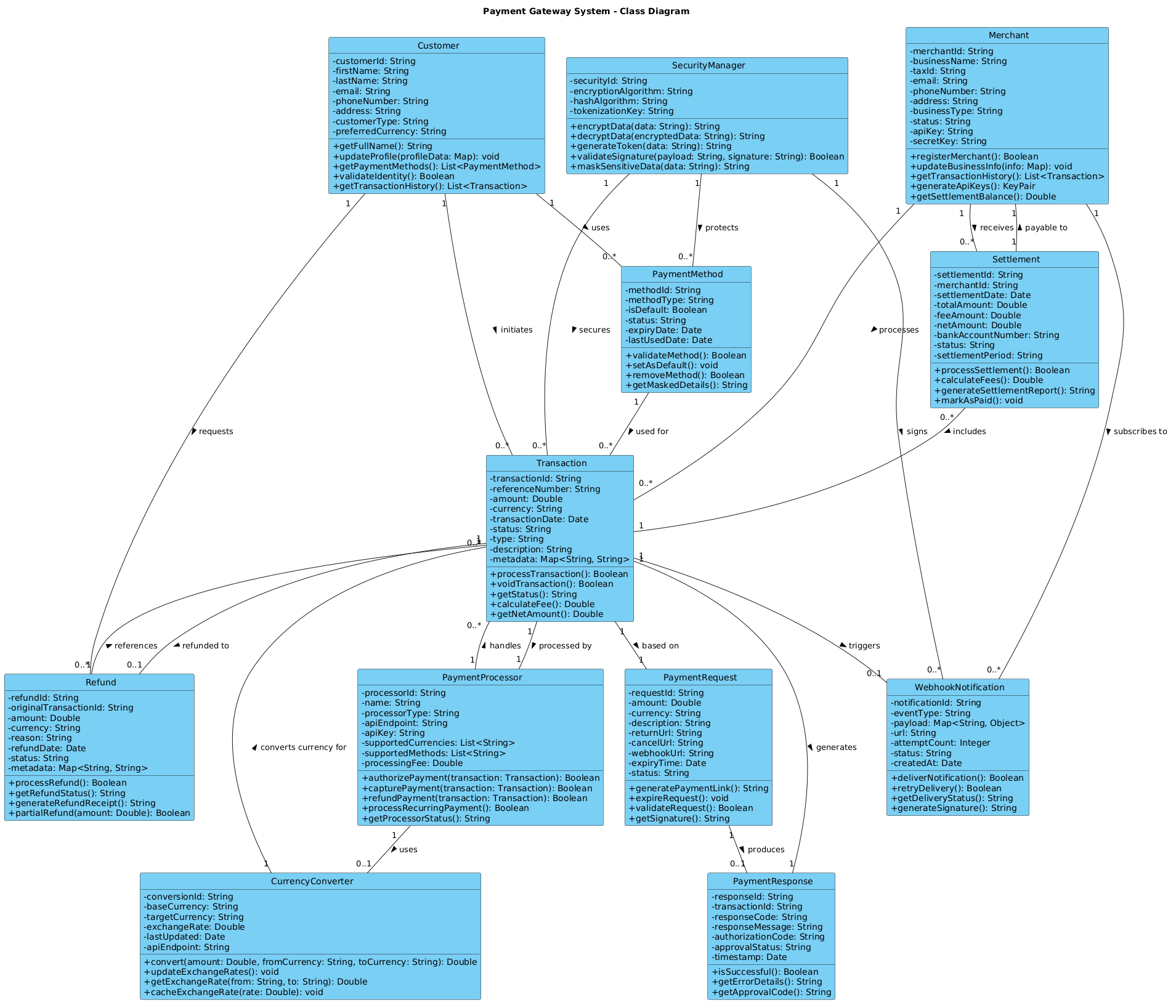
@startuml

!include https://static.visual-paradigm.com/web/resources/plantuml-stdlib/themes/vp.puml

title Payment Gateway System - Class Diagram

' Merchant and Customer classes
class Merchant {
  - merchantId: String
  - businessName: String
  - taxId: String
  - email: String
  - phoneNumber: String
  - address: String
  - businessType: String
  - status: String
  - apiKey: String
  - secretKey: String
  + registerMerchant(): Boolean
  + updateBusinessInfo(info: Map): void
  + getTransactionHistory(): List<Transaction>
  + generateApiKeys(): KeyPair
  + getSettlementBalance(): Double
}

class Customer {
  - customerId: String
  - firstName: String
  - lastName: String
  - email: String
  - phoneNumber: String
  - address: String
  - customerType: String
  - preferredCurrency: String
  + getFullName(): String
  + updateProfile(profileData: Map): void
  + getPaymentMethods(): List<PaymentMethod>
  + validateIdentity(): Boolean
  + getTransactionHistory(): List<Transaction>
}

class PaymentMethod {
  - methodId: String
  - methodType: String
  - isDefault: Boolean
  - status: String
  - expiryDate: Date
  - lastUsedDate: Date
  + validateMethod(): Boolean
  + setAsDefault(): void
  + removeMethod(): Boolean
  + getMaskedDetails(): String
}

' Transaction and Payment classes
class Transaction {
  - transactionId: String
  - referenceNumber: String
  - amount: Double
  - currency: String
  - transactionDate: Date
  - status: String
  - type: String
  - description: String
  - metadata: Map<String, String>
  + processTransaction(): Boolean
  + voidTransaction(): Boolean
  + getStatus(): String
  + calculateFee(): Double
  + getNetAmount(): Double
}

class PaymentRequest {
  - requestId: String
  - amount: Double
  - currency: String
  - description: String
  - returnUrl: String
  - cancelUrl: String
  - webhookUrl: String
  - expiryTime: Date
  - status: String
  + generatePaymentLink(): String
  + expireRequest(): void
  + validateRequest(): Boolean
  + getSignature(): String
}

class PaymentResponse {
  - responseId: String
  - transactionId: String
  - responseCode: String
  - responseMessage: String
  - authorizationCode: String
  - approvalStatus: String
  - timestamp: Date
  + isSuccessful(): Boolean
  + getErrorDetails(): String
  + getApprovalCode(): String
}

class PaymentProcessor {
  - processorId: String
  - name: String
  - processorType: String
  - apiEndpoint: String
  - apiKey: String
  - supportedCurrencies: List<String>
  - supportedMethods: List<String>
  - processingFee: Double
  + authorizePayment(transaction: Transaction): Boolean
  + capturePayment(transaction: Transaction): Boolean
  + refundPayment(transaction: Transaction): Boolean
  + processRecurringPayment(): Boolean
  + getProcessorStatus(): String
}

class Refund {
  - refundId: String
  - originalTransactionId: String
  - amount: Double
  - currency: String
  - reason: String
  - refundDate: Date
  - status: String
  - metadata: Map<String, String>
  + processRefund(): Boolean
  + getRefundStatus(): String
  + generateRefundReceipt(): String
  + partialRefund(amount: Double): Boolean
}

class WebhookNotification {
  - notificationId: String
  - eventType: String
  - payload: Map<String, Object>
  - url: String
  - attemptCount: Integer
  - status: String
  - createdAt: Date
  + deliverNotification(): Boolean
  + retryDelivery(): Boolean
  + getDeliveryStatus(): String
  + generateSignature(): String
}

class Settlement {
  - settlementId: String
  - merchantId: String
  - settlementDate: Date
  - totalAmount: Double
  - feeAmount: Double
  - netAmount: Double
  - bankAccountNumber: String
  - status: String
  - settlementPeriod: String
  + processSettlement(): Boolean
  + calculateFees(): Double
  + generateSettlementReport(): String
  + markAsPaid(): void
}

class SecurityManager {
  - securityId: String
  - encryptionAlgorithm: String
  - hashAlgorithm: String
  - tokenizationKey: String
  + encryptData(data: String): String
  + decryptData(encryptedData: String): String
  + generateToken(data: String): String
  + validateSignature(payload: String, signature: String): Boolean
  + maskSensitiveData(data: String): String
}

class CurrencyConverter {
  - conversionId: String
  - baseCurrency: String
  - targetCurrency: String
  - exchangeRate: Double
  - lastUpdated: Date
  - apiEndpoint: String
  + convert(amount: Double, fromCurrency: String, toCurrency: String): Double
  + updateExchangeRates(): void
  + getExchangeRate(from: String, to: String): Double
  + cacheExchangeRate(rate: Double): void
}

' Relationships
Merchant "1" -- "0..*" Transaction : processes >
Merchant "1" -- "0..*" Settlement : receives >
Merchant "1" -- "0..*" WebhookNotification : subscribes to >

Customer "1" -- "0..*" Transaction : initiates >
Customer "1" -- "0..*" PaymentMethod : uses >
Customer "1" -- "0..*" Refund : requests >

Transaction "1" -- "1" PaymentRequest : based on >
Transaction "1" -- "1" PaymentResponse : generates >
Transaction "1" -- "1" PaymentProcessor : processed by >
Transaction "1" -- "0..1" Refund : refunded to >
Transaction "1" -- "0..1" WebhookNotification : triggers >

PaymentMethod "1" -- "0..*" Transaction : used for >

PaymentProcessor "1" -- "0..*" Transaction : handles >
PaymentProcessor "1" -- "0..1" CurrencyConverter : uses >

Refund "1" -- "1" Transaction : references >

Settlement "1" -- "1" Merchant : payable to >
Settlement "0..*" -- "1" Transaction : includes >

SecurityManager "1" -- "0..*" Transaction : secures >
SecurityManager "1" -- "0..*" PaymentMethod : protects >
SecurityManager "1" -- "0..*" WebhookNotification : signs >

CurrencyConverter "1" -- "0..*" Transaction : converts currency for >

PaymentRequest "1" -- "0..1" PaymentResponse : produces >

@endumlStep-by-Step Architectural Walkthrough
Now that you have the full blueprint, let’s break down how to construct this diagram logically within VPasCode. We will walk through the process in four distinct phases.
Phase 1: Canvas Configuration & Layout Directives
Every PlantUML diagram begins with setup commands. We start by defining the theme to ensure the diagram looks professional and consistent with the VPasCode branding.
First, we include the standard library theme:
!include https://static.visual-paradigm.com/web/resources/plantuml-stdlib/themes/vp.pumlNext, we add a title to provide immediate context for anyone viewing the rendered output:
title Payment Gateway System - Class DiagramThis phase ensures that the visual style is applied globally before we define any specific classes.
Phase 2: Declaring Core Entities, Actors, and Boundaries
The foundation of a Class Diagram is the class definition. In PlantUML, a class is defined using the class keyword followed by the name and a block containing attributes and methods.
Consider the Merchant class. It represents the business entity receiving payments. We define private attributes with a minus sign (-) and public methods with a plus sign (+):
class Merchant {
  - merchantId: String
  - apiKey: String
  + registerMerchant(): Boolean
  + getSettlementBalance(): Double
}
We repeat this pattern for Customer, PaymentMethod, and Transaction. Notice how we use specific data types like String, Double, and Date to enforce type safety in the design.
Phase 3: Mapping Data Flows & Key Interactions
Once the classes are defined, we must establish how they relate. Relationships are drawn using the -- operator. We define cardinality (multiplicity) to indicate how many instances of one class relate to another.
For example, a single Merchant can process many Transactions, but a Transaction belongs to only one Merchant. This is expressed as:
Merchant "1" -- "0..*" Transaction : processes >Here, "1" means exactly one, and "0..*" means zero to many. The arrow direction indicates the navigability or the primary flow of the relationship.
Phase 4: Grouping, Annotations & Visual Polish
While this diagram relies heavily on relationships, we also include utility classes like SecurityManager and CurrencyConverter. These are critical for cross-cutting concerns like encryption and internationalization.
We ensure the diagram is complete by linking the Refund process back to the original Transaction:
Refund "1" -- "1" Transaction : references >This ensures the audit trail is visually represented, showing that every refund is tied to a specific transaction ID.
Syntax & Keyword Deep Dive
To master PlantUML class diagrams, you must understand the specific syntax used in this model. Below are the critical keywords and conventions utilized:
class: Defines a new class entity. The name follows immediately after the keyword.-(Private):** Precedes attributes or methods that are internal to the class (e.g.,- merchantId).+(Public):** Precedes methods accessible from outside the class (e.g.,+ registerMerchant()).--(Association):** Creates a solid line relationship between two classes."1"/"0..*"(Cardinality):** Defines the minimum and maximum number of instances allowed in a relationship.:(Label):** Used to add a descriptive text label to the relationship line (e.g.,: processes >).::(Inheritance):** Though not heavily used in this specific snippet,extendsorextendssyntax is used for inheritance.
Best Practices & Pitfalls to Avoid
When designing complex system diagrams like this Payment Gateway model, adherence to best practices ensures maintainability and clarity.
- Maintain Logical Grouping: Keep related classes close together in your code (e.g., all transaction-related classes together) to make the source file easier to read, even if the layout engine rearranges them.
- Use Meaningful Names: Avoid generic names like
Class1. Use domain-specific terms likePaymentProcessororSettlementto reflect the finance industry context. - Limit Attribute Depth: Do not list every single database column. Only include attributes that are critical to the system’s logic or API contract.
- Validate Relationships: Ensure cardinalities make sense. A
Customershould not be able to initiate aRefundwithout an underlyingTransaction.
Try It Yourself with VPasCode
Start Building Class Diagrams Faster with VPasCode
Visualize complex finance system architectures instantly with zero setup using our free PlantUML editor.