


In the fast-paced world of digital retail, the backbone of any successful e-commerce platform lies in its data architecture. For software architects and backend engineers, translating complex business requirements into a structured class model is the critical first step before writing a single line of application code. An E-commerce Storefront System is not merely a list of products; it is a sophisticated ecosystem involving user management, inventory tracking, order processing, payment gateways, and shipment logistics.
Visualizing this domain through a Class Diagram allows teams to align on object-oriented design principles, specifically how entities like Order, Product, and Payment interact. Using PlantUML within the VPasCode editor empowers developers to define these relationships declaratively. This approach ensures that the visual model remains synchronized with the codebase, serving as living documentation that evolves alongside the system.
By leveraging a diagram-as-code tool like VPasCode, you eliminate the friction of manual drawing. You can instantly render, iterate, and export your architecture, ensuring that your E-commerce design is robust, scalable, and ready for implementation.
Understanding the Model: Purpose, Scope & Problem Framing
Diagram Abstraction & Representation
A Class Diagram is the structural blueprint of an object-oriented system. In the context of an E-commerce Storefront, this diagram answers critical architectural questions: Who owns the data? How are relationships maintained? What is the lifecycle of an object?
- Entities: Represent real-world objects like
Customer,Product, orOrder. - Attributes: Define the state of these entities (e.g.,
price,email,status). - Methods: Define the behaviors (e.g.,
placeOrder(),updatePrice()). - Relationships: Define how entities connect, ranging from simple associations to strong compositions.
Target Domain Scope & Scenario
This tutorial focuses on the core domain logic of a retail application. We model the essential boundaries:
- Identity Management: Distinguishing between generic
Userroles and specificCustomerorAdminprofiles. - Product Catalog: Managing
Productdata, categorization, and inventory levels. - Transaction Flow: The lifecycle from
ShoppingCarttoOrder, includingPaymentprocessing andShipmenttracking.
We intentionally exclude infrastructure concerns like database connection strings or API endpoints to focus purely on the business logic structure.
Key Takeaways & Educational Insights
By following this guide, you will gain the ability to:
- Differentiate between Composition (strong ownership) and Aggregation (shared ownership) in domain modeling.
- Implement Generalization (inheritance) to handle polymorphism in user roles and payment methods.
- Structure a scalable class hierarchy using PlantUML syntax within VPasCode.
Complete Diagram & Full Source Code
Before diving into the step-by-step construction, here is the complete, production-ready source code for the E-commerce Storefront System class diagram. You can copy this directly into the VPasCode editor to see the rendered visualization.
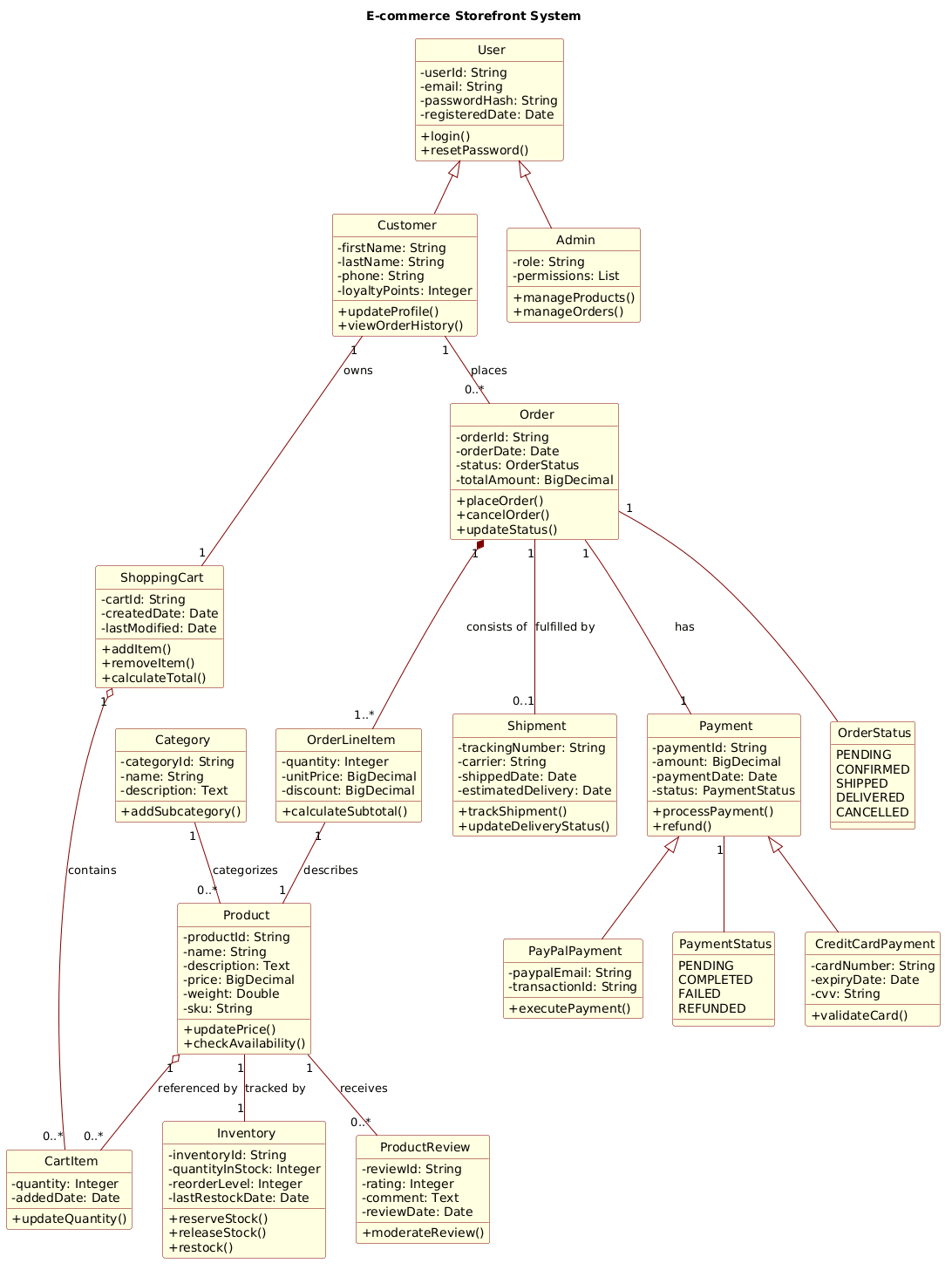
@startuml
!include https://static.visual-paradigm.com/web/resources/plantuml-stdlib/themes/rose.puml

title E-commerce Storefront System

/'
This class diagram models the core domain entities and relationships for a typical e-commerce storefront.
It captures the essential structure for managing products, customer accounts, shopping sessions, orders,
payments, and inventory. The system supports product categorization, customer reviews, and order
fulfillment through shipment tracking. The diagram illustrates key design decisions such as composition
for order-line items (orders own their line items), aggregation for shopping carts (carts reference
products without owning them), and inheritance for differentiated user roles and payment methods.
The context assumes a relational database-backed application with object-relational mapping, focusing
on business logic rather than infrastructure concerns like data access layers or external service integrations.
'/

class User {
  - userId: String
  - email: String
  - passwordHash: String
  - registeredDate: Date
  + login()
  + resetPassword()
}

class Customer {
  - firstName: String
  - lastName: String
  - phone: String
  - loyaltyPoints: Integer
  + updateProfile()
  + viewOrderHistory()
}

class Admin {
  - role: String
  - permissions: List
  + manageProducts()
  + manageOrders()
}

class Product {
  - productId: String
  - name: String
  - description: Text
  - price: BigDecimal
  - weight: Double
  - sku: String
  + updatePrice()
  + checkAvailability()
}

class Category {
  - categoryId: String
  - name: String
  - description: Text
  + addSubcategory()
}

class ProductReview {
  - reviewId: String
  - rating: Integer
  - comment: Text
  - reviewDate: Date
  + moderateReview()
}

class ShoppingCart {
  - cartId: String
  - createdDate: Date
  - lastModified: Date
  + addItem()
  + removeItem()
  + calculateTotal()
}

class CartItem {
  - quantity: Integer
  - addedDate: Date
  + updateQuantity()
}

class Order {
  - orderId: String
  - orderDate: Date
  - status: OrderStatus
  - totalAmount: BigDecimal
  + placeOrder()
  + cancelOrder()
  + updateStatus()
}

enum OrderStatus {
  PENDING
  CONFIRMED
  SHIPPED
  DELIVERED
  CANCELLED
}

class OrderLineItem {
  - quantity: Integer
  - unitPrice: BigDecimal
  - discount: BigDecimal
  + calculateSubtotal()
}

class Payment {
  - paymentId: String
  - amount: BigDecimal
  - paymentDate: Date
  - status: PaymentStatus
  + processPayment()
  + refund()
}

enum PaymentStatus {
  PENDING
  COMPLETED
  FAILED
  REFUNDED
}

class CreditCardPayment {
  - cardNumber: String
  - expiryDate: Date
  - cvv: String
  + validateCard()
}

class PayPalPayment {
  - paypalEmail: String
  - transactionId: String
  + executePayment()
}

class Shipment {
  - trackingNumber: String
  - carrier: String
  - shippedDate: Date
  - estimatedDelivery: Date
  + trackShipment()
  + updateDeliveryStatus()
}

class Inventory {
  - inventoryId: String
  - quantityInStock: Integer
  - reorderLevel: Integer
  - lastRestockDate: Date
  + reserveStock()
  + releaseStock()
  + restock()
}

' Generalization (inheritance)
User <|-- Customer
User <|-- Admin

' Association (bi-directional)
Customer "1" -- "0..*" Order : places
Customer "1" -- "1" ShoppingCart : owns
Product "1" -- "0..*" ProductReview : receives
Category "1" -- "0..*" Product : categorizes

' Aggregation (shared ownership)
ShoppingCart "1" o-- "0..*" CartItem : contains
Product "1" o-- "0..*" CartItem : referenced by

' Composition (strong ownership)
Order "1" *-- "1..*" OrderLineItem : consists of
OrderLineItem "1" -- "1" Product : describes
Order "1" -- "1" Payment : has
Order "1" -- "0..1" Shipment : fulfilled by

' Association with enum
Order "1" -- OrderStatus

' Payment inheritance
Payment <|-- CreditCardPayment
Payment <|-- PayPalPayment

' Inventory association
Product "1" -- "1" Inventory : tracked by

' Payment status association
Payment "1" -- PaymentStatus
@endumlStep-by-Step Architectural Walkthrough
Now that you have the complete view, let’s break down how to construct this diagram logically within VPasCode. We will build this in four distinct phases.
Phase 1: Canvas Configuration & Layout Directives
Every professional diagram starts with the right environment. We begin by including the necessary theme to ensure the visual output matches modern UI standards.
First, we define the diagram title to provide immediate context to stakeholders:
title E-commerce Storefront SystemNext, we apply the rose.puml theme to give the classes a clean, rounded aesthetic with distinct color coding for different entity types. This is done via the include directive at the very top of the file:
!include https://static.visual-paradigm.com/web/resources/plantuml-stdlib/themes/rose.pumlFinally, we add a comment block to document the architectural intent. This is crucial for team alignment and future maintenance:
/'
This class diagram models the core domain entities...
'/
Phase 2: Declaring Core Entities, Actors, and Boundaries
The foundation of the system consists of the primary actors and the core domain objects. We define these using the class keyword, specifying attributes (fields) and methods (behaviors).
Identity Management: We start with the User base class, which holds common authentication data. We then define specialized roles like Customer and Admin.
class User {
  - userId: String
  - email: String
  + login()
}

class Customer {
  - firstName: String
  - loyaltyPoints: Integer
}
Product Catalog: The heart of an e-commerce store is the product. We define Product, Category, and Inventory to manage stock levels and categorization.
class Product {
  - price: BigDecimal
  - sku: String
  + checkAvailability()
}
Phase 3: Mapping Data Flows & Key Interactions
With entities defined, we now connect them to represent business logic. This is where PlantUML shines in modeling relationships.
Order Lifecycle: An Order is composed of multiple OrderLineItems. This is a strong relationship; if the order is deleted, the line items lose meaning. We use the Composition symbol (*--):
Order "1" *-- "1..*" OrderLineItem : consists ofShopping Cart: A cart contains items, but the items themselves (e.g., a Product) exist independently of the cart. This is an Aggregation relationship (o--):
ShoppingCart "1" o-- "0..*" CartItem : containsInheritance: To handle different payment methods, we create a base Payment class and extend it with CreditCardPayment and PayPalPayment using Generalization (<|--):
Payment <|-- CreditCardPayment
Payment <|-- PayPalPayment
Phase 4: Grouping, Annotations & Visual Polish
To complete the diagram, we incorporate enumerations for state management. Enums like OrderStatus and PaymentStatus keep the data consistent across the application.
We also ensure cardinality is explicitly defined (e.g., "1", "0..*") to clarify how many instances of one class relate to another. For example, a Customer can place zero or many Orders:
Customer "1" -- "0..*" Order : placesThis phase ensures the diagram is not just a list of classes, but a functional map of the system's data flow.
Syntax & Keyword Deep Dive
Understanding the specific PlantUML syntax is key to mastering diagram-as-code. Here are the critical keywords used in this E-commerce model:
class: Defines a class with attributes (-for private,+for public) and methods. Example:class User { ... }.enum: Defines an enumeration of constant values. Example:enum OrderStatus { PENDING, ... }.<|--: Represents Generalization (Inheritance). The arrow points from the subclass to the superclass (e.g.,CustomerextendsUser).*--: Represents Composition. A strong "owns" relationship where the child cannot exist without the parent (e.g.,OrderownsOrderLineItem).o--: Represents Aggregation. A weaker "has-a" relationship where the child can exist independently (e.g.,Productis referenced byCartItem).--: Represents a standard Association. A bidirectional link between two entities (e.g.,CustomerplacesOrder)."1"/"0..*": Cardinality constraints.1means exactly one,0..*means zero or many.
Best Practices & Pitfalls to Avoid
When modeling complex systems like E-commerce platforms, adherence to best practices ensures maintainability:
- Separation of Concerns: Do not mix infrastructure concerns (like database connection details) with domain logic. Keep your classes focused on business entities.
- Consistent Naming: Use clear, camelCase or PascalCase naming conventions. Avoid abbreviations unless they are industry-standard (e.g.,
SKUis fine,qtyis less clear). - Correct Relationship Usage: Distinguish carefully between Composition (
*--) and Aggregation (o--). Misusing these can lead to confusion about object lifecycles in the actual code. - Modular Diagrams: If the diagram becomes too large, consider splitting it into sub-diagrams (e.g., one for User Management, one for Order Processing) and linking them.
Try It Yourself with VPasCode
Start Building E-commerce Class Diagrams Faster with VPasCode
Instantly render, customize, and share your PlantUML class diagrams in the browser without installing any tools.