


In the rapidly evolving landscape of financial technology, Treasury Management Systems (TMS) serve as the backbone for corporate cash management, investment tracking, and risk assessment. Financial institutions and multinational corporations rely on sophisticated class models to orchestrate complex relationships between treasury instruments, cash positions, investment portfolios, and risk management components. Without clear visual documentation, the architectural complexity of these systems can become opaque to development teams, leading to integration issues and maintenance challenges.

Diagramming-as-code with PlantUML offers a powerful solution for documenting these intricate financial architectures. By encoding class relationships, inheritance hierarchies, and cardinality constraints directly in text, architects can maintain living documentation that evolves alongside their systems. VPasCode provides the ideal platform for this workflow, enabling instant browser-based rendering of complex UML class diagrams without requiring local Java installations or CLI toolchains. This tutorial demonstrates how to construct a professional-grade Treasury Management System class diagram that captures the essential domain entities and their interdependencies.
Understanding the Model: Purpose, Scope & Problem Framing
A class diagram serves as the structural blueprint for any object-oriented software system. In the context of a Treasury Management System, this diagram type is particularly valuable because it explicitly models the domain entities that financial professionals interact with daily. Unlike sequence diagrams that capture temporal behavior or use case diagrams that focus on user interactions, a class diagram reveals the static relationships and data structures that form the system’s foundation.
Diagram Abstraction & Representation
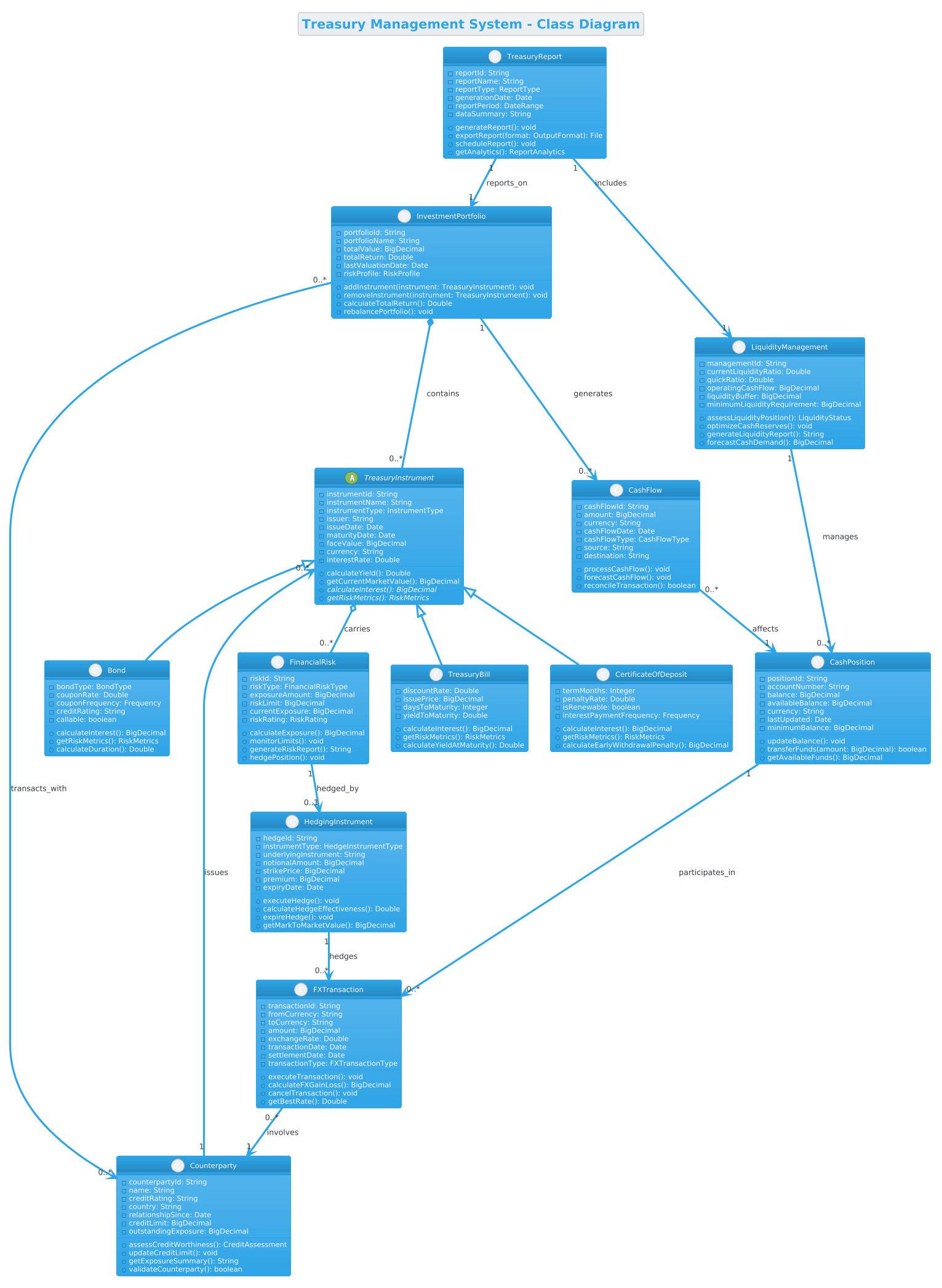
This Treasury Management System class diagram models the core financial entities and their relationships using standard UML notation. The TreasuryInstrument abstract class establishes the foundation for all tradable financial instruments, with concrete implementations like Bond, TreasuryBill, and CertificateOfDeposit extending its functionality. This inheritance hierarchy allows the system to treat diverse financial products uniformly while preserving their unique characteristics.
The diagram also captures critical business relationships through composition (strong ownership), aggregation (weak ownership), and association (connections). For instance, InvestmentPortfolio compositionally owns TreasuryInstrument instances, meaning instruments cannot exist independently of a portfolio. Conversely, TreasuryInstrument aggregates FinancialRisk data, indicating that risk metrics can exist independently of the instrument itself.
Target Domain Scope & Scenario
This model focuses on the core treasury operations domain, including:
- Instrument Management: Bonds, Treasury bills, and certificates of deposit with their specific attributes and calculations
- Cash Position Tracking: Account balances, available funds, and transfer operations
- Investment Portfolio: Portfolio composition, valuation, and rebalancing capabilities
- Risk Management: Exposure monitoring, limit tracking, and hedging strategies
- Counterparty Management: Credit assessment and relationship tracking
- Reporting: Automated report generation and analytics
Key Takeaways & Educational Insights
By studying and building this diagram, readers will gain:
- Understanding of UML inheritance hierarchies and abstract class design patterns
- Ability to model complex cardinality relationships (one-to-many, many-to-many)
- Knowledge of composition versus aggregation in domain modeling
- Practical experience with PlantUML class diagram syntax and styling
- Insight into financial domain concepts and their software representations
Complete Diagram & Full Source Code
Before diving into the construction process, examine the complete Treasury Management System class diagram to understand the final architectural vision. This diagram includes 10+ classes with various relationship types, demonstrating how PlantUML can express complex domain models in a concise, readable format.
@startuml

!theme cerulean
title Treasury Management System - Class Diagram

' Abstract base class
abstract class TreasuryInstrument {
  - instrumentId: String
  - instrumentName: String
  - instrumentType: InstrumentType
  - issuer: String
  - issueDate: Date
  - maturityDate: Date
  - faceValue: BigDecimal
  - currency: String
  - interestRate: Double
  + calculateYield(): Double
  + getCurrentMarketValue(): BigDecimal
  + {abstract} calculateInterest(): BigDecimal
  + {abstract} getRiskMetrics(): RiskMetrics
}

' Derived classes from TreasuryInstrument
class Bond {
  - bondType: BondType
  - couponRate: Double
  - couponFrequency: Frequency
  - creditRating: String
  - callable: boolean
  + calculateInterest(): BigDecimal
  + getRiskMetrics(): RiskMetrics
  + calculateDuration(): Double
}

class TreasuryBill {
  - discountRate: Double
  - issuePrice: BigDecimal
  - daysToMaturity: Integer
  - yieldToMaturity: Double
  + calculateInterest(): BigDecimal
  + getRiskMetrics(): RiskMetrics
  + calculateYieldAtMaturity(): Double
}

class CertificateOfDeposit {
  - termMonths: Integer
  - penaltyRate: Double
  - isRenewable: boolean
  - interestPaymentFrequency: Frequency
  + calculateInterest(): BigDecimal
  + getRiskMetrics(): RiskMetrics
  + calculateEarlyWithdrawalPenalty(): BigDecimal
}

' CashPosition class
class CashPosition {
  - positionId: String
  - accountNumber: String
  - balance: BigDecimal
  - availableBalance: BigDecimal
  - currency: String
  - lastUpdated: Date
  - minimumBalance: BigDecimal
  + updateBalance(): void
  + transferFunds(amount: BigDecimal): boolean
  + getAvailableFunds(): BigDecimal
}

' CashFlow class
class CashFlow {
  - cashFlowId: String
  - amount: BigDecimal
  - currency: String
  - cashFlowDate: Date
  - cashFlowType: CashFlowType
  - source: String
  - destination: String
  + processCashFlow(): void
  + forecastCashFlow(): void
  + reconcileTransaction(): boolean
}

' InvestmentPortfolio class
class InvestmentPortfolio {
  - portfolioId: String
  - portfolioName: String
  - totalValue: BigDecimal
  - totalReturn: Double
  - lastValuationDate: Date
  - riskProfile: RiskProfile
  + addInstrument(instrument: TreasuryInstrument): void
  + removeInstrument(instrument: TreasuryInstrument): void
  + calculateTotalReturn(): Double
  + rebalancePortfolio(): void
}

' LiquidityManagement class
class LiquidityManagement {
  - managementId: String
  - currentLiquidityRatio: Double
  - quickRatio: Double
  - operatingCashFlow: BigDecimal
  - liquidityBuffer: BigDecimal
  - minimumLiquidityRequirement: BigDecimal
  + assessLiquidityPosition(): LiquidityStatus
  + optimizeCashReserves(): void
  + generateLiquidityReport(): String
  + forecastCashDemand(): BigDecimal
}

' FinancialRisk class
class FinancialRisk {
  - riskId: String
  - riskType: FinancialRiskType
  - exposureAmount: BigDecimal
  - riskLimit: BigDecimal
  - currentExposure: BigDecimal
  - riskRating: RiskRating
  + calculateExposure(): BigDecimal
  + monitorLimits(): void
  + generateRiskReport(): String
  + hedgePosition(): void
}

' HedgingInstrument class
class HedgingInstrument {
  - hedgeId: String
  - instrumentType: HedgeInstrumentType
  - underlyingInstrument: String
  - notionalAmount: BigDecimal
  - strikePrice: BigDecimal
  - premium: BigDecimal
  - expiryDate: Date
  + executeHedge(): void
  + calculateHedgeEffectiveness(): Double
  + expireHedge(): void
  + getMarkToMarketValue(): BigDecimal
}

' FXTransaction class
class FXTransaction {
  - transactionId: String
  - fromCurrency: String
  - toCurrency: String
  - amount: BigDecimal
  - exchangeRate: Double
  - transactionDate: Date
  - settlementDate: Date
  - transactionType: FXTransactionType
  + executeTransaction(): void
  + calculateFXGainLoss(): BigDecimal
  + cancelTransaction(): void
  + getBestRate(): Double
}

' Counterparty class
class Counterparty {
  - counterpartyId: String
  - name: String
  - creditRating: String
  - country: String
  - relationshipSince: Date
  - creditLimit: BigDecimal
  - outstandingExposure: BigDecimal
  + assessCreditWorthiness(): CreditAssessment
  + updateCreditLimit(): void
  + getExposureSummary(): String
  + validateCounterparty(): boolean
}

' TreasuryReport class
class TreasuryReport {
  - reportId: String
  - reportName: String
  - reportType: ReportType
  - generationDate: Date
  - reportPeriod: DateRange
  - dataSummary: String
  + generateReport(): void
  + exportReport(format: OutputFormat): File
  + scheduleReport(): void
  + getAnalytics(): ReportAnalytics
}

' ============ Relationships ============

' Generalization (Inheritance)
TreasuryInstrument <|-- Bond
TreasuryInstrument <|-- TreasuryBill
TreasuryInstrument <|-- CertificateOfDeposit

' Composition (InvestmentPortfolio - TreasuryInstrument) - Strong ownership
InvestmentPortfolio *-- "0..*" TreasuryInstrument : contains

' Association (CashFlow - CashPosition) - One-to-Many
CashFlow "0..*" --> "1" CashPosition : affects

' Association (LiquidityManagement - CashPosition) - One-to-Many
LiquidityManagement "1" --> "0..*" CashPosition : manages

' Association (InvestmentPortfolio - CashFlow) - One-to-Many
InvestmentPortfolio "1" --> "0..*" CashFlow : generates

' Aggregation (TreasuryInstrument - FinancialRisk) - Weak ownership
TreasuryInstrument o-- "0..*" FinancialRisk : carries

' Association (FinancialRisk - HedgingInstrument) - One-to-One
FinancialRisk "1" --> "0..1" HedgingInstrument : hedged_by

' Association (Counterparty - TreasuryInstrument) - One-to-Many
Counterparty "1" --> "0..*" TreasuryInstrument : issues

' Association (InvestmentPortfolio - Counterparty) - Many-to-Many
InvestmentPortfolio "0..*" --> "0..*" Counterparty : transacts_with

' Association (FXTransaction - Counterparty) - Many-to-One
FXTransaction "0..*" --> "1" Counterparty : involves

' Association (TreasuryReport - InvestmentPortfolio) - One-to-One
TreasuryReport "1" --> "1" InvestmentPortfolio : reports_on

' Association (TreasuryReport - LiquidityManagement) - One-to-One
TreasuryReport "1" --> "1" LiquidityManagement : includes

' Association (CashPosition - FXTransaction) - One-to-Many
CashPosition "1" --> "0..*" FXTransaction : participates_in

' Association (HedgingInstrument - FXTransaction) - One-to-Many
HedgingInstrument "1" --> "0..*" FXTransaction : hedges

@endumlStep-by-Step Architectural Walkthrough
Now that you’ve seen the complete diagram, let’s break down its construction into logical phases. This approach helps you understand not just the syntax, but the architectural thinking behind each modeling decision.
Phase 1: Canvas Configuration & Layout Directives
Every PlantUML diagram begins with configuration directives that establish the visual theme and overall layout. For this Treasury Management System diagram, we start with the @startuml directive to signal the beginning of the diagram definition.
@startuml

!theme cerulean
title Treasury Management System - Class Diagram
The !theme cerulean directive applies a professional blue-themed color scheme that works well for financial documentation. The title directive adds a descriptive header that appears at the top of the rendered diagram. These configuration elements set the stage before any class definitions appear.
Phase 2: Declaring Core Entities, Actors, and Boundaries
The foundation of any class diagram is the entity definitions. Each class declaration follows a consistent pattern: visibility modifiers, attributes, and methods.
abstract class TreasuryInstrument {
  - instrumentId: String
  - instrumentName: String
  - instrumentType: InstrumentType
  - issuer: String
  - issueDate: Date
  - maturityDate: Date
  - faceValue: BigDecimal
  - currency: String
  - interestRate: Double
  + calculateYield(): Double
  + getCurrentMarketValue(): BigDecimal
  + {abstract} calculateInterest(): BigDecimal
  + {abstract} getRiskMetrics(): RiskMetrics
}
Notice the use of abstract class for TreasuryInstrument, which indicates this class cannot be instantiated directly but serves as a base for concrete implementations. The - prefix denotes private attributes, while + denotes public methods. Abstract methods are marked with {abstract} to indicate they must be implemented by subclasses.
The derived classes Bond, TreasuryBill, and CertificateOfDeposit inherit from TreasuryInstrument while adding their own domain-specific attributes and methods.
Phase 3: Mapping Data Flows & Key Interactions
Relationships between classes express how entities interact and depend on each other. PlantUML uses distinct arrow styles and symbols to represent different relationship types.
TreasuryInstrument <|-- Bond
TreasuryInstrument <|-- TreasuryBill
TreasuryInstrument <|-- CertificateOfDeposit
The <|-- notation indicates generalization (inheritance), where the arrow points from subclass to superclass. This establishes the inheritance hierarchy clearly.
For composition relationships (strong ownership), we use the filled diamond:
InvestmentPortfolio *-- "0..*" TreasuryInstrument : containsThe filled diamond on the InvestmentPortfolio side indicates that TreasuryInstrument objects are owned by the portfolio and cannot exist independently. The "0..*" notation specifies that a portfolio can contain zero or more instruments.
Association relationships use standard arrows with cardinality notation:
CashFlow "0..*" --> "1" CashPosition : affectsThis indicates that multiple CashFlow records can affect a single CashPosition, establishing a many-to-one relationship.
Phase 4: Grouping, Annotations & Visual Polish
While this diagram doesn't use packages explicitly, we can organize related classes through naming conventions and logical grouping. The relationship section at the end of the diagram uses comments to separate relationship definitions from class definitions.
' ============ Relationships ============

' Generalization (Inheritance)
TreasuryInstrument <|-- Bond
Single-line comments starting with ' help document the diagram's structure without affecting rendering. The section header comment =========== creates visual separation between different parts of the diagram definition.
Syntax & Keyword Deep Dive
Understanding PlantUML class diagram syntax is essential for creating maintainable, professional diagrams. Here's a breakdown of the key syntax elements used in this Treasury Management System diagram:
- class: Declares a standard class with attributes and methods
- abstract class: Declares an abstract class that cannot be instantiated directly
-prefix: Denotes private attributes (accessible only within the class)+prefix: Denotes public methods (accessible from outside the class){abstract}keyword: Marks methods that must be implemented by subclasses<|--symbol: Indicates generalization (inheritance) relationship*--symbol: Indicates composition (strong ownership) relationshipo--symbol: Indicates aggregation (weak ownership) relationship-->symbol: Indicates standard association relationship"0..*"notation: Specifies cardinality (zero or more)"1"notation: Specifies cardinality (exactly one)"0..1"notation: Specifies cardinality (zero or one)!themedirective: Applies visual theme to the entire diagramtitledirective: Adds a descriptive title to the diagram
Best Practices & Pitfalls to Avoid
Creating maintainable class diagrams requires following established modeling conventions. Here are key best practices to apply when working with PlantUML in VPasCode:
1. Maintain Consistent Naming Conventions
Use clear, descriptive class names that reflect their domain purpose. Avoid abbreviations that may confuse team members. For example, use CashPosition instead of Cash to distinguish it from cash flow entities.
2. Balance Abstraction and Detail
Include only the attributes and methods that are relevant to the diagram's purpose. Don't clutter the diagram with every possible attribute of a class. Focus on relationships and key domain concepts.
3. Choose Appropriate Relationship Types
Use composition for strong ownership relationships, aggregation for weak ownership, and association for general connections. Misusing these relationships can lead to architectural confusion.
4. Document Cardinality Clearly
Always specify cardinality notation ("0..*", "1", "0..1") to avoid ambiguity about how many instances of each class can be related.
5. Test Incrementally
Build and test your diagram incrementally in VPasCode's live editor. Add classes and relationships gradually to catch syntax errors early and understand how each change affects the overall diagram.
Try It Yourself with VPasCode
Start Building Treasury Management System Diagrams Faster with VPasCode
Create and refine your PlantUML class diagrams instantly in your browser with VPasCode's live rendering engine—no local installation required.