


In the high-stakes environment of healthcare technology, clarity in system architecture is not just a design preference; it is a safety requirement. When building software to manage Organ Transplant Matching Systems, the complexity of relationships between donors, recipients, medical profiles, and surgical logistics demands a rigorous visual blueprint. Diagrams serve as the universal language that aligns medical professionals, software engineers, and compliance officers on how data flows through the system before a single line of production code is written.
Using diagram-as-code tools like VPasCode allows architects to define these complex structures textually, ensuring version stability and precise syntax validation without the drag-and-drop ambiguity of traditional whiteboards. This approach is particularly vital for class diagrams, where inheritance hierarchies and data composition must be exact. By leveraging PlantUML within the VPasCode browser editor, you can rapidly prototype the core entities of a transplant system, verify relationship cardinalities, and document the logic that drives life-saving matches.
Understanding the Model: Purpose, Scope & Problem Framing
This tutorial focuses on constructing a Class Diagram for an Organ Transplant Matching System. In the context of healthcare software, a class diagram acts as the structural blueprint, defining the static organization of the system’s components. It maps out the entities (like Patient and Donor), their attributes (such as bloodType and medicalHistory), and the critical associations that bind them together (such as Waitlist items and MatchResult outcomes).
Diagram Abstraction & Representation: Unlike sequence diagrams that focus on time-based interactions, this class diagram abstracts the system into its persistent building blocks. It illustrates how a Person is generalized into specific roles like Patient or Donor, and how sensitive data like MedicalProfile is composed within those roles. It visualizes the logic engine (MatchingEngine) that processes these entities to generate viable matches.
Target Domain Scope & Scenario: The scope covers the core data model required to manage the lifecycle of a transplant: from donor registration and patient waitlisting to the surgical outcome. It intentionally excludes external integrations like hospital billing systems or real-time sensor data, focusing instead on the internal logic of matching and eligibility.
Key Takeaways & Educational Insights: By completing this guide, you will understand how to model complex inheritance trees, differentiate between composition and aggregation in healthcare data, and implement a theme to maintain professional visual standards. You will gain the ability to document system boundaries clearly, ensuring that developers and medical stakeholders share a unified understanding of the data architecture.
Complete Diagram & Full Source Code
Before diving into the construction phases, here is the complete, finalized diagram that we will build together. This model encapsulates the necessary entities to handle donor-recipient matching, urgency scoring, and surgical coordination.
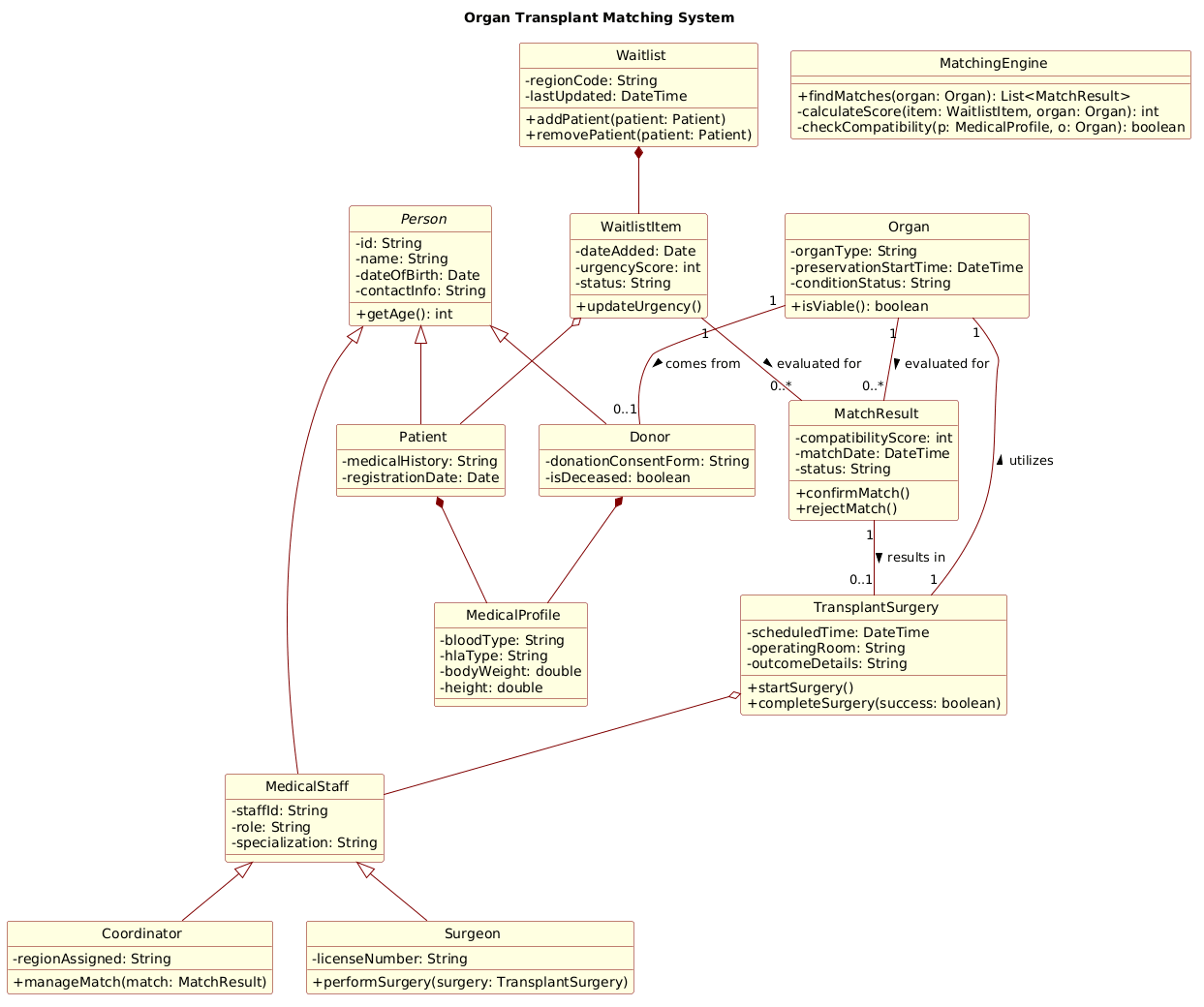
The following code block contains the complete PlantUML source. You can copy this directly into the VPasCode editor to render the diagram instantly.
@startuml

!include https://static.visual-paradigm.com/web/resources/plantuml-stdlib/themes/rose.puml

title Organ Transplant Matching System

/'
This class diagram represents an Organ Transplant Matching System designed to
efficiently and ethically pair organ donors with compatible recipients. The system
manages detailed medical profiles, tracks the status of patients on waitlists,
coordinates urgent transplant matches based on medical urgency and biological
compatibility, and logs the outcomes of surgical procedures.
'/

abstract class Person {
    - id: String
    - name: String
    - dateOfBirth: Date
    - contactInfo: String
    + getAge(): int
}

class Patient {
    - medicalHistory: String
    - registrationDate: Date
}

class Donor {
    - donationConsentForm: String
    - isDeceased: boolean
}

class MedicalProfile {
    - bloodType: String
    - hlaType: String
    - bodyWeight: double
    - height: double
}

class Waitlist {
    - regionCode: String
    - lastUpdated: DateTime
    + addPatient(patient: Patient)
    + removePatient(patient: Patient)
}

class WaitlistItem {
    - dateAdded: Date
    - urgencyScore: int
    - status: String
    + updateUrgency()
}

class Organ {
    - organType: String
    - preservationStartTime: DateTime
    - conditionStatus: String
    + isViable(): boolean
}

class MatchingEngine {
    + findMatches(organ: Organ): List<MatchResult>
    - calculateScore(item: WaitlistItem, organ: Organ): int
    - checkCompatibility(p: MedicalProfile, o: Organ): boolean
}

class MatchResult {
    - compatibilityScore: int
    - matchDate: DateTime
    - status: String
    + confirmMatch()
    + rejectMatch()
}

class TransplantSurgery {
    - scheduledTime: DateTime
    - operatingRoom: String
    - outcomeDetails: String
    + startSurgery()
    + completeSurgery(success: boolean)
}

class MedicalStaff {
    - staffId: String
    - role: String
    - specialization: String
}

class Coordinator {
    - regionAssigned: String
    + manageMatch(match: MatchResult)
}

class Surgeon {
    - licenseNumber: String
    + performSurgery(surgery: TransplantSurgery)
}

' --- Relationships ---

' Generalization (Inheritance)
Person <|-- Patient
Person <|-- Donor
Person <|-- MedicalStaff
MedicalStaff <|-- Coordinator
MedicalStaff <|-- Surgeon

' Composition
Patient *-- MedicalProfile
Donor *-- MedicalProfile
Waitlist *-- WaitlistItem

' Aggregation
WaitlistItem o-- Patient
TransplantSurgery o-- MedicalStaff

' Association
Organ "1" -- "0..1" Donor : comes from >
WaitlistItem "1" -- "0..*" MatchResult : evaluated for >
Organ "1" -- "0..*" MatchResult : evaluated for >
MatchResult "1" -- "0..1" TransplantSurgery : results in >
TransplantSurgery "1" -- "1" Organ : utilizes >

@endumlStep-by-Step Architectural Walkthrough
Building a robust healthcare class diagram requires a methodical approach. We will construct this model in four distinct phases, ensuring that the structure is sound before adding complex relationships.
Phase 1: Canvas Configuration & Layout Directives
The first step in any PlantUML project is setting the stage. We begin by defining the theme to ensure the diagram looks professional and consistent with healthcare documentation standards. We also set the title and add a descriptive comment block to explain the diagram’s purpose to future maintainers.
!include https://static.visual-paradigm.com/web/resources/plantuml-stdlib/themes/rose.puml

title Organ Transplant Matching System

/'
This class diagram represents an Organ Transplant Matching System designed to
efficiently and ethically pair organ donors with compatible recipients...
'/
The !include directive pulls in the rose.puml theme, which applies a consistent color palette and styling. The title directive provides a clear header, while the /' ... '/ block acts as a multi-line comment that renders as documentation within the diagram context.
Phase 2: Declaring Core Entities, Actors, and Boundaries
Next, we define the fundamental classes. In this healthcare scenario, the hierarchy starts with a generic Person class. We use the abstract keyword to indicate that Person itself is not instantiated directly but serves as a base for specific roles.
abstract class Person {
    - id: String
    - name: String
    - dateOfBirth: Date
    - contactInfo: String
    + getAge(): int
}
We then define specialized classes like Patient and Donor. Notice that Patient includes medicalHistory, while Donor includes donationConsentForm. This distinction is critical for compliance and data privacy in healthcare systems. We also define MedicalStaff and its sub-roles Coordinator and Surgeon to represent the human operators within the system.
Phase 3: Mapping Data Flows & Key Interactions
With entities defined, we model the core business logic. The MatchingEngine class is central to the system. It contains methods like findMatches and checkCompatibility. We also define Waitlist and WaitlistItem to manage patient queues. Each WaitlistItem tracks an urgencyScore, which is a key metric for transplant prioritization.
class MatchingEngine {
    + findMatches(organ: Organ): List
    - calculateScore(item: WaitlistItem, organ: Organ): int
    - checkCompatibility(p: MedicalProfile, o: Organ): boolean
}
Here, we see method signatures using PlantUML syntax. The return type List indicates that the engine can return multiple potential matches, reflecting the real-world scenario where one organ might be suitable for several patients.
Phase 4: Grouping, Annotations & Visual Polish
The final phase involves connecting the classes with relationships that accurately reflect the domain logic. We use different arrow types to denote the strength of the relationship between entities.
' Composition
Patient *-- MedicalProfile
Donor *-- MedicalProfile

' Aggregation
WaitlistItem o-- Patient

' Association
Organ "1" -- "0..1" Donor : comes from >
Composition (*--) is used for MedicalProfile because a profile cannot exist independently of a patient or donor. Aggregation (o--) is used for WaitlistItem to Patient because a patient can exist outside the specific waitlist context. Association (--) with cardinality labels like "1" and "0..*" defines the multiplicity of the relationships, ensuring the data model enforces correct constraints.
Syntax & Keyword Deep Dive
To fully leverage PlantUML for healthcare architecture, it is essential to understand the specific keywords used in this diagram. Here is a breakdown of the critical syntax elements:
abstract class: Indicates that the class serves as a base for inheritance and cannot be instantiated directly. Used here forPerson.<|--: Represents Generalization (Inheritance). The arrow points from the subclass to the superclass (e.g.,PatientextendsPerson).*--: Represents Composition. This is a strong form of aggregation where the child part cannot exist without the parent (e.g.,MedicalProfilebelongs toPatient).o--: Represents Aggregation. A weak relationship where the child can exist independently of the parent (e.g.,Patientexists even if removed from a specificWaitlistItem)."1" -- "0..*": Represents Association with Cardinality. This defines how many instances of one class relate to another (e.g., One Organ can be evaluated for Zero to Many Match Results).!include: A directive to import external style files or macros, allowing for consistent theming across multiple diagrams.
Best Practices & Pitfalls to Avoid
When modeling complex healthcare systems like this, adherence to best practices ensures the diagram remains maintainable and accurate over time.
- Maintain Clear Inheritance Hierarchies: Avoid deep inheritance chains. In this diagram, we kept the hierarchy shallow (Person -> Patient/Donor) to prevent confusion. Deep nesting can make the diagram hard to read.
- Use Precise Cardinality Labels: Always specify cardinality (e.g.,
"0..1"vs"1..*") on associations. In transplant systems, knowing if a donor is mandatory for an organ record or optional is critical for database schema design. - Separate Logic from Data: Notice how
MatchingEngineis separate fromOrganorWaitlist. Keep the logic classes distinct from the data entities to maintain separation of concerns. - Document with Comments: Use the
/' ... '/syntax to add high-level context. In regulated industries like healthcare, diagrams often serve as compliance artifacts, so clear documentation is mandatory.
Start Building PlantUML Class Diagrams Faster with VPasCode
Instantly prototype your healthcare system architecture with zero setup. Test syntax, apply themes, and export diagrams directly from your browser.