


In the competitive landscape of online gaming, maintaining fairness and integrity is paramount. A robust anti-cheat system is not just a security feature; it is the backbone of player trust and ecosystem health. For software architects and game developers, visualizing the intricate data flows between the game client, matchmaking servers, and security services is essential to ensure reliability under load. Diagramming these workflows as code allows teams to iterate quickly, document complex logic, and validate system boundaries before a single line of production code is written.

This tutorial demonstrates how to construct a professional activity diagram using PlantUML within VPasCode. We will model the lifecycle of an anti-cheat detection event, from initial player action logging to the final enforcement of a ban. By leveraging swimlanes, fork/join blocks, and conditional logic, you can create a clear, living blueprint of your security architecture that remains accessible to all stakeholders.
Understanding the Model: Purpose, Scope & Problem Framing
Diagram Abstraction & Representation: Activity diagrams are the ideal tool for modeling the dynamic behavior of a system. In this context, the diagram maps the chronological flow of control and data across multiple interacting components. Unlike static class diagrams, activity diagrams capture the runtime process, including concurrency (parallel scanning), decision points (cheat detection), and termination states (ban or allow).
Target Domain Scope & Scenario: This model focuses specifically on the post-matchmaking or during-match security pipeline. It isolates the interaction between the Game Client (the user endpoint), the Matchmaking Server (the orchestration layer), the Anti-Cheat Service (the analysis engine), and the Admin Panel (the oversight interface). It intentionally excludes unrelated flows like payment processing or lobby selection to maintain clarity.
Key Takeaways & Educational Insights: By building this diagram, you will gain insight into how to manage complex state transitions in a distributed system. You will learn how to represent asynchronous background tasks (memory scans) alongside synchronous network requests, and how to handle error paths and evidence logging effectively.
Complete Diagram & Full Source Code
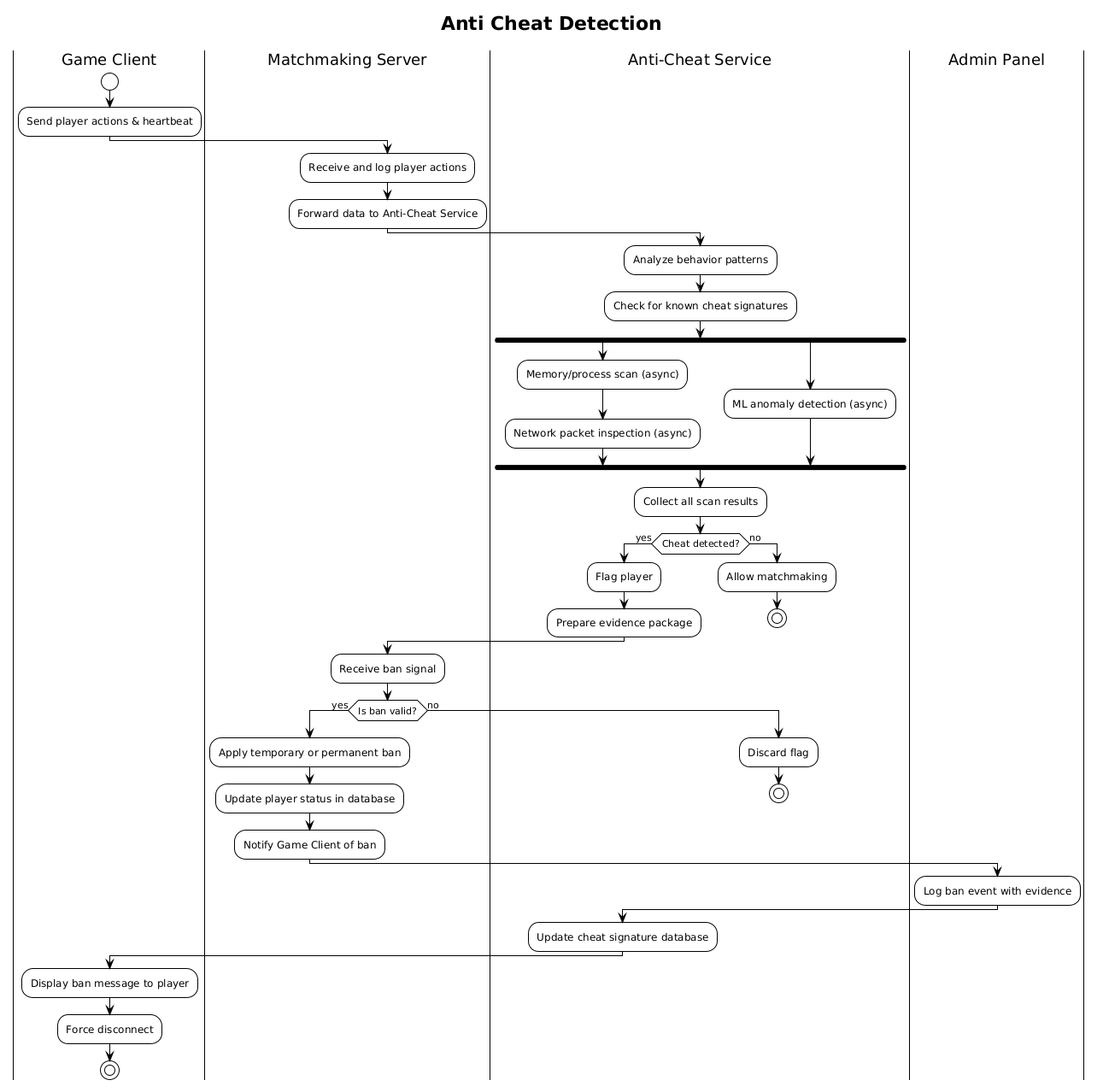
Below is the complete source code for the Anti-Cheat Activity Diagram. This code utilizes the !theme plain directive for a clean look and organizes logic into four distinct swimlanes.
@startuml
!theme plain
title Anti Cheat Detection

|Game Client|
|Matchmaking Server|
|Anti-Cheat Service|
|Admin Panel|

|Game Client|
start
:Send player actions & heartbeat;

|Matchmaking Server|
:Receive and log player actions;
:Forward data to Anti-Cheat Service;

|Anti-Cheat Service|
:Analyze behavior patterns;
:Check for known cheat signatures;

fork
  :Memory/process scan (async);
  :Network packet inspection (async);
fork again
  :ML anomaly detection (async);
end fork

:Collect all scan results;

if (Cheat detected?) then (yes)
  :Flag player;
  :Prepare evidence package;
  ->|Trigger ban| Matchmaking Server;
else (no)
  :Allow matchmaking;
  stop
endif

|Matchmaking Server|
:Receive ban signal;
if (Is ban valid?) then (yes)
  :Apply temporary or permanent ban;
  :Update player status in database;
  :Notify Game Client of ban;
  |Admin Panel|
  :Log ban event with evidence;
  |Anti-Cheat Service|
  :Update cheat signature database;
else (no)
  :Discard flag;
  stop
endif

|Game Client|
:Display ban message to player;
:Force disconnect;

stop
@endumlStep-by-Step Architectural Walkthrough
Building this diagram in VPasCode is a modular process. We will break the construction down into four logical phases to ensure structural integrity and readability.
Phase 1: Canvas Configuration & Layout Directives
Every PlantUML diagram begins with setup directives. Here, we define the visual theme to ensure consistency across your documentation. We also declare the title to provide immediate context for the diagram.
@startuml
!theme plain
title Anti Cheat Detection
The !theme plain directive removes default styling decorations, creating a cleaner look suitable for technical documentation. The title directive sets the main heading displayed at the top of the rendered diagram.
Phase 2: Declaring Core Entities, Actors, and Boundaries
Activity diagrams rely on swimlanes to separate responsibilities. In this model, we define four critical actors: the Game Client, Matchmaking Server, Anti-Cheat Service, and Admin Panel. These define the vertical boundaries where specific actions will occur.
|Game Client|
|Matchmaking Server|
|Anti-Cheat Service|
|Admin Panel|
Notice how we declare the lanes at the top. When an action is assigned to a specific lane (e.g., |Game Client|), all subsequent actions remain in that lane until a new lane declaration is encountered. This visual separation is crucial for understanding system ownership.
Phase 3: Mapping Data Flows & Key Interactions
The core logic begins with the client sending data. We then move to the Matchmaking Server, which acts as a router. The Anti-Cheat Service handles the heavy lifting, utilizing concurrency to perform multiple checks simultaneously.
fork
  :Memory/process scan (async);
  :Network packet inspection (async);
fork again
  :ML anomaly detection (async);
end fork
The fork and end fork blocks allow us to model parallel processing. This is vital for anti-cheat systems where memory scanning and network inspection happen at the same time to reduce latency. The -> arrow represents a message passing between lanes, specifically triggering the ban process.
Phase 4: Grouping, Annotations & Visual Polish
Finally, we handle the decision logic and termination states. The if block determines the flow based on detection results. We ensure that both success and failure paths are clearly marked with stop nodes.
if (Cheat detected?) then (yes)
  ...
else (no)
  ...
endif
Using then (yes) and else (no) labels makes the diagram self-documenting. The final stop node indicates the end of the process for that specific transaction, ensuring the diagram does not appear to loop indefinitely.
Syntax & Keyword Deep Dive
Understanding the specific PlantUML syntax is key to mastering diagram-as-code. Here are the critical keywords used in this anti-cheat workflow model:
title: Defines the main heading of the diagram, ensuring immediate context for viewers.|lane|: Declares a swimlane. Any action following this declaration belongs to that specific actor or component until a new lane is declared.fork/fork again/end fork: Creates parallel threads of execution. This is essential for modeling asynchronous tasks like background security scans.if/then/else: Implements conditional logic. It splits the flow based on a boolean condition (e.g., detection status).stop: Terminates the current flow. It acts as a terminal node for a specific path.->|label|: Represents a message arrow with a custom label, often used for cross-lane communication like triggering a ban.
Best Practices & Pitfalls to Avoid
To maintain high-quality diagrams in VPasCode, follow these architectural modeling guidelines:
- Maintain Swimlane Clarity: Avoid moving actions between lanes too frequently. Keep related logic within the same lane to reduce visual noise and cognitive load.
- Balance Concurrency: Use
forkblocks only when necessary. Overusing parallel flows can make the diagram difficult to read. Ensure thatend forkis always present to join the threads. - Label Decision Paths: Never leave
ifbranches unlabeled. Always specify(yes)and(no)or(true)and(false)to make the flow unambiguous. - Consistent Naming: Use descriptive labels for actions (e.g.,
Apply temporary or permanent baninstead of justBan) to provide context without needing external documentation.
Try It Yourself with VPasCode
Start Building PlantUML Activity Diagrams Faster with VPasCode
Design complex gaming workflows instantly in your browser with zero setup, testing logic and swimlanes in real time.