


In the rapidly evolving landscape of healthcare data management, precision is not just a preference—it is a regulatory and clinical necessity. For optometry clinics, the complexity of patient care extends far beyond a simple appointment log. A single patient visit may involve a comprehensive vision exam, the diagnosis of a specific ocular condition, the issuance of a complex prescription, and potentially a specialized contact lens fitting session. Each of these events generates a distinct set of data points that must be captured, linked, and retrieved with absolute integrity over time.

Traditional spreadsheet-based tracking often fails to capture the relational depth required here. How do we ensure that a specific contact lens fitting is linked to the exact vision exam that prompted it? How do we track multiple prescriptions for the same patient across different years without data duplication? This is where the power of diagramming-as-code comes into play. By modeling the data architecture using PlantUML within the VPasCode editor, healthcare architects can visualize the intricate web of relationships between patients, providers, and clinical events. This approach transforms abstract database requirements into a clear, living blueprint that developers can implement directly, ensuring compliance with industry standards and facilitating seamless data interoperability.
Understanding the Model: Purpose, Scope & Problem Framing
Diagram Abstraction & Representation
This Entity Relationship Diagram (ERD) serves as the structural backbone for a clinical database system. In this specific context, the ERD models the static structure of data rather than the dynamic flow of user interaction. It defines the “nouns” of the system—Patients, Providers, Exams, Diagnoses, Prescriptions, and Fittings—and explicitly maps the “verbs” or relationships that bind them together. For instance, the diagram clarifies that a Provider (the doctor) conducts a VisionExam, which in turn may result in a Prescription. It also handles complex scenarios, such as a single exam leading to multiple fittings or a single patient undergoing multiple exams over their lifetime.
Target Domain Scope & Scenario
The scope of this model is strictly defined within the domain of an optometry practice. It intentionally excludes billing or inventory management systems to focus purely on the clinical data lifecycle. The diagram addresses the specific challenge of separating encounters (the exam) from outcomes (the prescription or fitting). This separation is critical for analytics; it allows the clinic to query, for example, “Which patients had a diagnosis of glaucoma in 2023 but did not receive a contact lens fitting?” The model also introduces a reference entity for ContactLensProduct, ensuring that every fitting records the specific brand and material used, which is vital for tracking adverse reactions or product recalls.
Key Takeaways & Educational Insights
By building this diagram, you will gain a deep understanding of how to model one-to-many relationships (e.g., one patient has many exams) and how to handle optional relationships (e.g., an exam may lead to a fitting, but not always). You will learn how to structure primary keys (PK) and foreign keys (FK) to maintain referential integrity and how to use PlantUML’s entity syntax to define attributes with specific data types like DECIMAL for precise optical measurements.
Complete Diagram & Full Source Code
Below is the complete, rendered view of the Optometry Vision Exam ERD. This diagram visualizes the relationships between the core clinical entities, ensuring that every data point from patient demographics to lens base curves is properly connected.
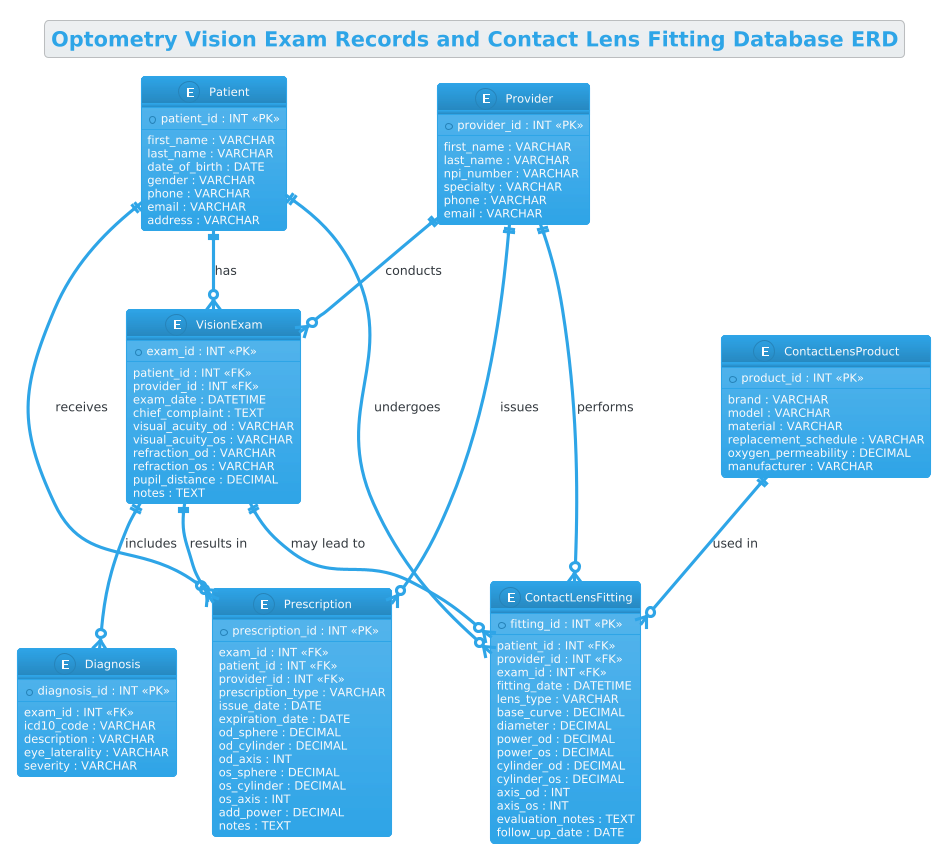
The following code block contains the complete PlantUML source code. You can copy this directly into the VPasCode editor to render the diagram instantly.
@startuml
!theme cerulean
title Optometry Vision Exam Records and Contact Lens Fitting Database ERD

/'
Diagram Context:
This ERD models an optometry clinic's core clinical data for vision exams and contact lens fittings.
It supports recording patient demographics, provider details, exam findings, diagnoses, prescriptions,
and contact lens fitting parameters. The structure is designed to separate exam encounters from
prescription and fitting events, allowing one patient to have multiple exams and multiple fittings over time.
It also captures the relationship between a fitting and the specific contact lens product used,
as well as the provider who performed the service.
'/

' Entities
entity "Patient" as patient {
  * patient_id : INT <<PK>>
  --
  first_name : VARCHAR
  last_name : VARCHAR
  date_of_birth : DATE
  gender : VARCHAR
  phone : VARCHAR
  email : VARCHAR
  address : VARCHAR
}

entity "Provider" as provider {
  * provider_id : INT <<PK>>
  --
  first_name : VARCHAR
  last_name : VARCHAR
  npi_number : VARCHAR
  specialty : VARCHAR
  phone : VARCHAR
  email : VARCHAR
}

entity "VisionExam" as exam {
  * exam_id : INT <<PK>>
  --
  patient_id : INT <<FK>>
  provider_id : INT <<FK>>
  exam_date : DATETIME
  chief_complaint : TEXT
  visual_acuity_od : VARCHAR
  visual_acuity_os : VARCHAR
  refraction_od : VARCHAR
  refraction_os : VARCHAR
  pupil_distance : DECIMAL
  notes : TEXT
}

entity "Diagnosis" as diagnosis {
  * diagnosis_id : INT <<PK>>
  --
  exam_id : INT <<FK>>
  icd10_code : VARCHAR
  description : VARCHAR
  eye_laterality : VARCHAR
  severity : VARCHAR
}

entity "Prescription" as prescription {
  * prescription_id : INT <<PK>>
  --
  exam_id : INT <<FK>>
  patient_id : INT <<FK>>
  provider_id : INT <<FK>>
  prescription_type : VARCHAR
  issue_date : DATE
  expiration_date : DATE
  od_sphere : DECIMAL
  od_cylinder : DECIMAL
  od_axis : INT
  os_sphere : DECIMAL
  os_cylinder : DECIMAL
  os_axis : INT
  add_power : DECIMAL
  notes : TEXT
}

entity "ContactLensFitting" as fitting {
  * fitting_id : INT <<PK>>
  --
  patient_id : INT <<FK>>
  provider_id : INT <<FK>>
  exam_id : INT <<FK>>
  fitting_date : DATETIME
  lens_type : VARCHAR
  base_curve : DECIMAL
  diameter : DECIMAL
  power_od : DECIMAL
  power_os : DECIMAL
  cylinder_od : DECIMAL
  cylinder_os : DECIMAL
  axis_od : INT
  axis_os : INT
  evaluation_notes : TEXT
  follow_up_date : DATE
}

entity "ContactLensProduct" as lens_product {
  * product_id : INT <<PK>>
  --
  brand : VARCHAR
  model : VARCHAR
  material : VARCHAR
  replacement_schedule : VARCHAR
  oxygen_permeability : DECIMAL
  manufacturer : VARCHAR
}

' Relationships
patient ||--o{ exam : "has"
provider ||--o{ exam : "conducts"
exam ||--o{ diagnosis : "includes"
exam ||--o{ prescription : "results in"
patient ||--o{ prescription : "receives"
provider ||--o{ prescription : "issues"
patient ||--o{ fitting : "undergoes"
provider ||--o{ fitting : "performs"
exam ||--o{ fitting : "may lead to"
lens_product ||--o{ fitting : "used in"

@endumlStep-by-Step Architectural Walkthrough
Phase 1: Canvas Configuration & Layout Directives
The first step in building a professional diagram is setting the stage. We begin with the @startuml directive to signal the start of the PlantUML code. Immediately following this, we apply the !theme cerulean directive. This is a crucial styling choice for healthcare diagrams; the Cerulean theme provides a clean, blue-toned aesthetic that conveys trust and clinical professionalism, distinct from the default black-and-white look.
Next, we define the diagram title using the title command. This ensures that any exported image or PDF automatically includes a descriptive header. Finally, we insert a comment block using / and / to document the context of the diagram. This documentation is vital for future developers or stakeholders who need to understand the business logic without reading the raw code.
' Comment block starts here
/'
Diagram Context:
This ERD models an optometry clinic's core clinical data...
'/
' Comment block ends here
Phase 2: Declaring Core Entities, Actors, and Boundaries
The core of an ERD is the entity definition. In PlantUML, we use the entity keyword. Each entity represents a table in the database. We define the entity name (e.g., "Patient") and assign a short alias (e.g., as patient) for use in relationship lines later. Inside the curly braces {}, we list the attributes.
For the Patient entity, we start with the primary key. In PlantUML, an asterisk * denotes a Primary Key (PK). We define * patient_id : INT <. The < stereotype is optional if we use the asterisk, but it adds explicit clarity. We use a double dash -- to create a visual separator between the key and the other attributes. We then list standard demographic fields like first_name and date_of_birth with their data types (e.g., VARCHAR, DATE). This pattern is repeated for Provider, VisionExam, Diagnosis, Prescription, ContactLensFitting, and ContactLensProduct, ensuring each table has a unique identifier and relevant clinical attributes.
entity "VisionExam" as exam {
* exam_id : INT <>
--
patient_id : INT <>
provider_id : INT < >
exam_date : DATETIME
... Phase 3: Mapping Data Flows & Key Interactions
Once the entities are defined, we establish the relationships between them using the ||--o{ syntax. This specific arrow notation is standard for Entity Relationship Diagrams. The || on the left indicates “mandatory one” (the parent entity must exist), and the o{ on the right indicates “optional many” (the child entity can have zero or more instances). For example, patient ||--o{ exam : "has" means one patient can have zero or many exams, but an exam must belong to exactly one patient.
We map the clinical flow logically: A Provider conducts an Exam. An Exam can include multiple Diagnoses. An Exam results in a Prescription. Crucially, we also model the ContactLensFitting, which links back to the Patient, Provider, and the original Exam. This creates a robust history of care. We also link the ContactLensProduct to the Fitting to track which specific lens was used for which patient.
provider ||--o{ exam : "conducts"
exam ||--o{ diagnosis : "includes"
lens_product ||--o{ fitting : "used in"
Phase 4: Grouping, Annotations & Visual Polish
While this diagram uses a flat structure for clarity, PlantUML allows for grouping entities into packages if the model grows larger. In this case, we rely on the title and the comment block for context. We ensure visual consistency by using the DECIMAL type for optical measurements (sphere, cylinder, axis) and INT for discrete counts. The use of FK stereotypes on foreign keys (like patient_id : INT <) in the entity definitions helps developers quickly identify the join keys when translating this diagram into SQL. The !theme cerulean directive applied at the start ensures the entire diagram, including these relationships, adopts a cohesive, professional look.
Syntax & Keyword Deep Dive
To build this diagram effectively, it is essential to understand the specific PlantUML syntax elements used:
entity "Name" as alias: Defines a new table. The name in quotes is the display label, while the alias is the shorthand variable used in relationship lines.* attribute : TYPE <: The asterisk> *marks the Primary Key. TheTYPEdefines the data structure (e.g.,INT,VARCHAR). The<(like> PKorFK) adds metadata that can be rendered visually or used by code generators.--: A separator line used within an entity to visually divide the primary key from the rest of the attributes.||--o{: The cardinality notation.||means “exactly one” (mandatory), ando{means “zero or more” (optional). This is the standard Crow’s Foot notation for One-to-Many relationships."relationship name": The text string placed after the arrow defines the semantic meaning of the relationship (e.g., “conducts”, “results in”)./…/: Multi-line comment syntax. This allows you to embed documentation directly in the code without it being rendered as a diagram element.
Best Practices & Pitfalls to Avoid
When modeling complex healthcare systems like this optometry database, adhere to these best practices to ensure your diagram remains scalable and maintainable:
- Maintain Referential Integrity: Always ensure that foreign keys in child tables (like
patient_idin the VisionExam table) match the data type and name of the primary key in the parent table. Inconsistent naming can lead to SQL errors during implementation. - Separate Concerns: Notice how we separated VisionExam from ContactLensFitting. A common pitfall is combining these into a single table. By keeping them separate, you allow a patient to have an exam without a fitting, or a fitting without a new exam (e.g., a follow-up), preserving data flexibility.
- Use Meaningful Aliases: When defining relationships, using short aliases (like
as exam) makes the relationship lines much cleaner and easier to read than repeating the full entity name. - Document with Comments: Always include a comment block explaining the scope. As the system grows, new developers will thank you for the context provided in the
/…/block.
Try It Yourself with VPasCode
Start Building Optometry ERDs Faster with VPasCode
Instantly render, customize, and export your healthcare database schemas online with VPasCode’s free PlantUML editor—no local installation required.