


In the high-stakes environment of Emergency Medical Services (EMS), data integrity is not merely a technical requirement; it is a matter of patient safety and operational efficiency. When a 911 call comes in, a complex chain of events is triggered involving dispatchers, ambulance crews, and clinical documentation. To support this workflow, a well-structured database schema is essential. It must seamlessly track the lifecycle of an emergency incident—from the initial call intake and location triangulation to the assignment of specific vehicles and crews, and finally, the detailed clinical record of care provided at the scene and during transport.

Traditional database design often struggles to capture the nuances of these dynamic interactions without becoming overly complex or rigid. This is where diagramming-as-code, specifically using PlantUML, offers a transformative advantage. By defining the schema in code, architects can version the data model alongside the application logic, ensuring that the database structure evolves in lockstep with the software. In this tutorial, we will build a comprehensive Entity Relationship Diagram (ERD) for an Ambulance Dispatch and Pre-hospital Emergency Care system using VPasCode. This visual blueprint will illuminate how disparate data points—such as vital signs, medication administrations, and dispatch assignments—interconnect to form a cohesive story of patient care.
Understanding the Model: Purpose, Scope & Problem Framing
Diagram Abstraction & Representation
An Entity Relationship Diagram (ERD) serves as the architectural blueprint for a relational database. In the context of healthcare, it defines the “nouns” of the system (Entities like Patient, Ambulance, Call) and the “verbs” that connect them (Relationships like Assigns, Treats, Transports). This specific ERD is designed to model the core data structures of an EMS operation. It distinguishes between the logistical side of the operation (who is on duty, which vehicle is available, where the call originated) and the clinical side (what happened to the patient, what meds were given, what vitals were recorded).
Target Domain Scope & Scenario
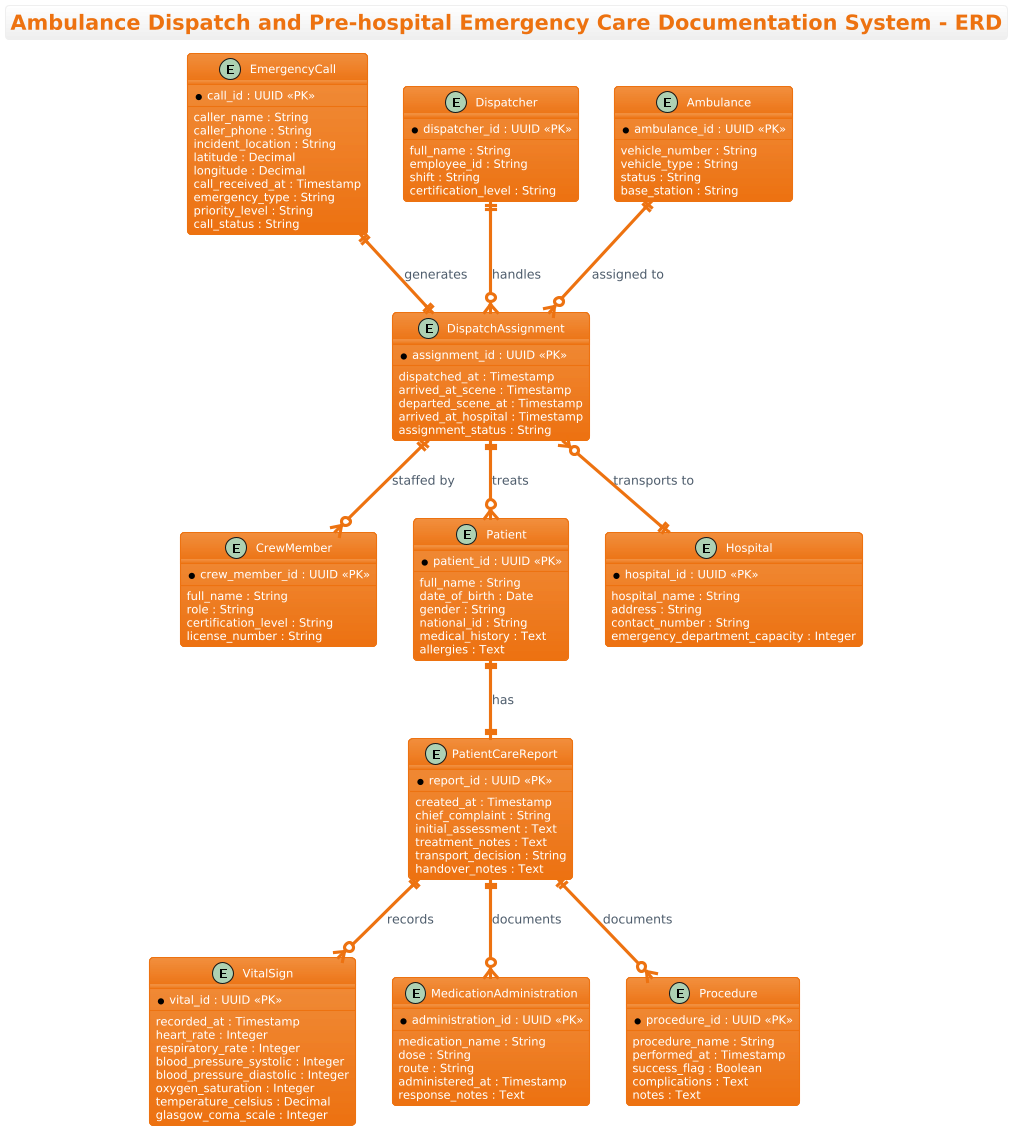
The scope of this model covers the entire pre-hospital care continuum. It begins with the EmergencyCall, capturing the raw input from the public. It then models the DispatchAssignment, which acts as the central hub linking the logistical resources (Dispatcher, Ambulance, Crew) to the clinical outcome (Patient, PatientCareReport). The diagram explicitly includes entities for tracking time-sensitive clinical data like VitalSigns and MedicationAdministration, ensuring that the final report is a complete medical record, not just a logistical receipt.
Key Takeaways & Educational Insights
By studying this model, you will learn how to handle one-to-many and one-to-one relationships in a complex workflow. You will see how to structure a “fact table” (PatientCareReport) that aggregates multiple data streams (vitals, meds, procedures) under a single incident. Furthermore, the use of PlantUML allows you to visualize these constraints clearly, ensuring that the resulting database enforces data integrity rules critical for healthcare compliance.
Complete Diagram & Full Source Code
Below is the finalized Entity Relationship Diagram. It utilizes the aws-orange theme to provide a professional, high-contrast look suitable for technical documentation and stakeholder presentations.
@startuml
/'
Ambulance Dispatch and Pre-hospital Emergency Care Documentation System

This ERD models the core data structures supporting emergency medical services operations.
The system tracks emergency calls received by dispatchers, the assignment of ambulances and
crews to those calls, and the complete clinical documentation created by paramedics during
pre-hospital care. Key entities capture call intake details, vehicle and personnel dispatch,
patient assessment findings, administered medications, performed procedures, and vital signs
recorded over time. The diagram illustrates how a single emergency incident connects dispatch
logistics with the clinical record, enabling continuity of care from the scene through handover
at the hospital.
'/
!theme aws-orange

title Ambulance Dispatch and Pre-hospital Emergency Care Documentation System - ERD

entity "EmergencyCall" as call {
  * call_id : UUID <<PK>>
  --
  caller_name : String
  caller_phone : String
  incident_location : String
  latitude : Decimal
  longitude : Decimal
  call_received_at : Timestamp
  emergency_type : String
  priority_level : String
  call_status : String
}

entity "Dispatcher" as dispatcher {
  * dispatcher_id : UUID <<PK>>
  --
  full_name : String
  employee_id : String
  shift : String
  certification_level : String
}

entity "Ambulance" as ambulance {
  * ambulance_id : UUID <<PK>>
  --
  vehicle_number : String
  vehicle_type : String
  status : String
  base_station : String
}

entity "CrewMember" as crew {
  * crew_member_id : UUID <<PK>>
  --
  full_name : String
  role : String
  certification_level : String
  license_number : String
}

entity "DispatchAssignment" as assignment {
  * assignment_id : UUID <<PK>>
  --
  dispatched_at : Timestamp
  arrived_at_scene : Timestamp
  departed_scene_at : Timestamp
  arrived_at_hospital : Timestamp
  assignment_status : String
}

entity "Patient" as patient {
  * patient_id : UUID <<PK>>
  --
  full_name : String
  date_of_birth : Date
  gender : String
  national_id : String
  medical_history : Text
  allergies : Text
}

entity "PatientCareReport" as pcr {
  * report_id : UUID <<PK>>
  --
  created_at : Timestamp
  chief_complaint : String
  initial_assessment : Text
  treatment_notes : Text
  transport_decision : String
  handover_notes : Text
}

entity "VitalSign" as vital {
  * vital_id : UUID <<PK>>
  --
  recorded_at : Timestamp
  heart_rate : Integer
  respiratory_rate : Integer
  blood_pressure_systolic : Integer
  blood_pressure_diastolic : Integer
  oxygen_saturation : Integer
  temperature_celsius : Decimal
  glasgow_coma_scale : Integer
}

entity "MedicationAdministration" as medication {
  * administration_id : UUID <<PK>>
  --
  medication_name : String
  dose : String
  route : String
  administered_at : Timestamp
  response_notes : Text
}

entity "Procedure" as procedure {
  * procedure_id : UUID <<PK>>
  --
  procedure_name : String
  performed_at : Timestamp
  success_flag : Boolean
  complications : Text
  notes : Text
}

entity "Hospital" as hospital {
  * hospital_id : UUID <<PK>>
  --
  hospital_name : String
  address : String
  contact_number : String
  emergency_department_capacity : Integer
}

call ||--|| assignment : "generates"
dispatcher ||--o{ assignment : "handles"
ambulance ||--o{ assignment : "assigned to"
assignment ||--o{ crew : "staffed by"
assignment ||--o{ patient : "treats"
patient ||--|| pcr : "has"
pcr ||--o{ vital : "records"
pcr ||--o{ medication : "documents"
pcr ||--o{ procedure : "documents"
assignment }o--|| hospital : "transports to"

@endumlStep-by-Step Architectural Walkthrough
Building a complex ERD like this requires a systematic approach. We will break down the construction into four distinct phases: setup, entity declaration, relationship mapping, and final refinement.
Phase 1: Canvas Configuration & Layout Directives
Before defining any data structures, we must set the stage for the diagram. In PlantUML, this is done using directives at the very beginning of the code. We start with the @startuml tag to initialize the parser. Crucially, we include a comment block using /' and '/ to describe the diagram’s purpose. This documentation becomes part of the diagram’s metadata, ensuring that anyone viewing the model understands the context immediately.
We also apply a specific visual theme to match industry standards. The !theme aws-orange directive sets a professional color palette that is easy on the eyes and suitable for technical reports.
/'
Ambulance Dispatch and Pre-hospital Emergency Care Documentation System
... description ...
'/
!theme aws-orange
Phase 2: Declaring Core Entities, Actors, and Boundaries
Next, we define the entities. In PlantUML, the entity keyword is used to create a table-like structure. Each entity represents a table in the database. We use the as keyword to assign a shorthand alias (e.g., as call) to make relationship lines more readable later.
Inside each entity block, we define the attributes. The * symbol indicates a Primary Key (PK). We also use the -- separator to visually divide the key attributes from the regular attributes, improving readability. Data types like UUID, Timestamp, and Text are explicitly declared to ensure the resulting schema is type-safe.
entity "EmergencyCall" as call {
  * call_id : UUID <>
  --
  caller_name : String
  incident_location : String
}
Phase 3: Mapping Data Flows & Key Interactions
The heart of an ERD is the relationship. We use the ||--|| (mandatory one-to-one) and ||--o{ (mandatory one-to-many) syntax to define cardinality. In this healthcare scenario, the DispatchAssignment is the central pivot.
For instance, a single EmergencyCall generates exactly one DispatchAssignment (represented by call ||--|| assignment). Conversely, one Dispatcher can handle many assignments over time, but an assignment is handled by exactly one dispatcher at the moment of creation (represented by dispatcher ||--o{ assignment).
We also model the clinical flow: A patient has a specific care report, and that report records multiple vital signs. This is expressed as pcr ||--o{ vital, indicating that one report can contain many vital sign entries over time.
assignment ||--o{ patient : "treats"
patient ||--|| pcr : "has"
pcr ||--o{ vital : "records"
Phase 4: Grouping, Annotations & Visual Polish
To finalize the diagram, we ensure all relationships are labeled with descriptive text (e.g., “transports to”, “staffed by”) to make the diagram self-explanatory. The final step involves reviewing the cardinality markers to ensure they accurately reflect the business rules. For example, a patient can be treated by multiple assignments (if transferred), but in this specific model, we link the assignment directly to the patient for the primary incident. The Hospital entity is linked to the assignment to track the destination of the transport, completing the operational loop.
Syntax & Keyword Deep Dive
PlantUML provides a robust set of keywords for ERD modeling. Here is a breakdown of the specific syntax used in this healthcare diagram:
entity: Defines a new table or class. The string inside quotes is the table name, and the alias afterasis used for referencing.* attribute : Type: The asterisk marks the attribute as a Primary Key. The type (e.g.,UUID,Integer) defines the data storage format.<: A stereotype used to explicitly label an attribute as a Primary Key in the visual diagram.> ||--||: Represents a Mandatory One-to-One relationship. Both sides must exist (e.g., a Call must have an Assignment).||--o{: Represents a Mandatory One-to-Many relationship. The parent must exist, but the child can be optional or multiple (e.g., A Dispatcher handles many Assignments)."label": Text enclosed in quotes placed after a relationship line to describe the nature of the connection.--: A horizontal separator used within an entity block to visually group Primary Keys separately from other attributes.
Best Practices & Pitfalls to Avoid
When modeling complex healthcare systems with PlantUML, adhering to best practices ensures the diagram remains maintainable and accurate.
- Normalize Your Entities: Avoid putting all data in a single giant table. As seen in this guide, separating VitalSigns from Medication allows for flexible querying and historical tracking of patient changes over time.
- Use Descriptive Aliases: While entity names like “EmergencyCall” are long, using short aliases like
as callmakes the relationship lines (e.g.,call ||--|| assignment) much cleaner and easier to read. - Be Precise with Cardinality: In medical systems, the difference between a one-to-one and one-to-many relationship is critical. Ensure your
||--vs||--o{syntax accurately reflects whether a patient must have a report or if a report can exist without a patient (which would be a data integrity error). - Document the “Why”: Always use the comment block
/' ... '/to explain the business logic, not just the technical structure. This helps future developers understand why a specific relationship exists.
Start Building Healthcare ERDs Faster with VPasCode
Design, test, and export complex database schemas instantly in your browser with VPasCode, the free PlantUML editor for data architects.