


In the rapidly evolving landscape of precision medicine and clinical research, the integrity of data is paramount. Biobanks serve as the critical infrastructure for storing biological samples, yet managing the lifecycle of these samples—from initial consent to final analysis—requires a robust data architecture. A single error in tracking sample provenance or consent status can compromise years of research and violate strict regulatory standards like HIPAA or GDPR. Traditional spreadsheet-based tracking often fails to capture the complex, multi-dimensional relationships required in modern biobanking, leading to data silos and compliance risks.

Visual modeling through Entity Relationship Diagrams (ERDs) provides the necessary clarity to design systems that are both scalable and compliant. By adopting a diagram-as-code approach with PlantUML, data architects can define these complex schemas with precision, versioning the design alongside the codebase, and ensuring that the database structure perfectly mirrors the operational realities of sample collection, storage, and distribution. This tutorial demonstrates how to architect a comprehensive Biobank ERD using VPasCode, a free, browser-based PlantUML editor, to model the intricate relationships between participants, consent forms, samples, and storage logistics.
Understanding the Model: Purpose, Scope & Problem Framing
This tutorial focuses on constructing a specialized Entity Relationship Diagram (ERD) tailored for a Medical Research Biobank. The primary challenge in biobanking is not just storing data, but maintaining the chain of custody and ensuring consent validity for every single aliquot (sub-sample) throughout its lifecycle.
Diagram Abstraction & Representation
An ERD in this context serves as the blueprint for the relational database schema. Unlike a flowchart which depicts process steps, this diagram models static data structures and their relationships. We represent entities such as Participant and Study as tables, and their attributes as columns. The relationships (lines connecting entities) define cardinality—specifying, for instance, that one participant can have many samples, but each sample must belong to exactly one participant. This abstraction allows architects to visualize data integrity constraints, such as foreign keys and unique identifiers, before writing a single line of SQL.
Target Domain Scope & Scenario
The scope of this model encompasses the full operational loop of a biobank:
- Participant Management: Storing PII (Personally Identifiable Information) and consent status.
- Sample Lifecycle: Tracking a sample from collection, through aliquoting (splitting into smaller parts), to storage location.
- Chain of Custody: Logging every movement of a sample to ensure auditability.
- Researcher Access: Managing who requests samples and for which study.
Key Takeaways & Educational Insights
By following this guide, you will learn how to model recursive relationships (e.g., a sample splitting into aliquots), handle hierarchical storage locations (freezer -> rack -> box), and link consent status directly to sample availability. You will gain the ability to translate complex regulatory requirements into clean, enforceable database schemas using PlantUML syntax.
Complete Diagram & Full Source Code
Before diving into the step-by-step construction, here is the complete visual representation of the Biobank ERD. This diagram illustrates the interconnectedness of participants, studies, samples, and storage logistics.
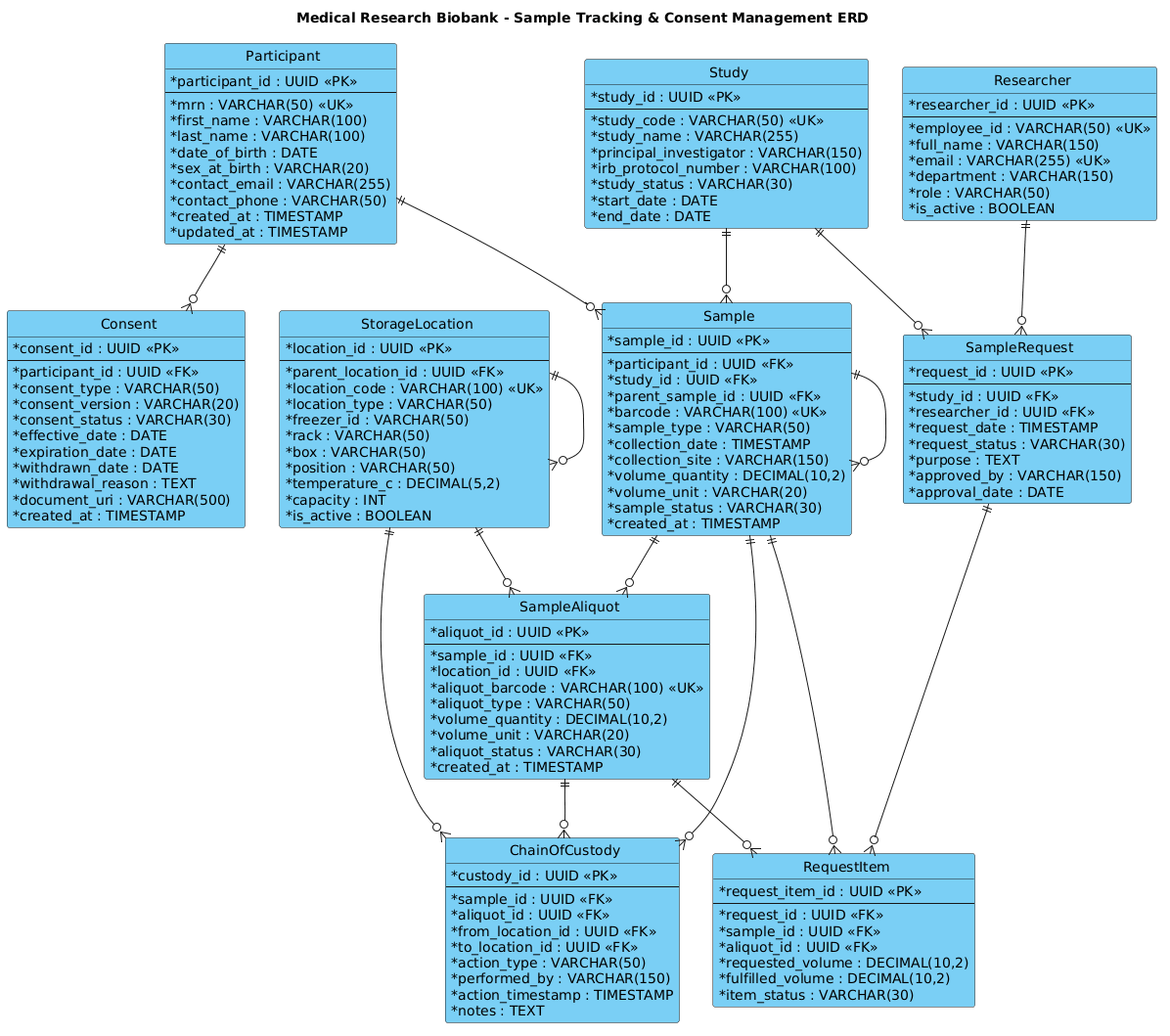
@startuml
!include https://static.visual-paradigm.com/web/resources/plantuml-stdlib/themes/vp.puml

title Medical Research Biobank - Sample Tracking & Consent Management ERD

/'
This ERD models the core data structures needed for a medical research biobank.
The central entities are Participant, Consent, and Sample, which are linked to
track consent status, sample provenance, storage location, and chain-of-custody.
The diagram supports operational needs such as sample lifecycle tracking,
consent withdrawal handling, and regulatory reporting for research studies.
'/

entity "Participant" as participant {
  * participant_id : UUID <<PK>>
  --
  * mrn : VARCHAR(50) <<UK>>
  * first_name : VARCHAR(100)
  * last_name : VARCHAR(100)
  * date_of_birth : DATE
  * sex_at_birth : VARCHAR(20)
  * contact_email : VARCHAR(255)
  * contact_phone : VARCHAR(50)
  * created_at : TIMESTAMP
  * updated_at : TIMESTAMP
}

entity "Consent" as consent {
  * consent_id : UUID <<PK>>
  --
  * participant_id : UUID <<FK>>
  * consent_type : VARCHAR(50)
  * consent_version : VARCHAR(20)
  * consent_status : VARCHAR(30)
  * effective_date : DATE
  * expiration_date : DATE
  * withdrawn_date : DATE
  * withdrawal_reason : TEXT
  * document_uri : VARCHAR(500)
  * created_at : TIMESTAMP
}

entity "Study" as study {
  * study_id : UUID <<PK>>
  --
  * study_code : VARCHAR(50) <<UK>>
  * study_name : VARCHAR(255)
  * principal_investigator : VARCHAR(150)
  * irb_protocol_number : VARCHAR(100)
  * study_status : VARCHAR(30)
  * start_date : DATE
  * end_date : DATE
}

entity "Sample" as sample {
  * sample_id : UUID <<PK>>
  --
  * participant_id : UUID <<FK>>
  * study_id : UUID <<FK>>
  * parent_sample_id : UUID <<FK>>
  * barcode : VARCHAR(100) <<UK>>
  * sample_type : VARCHAR(50)
  * collection_date : TIMESTAMP
  * collection_site : VARCHAR(150)
  * volume_quantity : DECIMAL(10,2)
  * volume_unit : VARCHAR(20)
  * sample_status : VARCHAR(30)
  * created_at : TIMESTAMP
}

entity "StorageLocation" as storage_location {
  * location_id : UUID <<PK>>
  --
  * parent_location_id : UUID <<FK>>
  * location_code : VARCHAR(100) <<UK>>
  * location_type : VARCHAR(50)
  * freezer_id : VARCHAR(50)
  * rack : VARCHAR(50)
  * box : VARCHAR(50)
  * position : VARCHAR(50)
  * temperature_c : DECIMAL(5,2)
  * capacity : INT
  * is_active : BOOLEAN
}

entity "SampleAliquot" as sample_aliquot {
  * aliquot_id : UUID <<PK>>
  --
  * sample_id : UUID <<FK>>
  * location_id : UUID <<FK>>
  * aliquot_barcode : VARCHAR(100) <<UK>>
  * aliquot_type : VARCHAR(50)
  * volume_quantity : DECIMAL(10,2)
  * volume_unit : VARCHAR(20)
  * aliquot_status : VARCHAR(30)
  * created_at : TIMESTAMP
}

entity "ChainOfCustody" as chain_of_custody {
  * custody_id : UUID <<PK>>
  --
  * sample_id : UUID <<FK>>
  * aliquot_id : UUID <<FK>>
  * from_location_id : UUID <<FK>>
  * to_location_id : UUID <<FK>>
  * action_type : VARCHAR(50)
  * performed_by : VARCHAR(150)
  * action_timestamp : TIMESTAMP
  * notes : TEXT
}

entity "Researcher" as researcher {
  * researcher_id : UUID <<PK>>
  --
  * employee_id : VARCHAR(50) <<UK>>
  * full_name : VARCHAR(150)
  * email : VARCHAR(255) <<UK>>
  * department : VARCHAR(150)
  * role : VARCHAR(50)
  * is_active : BOOLEAN
}

entity "SampleRequest" as sample_request {
  * request_id : UUID <<PK>>
  --
  * study_id : UUID <<FK>>
  * researcher_id : UUID <<FK>>
  * request_date : TIMESTAMP
  * request_status : VARCHAR(30)
  * purpose : TEXT
  * approved_by : VARCHAR(150)
  * approval_date : DATE
}

entity "RequestItem" as request_item {
  * request_item_id : UUID <<PK>>
  --
  * request_id : UUID <<FK>>
  * sample_id : UUID <<FK>>
  * aliquot_id : UUID <<FK>>
  * requested_volume : DECIMAL(10,2)
  * fulfilled_volume : DECIMAL(10,2)
  * item_status : VARCHAR(30)
}

participant ||--o{ consent
participant ||--o{ sample
study ||--o{ sample
study ||--o{ sample_request
sample ||--o{ sample
sample ||--o{ sample_aliquot
sample ||--o{ chain_of_custody
sample_aliquot ||--o{ chain_of_custody
storage_location ||--o{ storage_location
storage_location ||--o{ sample_aliquot
storage_location ||--o{ chain_of_custody
researcher ||--o{ sample_request
sample_request ||--o{ request_item
sample ||--o{ request_item
sample_aliquot ||--o{ request_item

@endumlStep-by-Step Architectural Walkthrough
Phase 1: Canvas Configuration & Layout Directives
Every PlantUML diagram begins with configuration directives that set the stage for rendering. In this biobank ERD, we prioritize a clean, professional look suitable for technical documentation. We start by including the vp.puml theme, which applies the Visual Paradigm styling standard, ensuring consistent fonts, colors, and borders.
We then define a title directive to provide an immediate context for the diagram. Finally, we insert a comment block using the /' and '/ syntax. This is a crucial best practice in diagram-as-code; it allows you to document the why of the model (business rules, scope) directly within the code file, ensuring the documentation stays in sync with the schema.
@startuml
!include https://static.visual-paradigm.com/web/resources/plantuml-stdlib/themes/vp.puml

title Medical Research Biobank - Sample Tracking & Consent Management ERD

/'
This ERD models the core data structures needed for a medical research biobank.
... [Documentation continues] ...
'/
Phase 2: Declaring Core Entities, Actors, and Boundaries
The foundation of an ERD lies in the entities. We define each table using the entity keyword. Notice the naming convention: we use the database table name in quotes (e.g., “Participant”) and assign an alias (e.g., as participant). This alias is critical for drawing relationships later, as it keeps the syntax concise.
Inside each entity block, we list attributes. We use the asterisk * prefix to denote mandatory fields (NOT NULL). We explicitly define Primary Keys (<<PK>>) and Unique Keys (<<UK>>) to enforce data integrity. For example, the Participant entity uses a UUID as the primary key, while the MRN (Medical Record Number) is marked as a unique key to prevent duplicate patient records.
entity "Participant" as participant {
  * participant_id : UUID <>
  --
  * mrn : VARCHAR(50) <>
  * first_name : VARCHAR(100)
  ...
Phase 3: Mapping Data Flows & Key Interactions
Once entities are defined, we map the relationships using the ||--o{ syntax. This notation represents a one-to-many relationship. The || indicates “one” (mandatory) on the left side, and o{ indicates “zero or many” on the right side.
For the Biobank scenario, we model specific relationships:
– A Participant can have zero or many Consent records (as they update consent over time).
– A Study can have zero or many Sample records.
– A Sample can have zero or many ChainOfCustody logs (to track history).
participant ||--o{ consent
study ||--o{ sample
sample ||--o{ chain_of_custody
Phase 4: Grouping, Annotations & Visual Polish
Advanced ERDs often require recursive relationships (e.g., a sample splitting into aliquots) or hierarchical structures (e.g., storage locations within freezers). In this diagram, we model the Sample splitting into SampleAliquot and the StorageLocation hierarchy where a location can have a parent location. We also link the Researcher to SampleRequest to close the loop of who is accessing the data. These connections ensure the diagram is not just a list of tables, but a functional map of the biobank’s operations.
Syntax & Keyword Deep Dive
Understanding the specific PlantUML ERD syntax is essential for building complex schemas. Here is a breakdown of the key keywords used in this biobank model:
entity: The primary keyword to define a database table. It takes a display name in quotes and an alias for referencing.as: Used to assign a short variable name (alias) to an entity, making relationship lines cleaner (e.g.,as participantinstead ofas Participant).<<PK>>: Stereotype indicating a Primary Key. This marks the unique identifier for the table.<<FK>>: Stereotype indicating a Foreign Key. This links the table to a parent entity (e.g.,participant_idin theSampletable links back toParticipant).<<UK>>: Stereotype for a Unique Key. This ensures no two rows have the same value for this column (e.g., a Medical Record Number).||--o{: The relationship arrow.||means “one and only one” (mandatory), ando{means “zero or more” (optional). This defines the cardinality of the relationship.--: A separator line within an entity block, visually grouping attributes (often used to separate keys from regular columns).
Best Practices & Pitfalls to Avoid
When modeling complex healthcare data schemas, adherence to best practices ensures the diagram remains readable and the resulting database is robust.
- Use Aliases for Readability: Always define an alias for entities (e.g.,
as participant). Without aliases, relationship lines become cluttered with long table names, making the diagram hard to parse. - Consistent Naming Conventions: Stick to a strict naming convention for attributes (e.g.,
snake_casefor columns) and entity names. In the biobank model, we usesnake_casefor attributes likecollection_dateto match standard SQL conventions. - Document the “Why”: Use the
/' ... '/comment block to explain the business logic. In regulated industries like healthcare, understanding why a field exists (e.g.,withdrawal_reason) is as important as the field itself. - Avoid Over-Abstraction: While it’s tempting to simplify, ensure your ERD reflects the actual data requirements. For example, separating
SampleandSampleAliquotis necessary to track the volume of specific sub-samples independently.
Start Building Biobank ERDs Faster with VPasCode
Design complex healthcare database schemas instantly in your browser with VPasCode, the free PlantUML editor that requires no local installation.