


In the rapidly evolving landscape of digital health and wellness applications, the integrity of data modeling is paramount. For nutritionists and health-tech developers, the challenge lies not just in tracking what a client eats, but in structuring the complex relationships between personalized dietary plans, specific meal schedules, and granular food item attributes. A poorly designed schema can lead to data redundancy, reporting errors, and an inability to scale as the user base grows. Visualizing these relationships before writing a single line of SQL is a critical step in the software development lifecycle, ensuring that the database architecture aligns perfectly with real-world operational workflows.

This tutorial demonstrates how to construct a comprehensive Entity Relationship Diagram (ERD) for a Nutritionist Dietary Plan Creation and Client Meal Logging application. By leveraging the diagram-as-code approach with PlantUML in VPasCode, we move away from static, manual drawing tools and embrace a version-friendly, text-driven methodology. This allows for precise control over cardinalities, foreign keys, and entity attributes, ensuring that the final database schema is robust enough to handle the nuances of healthcare data—such as tracking daily calorie targets, specific meal times, and detailed nutritional breakdowns like protein, carbs, and fats.
Understanding the Model: Purpose, Scope & Problem Framing
Diagram Abstraction & Representation
An Entity Relationship Diagram (ERD) is the blueprint of a relational database. In this specific context, the ERD serves as the architectural foundation for a dual-sided application: one side for the Nutritionist to create and manage plans, and the other for the Client to log their daily intake. The diagram abstracts the physical storage of data into logical entities. It defines what data exists (e.g., a Client), how that data is structured (attributes like first_name, date_of_birth), and how entities relate to one another (e.g., a Client receives a Dietary Plan).
Target Domain Scope & Scenario
The scope of this model covers the core lifecycle of a nutrition consultation. It begins with a Nutritionist managing a roster of Clients. It extends to the creation of DietaryPlans which are time-bound (start/end dates) and goal-oriented. Crucially, the model addresses the complexity of meal planning: a plan contains multiple Meals, and each meal is composed of various FoodItems. Finally, it captures the execution phase where MealLogs record the actual consumption of these planned meals or standalone food items, linking back to the client and the specific nutritional content.
Key Takeaways & Educational Insights
By building this diagram, you will gain insights into:
- One-to-Many Relationships: How a single Nutritionist manages many Clients, and how a single Plan contains many Meals.
- Associative Entities: The use of the
MealFoodItemtable to resolve the many-to-many relationship between Meals and FoodItems, allowing for specific quantities per meal. - Referential Integrity: How Foreign Keys (FK) link logs and plans back to their parent entities, ensuring data consistency across the application.
Complete Diagram & Full Source Code
Below is the complete, rendered ERD for the Nutritionist application. This diagram visualizes the entities, their attributes, primary keys (PK), foreign keys (FK), and the cardinality of their relationships.
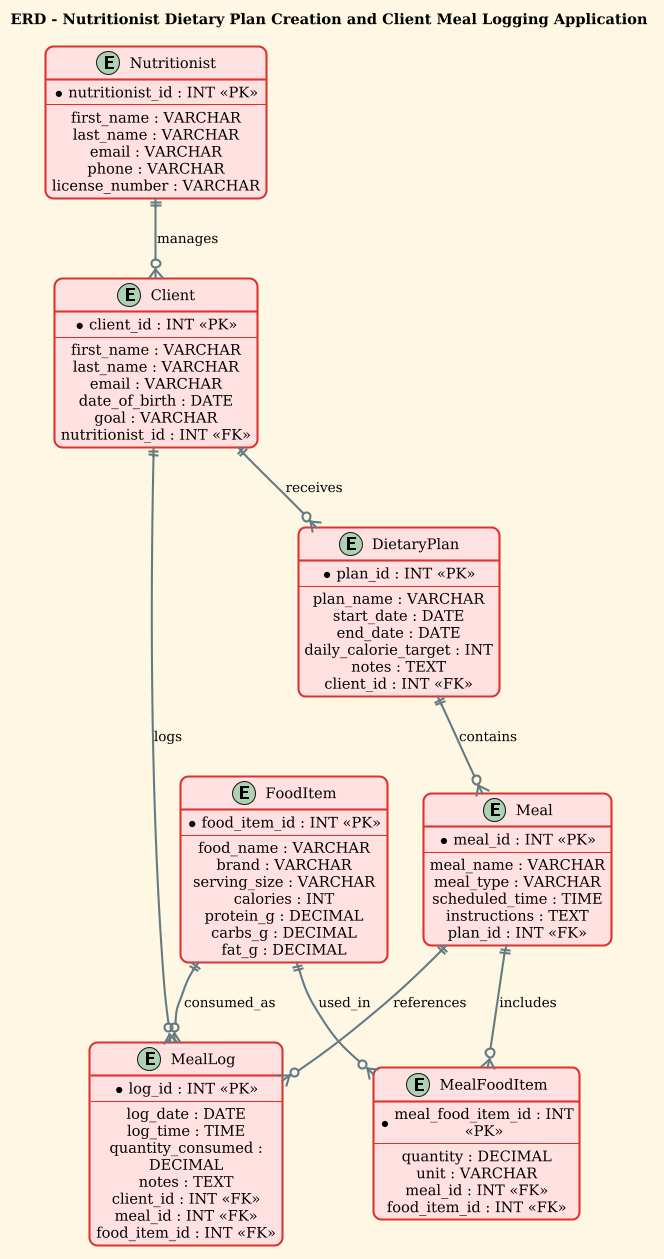
Copy the following complete source code to generate this diagram instantly in the VPasCode editor:
@startuml
!theme sunlust
title ERD - Nutritionist Dietary Plan Creation and Client Meal Logging Application

/'
Diagram Context:
This ERD models a nutrition application where nutritionists create personalized dietary plans
for their clients, and clients log their daily meals against those plans. The core entities are
Nutritionist, Client, DietaryPlan, Meal, and FoodItem. A Nutritionist can manage many Clients,
and each Client may have multiple DietaryPlans over time. A DietaryPlan contains many Meals,
and each Meal references one or more FoodItems with quantity and calorie details. Clients also
log their actual consumed meals, which link back to planned meals or stand alone as logged
entries. The diagram captures these relationships, keys, and attributes needed to support
plan creation, meal logging, and nutritional tracking.
'/

entity "Nutritionist" as nutritionist {
  *nutritionist_id : INT <<PK>>
  --
  first_name : VARCHAR
  last_name : VARCHAR
  email : VARCHAR
  phone : VARCHAR
  license_number : VARCHAR
}

entity "Client" as client {
  *client_id : INT <<PK>>
  --
  first_name : VARCHAR
  last_name : VARCHAR
  email : VARCHAR
  date_of_birth : DATE
  goal : VARCHAR
  nutritionist_id : INT <<FK>>
}

entity "DietaryPlan" as dietary_plan {
  *plan_id : INT <<PK>>
  --
  plan_name : VARCHAR
  start_date : DATE
  end_date : DATE
  daily_calorie_target : INT
  notes : TEXT
  client_id : INT <<FK>>
}

entity "Meal" as meal {
  *meal_id : INT <<PK>>
  --
  meal_name : VARCHAR
  meal_type : VARCHAR
  scheduled_time : TIME
  instructions : TEXT
  plan_id : INT <<FK>>
}

entity "FoodItem" as food_item {
  *food_item_id : INT <<PK>>
  --
  food_name : VARCHAR
  brand : VARCHAR
  serving_size : VARCHAR
  calories : INT
  protein_g : DECIMAL
  carbs_g : DECIMAL
  fat_g : DECIMAL
}

entity "MealFoodItem" as meal_food_item {
  *meal_food_item_id : INT <<PK>>
  --
  quantity : DECIMAL
  unit : VARCHAR
  meal_id : INT <<FK>>
  food_item_id : INT <<FK>>
}

entity "MealLog" as meal_log {
  *log_id : INT <<PK>>
  --
  log_date : DATE
  log_time : TIME
  quantity_consumed : DECIMAL
  notes : TEXT
  client_id : INT <<FK>>
  meal_id : INT <<FK>>
  food_item_id : INT <<FK>>
}

nutritionist ||--o{ client : manages
client ||--o{ dietary_plan : receives
dietary_plan ||--o{ meal : contains
meal ||--o{ meal_food_item : includes
food_item ||--o{ meal_food_item : used_in
client ||--o{ meal_log : logs
meal ||--o{ meal_log : references
food_item ||--o{ meal_log : consumed_as

@endumlStep-by-Step Architectural Walkthrough
Phase 1: Canvas Configuration & Layout Directives
Before defining any entities, we must set the stage for the diagram. In PlantUML, this is done at the very top of the file. We start by declaring the start of the diagram using @startuml. Immediately after, we apply the !theme sunlust directive. This is a crucial step for visual consistency; it ensures the diagram adopts a specific, professional color palette (Sunlust) that enhances readability, particularly for complex ERDs with many entities.
We then add a title directive to provide a clear header for the diagram. Finally, we insert a comment block using the /' ... '/ syntax. This block is not rendered as a graphical element but serves as vital documentation within the code, explaining the business logic and scope of the diagram for future developers.
@startuml
!theme sunlust
title ERD - Nutritionist Dietary Plan Creation and Client Meal Logging Application

/'
Diagram Context:
This ERD models a nutrition application...
'/
Phase 2: Declaring Core Entities, Actors, and Boundaries
The backbone of an ERD is the entity definition. In PlantUML, we use the entity keyword followed by the entity name in quotes. We assign a unique alias (e.g., nutritionist) to this entity to use in relationship definitions later. Inside the curly braces {}, we define the attributes.
For the Nutritionist entity, we define the Primary Key (PK) by prefixing the attribute with an asterisk * (e.g., *nutritionist_id) and labeling it with the stereotype <. This explicitly tells the database designer that this column uniquely identifies every nutritionist. We use a double dash -- to separate keys from other attributes, improving visual clarity.
entity "Nutritionist" as nutritionist {
  *nutritionist_id : INT <>
  --
  first_name : VARCHAR
  last_name : VARCHAR
  email : VARCHAR
  license_number : VARCHAR
}
We repeat this pattern for Client, DietaryPlan, Meal, and FoodItem. Notice how FoodItem includes detailed nutritional metrics like protein_g and carbs_g using the DECIMAL data type, which is essential for accurate dietary tracking.
Phase 3: Mapping Data Flows & Key Interactions
Once entities are defined, we establish the relationships using the double-dash -- syntax combined with cardinality symbols. The syntax ||--o{ represents a “One or More” relationship (One-to-Many).
For example, nutritionist ||--o{ client : manages means one Nutritionist can manage zero or many Clients. The : manages part adds a semantic label to the line, describing the nature of the relationship.
We also introduce the MealFoodItem entity. This is a classic example of an associative entity (or junction table). Since a Meal can have many FoodItems and a FoodItem can be in many Meals, we cannot link them directly with a simple line. Instead, we create MealFoodItem which holds the Foreign Keys meal_id and food_item_id, allowing us to store the specific quantity and unit for that specific combination.
meal ||--o{ meal_food_item : includes
food_item ||--o{ meal_food_item : used_in
Phase 4: Grouping, Annotations & Visual Polish
The final phase involves ensuring the MealLog entity is correctly structured to capture the history of consumption. This entity links back to Client, Meal, and FoodItem. This creates a flexible logging system where a client can log a specific planned meal (referencing meal_id) or log a standalone food item (referencing food_item_id), or both.
The use of DATE, TIME, and TEXT data types ensures that the diagram accurately reflects the temporal nature of meal logging and the need for unstructured notes. The visual polish comes from the consistent use of INT for IDs and DECIMAL for measurements, making the diagram self-documenting and easy to translate into SQL DDL statements.
Syntax & Keyword Deep Dive
To fully master PlantUML ERD modeling, it is essential to understand the specific keywords and symbols used in this diagram:
entity: The fundamental building block used to define a table or class. It accepts a display name (in quotes) and an internal alias.entity { ... }: Defines the internal structure of the entity, including attributes, data types, and keys.*attribute_name: The asterisk prefix is the PlantUML convention for marking a Primary Key (PK) within an entity definition.<and> <: These are stereotypes.> <explicitly marks a Primary Key, while> <marks a Foreign Key, aiding in visual recognition of database constraints.> --: A separator line used within entities to visually group keys separately from regular attributes.||--o{: This is the cardinality notation.||means “one and only one” (mandatory), ando{means “zero or many” (optional). Together, they define a mandatory one-to-many relationship.!theme: A directive to apply a predefined visual style (skinparam) to the entire diagram, ensuring consistency without manual styling of every element./' ... '/: A block comment syntax. Content inside is ignored by the renderer but remains in the source code as documentation.
Best Practices & Pitfalls to Avoid
When constructing ERDs for complex applications like healthcare systems, adhering to best practices ensures long-term maintainability:
- Use Descriptive Aliases: While the display name might be “DietaryPlan”, use a clean, lowercase alias like
dietary_planfor relationships. This prevents syntax errors and makes the relationship lines easier to read. - Normalize Data Types: Be precise with data types. Use
DECIMALfor nutritional values (calories, grams) rather thanINTto avoid rounding errors, andTEXTfor notes that might exceed standard character limits. - Clarify Cardinality: Don’t assume relationships are optional or mandatory. Explicitly use
||--o{(Mandatory One to Optional Many) or|--|(Mandatory One to Mandatory One) to reflect the real-world business rules accurately. - Document with Comments: As shown in this guide, always include a comment block at the top. ERDs evolve; the code is the single source of truth, and comments explain the why behind the structure, not just the what.
Start Building Healthcare ERDs Faster with VPasCode
Design and visualize complex database schemas for your nutrition or health applications instantly in your browser with VPasCode, the free PlantUML editor.