


In the high-stakes environment of healthcare administration, the efficiency of the supply chain is not merely a logistical concern but a critical component of patient care. Hospitals manage thousands of medical consumables, from standard syringes to specialized surgical implants, requiring a data model that is as precise as the medical procedures it supports. A robust Entity Relationship Diagram (ERD) serves as the architectural blueprint for these systems, ensuring that procurement workflows, inventory tracking, and stock movements are recorded with absolute accuracy. Without a clear data structure, the risk of stockouts, expired medication distribution, or audit failures increases significantly.

Building this complex data model using traditional drag-and-drop tools can often lead to visual clutter and difficulty in maintaining relationships across dozens of entities. Diagram-as-code approaches, specifically using PlantUML, offer a superior alternative for architects and database designers. By defining the schema in text, developers can version the logic (conceptually), iterate rapidly, and ensure that every foreign key and relationship is explicitly defined before the database is ever created. In this masterclass, we will construct a comprehensive ERD for a Hospital Supply Chain Procurement and Medical Consumables Inventory System using VPasCode, a free, browser-based PlantUML editor.
Understanding the Model: Purpose, Scope & Problem Framing
Diagram Abstraction & Representation
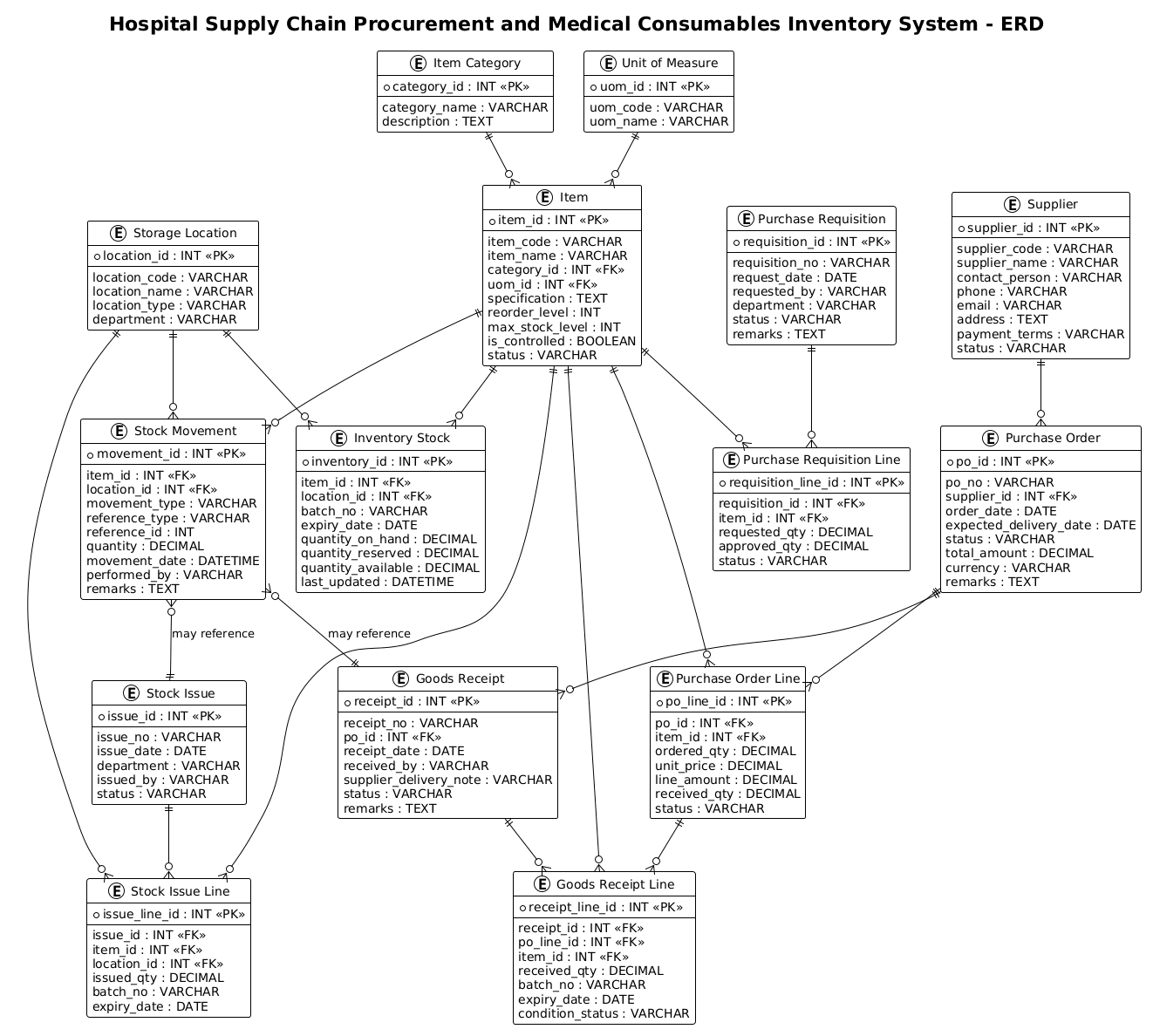
An Entity Relationship Diagram (ERD) is the foundational tool for database design, visualizing the structure of data rather than the logic of the application. In the context of healthcare supply chains, this diagram maps the lifecycle of medical consumables. It abstracts physical objects (like a box of gloves) into data entities (the Item) and defines how they interact with operational processes (like Purchase Orders and Goods Receipts). The diagram specifically focuses on cardinality (one-to-many relationships) and foreign keys, ensuring that every transaction can be traced back to its source.
Target Domain Scope & Scenario
This model covers the end-to-end procurement and inventory lifecycle within a hospital setting. The scope includes:
- Master Data: Managing Suppliers, Item Categories, Units of Measure, and Storage Locations.
- Procurement: The flow from Purchase Requisitions to Purchase Orders and their subsequent fulfillment.
- Receiving: The critical validation step where
Goods ReceiptsandReceipt Linescapture batch numbers and expiry dates. - Inventory & Consumption: Tracking stock levels, movements between locations, and issues to specific departments.
Crucially, this diagram enforces strict data integrity rules, such as ensuring that a stock movement is always linked to a specific item and location, and that every goods receipt is tied to a specific purchase order line.
Key Takeaways & Educational Insights
By constructing this diagram, you will gain insights into how to model complex transactional systems with line-item granularity. You will learn how to separate master data from transactional data, how to handle batch tracking (essential for medical expiry management), and how to represent the hierarchical nature of procurement documents (e.g., a Purchase Order containing multiple Lines).
Complete Diagram & Full Source Code
Below is the final rendered Entity Relationship Diagram for the Hospital Supply Chain system. This visual blueprint encapsulates the relationships between suppliers, inventory, and procurement workflows.
@startuml
!theme plain

/'
Diagram Context:
This ERD models the core data structure for a hospital supply chain procurement
and medical consumables inventory system. It captures how suppliers provide items,
how purchase orders are created and fulfilled, how items are received into
inventory, and how stock movements are tracked across storage locations. The
diagram supports operational visibility for procurement, receiving, inventory
control, and consumption tracking of medical consumables.
'/

title Hospital Supply Chain Procurement and Medical Consumables Inventory System - ERD

' =========================
' Master / Reference Entities
' =========================

entity "Supplier" as supplier {
  * supplier_id : INT <<PK>>
  --
  supplier_code : VARCHAR
  supplier_name : VARCHAR
  contact_person : VARCHAR
  phone : VARCHAR
  email : VARCHAR
  address : TEXT
  payment_terms : VARCHAR
  status : VARCHAR
}

entity "Item Category" as category {
  * category_id : INT <<PK>>
  --
  category_name : VARCHAR
  description : TEXT
}

entity "Unit of Measure" as uom {
  * uom_id : INT <<PK>>
  --
  uom_code : VARCHAR
  uom_name : VARCHAR
}

entity "Storage Location" as location {
  * location_id : INT <<PK>>
  --
  location_code : VARCHAR
  location_name : VARCHAR
  location_type : VARCHAR
  department : VARCHAR
}

entity "Item" as item {
  * item_id : INT <<PK>>
  --
  item_code : VARCHAR
  item_name : VARCHAR
  category_id : INT <<FK>>
  uom_id : INT <<FK>>
  specification : TEXT
  reorder_level : INT
  max_stock_level : INT
  is_controlled : BOOLEAN
  status : VARCHAR
}

' =========================
' Procurement Entities
' =========================

entity "Purchase Requisition" as requisition {
  * requisition_id : INT <<PK>>
  --
  requisition_no : VARCHAR
  request_date : DATE
  requested_by : VARCHAR
  department : VARCHAR
  status : VARCHAR
  remarks : TEXT
}

entity "Purchase Requisition Line" as requisition_line {
  * requisition_line_id : INT <<PK>>
  --
  requisition_id : INT <<FK>>
  item_id : INT <<FK>>
  requested_qty : DECIMAL
  approved_qty : DECIMAL
  status : VARCHAR
}

entity "Purchase Order" as purchase_order {
  * po_id : INT <<PK>>
  --
  po_no : VARCHAR
  supplier_id : INT <<FK>>
  order_date : DATE
  expected_delivery_date : DATE
  status : VARCHAR
  total_amount : DECIMAL
  currency : VARCHAR
  remarks : TEXT
}

entity "Purchase Order Line" as po_line {
  * po_line_id : INT <<PK>>
  --
  po_id : INT <<FK>>
  item_id : INT <<FK>>
  ordered_qty : DECIMAL
  unit_price : DECIMAL
  line_amount : DECIMAL
  received_qty : DECIMAL
  status : VARCHAR
}

entity "Goods Receipt" as goods_receipt {
  * receipt_id : INT <<PK>>
  --
  receipt_no : VARCHAR
  po_id : INT <<FK>>
  receipt_date : DATE
  received_by : VARCHAR
  supplier_delivery_note : VARCHAR
  status : VARCHAR
  remarks : TEXT
}

entity "Goods Receipt Line" as receipt_line {
  * receipt_line_id : INT <<PK>>
  --
  receipt_id : INT <<FK>>
  po_line_id : INT <<FK>>
  item_id : INT <<FK>>
  received_qty : DECIMAL
  batch_no : VARCHAR
  expiry_date : DATE
  condition_status : VARCHAR
}

' =========================
' Inventory Entities
' =========================

entity "Inventory Stock" as inventory {
  * inventory_id : INT <<PK>>
  --
  item_id : INT <<FK>>
  location_id : INT <<FK>>
  batch_no : VARCHAR
  expiry_date : DATE
  quantity_on_hand : DECIMAL
  quantity_reserved : DECIMAL
  quantity_available : DECIMAL
  last_updated : DATETIME
}

entity "Stock Movement" as stock_movement {
  * movement_id : INT <<PK>>
  --
  item_id : INT <<FK>>
  location_id : INT <<FK>>
  movement_type : VARCHAR
  reference_type : VARCHAR
  reference_id : INT
  quantity : DECIMAL
  movement_date : DATETIME
  performed_by : VARCHAR
  remarks : TEXT
}

entity "Stock Issue" as stock_issue {
  * issue_id : INT <<PK>>
  --
  issue_no : VARCHAR
  issue_date : DATE
  department : VARCHAR
  issued_by : VARCHAR
  status : VARCHAR
}

entity "Stock Issue Line" as issue_line {
  * issue_line_id : INT <<PK>>
  --
  issue_id : INT <<FK>>
  item_id : INT <<FK>>
  location_id : INT <<FK>>
  issued_qty : DECIMAL
  batch_no : VARCHAR
  expiry_date : DATE
}

' =========================
' Relationships
' =========================

category ||--o{ item
uom ||--o{ item

supplier ||--o{ purchase_order

requisition ||--o{ requisition_line
item ||--o{ requisition_line

purchase_order ||--o{ po_line
item ||--o{ po_line

purchase_order ||--o{ goods_receipt
goods_receipt ||--o{ receipt_line
po_line ||--o{ receipt_line
item ||--o{ receipt_line

item ||--o{ inventory
location ||--o{ inventory

item ||--o{ stock_movement
location ||--o{ stock_movement

stock_issue ||--o{ issue_line
item ||--o{ issue_line
location ||--o{ issue_line

stock_movement }o--|| stock_issue : "may reference"
stock_movement }o--|| goods_receipt : "may reference"

@endumlStep-by-Step Architectural Walkthrough
Building a complex ERD like this requires a structured approach. We will break the construction down into four distinct phases: setting the stage, defining master data, modeling transactions, and establishing relationships.
Phase 1: Canvas Configuration & Layout Directives
Every PlantUML diagram begins with configuration directives that set the visual tone and behavior. In our healthcare context, we want a clean, professional look that is easy to read for stakeholders. We use the !theme plain directive to remove unnecessary decorative elements and focus on the data structure.
@startuml
!theme plain

/'
Diagram Context:
This ERD models the core data structure for a hospital supply chain procurement
and medical consumables inventory system...
'/

title Hospital Supply Chain Procurement and Medical Consumables Inventory System - ERD
The title directive provides a clear header for the diagram, which is essential for documentation. The comment block (starting with /' and ending with '/) serves as a crucial piece of metadata, explaining the business context without cluttering the visual diagram.
Phase 2: Declaring Core Entities, Actors, and Boundaries
The foundation of any ERD is the entity block. In PlantUML, we define an entity using the entity "Display Name" as alias syntax. This alias is used for referencing the entity in relationships. Inside the curly braces {}, we define the attributes.
For the Item entity, which is central to the supply chain, we define the primary key (PK) and foreign keys (FK) explicitly:
entity "Item" as item {
* item_id : INT <>
--
item_code : VARCHAR
item_name : VARCHAR
category_id : INT <>
uom_id : INT < >
specification : TEXT
reorder_level : INT
max_stock_level : INT
is_controlled : BOOLEAN
status : VARCHAR
} Key observations here include:
- Primary Key: Marked with
*and the stereotype<<PK>>. - Foreign Keys: Marked with
<<FK>>to indicate relationships to other tables. - Separators: The
--line separates keys from regular attributes, improving readability. - Data Types: We use standard SQL types like
INT,VARCHAR,DECIMAL, andBOOLEANto ensure the diagram accurately reflects the underlying database schema.
Phase 3: Mapping Data Flows & Key Interactions
Once the entities are defined, we model the transactional flow. In a hospital supply chain, the flow is linear: Requisition → Purchase Order → Goods Receipt → Inventory. We replicate this structure by creating entities for each stage, such as PurchaseOrder and GoodsReceipt.
A critical aspect of this diagram is the handling of line items. A Purchase Order is not just a single number; it contains multiple lines (items). We model this by creating a po_line entity that links back to the purchase_order and the item:
entity "Purchase Order Line" as po_line {
* po_line_id : INT <>
--
po_id : INT <>
item_id : INT < >
ordered_qty : DECIMAL
unit_price : DECIMAL
received_qty : DECIMAL
status : VARCHAR
} This structure allows us to track exactly how many units of a specific item were ordered versus how many were actually received, which is vital for inventory reconciliation.
Phase 4: Grouping, Annotations & Visual Polish
While PlantUML ERD mode doesn’t support visual grouping boxes in the same way as class diagrams, we use logical separation by defining entities in blocks (as seen in the code with comments like ' ========================= Procurement Entities'). We also use relationship arrows to define the cardinality of the data flow.
The final relationships are drawn using the ||--o{ syntax. For example, category ||--o{ item means “One Category has zero or many Items”. The double bar || indicates mandatory participation (an item must have a category), while the crow’s foot { indicates one-to-many.
Syntax & Keyword Deep Dive
To master PlantUML ERD diagrams, it is essential to understand the specific keywords and symbols used to define structure and relationships.
entity: The fundamental building block used to define a table or entity. Syntax:entity "Name" as alias { attributes }.<<PK>>&<<FK>>: Stereotypes used to visually mark Primary Keys and Foreign Keys. The asterisk*is also used to denote the primary key attribute.--: A separator line used within an entity block to visually divide keys from other attributes.||--o{: A relationship arrow indicating a one-to-many relationship where the “one” side is mandatory (the double bar) and the “many” side is optional (the open circle).o--||: A relationship arrow indicating a one-to-one relationship where the “one” side is optional and the “many” (or other side) is mandatory./' ... '/: The syntax for multi-line comments in PlantUML, used here to provide a business context description.
Best Practices & Pitfalls to Avoid
When designing ERDs for complex systems like hospital supply chains, following best practices ensures the diagram remains maintainable and useful.
- Separate Master Data from Transactional Data: Notice how we have distinct entities for
Item(Master Data) andGoodsReceipt(Transactional Data). Do not mix these; keeping them separate allows for historical analysis of transactions without bloating the master record. - Use Aliases Consistently: Always use short, unique aliases (e.g.,
item,po) for relationships. This prevents the diagram from becoming cluttered with long entity names and makes the relationship syntax cleaner. - Explicit Cardinality: Always define the cardinality (one-to-many, one-to-one) explicitly. Ambiguous relationships lead to database design errors where referential integrity cannot be enforced.
- Standardize Data Types: Use consistent data types across similar fields (e.g., always use
DECIMALfor quantities and currency) to avoid confusion when translating the diagram to actual SQL code.
Design Hospital ERDs Instantly with VPasCode
Transform your database design ideas into professional Entity Relationship Diagrams instantly using our free, browser-based PlantUML editor—no installation required.