


In the rapidly evolving landscape of Direct-to-Consumer (D2C) retail, subscription box services have revolutionized how customers interact with brands. Unlike traditional e-commerce, these models rely on a sophisticated data backbone to manage recurring revenue, dynamic customer preferences, and complex fulfillment logistics. The challenge for architects and data modelers is not just storing customer data, but structuring it to handle the temporal nature of subscriptions, the variability of billing cycles, and the granular details of product customization.
A robust data model must seamlessly connect the customer’s lifecycle with their billing history and the physical contents of their boxes. When a customer selects a plan, the system must immediately establish a relationship with a billing schedule, track their specific customization preferences, and generate invoices for each cycle. Furthermore, the model needs to account for the shipment lifecycle, from packing to delivery, while ensuring that every product in a box is traceable back to the catalog. This is where a well-structured Entity Relationship Diagram (ERD) becomes indispensable, serving as the architectural blueprint that ensures data integrity across all these moving parts.
Understanding the Model: Purpose, Scope & Problem Framing
This PlantUML ERD is specifically designed to address the data modeling requirements of a subscription box service. It moves beyond simple transactional logging to capture the relational complexity inherent in recurring billing and personalization.
Diagram Abstraction & Representation
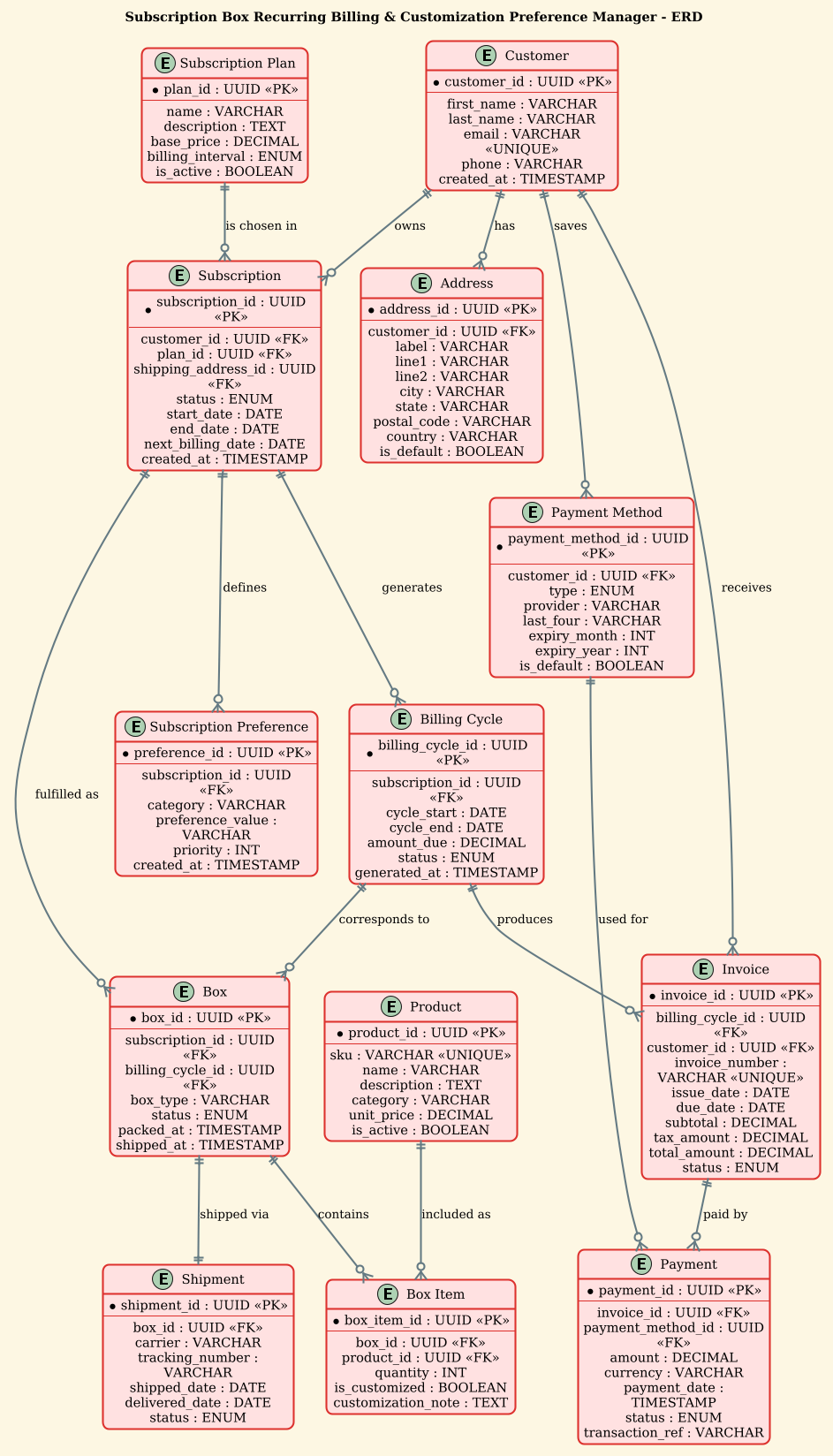
In this model, we treat the “Customer” as the central actor, but the true complexity lies in the Subscription entity. Unlike a one-time purchase, a subscription is a time-bound contract that links a customer to a specific plan and a recurring billing schedule. The diagram abstracts the concept of a “cycle” into distinct entities like Billing Cycle and Invoice, allowing the system to track financial obligations independently of the customer’s static profile. Additionally, the Subscription Preference entity introduces a flexible key-value structure, enabling customers to define specific customization rules (e.g., “No nuts,” “Organic only”) that dynamically influence the contents of their future boxes.
Target Domain Scope & Scenario
The scope of this diagram covers the entire operational loop of a retail subscription service. It includes:
- Customer Management: Profiles, multiple addresses, and saved payment methods.
- Subscription Logic: Plan definitions, active status, and start/end dates.
- Financials: The generation of billing cycles, invoices, and payment records.
- Fulfillment: The mapping of billing cycles to physical boxes, the inventory of box items, and shipment tracking.
Crucially, it excludes external payment gateway API integrations, focusing instead on the internal data state required to trigger those payments.
Key Takeaways & Educational Insights
By studying this model, developers will learn how to handle one-to-many relationships in a recurring context, how to decouple billing logic from customer data, and how to implement a flexible preference system without hardcoding fields. It demonstrates best practices for naming conventions (e.g., using UUID for primary keys) and managing cardinality (e.g., a subscription has one plan, but a plan can be chosen by many subscriptions).
Complete Diagram & Full Source Code
Below is the final rendered diagram, showcasing the complete relationship map for the Subscription Box Recurring Billing & Customization Preference Manager.
@startuml
!theme sunlust

/'
Diagram Context:
This ERD models the data foundation for a subscription box service that supports
recurring billing and customer-driven customization preferences. It captures how
customers subscribe to plans, how each billing cycle generates invoices and
payments, and how customers define preferences that shape the contents of their
boxes. The design also tracks shipments, box items, and product catalog details
so that each recurring order can be fulfilled according to the customer's selected
plan and personalization settings.
'/

title Subscription Box Recurring Billing & Customization Preference Manager - ERD

' ---------- Core Entities ----------

entity "Customer" as customer {
  * customer_id : UUID <<PK>>
  --
  first_name : VARCHAR
  last_name : VARCHAR
  email : VARCHAR <<UNIQUE>>
  phone : VARCHAR
  created_at : TIMESTAMP
}

entity "Address" as address {
  * address_id : UUID <<PK>>
  --
  customer_id : UUID <<FK>>
  label : VARCHAR
  line1 : VARCHAR
  line2 : VARCHAR
  city : VARCHAR
  state : VARCHAR
  postal_code : VARCHAR
  country : VARCHAR
  is_default : BOOLEAN
}

entity "Subscription Plan" as plan {
  * plan_id : UUID <<PK>>
  --
  name : VARCHAR
  description : TEXT
  base_price : DECIMAL
  billing_interval : ENUM
  is_active : BOOLEAN
}

entity "Subscription" as subscription {
  * subscription_id : UUID <<PK>>
  --
  customer_id : UUID <<FK>>
  plan_id : UUID <<FK>>
  shipping_address_id : UUID <<FK>>
  status : ENUM
  start_date : DATE
  end_date : DATE
  next_billing_date : DATE
  created_at : TIMESTAMP
}

entity "Subscription Preference" as preference {
  * preference_id : UUID <<PK>>
  --
  subscription_id : UUID <<FK>>
  category : VARCHAR
  preference_value : VARCHAR
  priority : INT
  created_at : TIMESTAMP
}

entity "Billing Cycle" as billing_cycle {
  * billing_cycle_id : UUID <<PK>>
  --
  subscription_id : UUID <<FK>>
  cycle_start : DATE
  cycle_end : DATE
  amount_due : DECIMAL
  status : ENUM
  generated_at : TIMESTAMP
}

entity "Invoice" as invoice {
  * invoice_id : UUID <<PK>>
  --
  billing_cycle_id : UUID <<FK>>
  customer_id : UUID <<FK>>
  invoice_number : VARCHAR <<UNIQUE>>
  issue_date : DATE
  due_date : DATE
  subtotal : DECIMAL
  tax_amount : DECIMAL
  total_amount : DECIMAL
  status : ENUM
}

entity "Payment" as payment {
  * payment_id : UUID <<PK>>
  --
  invoice_id : UUID <<FK>>
  payment_method_id : UUID <<FK>>
  amount : DECIMAL
  currency : VARCHAR
  payment_date : TIMESTAMP
  status : ENUM
  transaction_ref : VARCHAR
}

entity "Payment Method" as payment_method {
  * payment_method_id : UUID <<PK>>
  --
  customer_id : UUID <<FK>>
  type : ENUM
  provider : VARCHAR
  last_four : VARCHAR
  expiry_month : INT
  expiry_year : INT
  is_default : BOOLEAN
}

entity "Box" as box {
  * box_id : UUID <<PK>>
  --
  subscription_id : UUID <<FK>>
  billing_cycle_id : UUID <<FK>>
  box_type : VARCHAR
  status : ENUM
  packed_at : TIMESTAMP
  shipped_at : TIMESTAMP
}

entity "Box Item" as box_item {
  * box_item_id : UUID <<PK>>
  --
  box_id : UUID <<FK>>
  product_id : UUID <<FK>>
  quantity : INT
  is_customized : BOOLEAN
  customization_note : TEXT
}

entity "Product" as product {
  * product_id : UUID <<PK>>
  --
  sku : VARCHAR <<UNIQUE>>
  name : VARCHAR
  description : TEXT
  category : VARCHAR
  unit_price : DECIMAL
  is_active : BOOLEAN
}

entity "Shipment" as shipment {
  * shipment_id : UUID <<PK>>
  --
  box_id : UUID <<FK>>
  carrier : VARCHAR
  tracking_number : VARCHAR
  shipped_date : DATE
  delivered_date : DATE
  status : ENUM
}

' ---------- Relationships ----------

customer ||--o{ address : "has"
customer ||--o{ subscription : "owns"
customer ||--o{ payment_method : "saves"
customer ||--o{ invoice : "receives"

plan ||--o{ subscription : "is chosen in"

subscription ||--o{ preference : "defines"
subscription ||--o{ billing_cycle : "generates"
subscription ||--o{ box : "fulfilled as"

billing_cycle ||--o{ invoice : "produces"
billing_cycle ||--o{ box : "corresponds to"

invoice ||--o{ payment : "paid by"

payment_method ||--o{ payment : "used for"

box ||--o{ box_item : "contains"
box ||--|| shipment : "shipped via"

product ||--o{ box_item : "included as"

@endumlStep-by-Step Architectural Walkthrough
Building this ERD in VPasCode involves structuring the data model in logical phases. We start with the canvas setup, define the core entities, establish the relationships, and finally apply visual polish.
Phase 1: Canvas Configuration & Layout Directives
Every PlantUML diagram begins with configuration directives. In this article, we utilize the !theme sunlust directive to apply a modern, vibrant color palette that enhances readability. We also define a context comment block using /' and '/ to document the diagram’s purpose directly within the code, ensuring that anyone reading the source understands the business context immediately.
@startuml
!theme sunlust

/'
Diagram Context: ...
'/

title Subscription Box Recurring Billing & Customization Preference Manager - ERD
Phase 2: Declaring Core Entities, Actors, and Boundaries
The heart of an ERD is the entity definition. We use the entity keyword followed by the entity name and an alias (e.g., as customer). Inside the curly braces, we define attributes. Primary Keys (PK) are marked with *, and Foreign Keys (FK) are explicitly noted with < to clarify referential integrity. We use standard data types like UUID, VARCHAR, DECIMAL, and TIMESTAMP to ensure the model is database-agnostic yet specific enough for implementation.
entity "Customer" as customer {
  * customer_id : UUID <>
  --
  first_name : VARCHAR
  last_name : VARCHAR
  email : VARCHAR <>
}
Notice the use of the -- separator. This visual divider splits the primary key from the rest of the attributes, improving the diagram’s readability and adhering to standard ERD conventions.
Phase 3: Mapping Data Flows & Key Interactions
Once entities are defined, we establish relationships using the ||--o{ syntax. This notation represents a one-to-zero-or-more relationship. For example, a Customer can have zero or many Address records. The ||--|| syntax denotes a mandatory one-to-one relationship, which we use for the link between a Box and a Shipment (assuming every box must eventually be shipped in this specific flow, or strictly linked).
customer ||--o{ address : "has"
customer ||--o{ subscription : "owns"

subscription ||--o{ billing_cycle : "generates"
billing_cycle ||--o{ invoice : "produces"
Here, we trace the financial lifecycle: a Subscription generates a Billing Cycle, which in turn produces an Invoice. This linear flow is critical for understanding the recurring billing logic.
Phase 4: Grouping, Annotations & Visual Polish
To handle the complexity of customization, we introduce the Subscription Preference entity. This acts as a bridge, allowing a subscription to have multiple preference rules without cluttering the main subscription table. We also add labels to relationships (e.g., : "is chosen in") to make the diagram self-documenting. The final touch involves ensuring all entity names are wrapped in quotes to handle spaces correctly, and using the title directive to provide a clear header for the rendered output.
Syntax & Keyword Deep Dive
Understanding the specific PlantUML syntax used in this ERD is crucial for extending the model. Here is a breakdown of the key components:
entity "Name" as alias: Defines a new table or entity. Thealiasis used to reference this entity in relationship definitions, keeping the code concise.* attribute_name : TYPE <: The asterisk> *denotes a Primary Key. The<stereotype explicitly labels it. Similarly,> <marks Foreign Keys, and> <ensures data uniqueness constraints.> ||--o{Relationship Syntax: This is the standard cardinality notation.||means “one and only one” (mandatory), whileo{means “zero or more” (optional). The arrow points from the parent to the child.--Separator: Used within entity definitions to visually separate the primary key from other attributes, mimicking standard database schema layouts.!theme sunlust: A directive that applies a specific color scheme to the entire diagram, ensuring a professional and consistent look without manual styling of every element.
Best Practices & Pitfalls to Avoid
When modeling complex retail systems like subscription boxes, adhering to best practices ensures your diagram remains maintainable and scalable.
- Normalize Your Data: Avoid storing redundant data like
product_nameinside theBox Itemtable. Instead, link to aProductentity. This ensures that if a product’s name changes, it updates everywhere automatically. - Use UUIDs for Scalability: As seen in this diagram, using
UUIDfor primary keys is a best practice for distributed systems and microservices, preventing key collisions across different regional databases. - Separate Billing from Fulfillment: Keep the
Billing CycleandBoxentities distinct. A billing cycle might occur, but the box might be delayed or cancelled. Decoupling them allows for flexible error handling and status tracking. - Be Explicit with Cardinality: Don’t guess the relationship type. Use
||--o{for optional relationships and||--||for mandatory ones. Ambiguity in ERDs often leads to bugs in the application logic.
Start Building Subscription ERDs Faster with VPasCode
Instantly visualize, edit, and export your complex retail data models online with VPasCode’s free PlantUML editor—no installation required.