


In the rapidly evolving beauty tech sector, personalized recommendations are no longer a luxury but a necessity. Retailers and cosmetic brands are increasingly relying on sophisticated algorithms to match customers with the perfect foundation or concealer shade, moving beyond simple skin tone color wheels to deep, data-driven profiling. The core challenge lies in structuring the underlying data architecture to capture nuanced skin attributes—such as undertones, Fitzpatrick scales, hydration levels, and specific concerns like acne or sensitivity—and linking them dynamically to vast inventories of product shades.
A robust data model is the backbone of any successful shade matching engine. Without a clear Entity Relationship Diagram (ERD), the system risks data redundancy, ambiguous relationships between products and skin profiles, and an inability to track the efficacy of recommendations over time. By visualizing the schema that connects Customer profiles to Product shades and Recommendation histories, architects can ensure that the recommendation logic has access to the precise, structured data it needs to function accurately. This tutorial demonstrates how to translate these complex business requirements into a clean, maintainable PlantUML ERD using VPasCode.
Understanding the Model: Purpose, Scope & Problem Framing
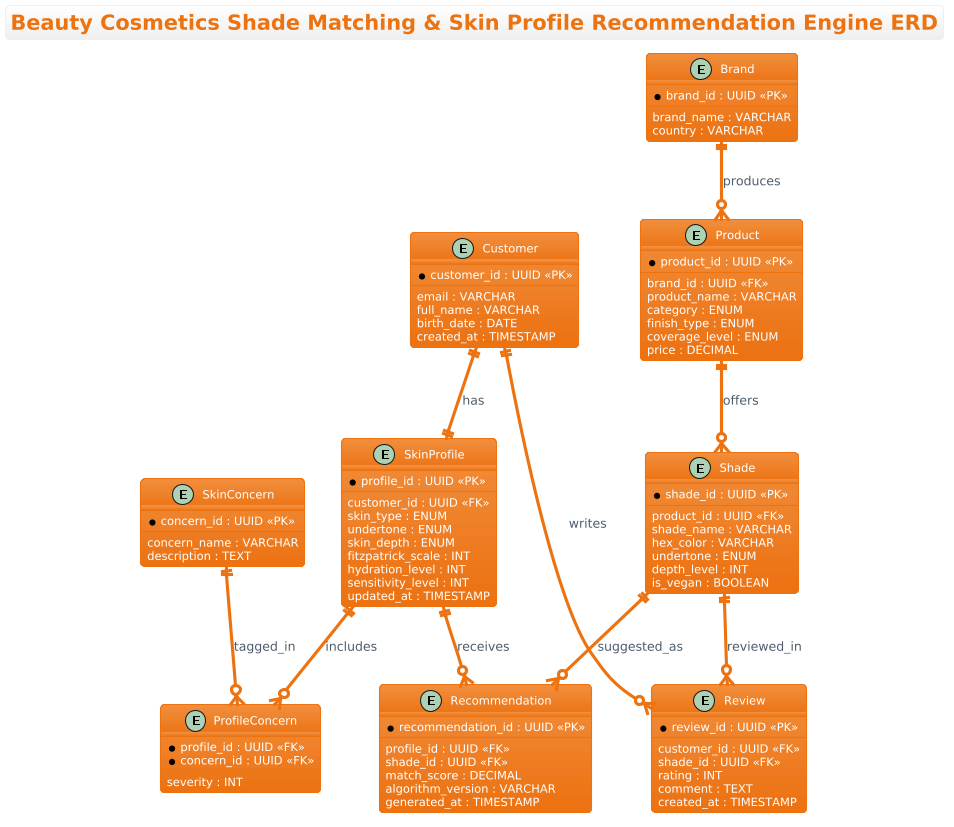
This ERD is designed to model the data architecture for a beauty cosmetics platform focused on complexion products. The primary abstraction here is the mapping between a user’s biological and preference data and the physical attributes of cosmetic products. The diagram explicitly separates static product data (Brands, Products, Shades) from dynamic user data (Customers, Skin Profiles, Concerns) and the interaction data (Recommendations, Reviews) that ties them together.
The scope of this model covers the entire lifecycle of a shade match: from the initial onboarding where a customer defines their skin profile and concerns, to the algorithmic generation of a recommendation, and finally to the post-purchase feedback loop via reviews. Key entities include Customer, SkinProfile, SkinConcern, Product, Shade, Brand, Recommendation, and Review. The relationships are carefully crafted to handle one-to-one mappings (like a customer having one primary profile) and many-to-many relationships (like a customer writing multiple reviews or a shade being recommended multiple times).
By studying this diagram, you will gain insights into how to normalize data for complex retail systems, how to handle multi-dimensional attributes like skin concerns, and how to structure historical data to track the performance of recommendation algorithms. This model serves as a blueprint for building scalable applications that can adapt to new skin concerns or product categories without requiring a complete database overhaul.
Complete Diagram & Full Source Code
Below is the finished Entity Relationship Diagram, visualizing the data flow for the beauty cosmetics engine. This blueprint defines the strict relationships between skin profiles and product shades, ensuring data integrity for the recommendation engine.
@startuml
!theme aws-orange

title Beauty Cosmetics Shade Matching & Skin Profile Recommendation Engine ERD

/'
Diagram Context:
This ERD models the data architecture for a beauty cosmetics platform that recommends
foundation, concealer, and other complexion products by matching a customer's skin
profile to the most suitable product shades. The system captures detailed skin
attributes (undertone, depth, type, concerns), product shade specifications, and
historical interactions to power personalized shade matching and recommendation logic.
Key entities include Customer, SkinProfile, SkinConcern, Product, Shade, Brand,
Recommendation, and Review. Relationships link customers to their skin profiles,
products to their available shades, and recommendations to the match score between
a skin profile and a shade.
'/

entity "Customer" as customer {
  * customer_id : UUID <<PK>>
  --
  email : VARCHAR
  full_name : VARCHAR
  birth_date : DATE
  created_at : TIMESTAMP
}

entity "SkinProfile" as skin_profile {
  * profile_id : UUID <<PK>>
  --
  customer_id : UUID <<FK>>
  skin_type : ENUM
  undertone : ENUM
  skin_depth : ENUM
  fitzpatrick_scale : INT
  hydration_level : INT
  sensitivity_level : INT
  updated_at : TIMESTAMP
}

entity "SkinConcern" as skin_concern {
  * concern_id : UUID <<PK>>
  --
  concern_name : VARCHAR
  description : TEXT
}

entity "ProfileConcern" as profile_concern {
  * profile_id : UUID <<FK>>
  * concern_id : UUID <<FK>>
  --
  severity : INT
}

entity "Brand" as brand {
  * brand_id : UUID <<PK>>
  --
  brand_name : VARCHAR
  country : VARCHAR
}

entity "Product" as product {
  * product_id : UUID <<PK>>
  --
  brand_id : UUID <<FK>>
  product_name : VARCHAR
  category : ENUM
  finish_type : ENUM
  coverage_level : ENUM
  price : DECIMAL
}

entity "Shade" as shade {
  * shade_id : UUID <<PK>>
  --
  product_id : UUID <<FK>>
  shade_name : VARCHAR
  hex_color : VARCHAR
  undertone : ENUM
  depth_level : INT
  is_vegan : BOOLEAN
}

entity "Recommendation" as recommendation {
  * recommendation_id : UUID <<PK>>
  --
  profile_id : UUID <<FK>>
  shade_id : UUID <<FK>>
  match_score : DECIMAL
  algorithm_version : VARCHAR
  generated_at : TIMESTAMP
}

entity "Review" as review {
  * review_id : UUID <<PK>>
  --
  customer_id : UUID <<FK>>
  shade_id : UUID <<FK>>
  rating : INT
  comment : TEXT
  created_at : TIMESTAMP
}

customer ||--|| skin_profile : has
skin_profile ||--o{ profile_concern : includes
skin_concern ||--o{ profile_concern : tagged_in
brand ||--o{ product : produces
product ||--o{ shade : offers
skin_profile ||--o{ recommendation : receives
shade ||--o{ recommendation : suggested_as
customer ||--o{ review : writes
shade ||--o{ review : reviewed_in

@endumlStep-by-Step Architectural Walkthrough
Phase 1: Canvas Configuration & Layout Directives
The first step in building this ERD is setting the stage for the diagram’s appearance and context. We begin by defining the theme to match the visual identity of the project. In this case, we use the !theme aws-orange directive to apply a warm, professional color palette suitable for a beauty brand. We also include a title for the diagram and a critical comment block. The comment block, enclosed by /' and '/, provides a high-level summary of the diagram’s purpose, ensuring that anyone reading the code understands the business context immediately.
!theme aws-orange
title Beauty Cosmetics Shade Matching & Skin Profile Recommendation Engine ERD

/'
Diagram Context:
This ERD models the data architecture for a beauty cosmetics platform...
'/
Phase 2: Declaring Core Entities, Actors, and Boundaries
Next, we define the core entities that represent the business objects. We start with the Customer and SkinProfile. Notice the use of the entity keyword followed by a quoted name and an alias (e.g., as customer). The alias is crucial for PlantUML to generate clean relationship labels later. Inside the curly braces, we define the attributes. We use * to denote Primary Keys (PK) and -- to separate keys from other attributes. Data types like UUID, VARCHAR, ENUM, and DECIMAL are explicitly declared to ensure the resulting database schema is type-safe and performant.
entity "Customer" as customer {
* customer_id : UUID <>
--
email : VARCHAR
full_name : VARCHAR
birth_date : DATE
created_at : TIMESTAMP
}
entity "SkinProfile" as skin_profile {
* profile_id : UUID < >
--
customer_id : UUID <>
skin_type : ENUM
undertone : ENUM
... Phase 3: Mapping Data Flows & Key Interactions
The complexity of this model lies in the many-to-many relationships, particularly around Skin Concerns and Recommendations. A customer can have multiple concerns, and a concern can apply to many profiles. To resolve this, we introduce a junction entity called ProfileConcern. This entity acts as a bridge, containing foreign keys for both the profile and the concern, plus an additional attribute for severity. This pattern allows us to capture granular data about how severe a specific concern is for a specific user, which is vital for accurate shade matching algorithms.
entity "ProfileConcern" as profile_concern {
* profile_id : UUID <>
* concern_id : UUID < >
--
severity : INT
}
skin_profile ||--o{ profile_concern : includes
skin_concern ||--o{ profile_concern : tagged_in Similarly, the Recommendation entity links a SkinProfile to a Shade. This entity is not just a link; it captures the result of the algorithm, including the match_score and the algorithm_version used. This allows the system to audit why a specific shade was recommended and how well it matched the user’s profile.
Phase 4: Grouping, Annotations & Visual Polish
Finally, we establish the relationships using PlantUML’s relationship syntax. We use the ||--o{ notation to indicate cardinality: a double bar (||) means “one and only one,” while a circle and crow’s foot (o{) means “zero or many.” For example, customer ||--|| skin_profile : has indicates that a customer must have exactly one skin profile, and a skin profile belongs to exactly one customer. We also link the Review entity to both Customer and Shade to close the feedback loop, ensuring that reviews are tied to specific users and specific products.
customer ||--|| skin_profile : has
skin_profile ||--o{ recommendation : receives
shade ||--o{ review : reviewed_in
Syntax & Keyword Deep Dive
Understanding the specific PlantUML ERD syntax is key to mastering this tool. Here are the critical keywords and conventions used in this diagram:
entity: The fundamental keyword used to define a table or entity. It takes a display name in quotes and an internal alias for referencing.entity "Name" as alias: Defines the entity. Theas aliaspart is essential for creating readable relationship lines later in the code.PKandFKStereotypes: Used as<<PK>>and<<FK>>to visually mark Primary Keys and Foreign Keys within the entity definition.||--o{Relationship Syntax: This specific syntax denotes cardinality.||represents mandatory one, ando{represents optional many. This helps database designers quickly identify one-to-one vs. one-to-many constraints.data-type: PlantUML ERD supports standard SQL data types likeUUID,VARCHAR,INT,DECIMAL, andBOOLEANto define attribute constraints.!theme: A directive to apply a predefined visual theme (likeaws-orange) to the entire diagram, ensuring consistent styling without manual configuration.
Best Practices & Pitfalls to Avoid
When modeling complex retail schemas like the beauty shade matching engine, adhering to best practices ensures your diagram remains a useful living document rather than a static picture.
- Use Junction Entities for Many-to-Many: Never try to force a many-to-many relationship directly between two entities without an intermediate table. As seen with
ProfileConcern, using a junction entity allows you to store additional attributes (likeseverity) that belong to the relationship itself. - Consistent Naming Conventions: Use lowercase aliases (e.g.,
as customer) for internal references to avoid syntax errors, but keep display names (e.g.,"Customer") capitalized and readable for stakeholders. - Separate Static vs. Dynamic Data: Clearly distinguish between entities that change rarely (like Brand or SkinConcern definitions) and those that change frequently (like Recommendation or Review). This separation helps in database partitioning and indexing strategies.
- Document with Comments: Always include a comment block at the top of your PlantUML file. It serves as documentation for the diagram’s scope and is invaluable for onboarding new team members.
Start Building Retail ERDs Faster with VPasCode
Design complex data schemas for beauty tech and retail platforms instantly in your browser with VPasCode, the free PlantUML editor.