


In the fast-paced world of furniture retail, the post-purchase experience is often where a brand is truly defined. Unlike small, lightweight goods, furniture delivery involves complex logistics: coordinating warehouse inventory, scheduling delivery windows, assigning specific vehicles, and managing installation crews who must arrive at precise times to assemble large items. For software architects and database designers, modeling this operational ecosystem requires more than just a simple list of tables; it demands a clear visualization of how orders, products, and service resources interconnect to ensure a seamless customer journey.

When transitioning from a conceptual business requirement to a physical database schema, the Entity Relationship Diagram (ERD) serves as the blueprint for data integrity and query performance. Using diagram-as-code with PlantUML allows architects to treat these schemas as versioned, testable, and collaborative documents. By leveraging VPasCode, you can instantly render these complex relationships, ensuring that the logic for delivery scheduling, installation appointments, and service assignments is robust before a single line of SQL is written.
Understanding the Model: Purpose, Scope & Problem Framing
Diagram Abstraction & Representation
An Entity Relationship Diagram (ERD) is the fundamental tool for visualizing the static structure of a database. In the context of this tutorial, we are modeling a Furniture Retail Delivery Scheduling and Installation Service Coordinator. This specific abstraction focuses on the data entities required to manage the lifecycle of a large furniture order. Unlike a simple e-commerce order flow, this model must account for the physical constraints of delivery (vehicle capacity, driver availability) and the labor-intensive nature of installation (technician skill levels, appointment slots).
Target Domain Scope & Scenario
The scope of this diagram covers the critical operational boundaries of a furniture retailer’s backend system. It explicitly models the relationship between the Customer and their Order, the Product inventory across multiple Warehouses, and the logistical execution layer involving Delivery Vehicles, Drivers, and Installation Technicians. The diagram bridges the gap between sales data (Order) and field operations (Delivery Schedule, Installation Appointment), ensuring that data flows logically from purchase to final assembly.
Key Takeaways & Educational Insights
By building this diagram, you will gain insights into:
- Many-to-Many Resolution: How to handle complex relationships, such as an order containing multiple products, or a single appointment requiring multiple service assignments.
- Resource Allocation: Modeling how physical resources (vehicles, technicians) are linked to specific time-bound events (schedules, appointments).
- State Tracking: Representing the status of orders, deliveries, and installations as distinct attributes within the entities.
Complete Diagram & Full Source Code
Below is the complete visual representation of the Furniture Retail Delivery Scheduling and Installation Service Coordinator ERD. This diagram captures the full data model required to coordinate the end-to-end service workflow.
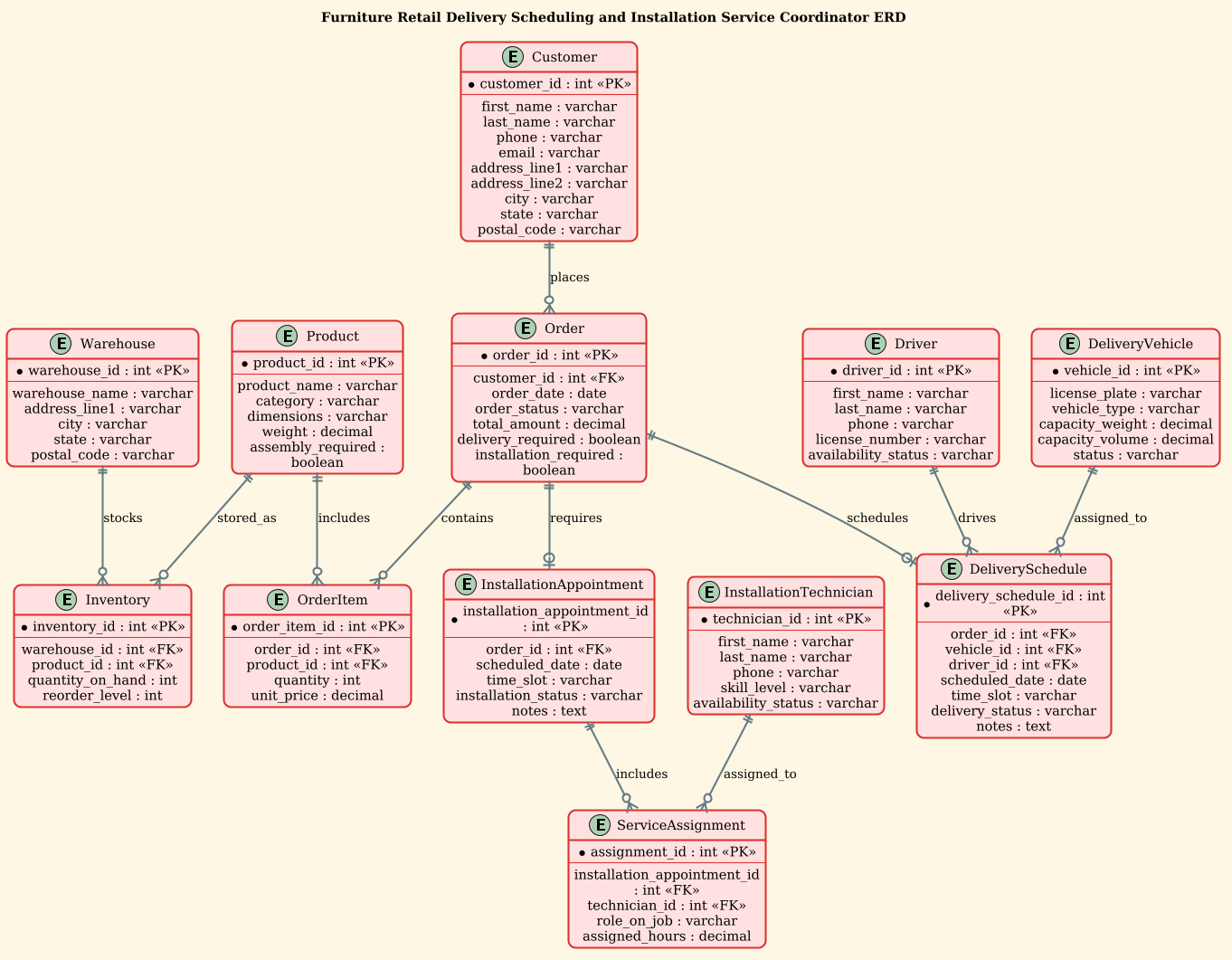
@startuml
!theme sunlust
title Furniture Retail Delivery Scheduling and Installation Service Coordinator ERD

/'
Diagram Context:
This ERD models the operational data needed to coordinate furniture retail deliveries and installation services.
It captures customers, orders, furniture products, warehouses, delivery vehicles, drivers, installation technicians,
scheduled delivery and installation appointments, and service task assignments. The diagram supports planning
delivery routes, assigning installation crews, tracking order fulfillment status, and managing post-sale service
workflows for furniture purchases.
'/

entity "Customer" as customer {
  * customer_id : int <<PK>>
  --
  first_name : varchar
  last_name : varchar
  phone : varchar
  email : varchar
  address_line1 : varchar
  address_line2 : varchar
  city : varchar
  state : varchar
  postal_code : varchar
}

entity "Order" as order {
  * order_id : int <<PK>>
  --
  customer_id : int <<FK>>
  order_date : date
  order_status : varchar
  total_amount : decimal
  delivery_required : boolean
  installation_required : boolean
}

entity "OrderItem" as order_item {
  * order_item_id : int <<PK>>
  --
  order_id : int <<FK>>
  product_id : int <<FK>>
  quantity : int
  unit_price : decimal
}

entity "Product" as product {
  * product_id : int <<PK>>
  --
  product_name : varchar
  category : varchar
  dimensions : varchar
  weight : decimal
  assembly_required : boolean
}

entity "Warehouse" as warehouse {
  * warehouse_id : int <<PK>>
  --
  warehouse_name : varchar
  address_line1 : varchar
  city : varchar
  state : varchar
  postal_code : varchar
}

entity "Inventory" as inventory {
  * inventory_id : int <<PK>>
  --
  warehouse_id : int <<FK>>
  product_id : int <<FK>>
  quantity_on_hand : int
  reorder_level : int
}

entity "DeliveryVehicle" as vehicle {
  * vehicle_id : int <<PK>>
  --
  license_plate : varchar
  vehicle_type : varchar
  capacity_weight : decimal
  capacity_volume : decimal
  status : varchar
}

entity "Driver" as driver {
  * driver_id : int <<PK>>
  --
  first_name : varchar
  last_name : varchar
  phone : varchar
  license_number : varchar
  availability_status : varchar
}

entity "InstallationTechnician" as technician {
  * technician_id : int <<PK>>
  --
  first_name : varchar
  last_name : varchar
  phone : varchar
  skill_level : varchar
  availability_status : varchar
}

entity "DeliverySchedule" as delivery_schedule {
  * delivery_schedule_id : int <<PK>>
  --
  order_id : int <<FK>>
  vehicle_id : int <<FK>>
  driver_id : int <<FK>>
  scheduled_date : date
  time_slot : varchar
  delivery_status : varchar
  notes : text
}

entity "InstallationAppointment" as installation_appointment {
  * installation_appointment_id : int <<PK>>
  --
  order_id : int <<FK>>
  scheduled_date : date
  time_slot : varchar
  installation_status : varchar
  notes : text
}

entity "ServiceAssignment" as service_assignment {
  * assignment_id : int <<PK>>
  --
  installation_appointment_id : int <<FK>>
  technician_id : int <<FK>>
  role_on_job : varchar
  assigned_hours : decimal
}

customer ||--o{ order : places
order ||--o{ order_item : contains
product ||--o{ order_item : includes
warehouse ||--o{ inventory : stocks
product ||--o{ inventory : stored_as
order ||--o| delivery_schedule : schedules
vehicle ||--o{ delivery_schedule : assigned_to
driver ||--o{ delivery_schedule : drives
order ||--o| installation_appointment : requires
installation_appointment ||--o{ service_assignment : includes
technician ||--o{ service_assignment : assigned_to

@endumlStep-by-Step Architectural Walkthrough
Building a robust ERD requires a structured approach. We will break down the construction of this diagram into four logical phases, moving from the core transactional data to the complex service scheduling logic.
Phase 1: Canvas Configuration & Layout Directives
Before defining any entities, we must set the stage for the diagram. This involves selecting a theme that provides professional visual clarity and establishing the title. In PlantUML, the !theme directive allows us to apply a consistent color palette and styling across the entire diagram. For this furniture retail context, we use the sunlust theme, which offers a warm, modern aesthetic suitable for retail documentation.
We also define the diagram title using the title directive. This ensures that when the diagram is exported or shared, the context is immediately clear.
!theme sunlust
title Furniture Retail Delivery Scheduling and Installation Service Coordinator ERD
Phase 2: Declaring Core Entities, Actors, and Boundaries
The foundation of any ERD is the entity definition. In PlantUML, we use the entity keyword to define a table structure. Each entity is wrapped in a block that lists the Primary Key (PK) and other attributes.
For the Customer and Order entities, we define the core transactional data. Notice the use of * to denote the Primary Key and FK (Foreign Key) markers for relationships. This visual cue is critical for database designers to quickly identify join conditions.
entity "Customer" as customer {
  * customer_id : int <>
  --
  first_name : varchar
  last_name : varchar
  ... (other attributes)
}
We also define resource entities like DeliveryVehicle and InstallationTechnician. These are distinct from the transactional entities because they represent the capacity and labor available to fulfill the orders. Attributes like capacity_weight and skill_level are essential for the scheduling logic.
Phase 3: Mapping Data Flows & Key Interactions
Once the entities are defined, we establish the relationships between them using PlantUML’s cardinality notation. The syntax ||--o{ represents a one-to-many relationship (one parent, zero or many children), while ||--o| represents a one-to-zero-or-one relationship.
In this diagram, the most critical flows are the links between orders and services. An Order can trigger a DeliverySchedule and an InstallationAppointment. We model this explicitly:
order ||--o| delivery_schedule : schedules
order ||--o| installation_appointment : requires
We also link the resources to the schedules. A single DeliverySchedule is assigned to exactly one Vehicle and one Driver, but a single vehicle can be used for many schedules over time. This is represented as:
vehicle ||--o{ delivery_schedule : assigned_to
driver ||--o{ delivery_schedule : drives
Phase 4: Grouping, Annotations & Visual Polish
To make the diagram readable, we include a descriptive comment block at the top using the /' ... '/ syntax. This block provides context without cluttering the visual model. Additionally, we ensure that the attribute types (e.g., varchar, decimal, boolean) are explicitly stated to guide the eventual database implementation.
The use of the -- separator within the entity block visually separates the primary key from the remaining attributes, improving the scanability of the data structure.
Syntax & Keyword Deep Dive
Understanding the specific PlantUML syntax used in this ERD is essential for customization and extension. Here are the key keywords and conventions employed:
entity: Defines a new table or entity. The syntaxentity "Name" as aliasallows you to set a display name (e.g., “DeliveryVehicle”) while using a shorter alias (e.g.,vehicle) for relationship definitions.entity { ... }: The block syntax for defining attributes. Each line inside represents a column in the database table.*: A marker used before an attribute name to indicate it is the Primary Key. This is rendered visually with a distinct icon in the diagram.FK: Used in the <> format (e.g., <) to denote a Foreign Key, helping to visually trace relationships between tables.> ||--o{: Represents a One-to-Many relationship. The double bar||indicates “one” (mandatory) on the left, and the crow’s footo{indicates “zero or many” on the right.||--o|: Represents a One-to-Optional-One relationship. The vertical bar|on the right indicates “zero or one”.:'and/': Used to wrap multi-line comment blocks that describe the diagram context without affecting the rendering.
Best Practices & Pitfalls to Avoid
When constructing complex ERDs for logistics and retail systems, adhering to best practices ensures your diagrams remain maintainable and accurate.
- Use Aliases for Readability: Long entity names like “InstallationAppointment” can make relationship lines cluttered. Always define a short alias (e.g.,
installation_appointment) for use in relationship definitions to keep the code clean. - Be Explicit with Cardinalities: Avoid ambiguous relationships. Clearly distinguish between “mandatory one” (
||) and “optional one” (|) to reflect business rules accurately (e.g., can an order exist without a scheduled delivery? Probably not, so use||). - Group Related Entities: While PlantUML ERD doesn’t strictly enforce physical grouping, visually organizing entities (e.g., putting all “Order” related entities together) helps readers understand the domain context faster.
- Validate Data Types: Ensure that data types like
decimalare used for monetary values anddatefor scheduling, avoiding genericvarcharfor structured data to prevent database design errors later.
Start Building Furniture Retail ERDs Faster with VPasCode
Instantly visualize and customize your complex database schemas with our free, browser-based PlantUML editor—no installation required.