


In the high-velocity environment of a fast food restaurant, the kitchen is the beating heart of the operation. When a customer places an order at a kiosk or a Point of Sale (POS) terminal, the data must instantly translate into physical action. A modern Kitchen Display System (KDS) is not merely a digital menu board; it is a sophisticated orchestration engine that manages the flow of information from the customer’s request to the final plated meal. Without a precise data architecture, orders can get lost, items can be prepared at the wrong station, and staff accountability becomes impossible.
The challenge for software architects in the retail sector is to model a system that handles complex routing logic. A single order often contains items that require different cooking methods—some on the grill, some in the fryer, and others for assembly. The data model must not only store customer transactions but also define the rules that split these transactions into specific work tickets for different kitchen stations. This tutorial demonstrates how to construct a comprehensive Entity Relationship Diagram (ERD) for such a system using PlantUML, leveraging the instant rendering capabilities of VPasCode to visualize these critical relationships.
Understanding the Model: Purpose, Scope & Problem Framing
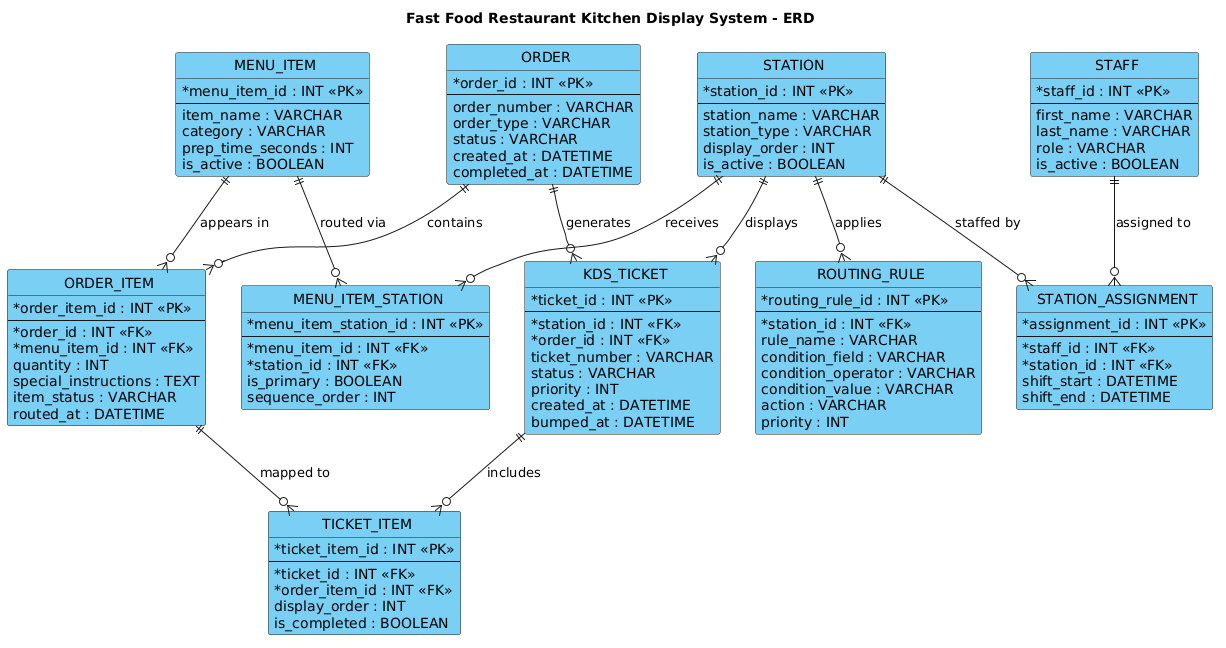
This diagram represents the backbone of a retail kitchen management solution. Unlike a simple inventory list, this ERD models the dynamic lifecycle of an order as it traverses the kitchen. It bridges the gap between the Ordering Layer (what the customer buys) and the Execution Layer (how the kitchen prepares it).
Diagram Abstraction & Representation
The ERD (Entity Relationship Diagram) is the ideal notation for this scenario because it focuses on data integrity and relational logic. In this model, Entities represent concrete business objects like Orders, Menu Items, and Kitchen Stations. Relationships define the cardinality and logic of how these objects interact—for instance, how one Order can contain many Items, or how a single Menu Item might be routed to multiple Stations based on cooking requirements.
Target Domain Scope & Scenario
The scope of this model is strictly the kitchen’s internal logic. It excludes external payment processing or loyalty program data to focus on the core operational workflow. The diagram covers the entire lifecycle from the moment an order is created, through the splitting of items into station-specific tickets, to the assignment of staff to specific work areas. It explicitly models the Routing Rules that determine priority and the Station Assignments that ensure accountability.
Key Takeaways & Educational Insights
By building this diagram, you will learn how to model many-to-many relationships (like items routed to stations) using junction tables, how to implement conditional logic (routing rules) within a static schema, and how to structure data for high-throughput transactional systems. You will gain a clear understanding of how to separate static definitions (Menu Items, Stations) from dynamic transactions (Orders, Tickets) to create a scalable architecture.
Complete Diagram & Full Source Code
Below is the complete visual representation of the Fast Food Kitchen Display System ERD. This diagram illustrates the complex interplay between customer orders and kitchen execution, highlighting the critical junction tables that enable flexible routing.
Copy the following complete source code to visualize this diagram immediately in the VPasCode editor:
@startuml
!include https://static.visual-paradigm.com/web/resources/plantuml-stdlib/themes/vp.puml

title Fast Food Restaurant Kitchen Display System - ERD

/'
Diagram Context:
This ERD models the core data structures behind a fast food restaurant's kitchen display system (KDS)
and its order routing logic. The system receives customer orders at the point of sale (POS) or self-service
kiosk, breaks them into individual line items, and routes each item to the appropriate kitchen station
(e.g., grill, fryer, assembly, drinks) based on the menu item's station mapping.

The ORDER entity represents the customer's overall transaction, while ORDER_ITEM captures each individual
product ordered. MENU_ITEM defines the products available, and STATION defines the kitchen work areas.
The MENU_ITEM_STATION mapping determines routing rules—deciding which station(s) prepare a given item.
KDS_TICKET represents the digital ticket displayed on a station's monitor, and TICKET_ITEM links each
order item to its ticket. ROUTING_RULE stores conditional logic (e.g., priority, split routing) that
affects how items are dispatched. STAFF and STATION_ASSIGNMENT track which employees are working at
which stations for accountability and load balancing.

Key relationships:
- One ORDER contains many ORDER_ITEMs.
- Each ORDER_ITEM references one MENU_ITEM.
- Each MENU_ITEM can be routed to one or more STATIONs via MENU_ITEM_STATION.
- A KDS_TICKET is generated per STATION and contains many TICKET_ITEMs.
- ROUTING_RULE influences how ORDER_ITEMs are assigned to KDS_TICKETs.
- STAFF are assigned to STATIONs through STATION_ASSIGNMENT.
'/

entity "ORDER" as order {
  * order_id : INT <<PK>>
  --
  order_number : VARCHAR
  order_type : VARCHAR
  status : VARCHAR
  created_at : DATETIME
  completed_at : DATETIME
}

entity "ORDER_ITEM" as order_item {
  * order_item_id : INT <<PK>>
  --
  * order_id : INT <<FK>>
  * menu_item_id : INT <<FK>>
  quantity : INT
  special_instructions : TEXT
  item_status : VARCHAR
  routed_at : DATETIME
}

entity "MENU_ITEM" as menu_item {
  * menu_item_id : INT <<PK>>
  --
  item_name : VARCHAR
  category : VARCHAR
  prep_time_seconds : INT
  is_active : BOOLEAN
}

entity "STATION" as station {
  * station_id : INT <<PK>>
  --
  station_name : VARCHAR
  station_type : VARCHAR
  display_order : INT
  is_active : BOOLEAN
}

entity "MENU_ITEM_STATION" as menu_item_station {
  * menu_item_station_id : INT <<PK>>
  --
  * menu_item_id : INT <<FK>>
  * station_id : INT <<FK>>
  is_primary : BOOLEAN
  sequence_order : INT
}

entity "KDS_TICKET" as kds_ticket {
  * ticket_id : INT <<PK>>
  --
  * station_id : INT <<FK>>
  * order_id : INT <<FK>>
  ticket_number : VARCHAR
  status : VARCHAR
  priority : INT
  created_at : DATETIME
  bumped_at : DATETIME
}

entity "TICKET_ITEM" as ticket_item {
  * ticket_item_id : INT <<PK>>
  --
  * ticket_id : INT <<FK>>
  * order_item_id : INT <<FK>>
  display_order : INT
  is_completed : BOOLEAN
}

entity "ROUTING_RULE" as routing_rule {
  * routing_rule_id : INT <<PK>>
  --
  * station_id : INT <<FK>>
  rule_name : VARCHAR
  condition_field : VARCHAR
  condition_operator : VARCHAR
  condition_value : VARCHAR
  action : VARCHAR
  priority : INT
}

entity "STAFF" as staff {
  * staff_id : INT <<PK>>
  --
  first_name : VARCHAR
  last_name : VARCHAR
  role : VARCHAR
  is_active : BOOLEAN
}

entity "STATION_ASSIGNMENT" as station_assignment {
  * assignment_id : INT <<PK>>
  --
  * staff_id : INT <<FK>>
  * station_id : INT <<FK>>
  shift_start : DATETIME
  shift_end : DATETIME
}

' Relationships
order ||--o{ order_item : "contains"
menu_item ||--o{ order_item : "appears in"
menu_item ||--o{ menu_item_station : "routed via"
station ||--o{ menu_item_station : "receives"
station ||--o{ kds_ticket : "displays"
order ||--o{ kds_ticket : "generates"
kds_ticket ||--o{ ticket_item : "includes"
order_item ||--o{ ticket_item : "mapped to"
station ||--o{ routing_rule : "applies"
staff ||--o{ station_assignment : "assigned to"
station ||--o{ station_assignment : "staffed by"

@endumlStep-by-Step Architectural Walkthrough
Building a complex ERD requires a structured approach. We will construct this diagram in four logical phases: setting up the environment, defining the core data entities, establishing the routing logic, and finally mapping the relationships.
Phase 1: Canvas Configuration & Layout Directives
Every PlantUML diagram benefits from a consistent theme and clear layout. We begin by including the Visual Paradigm standard library theme, which provides a modern, professional look with consistent coloring and fonts. We also define a title for the diagram to provide immediate context.
!include https://static.visual-paradigm.com/web/resources/plantuml-stdlib/themes/vp.puml

title Fast Food Restaurant Kitchen Display System - ERD
This setup ensures that when you render the diagram in VPasCode, it adopts a clean, enterprise-grade aesthetic immediately, saving you from manually styling every element.
Phase 2: Declaring Core Entities, Actors, and Boundaries
The foundation of any ERD is the definition of entities. In PlantUML, we use the entity keyword. We start with the core transactional entities: ORDER and ORDER_ITEM.
entity "ORDER" as order {
  * order_id : INT <>
  --
  order_number : VARCHAR
  order_type : VARCHAR
  status : VARCHAR
  created_at : DATETIME
  completed_at : DATETIME
}
Notice the syntax used here:
* order_id: The asterisk denotes the Primary Key (PK).<and> <: Stereotypes explicitly label keys for clarity.> --: This separator line visually divides keys from regular attributes.as order: This creates a short alias (order) used later to draw relationships.
We then define the STATION and STAFF entities to represent the physical and human resources of the kitchen. These are static reference tables that do not change frequently but are crucial for context.
Phase 3: Mapping Data Flows & Key Interactions
The most complex part of this model is the routing logic. We need to connect Menu Items to Kitchen Stations. Since a single menu item (like a burger) might be routed to both the Grill and the Assembly station, we need a junction table: MENU_ITEM_STATION.
entity "MENU_ITEM_STATION" as menu_item_station {
* menu_item_station_id : INT <>
--
* menu_item_id : INT <>
* station_id : INT < >
is_primary : BOOLEAN
sequence_order : INT
} This table resolves the many-to-many relationship between MENU_ITEM and STATION. It also introduces business logic attributes like is_primary and sequence_order, which dictate the workflow (e.g., cook the patty before assembling the bun).
Next, we model the KDS_TICKET. This is a virtual entity representing the digital display at a station. It links a specific ORDER to a specific STATION.
Phase 4: Grouping, Annotations & Visual Polish
To ensure the diagram is readable, we add the relationships. In PlantUML, relationships are defined using the double-dash syntax with cardinality symbols. For example, ||--o{ means “one or more” on the right side.
order ||--o{ order_item : "contains"
menu_item ||--o{ menu_item_station : "routed via"
kds_ticket ||--o{ ticket_item : "includes"
We also include a comment block at the top to document the context for future developers. This is done using /' ... '/ syntax, which renders as a note in the diagram without cluttering the visual flow.
Syntax & Keyword Deep Dive
To fully master this PlantUML ERD, it is essential to understand the specific keywords and conventions used:
entity: The core keyword to define a table or object. It takes a display name and an alias.as: Used to assign a short alias (e.g.,as order) to an entity, which is required to draw relationships between them.<&> <: These are stereotypes.> <marks a Primary Key, and> <marks a Foreign Key. They are critical for database schema generation.> ||--o{: This is a relationship arrow.||means “mandatory one” on the left, ando{means “optional many” on the right. This notation clearly defines the cardinality of the relationship.--: A separator line within an entity definition that visually separates keys from attributes./' ... '/: The syntax for multi-line comments in PlantUML, used here to provide a detailed context description.
Best Practices & Pitfalls to Avoid
When modeling complex systems like a Kitchen Display System, adhering to best practices ensures your diagram remains maintainable and accurate.
- Use Junction Tables for Many-to-Many Relationships: Never try to link two entities directly if they can have multiple associations. Always create an intermediate table (like
MENU_ITEM_STATION) to hold the foreign keys and any additional attributes likesequence_order. - Consistent Naming Conventions: Use clear, descriptive names for entities and attributes. Avoid abbreviations like
OIDfororder_idunless your entire team agrees. Usesnake_casefor attributes to improve readability. - Separate Static and Dynamic Data: Distinguish between reference data (Menu Items, Stations) and transactional data (Orders, Tickets). This separation makes it easier to update the menu without affecting historical order data.
- Document Logic, Not Just Structure: Use the comment blocks and relationship labels to explain why a relationship exists (e.g., “routed via” vs just “has”), especially for complex routing logic.
Start Building ERDs Faster with VPasCode
Design complex retail data models instantly in your browser with VPasCode’s free PlantUML editor—no installation required.