


In the high-stakes world of luxury retail, particularly within the bespoke jewelry sector, the ability to track the intricate lifecycle of a custom order is paramount. Unlike mass-market retail, a custom design consultation involves a complex web of interactions: a customer’s vision must be captured, a designer assigned, specific gemstones sourced from global suppliers, and finally, those materials allocated to a unique physical piece. Managing this data manually or through disjointed spreadsheets leads to lost opportunities, inventory mismatches, and a fragmented customer experience. A robust database schema is the backbone of this operation, ensuring that every carat, consultation, and design proposal is linked to a specific client and timeline.
Modeling this ecosystem requires more than just listing tables; it demands a clear visualization of how entities like Customers, Designers, Suppliers, and Gemstones interact. An Entity Relationship Diagram (ERD) provides this architectural clarity. By using diagram-as-code with PlantUML, architects can define these relationships with precision, version the schema logic alongside the application code, and instantly visualize the data flow from initial consultation to final jewelry piece fulfillment. This approach transforms a complex business requirement into a clean, maintainable visual blueprint.

This guide walks through the construction of a comprehensive ERD for a Jewelry Retail Custom Design Consultation and Gemstone Sourcing system. We will explore how to structure the database to handle one-to-many relationships, such as a single customer scheduling multiple consultations, and many-to-many associations, like a single jewelry piece incorporating multiple gemstones from various suppliers. Using VPasCode, you will learn to write the PlantUML code that brings this data model to life, ensuring your retail database is ready to support complex, high-value transactions.
Understanding the Model: Purpose, Scope & Problem Framing
This ERD is designed to solve a specific operational challenge: the fragmentation of data in custom jewelry manufacturing. The scope covers the entire “Custom Order Lifecycle,” starting from the moment a client expresses interest (Customer entity) through the design phase (Consultation and DesignProposal), the sourcing phase (Supplier and Gemstone entities), and the final production phase (JewelryPiece entity).
Diagram Abstraction & Representation
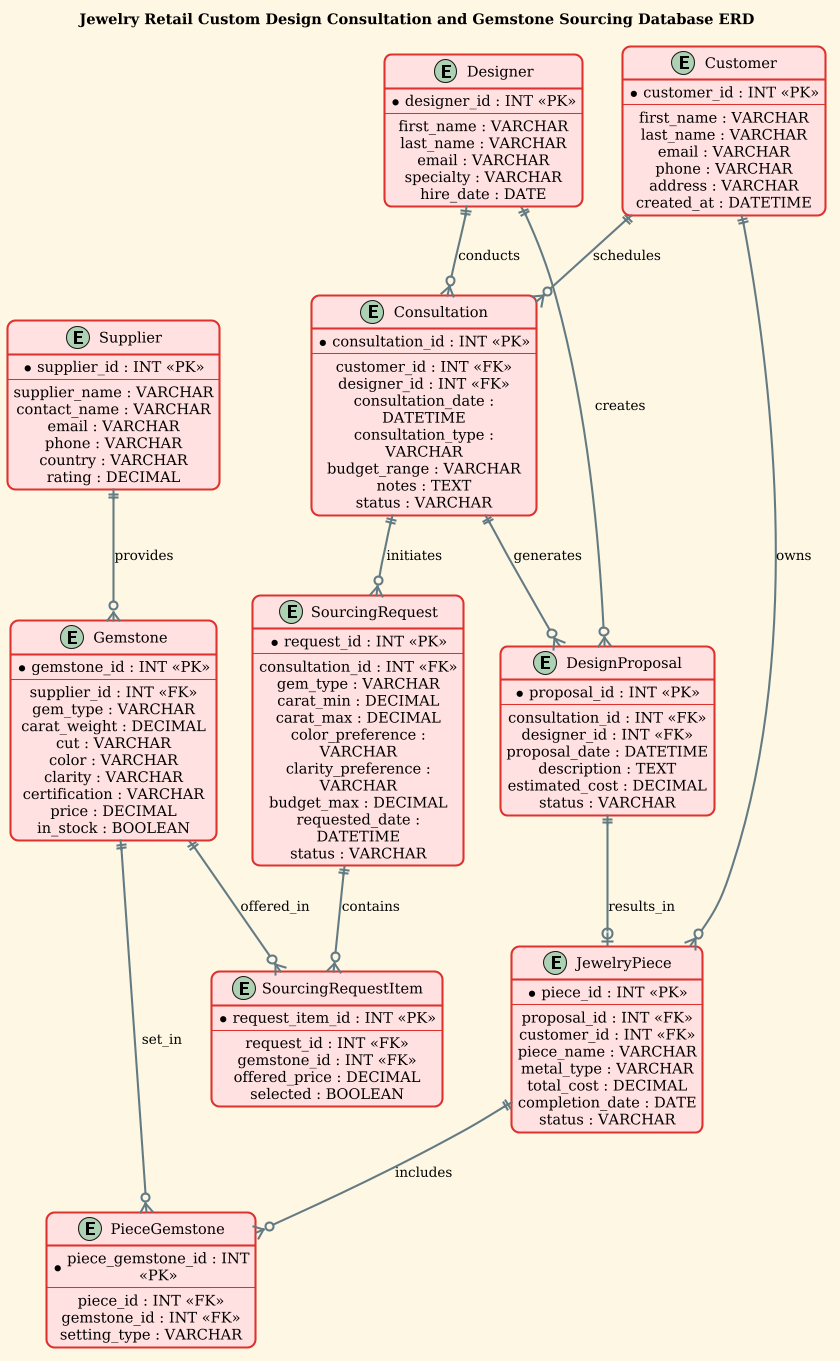
The diagram uses standard Entity Relationship notation to map the logical structure of the database. Each rectangle represents a database table (Entity), and the lines connecting them represent relationships. The cardinality markers (||–o{) indicate that one entity can be associated with zero or many instances of another. For instance, one Designer can conduct many Consultations, but a specific Consultation is conducted by exactly one Designer. This visual abstraction allows stakeholders to instantly understand data dependencies without needing to read raw SQL.
Target Domain Scope & Scenario
The model specifically addresses the “Custom Design” workflow. It distinguishes between DesignProposals (the plan) and JewelryPieces (the physical result). It also introduces a critical sub-model for Sourcing, separating the request for a gemstone from the actual Gemstone inventory. This allows the system to track which specific stone was offered to a client versus which one was ultimately set into the final piece, a crucial detail for high-value inventory management.
Key Takeaways & Educational Insights
By studying this model, readers will learn how to handle associative entities (like SourcingRequestItem and PieceGemstone) which bridge many-to-many relationships. You will also see how to structure a schema that supports flexible sourcing (e.g., a request for a “Red Ruby” can result in multiple offered stones before one is selected) and how to link the final product back to the original customer and designer.
Complete Diagram & Full Source Code
Below is the complete, rendered view of the Jewelry Retail ERD. This diagram illustrates the flow from customer intake to final product, highlighting the critical role of the SourcingRequest and DesignProposal entities in connecting the client’s vision to the physical inventory.
@startuml
!theme sunlust
title Jewelry Retail Custom Design Consultation and Gemstone Sourcing Database ERD

/'
Diagram Context:
This ERD models the operations of a jewelry retail business that offers custom design
consultations and sources gemstones for clients. The database captures the full lifecycle
from customer intake through design consultation, gemstone sourcing, and final custom
piece fulfillment. Key entities include customers, consultations, designers, design
proposals, gemstones, suppliers, sourcing requests, and finished jewelry pieces.
The model supports tracking which designer met with which customer, what design
proposals were created, which gemstones were sourced from which suppliers, and how
those gemstones are ultimately allocated to custom jewelry pieces. This enables the
retailer to manage inventory, supplier relationships, consultation scheduling, and
custom order fulfillment in a unified system.
'/

entity Customer {
  * customer_id : INT <<PK>>
  --
  first_name : VARCHAR
  last_name : VARCHAR
  email : VARCHAR
  phone : VARCHAR
  address : VARCHAR
  created_at : DATETIME
}

entity Consultation {
  * consultation_id : INT <<PK>>
  --
  customer_id : INT <<FK>>
  designer_id : INT <<FK>>
  consultation_date : DATETIME
  consultation_type : VARCHAR
  budget_range : VARCHAR
  notes : TEXT
  status : VARCHAR
}

entity Designer {
  * designer_id : INT <<PK>>
  --
  first_name : VARCHAR
  last_name : VARCHAR
  email : VARCHAR
  specialty : VARCHAR
  hire_date : DATE
}

entity DesignProposal {
  * proposal_id : INT <<PK>>
  --
  consultation_id : INT <<FK>>
  designer_id : INT <<FK>>
  proposal_date : DATETIME
  description : TEXT
  estimated_cost : DECIMAL
  status : VARCHAR
}

entity Gemstone {
  * gemstone_id : INT <<PK>>
  --
  supplier_id : INT <<FK>>
  gem_type : VARCHAR
  carat_weight : DECIMAL
  cut : VARCHAR
  color : VARCHAR
  clarity : VARCHAR
  certification : VARCHAR
  price : DECIMAL
  in_stock : BOOLEAN
}

entity Supplier {
  * supplier_id : INT <<PK>>
  --
  supplier_name : VARCHAR
  contact_name : VARCHAR
  email : VARCHAR
  phone : VARCHAR
  country : VARCHAR
  rating : DECIMAL
}

entity SourcingRequest {
  * request_id : INT <<PK>>
  --
  consultation_id : INT <<FK>>
  gem_type : VARCHAR
  carat_min : DECIMAL
  carat_max : DECIMAL
  color_preference : VARCHAR
  clarity_preference : VARCHAR
  budget_max : DECIMAL
  requested_date : DATETIME
  status : VARCHAR
}

entity SourcingRequestItem {
  * request_item_id : INT <<PK>>
  --
  request_id : INT <<FK>>
  gemstone_id : INT <<FK>>
  offered_price : DECIMAL
  selected : BOOLEAN
}

entity JewelryPiece {
  * piece_id : INT <<PK>>
  --
  proposal_id : INT <<FK>>
  customer_id : INT <<FK>>
  piece_name : VARCHAR
  metal_type : VARCHAR
  total_cost : DECIMAL
  completion_date : DATE
  status : VARCHAR
}

entity PieceGemstone {
  * piece_gemstone_id : INT <<PK>>
  --
  piece_id : INT <<FK>>
  gemstone_id : INT <<FK>>
  setting_type : VARCHAR
}

Customer ||--o{ Consultation : schedules
Designer ||--o{ Consultation : conducts
Consultation ||--o{ DesignProposal : generates
Designer ||--o{ DesignProposal : creates
Consultation ||--o{ SourcingRequest : initiates
SourcingRequest ||--o{ SourcingRequestItem : contains
Gemstone ||--o{ SourcingRequestItem : offered_in
Supplier ||--o{ Gemstone : provides
DesignProposal ||--o| JewelryPiece : results_in
Customer ||--o{ JewelryPiece : owns
JewelryPiece ||--o{ PieceGemstone : includes
Gemstone ||--o{ PieceGemstone : set_in

@endumlStep-by-Step Architectural Walkthrough
Phase 1: Canvas Configuration & Layout Directives
Before defining any entities, we must set the stage for the diagram. PlantUML allows us to control the visual theme and the title of the diagram directly in the code. This ensures the diagram is not only functional but also aesthetically aligned with the project’s branding.
We start by declaring the theme using !theme sunlust. This applies a specific color palette and styling to the entire diagram. Immediately after, we define the title directive to provide a clear, descriptive header for the ERD. This is crucial for documentation, ensuring anyone viewing the diagram understands its purpose at a glance.
!theme sunlust
title Jewelry Retail Custom Design Consultation and Gemstone Sourcing Database ERD
Additionally, we include a comment block using the /' ... '/ syntax. This block allows us to embed a detailed context description directly within the code file. This documentation travels with the diagram, serving as a living reference for the business logic behind the schema without cluttering the visual rendering.
Phase 2: Declaring Core Entities, Actors, and Boundaries
The foundation of any ERD is the definition of its entities. In PlantUML, we use the entity keyword followed by the table name. Inside the curly braces, we define the attributes (columns) and their data types.
For the Customer entity, we define the primary key using the * symbol (e.g., * customer_id : INT <). The < stereotype explicitly marks this as the Primary Key. We then list standard attributes like first_name, email, and created_at. The -- separator is used to visually group related attributes, such as separating the ID from the descriptive fields, which improves readability.
entity Customer {
  * customer_id : INT <>
  --
  first_name : VARCHAR
  last_name : VARCHAR
  email : VARCHAR
  created_at : DATETIME
}
We repeat this process for Designer, Supplier, and Gemstone. Note that Supplier and Gemstone are critical here. The Supplier entity tracks external vendors, while the Gemstone entity tracks the inventory items themselves, linked via a Foreign Key (supplier_id). This separation allows the retailer to source the same gem type from multiple different suppliers.
Phase 3: Mapping Data Flows & Key Interactions
Once entities are defined, we establish the relationships between them. This is where the “story” of the jewelry business is told through lines and arrows. We use the ||--o{ syntax to denote a one-to-many relationship. The || represents the “one” side (mandatory), and the o{ represents the “zero or many” side (optional collection).
For example, a single Customer can schedule multiple Consultations, but a Consultation is linked to only one Customer. We write this as:
Customer ||--o{ Consultation : schedulesWe also model the complex sourcing workflow. A SourcingRequest is initiated by a Consultation. However, a request isn’t just a list; it contains specific items. We introduce the SourcingRequestItem entity as an associative table. This allows a single request to have multiple Gemstone options offered to the client. The relationship SourcingRequest ||--o{ SourcingRequestItem : contains captures this grouping.
Phase 4: Grouping, Annotations & Visual Polish
The final phase involves ensuring the diagram is complete and visually consistent. We add the final relationships that link the design phase to the production phase. The DesignProposal leads to the creation of a JewelryPiece (indicated by ||--o| for one-to-one or optional one-to-one, though in this context, a proposal results in a piece).
We also define the PieceGemstone associative entity. This is a critical many-to-many bridge. A JewelryPiece includes many Gemstones, and a Gemstone (once sold) is set into one specific JewelryPiece. The relationship JewelryPiece ||--o{ PieceGemstone : includes and Gemstone ||--o{ PieceGemstone : set_in creates this bridge, allowing us to track the specific setting_type (e.g., “Prong”, “Bezel”) for each stone in the final ring or necklace.
Syntax & Keyword Deep Dive
To build this ERD effectively, it is essential to understand the specific PlantUML syntax used for database modeling. The following keywords and conventions are the building blocks of this diagram.
entity: The primary directive used to define a database table. It is followed by the table name and a block of attributes.entity_name{ … }: The curly braces define the scope of the entity’s attributes. Each attribute is listed on a new line.attribute_name : TYPE: Defines a column.TYPEcan be standard SQL types likeINT,VARCHAR,DECIMAL, orBOOLEAN.*(Asterisk): Placed before the attribute name (e.g.,* customer_id) to visually indicate the Primary Key in the diagram.<<PK>>and<<FK>>: These are stereotypes (double angle brackets) used to explicitly label Primary Keys and Foreign Keys in the rendered diagram, ensuring clarity for database developers.--(Double Dash): A visual separator used within an entity block to divide the Primary Key from other attributes, improving readability.||--o{: The relationship arrow syntax.||means “one and only one” (mandatory), ando{means “zero or many” (optional collection). This is the standard notation for one-to-many relationships.label: The text following the relationship arrow (e.g.,: schedules) describes the action or nature of the relationship between the two entities.
Best Practices & Pitfalls to Avoid
When modeling complex retail databases like this, adhering to best practices ensures the diagram remains useful as the system evolves.
- Use Associative Entities for Many-to-Many: Never try to force a many-to-many relationship directly between two tables. Always introduce an intermediate entity (like SourcingRequestItem or PieceGemstone) to hold the foreign keys and any additional attributes (like
offered_priceorsetting_type). - Consistent Naming Conventions: Stick to a consistent naming style. In this diagram, we used CamelCase for entity names (e.g.,
JewelryPiece) and snake_case or camelCase for attributes. Consistency helps developers map the diagram to the actual codebase quickly. - Separate Inventory from Requests: A common pitfall in retail ERDs is conflating the Supplier inventory with the Customer request. This diagram correctly separates Gemstone (inventory) from SourcingRequest (the specific request for a client), allowing the system to track availability vs. commitment.
- Document Business Logic in Comments: Use the
/' ... '/comment block to explain complex workflows that cannot be easily represented by arrows alone. This keeps the visual diagram clean while preserving critical context.
Start Building Jewelry Retail ERDs Faster with VPasCode
Design complex database schemas instantly with our free web-based PlantUML editor. No installation required—just write code, see the diagram live, and export your model in seconds.