


In the automotive retail and aftermarket industry, data complexity is the primary barrier to efficient inventory management and customer satisfaction. The core operational challenge lies in the “many-to-many” chaos of vehicle compatibility: a single physical component, such as a brake pad, might be sold under dozens of different manufacturer part numbers, aftermarket equivalents, and interchange numbers, while simultaneously fitting hundreds of vehicle configurations spanning various years, makes, models, engines, and trim levels. Traditional spreadsheets and rigid database schemas often fail to capture these intricate relationships, leading to incorrect part recommendations and costly return cycles.
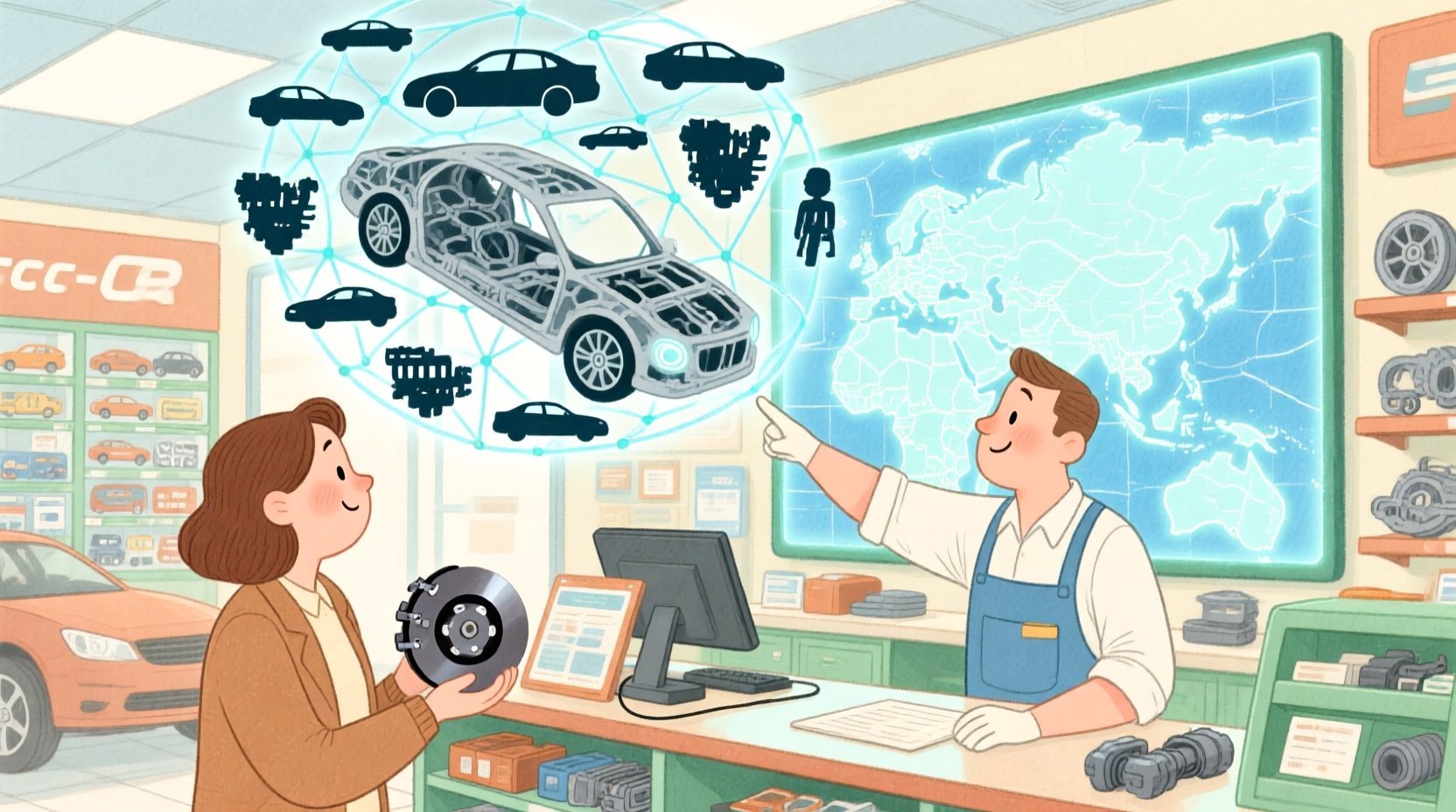
To solve this, data architects must design a normalized, flexible Entity-Relationship Diagram (ERD) that decouples the physical part identity from its various identifiers and fitment rules. By modeling the taxonomy of vehicles (Make, Model, Engine, Trim) separately from the part catalog and cross-reference mappings, engineers can build search engines that support both reverse lookups (“what parts fit this car?”) and forward lookups (“what cars does this part fit?”). This tutorial demonstrates how to construct such a sophisticated schema using PlantUML within the VPasCode editor, providing a living blueprint for a scalable retail data foundation.
Understanding the Model: Purpose, Scope & Problem Framing
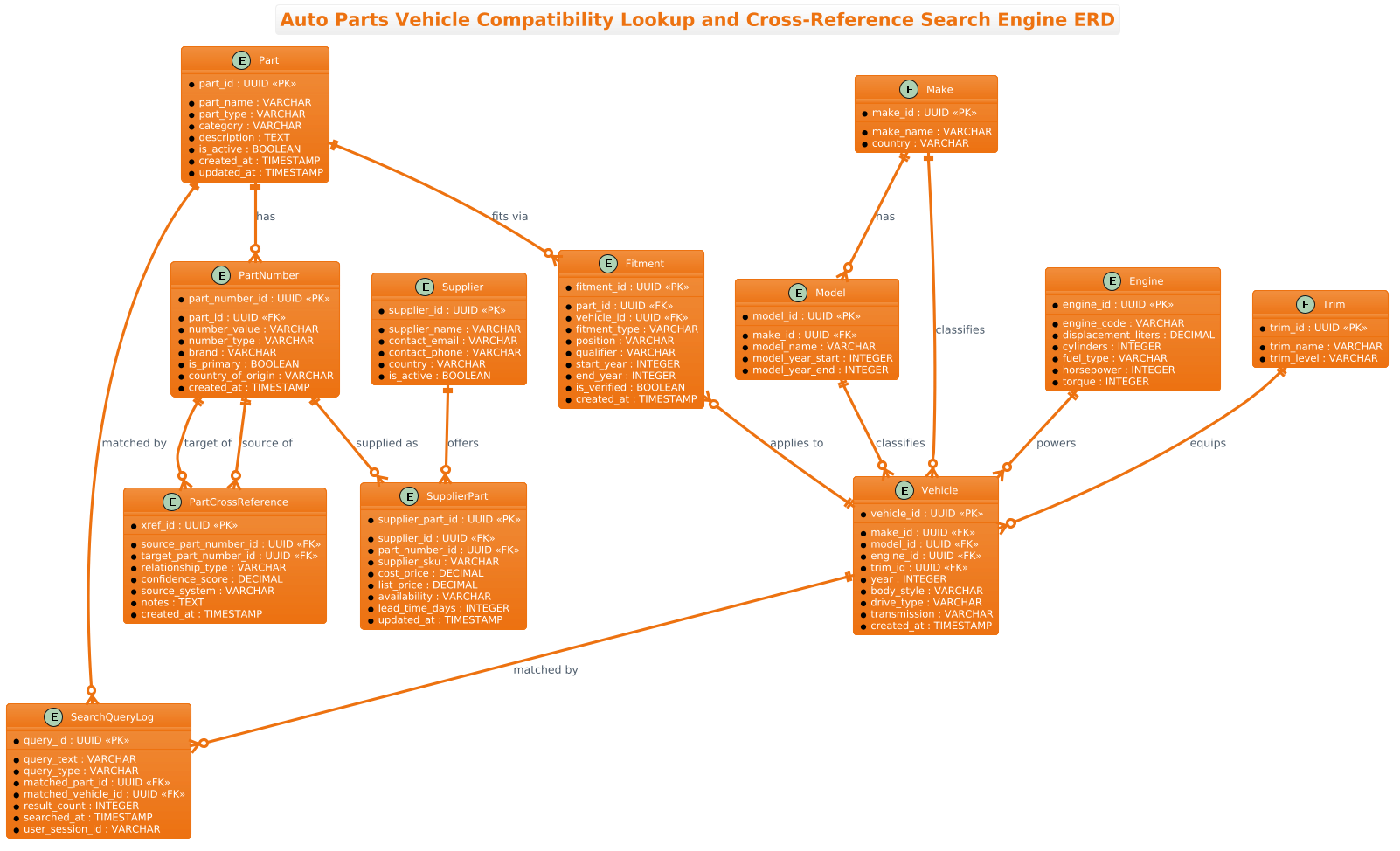
This diagram serves as the architectural backbone for an Auto Parts Vehicle Compatibility Lookup and Cross-Reference Search Engine. It is not merely a list of tables; it is a logical map of how disparate data points converge to answer critical business questions.
Diagram Abstraction & Representation
The ERD employs a normalized relational model to handle the high cardinality of the automotive domain. It separates concerns into distinct layers:
- Part Identity Layer: The
Partentity represents the physical object, distinct from thePartNumberentity which stores the various alphanumeric codes (OEM, aftermarket, interchange) used to identify it. - Vehicle Taxonomy Layer: Instead of storing a flat “Vehicle” string, the model breaks down vehicles into
Make,Model,Engine, andTrim. This allows for precise filtering and scalability. - Fitment & Cross-Reference Layer: The
Fitmententity acts as the bridge, linking a specific part to a specific vehicle configuration. ThePartCrossReferenceentity handles the logic of part substitution, allowing the system to suggest alternatives.
Target Domain Scope & Scenario
The scope of this model covers the entire lifecycle of a part search query. It includes entities for Supplier management (for procurement data) and SearchQueryLog (for analytics). It intentionally excludes transactional order data (invoices, carts) to focus purely on the lookup and compatibility logic. The boundaries are defined by the Part entity as the central hub, radiating out to its identifiers, its fitment rules, and its suppliers.
Key Takeaways & Educational Insights
By studying this model, you will learn how to handle many-to-many relationships (e.g., one part fits many vehicles, one vehicle fits many parts) using junction tables like Fitment. You will also see how to manage hierarchical data (Makes having Models) and how to implement polymorphic-like behavior for part numbers without violating normalization rules.
Complete Diagram & Full Source Code
Below is the finalized Entity-Relationship Diagram visualizing the Auto Parts Compatibility system. This blueprint defines the schema for the search engine described in the context above.
@startuml
!theme aws-orange
title Auto Parts Vehicle Compatibility Lookup and Cross-Reference Search Engine ERD

/'
Diagram Context:
This ERD models the data foundation for an auto parts compatibility lookup and cross-reference
search engine. The core problem is that a single physical auto part may be sold under many
different manufacturer part numbers, aftermarket numbers, or interchange numbers, and that
same part may fit many different vehicle configurations across years, makes, models, engines,
and trim levels. The diagram separates the part identity (Part) from its many identifiers
(PartNumber), from its vehicle fitment rules (Fitment), and from the vehicle taxonomy it
references (Vehicle, Make, Model, Engine, Trim). It also captures cross-reference mappings
between part numbers so that a user can search with any known number and discover equivalent
or alternate parts. Supplier and inventory-style tables are included to reflect real-world
procurement and lookup scenarios. This structure supports reverse lookups such as "what parts
fit this vehicle?" and forward lookups such as "what vehicles does this part fit?"
'/

entity "Part" as part {
  * part_id : UUID <<PK>>
  --
  * part_name : VARCHAR
  * part_type : VARCHAR
  * category : VARCHAR
  * description : TEXT
  * is_active : BOOLEAN
  * created_at : TIMESTAMP
  * updated_at : TIMESTAMP
}

entity "PartNumber" as part_number {
  * part_number_id : UUID <<PK>>
  --
  * part_id : UUID <<FK>>
  * number_value : VARCHAR
  * number_type : VARCHAR
  * brand : VARCHAR
  * is_primary : BOOLEAN
  * country_of_origin : VARCHAR
  * created_at : TIMESTAMP
}

entity "PartCrossReference" as part_xref {
  * xref_id : UUID <<PK>>
  --
  * source_part_number_id : UUID <<FK>>
  * target_part_number_id : UUID <<FK>>
  * relationship_type : VARCHAR
  * confidence_score : DECIMAL
  * source_system : VARCHAR
  * notes : TEXT
  * created_at : TIMESTAMP
}

entity "Fitment" as fitment {
  * fitment_id : UUID <<PK>>
  --
  * part_id : UUID <<FK>>
  * vehicle_id : UUID <<FK>>
  * fitment_type : VARCHAR
  * position : VARCHAR
  * qualifier : VARCHAR
  * start_year : INTEGER
  * end_year : INTEGER
  * is_verified : BOOLEAN
  * created_at : TIMESTAMP
}

entity "Vehicle" as vehicle {
  * vehicle_id : UUID <<PK>>
  --
  * make_id : UUID <<FK>>
  * model_id : UUID <<FK>>
  * engine_id : UUID <<FK>>
  * trim_id : UUID <<FK>>
  * year : INTEGER
  * body_style : VARCHAR
  * drive_type : VARCHAR
  * transmission : VARCHAR
  * created_at : TIMESTAMP
}

entity "Make" as make {
  * make_id : UUID <<PK>>
  --
  * make_name : VARCHAR
  * country : VARCHAR
}

entity "Model" as model {
  * model_id : UUID <<PK>>
  --
  * make_id : UUID <<FK>>
  * model_name : VARCHAR
  * model_year_start : INTEGER
  * model_year_end : INTEGER
}

entity "Engine" as engine {
  * engine_id : UUID <<PK>>
  --
  * engine_code : VARCHAR
  * displacement_liters : DECIMAL
  * cylinders : INTEGER
  * fuel_type : VARCHAR
  * horsepower : INTEGER
  * torque : INTEGER
}

entity "Trim" as trim {
  * trim_id : UUID <<PK>>
  --
  * trim_name : VARCHAR
  * trim_level : VARCHAR
}

entity "Supplier" as supplier {
  * supplier_id : UUID <<PK>>
  --
  * supplier_name : VARCHAR
  * contact_email : VARCHAR
  * contact_phone : VARCHAR
  * country : VARCHAR
  * is_active : BOOLEAN
}

entity "SupplierPart" as supplier_part {
  * supplier_part_id : UUID <<PK>>
  --
  * supplier_id : UUID <<FK>>
  * part_number_id : UUID <<FK>>
  * supplier_sku : VARCHAR
  * cost_price : DECIMAL
  * list_price : DECIMAL
  * availability : VARCHAR
  * lead_time_days : INTEGER
  * updated_at : TIMESTAMP
}

entity "SearchQueryLog" as search_log {
  * query_id : UUID <<PK>>
  --
  * query_text : VARCHAR
  * query_type : VARCHAR
  * matched_part_id : UUID <<FK>>
  * matched_vehicle_id : UUID <<FK>>
  * result_count : INTEGER
  * searched_at : TIMESTAMP
  * user_session_id : VARCHAR
}

part ||--o{ part_number : "has"
part ||--o{ fitment : "fits via"
part ||--o{ search_log : "matched by"

part_number ||--o{ part_xref : "source of"
part_number ||--o{ part_xref : "target of"
part_number ||--o{ supplier_part : "supplied as"

fitment }o--|| vehicle : "applies to"

make ||--o{ model : "has"
make ||--o{ vehicle : "classifies"
model ||--o{ vehicle : "classifies"
engine ||--o{ vehicle : "powers"
trim ||--o{ vehicle : "equips"

supplier ||--o{ supplier_part : "offers"

vehicle ||--o{ search_log : "matched by"

@endumlStep-by-Step Architectural Walkthrough
Phase 1: Canvas Configuration & Layout Directives
Before defining any entities, we must set the stage for the diagram. In PlantUML, we use directives to control the global appearance and layout. Here, we start by importing the aws-orange theme to give the diagram a modern, professional look that matches enterprise software aesthetics.
@startuml
!theme aws-orange
title Auto Parts Vehicle Compatibility Lookup and Cross-Reference Search Engine ERD
We also include a comment block immediately after the title. This is a crucial step for documentation. The comment block, wrapped in /' and '/, provides context for future developers without cluttering the rendering engine. It explains the “why” behind the model, ensuring the diagram remains self-documenting.
Phase 2: Declaring Core Entities, Actors, and Boundaries
The foundation of any ERD is the entity definition. In PlantUML, we use the entity keyword. We define the core Part entity first, as it is the central subject of our domain. Notice the use of UUID < for the primary key. This indicates that we are using Universally Unique Identifiers rather than simple auto-incrementing integers, which is a best practice for distributed systems and large-scale retail databases.
entity "Part" as part {
  * part_id : UUID <>
  --
  * part_name : VARCHAR
  * part_type : VARCHAR
  * category : VARCHAR
  * description : TEXT
  * is_active : BOOLEAN
  * created_at : TIMESTAMP
  * updated_at : TIMESTAMP
}
We then define the PartNumber entity. This is a classic one-to-many relationship (one part has many numbers). We use FK (Foreign Key) tags to explicitly link part_id back to the Part entity. This visual cue helps readers immediately understand the referential integrity constraints.
Phase 3: Mapping Data Flows & Key Interactions
The most complex part of this model is the Fitment entity. It acts as a junction table connecting Part and Vehicle. Since a part can fit many vehicles and a vehicle can have many parts, this is a many-to-many relationship resolved by the Fitment table. We define the attributes like start_year, end_year, and position (e.g., “Front Left”) to capture the specific constraints of the fitment.
entity "Fitment" as fitment {
* fitment_id : UUID <>
--
* part_id : UUID <>
* vehicle_id : UUID < >
* fitment_type : VARCHAR
* position : VARCHAR
* qualifier : VARCHAR
* start_year : INTEGER
* end_year : INTEGER
* is_verified : BOOLEAN
* created_at : TIMESTAMP
} We also model the vehicle taxonomy. Instead of a single “Vehicle” column, we break it down into Make, Model, Engine, and Trim. The Vehicle entity holds foreign keys to all these tables, creating a normalized structure that allows for flexible querying (e.g., “Find all vehicles with a 3.0L V6 engine”).
Phase 4: Grouping, Annotations & Visual Polish
Finally, we define the relationships using PlantUML’s arrow syntax. We use ||--o{ to denote a mandatory one-to-many relationship (a Part must have at least one Part Number) and }o--|| for the reverse. We also add relationship labels like : "has" or : "fits via" to make the diagram readable without needing to trace every line mentally.
part ||--o{ part_number : "has"
part ||--o{ fitment : "fits via"
fitment }o--|| vehicle : "applies to"
make ||--o{ model : "has"
make ||--o{ vehicle : "classifies"
model ||--o{ vehicle : "classifies"
engine ||--o{ vehicle : "powers"
trim ||--o{ vehicle : "equips"
Additional entities like Supplier and SearchQueryLog are added to round out the business logic, showing how the data is sourced and how user interactions are tracked.
Syntax & Keyword Deep Dive
This diagram leverages several specific PlantUML features to achieve clarity and precision.
entity "Name" as alias: Defines a database table. Thealias(e.g.,as part) is a shorthand used later for defining relationships, keeping the diagram clean.UUID <&> UUID <: PlantUML uses stereotypes to denote database constraints.> PKmarks a Primary Key, andFKmarks a Foreign Key. TheUUIDtype indicates the data type used for these keys.||--o{(Mandatory One-to-Many): The double bar||on the left indicates “one and only one” (mandatory), while the crow’s foot{on the right indicates “many” (zero or more). This is used forpart ||--o{ part_number, meaning a part must have at least one number, but can have many.}o--||(Optional Many-to-One): The}oindicates “zero or one” (optional) on the left, and||indicates “one and only one” on the right. This is used forfitment }o--|| vehicle, meaning a fitment record must point to exactly one vehicle.!theme: A directive to load a specific visual theme. Here,aws-orangeis used to apply a color palette inspired by Amazon Web Services documentation./'…'/: This is the syntax for a multi-line comment block in PlantUML. Unlike standard code comments, this is rendered as a text box within the diagram, perfect for high-level documentation.
Best Practices & Pitfalls to Avoid
When building complex ERDs like this one, adhering to best practices ensures the diagram remains maintainable and useful.
- Separate Identity from Attributes: Never store the part number directly inside the
Partentity. As seen in this model, thePartNumberentity is separate. This allows a single physical part to have multiple identifiers (OEM, aftermarket, interchange) without duplicating the core part data. - Normalize Vehicle Taxonomy: Avoid storing “Make, Model, Year” as a single string. By breaking them into
Make,Model, andVehicletables, you enable powerful filtering. For example, you can easily query “All vehicles made by Ford” without parsing text strings. - Use Explicit Foreign Keys: Always tag your foreign keys with
FKin PlantUML. This visual marker is critical for database architects to quickly understand the referential integrity of the schema. - Document the “Why”: Use the comment block (
/') to explain the business logic, not just the syntax. Explain why a junction table exists or why a specific field is optional. This makes the diagram a living document for the team.
Start Building Auto Parts ERDs Faster with VPasCode
Design complex retail data models instantly in your browser with VPasCode, the free PlantUML editor that renders your ERD code in real-time with zero setup.