


In the fast-paced environment of modern retail pharmacy, ensuring customer safety while managing inventory and compliance is a monumental task. When a customer walks into a pharmacy to purchase an over-the-counter (OTC) medication, the risk of dangerous interactions with their existing prescription drugs is a critical concern that cannot be left to chance. Simultaneously, the business must maintain a robust system to track refill schedules and send timely reminders, ensuring patients adhere to their treatment plans. Without a structured data model, these complex relationships between customers, medications, prescriptions, and safety alerts become fragmented, leading to potential health risks and operational inefficiencies.

This is where a well-designed Entity Relationship Diagram (ERD) becomes indispensable. By visualizing the data architecture upfront, architects can ensure that every transaction, safety check, and reminder is supported by a relational database that enforces integrity and scalability. Using diagram-as-code with PlantUML allows developers to define these relationships with precision, treating the database schema as living documentation that evolves alongside the software. In this masterclass, we will construct a comprehensive ERD for a pharmacy system that specifically addresses the dual challenges of OTC interaction checking and automated refill management, utilizing the free, browser-based VPasCode editor to bring the schema to life instantly.
Understanding the Model: Purpose, Scope & Problem Framing
The diagram we are building is a classic Entity Relationship Diagram (ERD), but with a specific focus on the healthcare retail domain. An ERD is the blueprint for a relational database, defining how different data entities relate to one another through keys and constraints. In this specific scenario, the model must handle many-to-many and one-to-many relationships that are common in pharmacy operations: a single customer has many prescriptions and makes many OTC purchases, while a single medication can be prescribed to many customers or purchased as OTC by many.
Diagram Abstraction & Representation
This ERD models the core data entities required to support three critical business functions: Customer Management, Safety Verification, and Adherence Tracking. The Customer entity acts as the central hub, linking to their medical history (Prescriptions), their allergy profile (Allergy), and their purchasing behavior (OTC_Purchase). The Medication entity serves as the master catalog, distinguishing between prescription-only and OTC drugs. Crucially, the Interaction entity is a junction table that allows the system to flag dangerous combinations between any two medications, while the Refill_Reminder entity ensures that the lifecycle of a prescription is monitored.
Target Domain Scope & Scenario
The scope of this model is strictly limited to the data required for the Pharmacy Retail OTC Drug Interaction Checker and Refill Reminder System. We are not modeling the point-of-sale hardware or the external insurance claim processing systems; instead, we focus on the internal data integrity required to answer questions like: “Is this OTC drug safe for this specific customer given their current prescriptions?” and “Which customers need a refill reminder today?” The boundaries are defined by the Customer, Medication, Prescription, OTC_Purchase, Interaction, Refill_Reminder, and Allergy entities.
Key Takeaways & Educational Insights
By following this tutorial, you will learn how to model complex healthcare data constraints using PlantUML. You will understand how to implement foreign keys to establish referential integrity, how to use junction entities to handle many-to-many relationships (like drug interactions), and how to structure entities to support both historical tracking (purchases) and real-time safety checks (interactions).
Complete Diagram & Full Source Code
Before we dive into the step-by-step construction, here is the complete, rendered ERD that we will be building. This visual representation shows the relationships between customers, medications, and safety protocols.
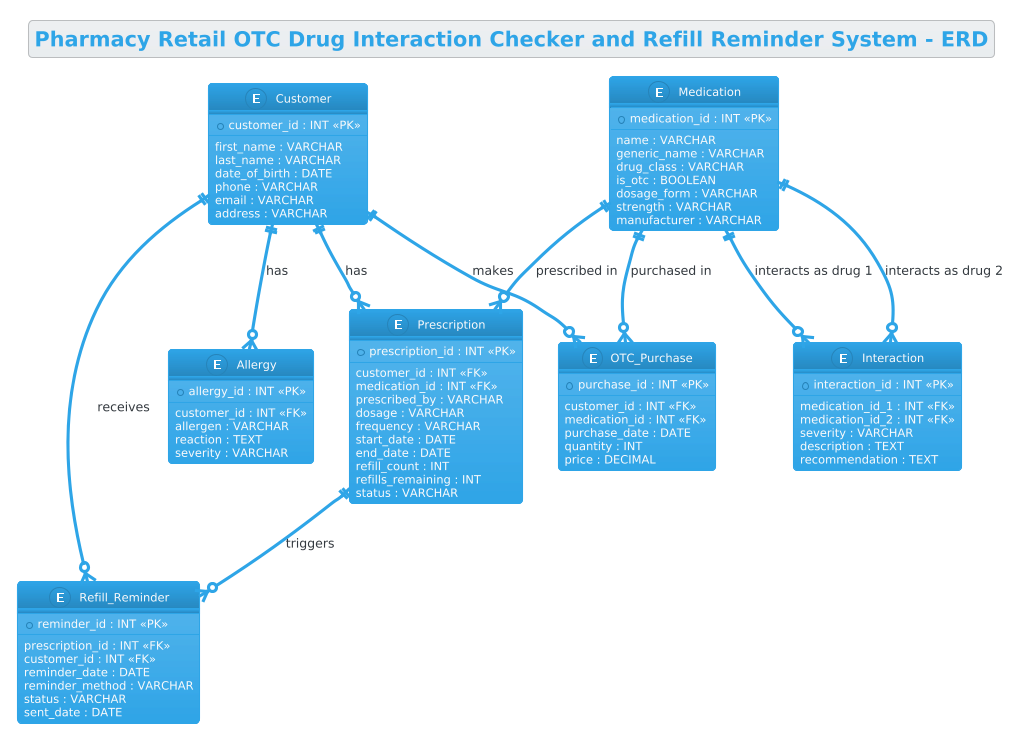
Here is the complete source code for the diagram. You can copy this directly into the VPasCode editor to see the live rendering.
@startuml
!theme cerulean
title Pharmacy Retail OTC Drug Interaction Checker and Refill Reminder System - ERD

/'
Diagram Context:
This ERD models a pharmacy retail system that supports over-the-counter (OTC) medication sales,
drug interaction checking, and refill reminders for customers. The diagram addresses the problem
of ensuring customer safety by detecting potentially harmful interactions between OTC drugs and
their existing prescriptions, while also helping customers remember when to refill their medications.

The system stores customer profiles, medication inventory, prescription records, and OTC purchase
history. When a customer buys an OTC drug, the system checks it against their active prescriptions
and known allergies to flag dangerous interactions. It also tracks refill schedules and generates
reminders for prescriptions that are due or overdue for refill. Key entities include Customer,
Medication, Prescription, OTC_Purchase, Interaction, Refill_Reminder, and Allergy.
'/

entity "Customer" as customer {
  * customer_id : INT <<PK>>
  --
  first_name : VARCHAR
  last_name : VARCHAR
  date_of_birth : DATE
  phone : VARCHAR
  email : VARCHAR
  address : VARCHAR
}

entity "Medication" as medication {
  * medication_id : INT <<PK>>
  --
  name : VARCHAR
  generic_name : VARCHAR
  drug_class : VARCHAR
  is_otc : BOOLEAN
  dosage_form : VARCHAR
  strength : VARCHAR
  manufacturer : VARCHAR
}

entity "Prescription" as prescription {
  * prescription_id : INT <<PK>>
  --
  customer_id : INT <<FK>>
  medication_id : INT <<FK>>
  prescribed_by : VARCHAR
  dosage : VARCHAR
  frequency : VARCHAR
  start_date : DATE
  end_date : DATE
  refill_count : INT
  refills_remaining : INT
  status : VARCHAR
}

entity "OTC_Purchase" as otc_purchase {
  * purchase_id : INT <<PK>>
  --
  customer_id : INT <<FK>>
  medication_id : INT <<FK>>
  purchase_date : DATE
  quantity : INT
  price : DECIMAL
}

entity "Interaction" as interaction {
  * interaction_id : INT <<PK>>
  --
  medication_id_1 : INT <<FK>>
  medication_id_2 : INT <<FK>>
  severity : VARCHAR
  description : TEXT
  recommendation : TEXT
}

entity "Refill_Reminder" as refill_reminder {
  * reminder_id : INT <<PK>>
  --
  prescription_id : INT <<FK>>
  customer_id : INT <<FK>>
  reminder_date : DATE
  reminder_method : VARCHAR
  status : VARCHAR
  sent_date : DATE
}

entity "Allergy" as allergy {
  * allergy_id : INT <<PK>>
  --
  customer_id : INT <<FK>>
  allergen : VARCHAR
  reaction : TEXT
  severity : VARCHAR
}

customer ||--o{ prescription : "has"
customer ||--o{ otc_purchase : "makes"
customer ||--o{ allergy : "has"
customer ||--o{ refill_reminder : "receives"

medication ||--o{ prescription : "prescribed in"
medication ||--o{ otc_purchase : "purchased in"
medication ||--o{ interaction : "interacts as drug 1"
medication ||--o{ interaction : "interacts as drug 2"

prescription ||--o{ refill_reminder : "triggers"

@endumlStep-by-Step Architectural Walkthrough
Phase 1: Canvas Configuration & Layout Directives
Every professional PlantUML diagram begins with configuration directives that set the stage for rendering. In this phase, we define the visual theme and the diagram title. We use the !theme cerulean directive to apply a clean, blue-toned color scheme that is highly readable and professional, suitable for healthcare documentation. The title directive provides a clear header for the diagram, ensuring that anyone viewing the output immediately understands the scope of the model.
Additionally, we include a comment block to document the context. In PlantUML, comments are wrapped in / and /. This allows us to embed a detailed description of the problem statement directly into the code without affecting the visual rendering of the diagram.
!theme cerulean
title Pharmacy Retail OTC Drug Interaction Checker and Refill Reminder System - ERD

/'
Diagram Context:
This ERD models a pharmacy retail system...
'/
Phase 2: Declaring Core Entities, Actors, and Boundaries
The foundation of an ERD is the entity definition. In PlantUML, we use the entity keyword followed by the entity name in quotes, and then an alias for shorthand referencing. Inside the curly braces {}, we define the attributes.
We start with the Customer entity. The primary key (PK) is marked with * before the attribute name. We use INT for numeric IDs and VARCHAR for strings. The -- separator line visually groups the primary key from the rest of the attributes, improving readability.
entity "Customer" as customer {
  * customer_id : INT <>
  --
  first_name : VARCHAR
  last_name : VARCHAR
  // ... other attributes
}
We follow a similar pattern for Medication, Prescription, and Allergy. Note the use of BOOLEAN for the is_otc flag in the Medication entity, which is crucial for distinguishing between prescription-only and over-the-counter drugs. We also define the Interaction entity, which will serve as a bridge between medications.
Phase 3: Mapping Data Flows & Key Interactions
Once the entities are defined, we establish the relationships using association lines. PlantUML uses specific arrow syntax to denote cardinality. The ||--o{ syntax represents a “One-to-Many” relationship where the solid double bar || indicates mandatory participation (one) and the o{ indicates optional participation (zero or many).
For example, customer ||--o{ prescription : "has" means a customer must have at least one prescription (or potentially zero if the system allows guest data, but here the syntax implies a strong link), and a prescription belongs to exactly one customer. We also see the medication ||--o{ interaction : "interacts as drug 1" relationship, which shows how a single medication can be part of multiple interaction records.
customer ||--o{ prescription : "has"
customer ||--o{ otc_purchase : "makes"

medication ||--o{ interaction : "interacts as drug 1"
medication ||--o{ interaction : "interacts as drug 2"
The Interaction entity is a special case here. It links to Medication twice (as drug 1 and drug 2), effectively creating a many-to-many relationship between medications to track which combinations are dangerous.
Phase 4: Grouping, Annotations & Visual Polish
To finalize the diagram, we ensure all relationships are clearly labeled. The text on the relationship lines (e.g., "has", "triggers") provides semantic meaning to the connection. In the Refill_Reminder entity, we include fields like reminder_method and status to track the delivery of the reminder, which is critical for the business logic of the system. The final rendering in VPasCode allows us to instantly verify that all foreign keys (FK) are properly linked and that the diagram layout is balanced and readable.
Syntax & Keyword Deep Dive
To master PlantUML for database modeling, it is essential to understand the specific syntax used in this ERD.
entity: The keyword used to define a database table or class. It takes a display name and an alias (e.g.,entity "Customer" as customer).*(Primary Key Marker): Placed before an attribute name to indicate it is the Primary Key (PK). PlantUML renders this with a special icon.<and> <(Stereotypes): These are annotations used to explicitly label attributes as Primary Keys or Foreign Keys in the diagram, improving clarity for readers.> ||--o{(Cardinality): This specific arrow syntax represents a mandatory one-to-many relationship. The||means “one and only one” on the left, ando{means “zero or many” on the right.--(Separator): Used inside an entity block to visually separate the primary key from the other attributes./…/(Comment Block): A multi-line comment syntax that allows for rich text descriptions within the code without rendering as a diagram element.
Best Practices & Pitfalls to Avoid
When modeling complex healthcare systems like this pharmacy ERD, adhering to best practices ensures the diagram remains maintainable and accurate.
- Consistent Naming Conventions: Always use clear, descriptive names for entities (e.g.,
OTC_Purchaseinstead ofPurchase) and use camelCase or snake_case consistently for attributes. This prevents confusion when the database is generated. - Separate Concerns: Keep the
Interactionlogic distinct from thePrescriptionlogic. By creating a dedicatedInteractionentity, you allow the system to scale to thousands of potential drug combinations without cluttering the main prescription table. - Use Comments for Context: As demonstrated in the
/block, always include a high-level summary of the diagram’s purpose. This is invaluable for new developers or auditors who need to understand the business rules quickly. - Validate Cardinality: Double-check your arrow syntax. Using
--o{(optional) instead of--|{(mandatory) can lead to data integrity issues if the database enforces strict constraints based on the diagram.
Start Building Pharmacy ERDs Faster with VPasCode
Instantly prototype and visualize your database schema for healthcare systems using our free PlantUML editor with zero local installation required.