


In the dynamic world of retail art supplies, managing the intricate data behind creative tools requires more than just a simple inventory list. Artists rely on sophisticated digital assistants to calculate precise color mixing ratios and determine the perfect canvas dimensions for their upcoming projects. These tools, often overlooked in standard database designs, demand a robust schema that can handle complex many-to-many relationships, decimal precision for ratios, and hierarchical data structures for color families and aspect ratios. Without a clear visual model, the risk of data redundancy and logical errors in calculations increases significantly, leading to a poor user experience for both the store and the artist.

This tutorial explores the architecture of an Art Supply Store database, specifically focusing on two critical modules: a Color Mixing Formula Database and a Canvas Sizing Calculator. By translating these business requirements into an Entity Relationship Diagram (ERD), we can visualize how base pigments, color families, and mixing ingredients interact with standard and custom canvas sizes. This visual blueprint ensures that the underlying database can accurately support features like “how-to-mix” guides and project-based artwork storage, bridging the gap between creative needs and technical data integrity.
Understanding the Model: Purpose, Scope & Problem Framing
This ERD serves as the foundational blueprint for a specialized retail application. Unlike generic e-commerce schemas that focus solely on products and orders, this model delves into the logic of art creation. It addresses the specific problem of how to mathematically represent color combinations and geometric dimensions in a relational database.
Diagram Abstraction & Representation
Entity Relationship Diagrams are the industry standard for visualizing data structures. In this specific context, the diagram abstracts the physical world into digital entities. Entities represent tangible or conceptual objects like “Color Family” or “Canvas Size.” Attributes define their properties (e.g., color_hex or surface_area_cm2). Relationships (lines) define how these entities interact, such as a single canvas size being used in multiple artwork projects, or a single mixing formula requiring multiple ingredients.
Target Domain Scope & Scenario
The scope of this model is strictly limited to the artistic calculation domain of a retail store. It does not model customer accounts, payment processing, or shipping logistics. Instead, it focuses on:
- Color Theory Data: Organizing pigments into families and defining how they combine.
- Geometric Data: Standardizing canvas sizes based on aspect ratios.
- Project Management: Linking a specific canvas and a specific set of formulas into a saved "Artwork Project."
Key Takeaways & Educational Insights
By studying this diagram, readers will learn how to handle associative entities (like Formula Ingredient and Project Formula) which are crucial for resolving many-to-many relationships. You will also see how to model hierarchical data (Families -> Pigments) and calculated attributes (Surface Area) within the schema definition.
Complete Diagram & Full Source Code
Before diving into the construction steps, here is the complete visual output of the ERD. This diagram illustrates the flow from color families down to specific project formulas, and from aspect ratios up to custom canvas sizes.
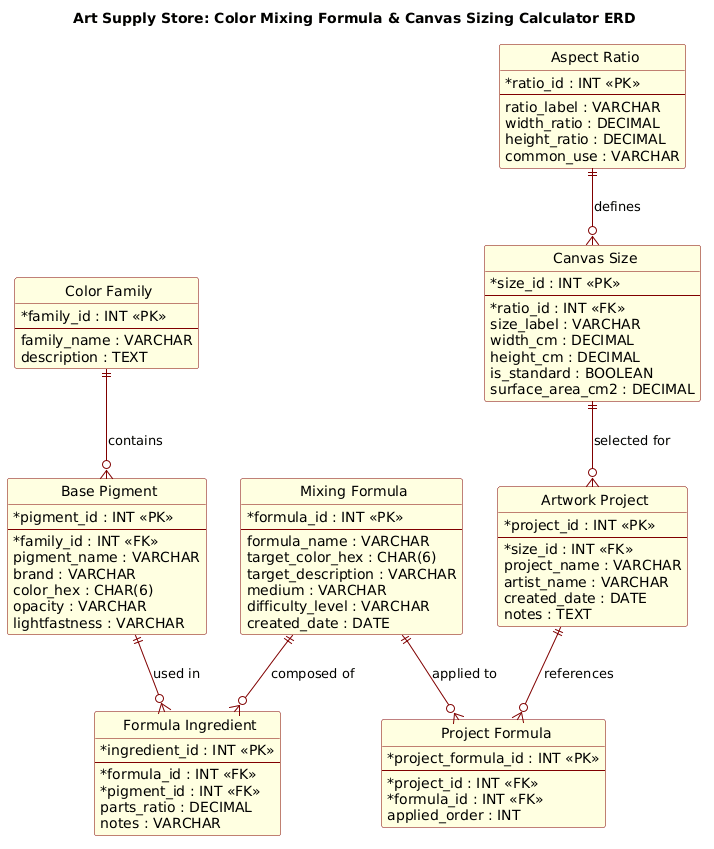
Copy the complete source code below to replicate this diagram instantly.
@startuml
!include https://static.visual-paradigm.com/web/resources/plantuml-stdlib/themes/rose.puml

title Art Supply Store: Color Mixing Formula & Canvas Sizing Calculator ERD

/'
Diagram Context:
This ERD models the data requirements for an art supply store's digital tools:
a color mixing formula database and a canvas sizing calculator.

The Color Mixing Formula Database helps artists determine which paint colors
to combine, in what proportions, to achieve a desired target color. It stores
base pigments, color families, mixing formulas, and the specific ratios of
pigments used in each formula.

The Canvas Sizing Calculator assists customers in choosing the right canvas
dimensions for their artwork. It stores standard canvas size presets, common
aspect ratios, and allows for custom canvas size entries. Each canvas size can
be linked to recommended framing options and surface area calculations.

These two domains are related through the "Artwork Project" entity, which
represents a customer's saved project containing both a chosen canvas size
and one or more color mixing formulas used for that artwork.

Key relationships:
- A Color Family contains many Base Pigments.
- A Base Pigment can appear in many Mixing Formulas (via Formula Ingredient).
- A Mixing Formula has many Formula Ingredients with specific ratios.
- A Canvas Size belongs to one Aspect Ratio.
- An Artwork Project uses one Canvas Size and can reference many Mixing Formulas.
'/

' Entities

entity "Color Family" as color_family {
  * family_id : INT <<PK>>
  --
  family_name : VARCHAR
  description : TEXT
}

entity "Base Pigment" as base_pigment {
  * pigment_id : INT <<PK>>
  --
  * family_id : INT <<FK>>
  pigment_name : VARCHAR
  brand : VARCHAR
  color_hex : CHAR(6)
  opacity : VARCHAR
  lightfastness : VARCHAR
}

entity "Mixing Formula" as mixing_formula {
  * formula_id : INT <<PK>>
  --
  formula_name : VARCHAR
  target_color_hex : CHAR(6)
  target_description : VARCHAR
  medium : VARCHAR
  difficulty_level : VARCHAR
  created_date : DATE
}

entity "Formula Ingredient" as formula_ingredient {
  * ingredient_id : INT <<PK>>
  --
  * formula_id : INT <<FK>>
  * pigment_id : INT <<FK>>
  parts_ratio : DECIMAL
  notes : VARCHAR
}

entity "Aspect Ratio" as aspect_ratio {
  * ratio_id : INT <<PK>>
  --
  ratio_label : VARCHAR
  width_ratio : DECIMAL
  height_ratio : DECIMAL
  common_use : VARCHAR
}

entity "Canvas Size" as canvas_size {
  * size_id : INT <<PK>>
  --
  * ratio_id : INT <<FK>>
  size_label : VARCHAR
  width_cm : DECIMAL
  height_cm : DECIMAL
  is_standard : BOOLEAN
  surface_area_cm2 : DECIMAL
}

entity "Artwork Project" as artwork_project {
  * project_id : INT <<PK>>
  --
  * size_id : INT <<FK>>
  project_name : VARCHAR
  artist_name : VARCHAR
  created_date : DATE
  notes : TEXT
}

entity "Project Formula" as project_formula {
  * project_formula_id : INT <<PK>>
  --
  * project_id : INT <<FK>>
  * formula_id : INT <<FK>>
  applied_order : INT
}

' Relationships

color_family ||--o{ base_pigment : "contains"
base_pigment ||--o{ formula_ingredient : "used in"
mixing_formula ||--o{ formula_ingredient : "composed of"
aspect_ratio ||--o{ canvas_size : "defines"
canvas_size ||--o{ artwork_project : "selected for"
artwork_project ||--o{ project_formula : "references"
mixing_formula ||--o{ project_formula : "applied to"

@endumlStep-by-Step Architectural Walkthrough
Building this ERD requires a logical progression from defining the core data structures to establishing the complex relationships that link them. We will break this down into four distinct phases.
Phase 1: Canvas Configuration & Layout Directives
Every professional PlantUML diagram begins with setup directives. In this case, we import a specific theme to ensure the diagram looks polished and consistent. We also define a comment block to provide context for anyone reading the raw code.
First, we include the rose.puml theme to apply a modern, colored styling to the entities. Then, we add a comment block starting with /' and ending with '/. This block is crucial for documentation, explaining the business logic without cluttering the visual diagram.
@startuml
!include https://static.visual-paradigm.com/web/resources/plantuml-stdlib/themes/rose.puml

title Art Supply Store: Color Mixing Formula & Canvas Sizing Calculator ERD

/'
Diagram Context:
... (context description) ...
'/
Phase 2: Declaring Core Entities, Actors, and Boundaries
The next step is defining the Entities. In PlantUML ERD, we use the entity keyword. Each entity is defined with a display name, an alias (for relationship mapping), and a list of attributes.
Notice the use of entity "Name" as alias. The alias (e.g., color_family) is the internal reference used in the relationship lines. Inside the entity block, we define attributes. Primary Keys are marked with * and «PK», while Foreign Keys are also marked with * and «FK» to indicate their referential integrity role.
entity "Color Family" as color_family {
* family_id : INT <>
--
family_name : VARCHAR
description : TEXT
}
entity "Base Pigment" as base_pigment {
* pigment_id : INT < >
--
* family_id : INT <>
... (other attributes)
}
Phase 3: Mapping Data Flows & Key Interactions
With entities defined, we now draw the Relationships. PlantUML uses Crow's Foot notation by default. The syntax ||--o{ represents a mandatory one-to-mandatory-many relationship (though here we use optional many o{ for flexibility). We map the "Color Family" to "Base Pigment" and "Aspect Ratio" to "Canvas Size" to establish the foundational hierarchy.
Crucially, we map the Associative Entities. The Formula Ingredient entity acts as a bridge between Mixing Formula and Base Pigment, allowing a formula to have multiple pigments and a pigment to be used in multiple formulas.
color_family ||--o{ base_pigment : "contains"
mixing_formula ||--o{ formula_ingredient : "composed of"
base_pigment ||--o{ formula_ingredient : "used in"
Phase 4: Grouping, Annotations & Visual Polish
The final phase involves connecting the Artwork Project to the rest of the system. This entity acts as the central hub for a user's specific creation. It links to a Canvas Size and references a Project Formula (another associative entity) which in turn links to the Mixing Formula. This structure ensures that a saved project retains the exact state of the canvas and formulas used at that moment, preserving the integrity of the user's work.
artwork_project ||--o{ project_formula : "references"
mixing_formula ||--o{ project_formula : "applied to"
Syntax & Keyword Deep Dive
To master PlantUML ERD, understanding the specific syntax keywords is essential. Here is a breakdown of the critical elements used in this diagram:
entity: The keyword used to define a table or object. It is followed by the display name in quotes and the alias for internal referencing.«PK»and«FK»: Stereotypes used to visually label Primary Keys and Foreign Keys. This helps database architects quickly identify the schema's integrity constraints.||--o{: The relationship connector.||represents "mandatory one" (the source must exist), ando{represents "optional many" (the target can exist zero or more times). This notation clearly depicts the cardinality of the relationship.«label»: The text appearing on the relationship line (e.g.,: "contains") to describe the nature of the link between entities.data types: Keywords likeINT,VARCHAR,DECIMAL, andBOOLEANdefine the expected data format for each attribute, ensuring the generated schema is ready for implementation.
Best Practices & Pitfalls to Avoid
When designing ERDs for complex domains like art supply calculations, adherence to best practices ensures maintainability and clarity.
- Use Associative Entities for Many-to-Many: Never link two entities directly with a many-to-many relationship. Always introduce an intermediate entity (like
Formula Ingredient) to store the specific attributes of that relationship, such as theparts_ratio. - Consistent Naming Conventions: Use clear, singular names for entities (e.g.,
Canvas SizenotCanvas Sizes) and consistent aliases (snake_case) to avoid confusion in the relationship lines. - Separate Logic from Data: Keep the "Calculation Logic" (like surface area formulas) in the application code, but model the result (the
surface_area_cm2attribute) in the schema if it needs to be stored for historical tracking. - Document Context Early: Always start your PlantUML file with a comment block explaining the diagram's scope. This is invaluable for team onboarding and future maintenance.
Start Building Art Supply ERDs Faster with VPasCode
Design complex database schemas for retail and creative tools instantly in your browser with VPasCode, the free PlantUML editor with live rendering.