


In the high-stakes world of modern logistics, the “last mile” represents the most complex and costly segment of the supply chain. It is the final leg where goods move from a local distribution hub to the customer’s doorstep, requiring a delicate balance of speed, cost-efficiency, and real-time coordination. As e-commerce volumes surge, logistics managers and software architects face the challenge of orchestrating thousands of daily deliveries, ensuring that drivers are matched with optimal routes, vehicles are utilized within capacity limits, and customers receive accurate, real-time tracking updates. Without a clear, standardized data model, these systems become brittle, leading to missed deliveries, inefficient fuel consumption, and frustrated customers.
Creating a robust data architecture for this domain requires more than just listing database tables; it demands a visual representation of how entities like Drivers, Vehicles, Routes, and Orders interact dynamically. An Entity Relationship Diagram (ERD) serves as the blueprint for this complexity, defining the cardinality of relationships and the integrity constraints necessary for a scalable dispatch engine. By using PlantUML within the VPasCode editor, architects can instantly visualize these relationships, iterate on the schema in real-time, and generate living documentation that keeps development teams and business stakeholders aligned on the logistics workflow.
Understanding the Model: Purpose, Scope & Problem Framing
Diagram Abstraction & Representation
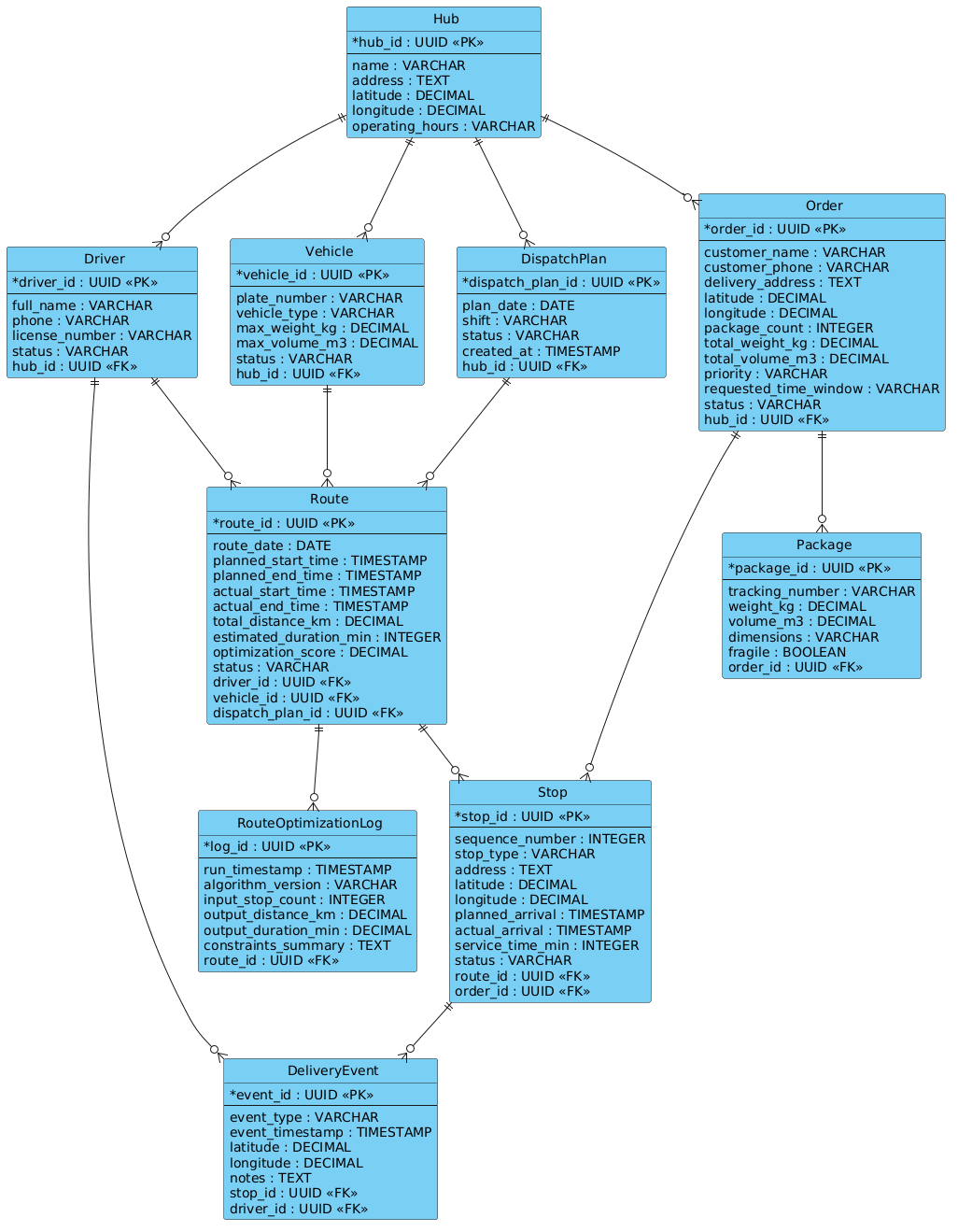
This ERD is designed to model the core data structures of a Last-Mile Delivery Route Optimization and Driver Dispatch Coordination Engine. Unlike a static inventory list, this diagram captures the dynamic nature of logistics operations. It represents the Hub as the central node for consolidation, the Driver and Vehicle as the executing resources, and the Route as the optimized sequence of actions. The diagram explicitly defines how a single DispatchPlan (a shift or daily plan) breaks down into multiple Routes, which in turn are composed of sequential Stops linked to specific Orders and Packages. This hierarchical structure is critical for enforcing business rules, such as ensuring a driver cannot be assigned to a route without a vehicle, or that a stop cannot exist without a parent route.
Target Domain Scope & Scenario
The scope of this model focuses strictly on the operational execution layer of logistics. It covers the lifecycle from the moment an order is assigned to a hub, through the optimization of its route, the physical execution by a driver, and the final confirmation of delivery. It intentionally excludes upstream supply chain processes (like warehouse receiving or supplier procurement) and downstream financial settlements, focusing instead on the real-time data flow required for dispatching and tracking. The model supports key operations such as load consolidation, capacity validation (weight/volume), and exception handling via DeliveryEvents.
Key Takeaways & Educational Insights
By constructing this diagram, you will gain a deep understanding of how to model many-to-one relationships (e.g., multiple stops belonging to one route) and how to manage temporal data (timestamps for planned vs. actual times). You will learn how to structure a schema that supports real-time tracking by linking DeliveryEvents to both drivers and stops, creating a rich audit trail. Finally, you will see how to incorporate optimization metadata, such as the RouteOptimizationLog, to track the performance of the algorithms driving the dispatch engine.
Complete Diagram & Full Source Code
@startuml
!include https://static.visual-paradigm.com/web/resources/plantuml-stdlib/themes/vp.puml

/'
The last-mile delivery route optimization and driver dispatch coordination engine
orchestrates the final leg of the supply chain, where packages move from a local
distribution hub to the end customer. This diagram models the core data
structures required to plan efficient routes, assign drivers, track vehicles,
and monitor deliveries in real time.

Key entities:
- Hub: a local facility where packages are consolidated and dispatched.
- Driver: a courier responsible for executing assigned routes.
- Vehicle: the transport asset used by a driver, with capacity constraints.
- Route: an optimized sequence of stops planned for a driver and vehicle.
- Stop: a single delivery or pickup point along a route, linked to an order.
- Package / Order: the customer demand that must be fulfilled.
- DeliveryEvent: a timestamped status update (e.g., picked up, delivered, failed).
- DispatchPlan: the daily or shift-level assignment of routes to drivers.

The diagram supports core operations such as load consolidation, route
sequencing, capacity validation, real-time tracking, and exception handling.
'/

entity "Hub" as hub {
  * hub_id : UUID <<PK>>
  --
  name : VARCHAR
  address : TEXT
  latitude : DECIMAL
  longitude : DECIMAL
  operating_hours : VARCHAR
}

entity "Driver" as driver {
  * driver_id : UUID <<PK>>
  --
  full_name : VARCHAR
  phone : VARCHAR
  license_number : VARCHAR
  status : VARCHAR
  hub_id : UUID <<FK>>
}

entity "Vehicle" as vehicle {
  * vehicle_id : UUID <<PK>>
  --
  plate_number : VARCHAR
  vehicle_type : VARCHAR
  max_weight_kg : DECIMAL
  max_volume_m3 : DECIMAL
  status : VARCHAR
  hub_id : UUID <<FK>>
}

entity "Route" as route {
  * route_id : UUID <<PK>>
  --
  route_date : DATE
  planned_start_time : TIMESTAMP
  planned_end_time : TIMESTAMP
  actual_start_time : TIMESTAMP
  actual_end_time : TIMESTAMP
  total_distance_km : DECIMAL
  estimated_duration_min : INTEGER
  optimization_score : DECIMAL
  status : VARCHAR
  driver_id : UUID <<FK>>
  vehicle_id : UUID <<FK>>
  dispatch_plan_id : UUID <<FK>>
}

entity "Stop" as stop {
  * stop_id : UUID <<PK>>
  --
  sequence_number : INTEGER
  stop_type : VARCHAR
  address : TEXT
  latitude : DECIMAL
  longitude : DECIMAL
  planned_arrival : TIMESTAMP
  actual_arrival : TIMESTAMP
  service_time_min : INTEGER
  status : VARCHAR
  route_id : UUID <<FK>>
  order_id : UUID <<FK>>
}

entity "Order" as order {
  * order_id : UUID <<PK>>
  --
  customer_name : VARCHAR
  customer_phone : VARCHAR
  delivery_address : TEXT
  latitude : DECIMAL
  longitude : DECIMAL
  package_count : INTEGER
  total_weight_kg : DECIMAL
  total_volume_m3 : DECIMAL
  priority : VARCHAR
  requested_time_window : VARCHAR
  status : VARCHAR
  hub_id : UUID <<FK>>
}

entity "Package" as package {
  * package_id : UUID <<PK>>
  --
  tracking_number : VARCHAR
  weight_kg : DECIMAL
  volume_m3 : DECIMAL
  dimensions : VARCHAR
  fragile : BOOLEAN
  order_id : UUID <<FK>>
}

entity "DeliveryEvent" as delivery_event {
  * event_id : UUID <<PK>>
  --
  event_type : VARCHAR
  event_timestamp : TIMESTAMP
  latitude : DECIMAL
  longitude : DECIMAL
  notes : TEXT
  stop_id : UUID <<FK>>
  driver_id : UUID <<FK>>
}

entity "DispatchPlan" as dispatch_plan {
  * dispatch_plan_id : UUID <<PK>>
  --
  plan_date : DATE
  shift : VARCHAR
  status : VARCHAR
  created_at : TIMESTAMP
  hub_id : UUID <<FK>>
}

entity "RouteOptimizationLog" as optimization_log {
  * log_id : UUID <<PK>>
  --
  run_timestamp : TIMESTAMP
  algorithm_version : VARCHAR
  input_stop_count : INTEGER
  output_distance_km : DECIMAL
  output_duration_min : DECIMAL
  constraints_summary : TEXT
  route_id : UUID <<FK>>
}

hub ||--o{ driver
hub ||--o{ vehicle
hub ||--o{ order
hub ||--o{ dispatch_plan

driver ||--o{ route
vehicle ||--o{ route
dispatch_plan ||--o{ route

route ||--o{ stop
order ||--o{ package
order ||--o{ stop

stop ||--o{ delivery_event
driver ||--o{ delivery_event

route ||--o{ optimization_log

@endumlStep-by-Step Architectural Walkthrough
Phase 1: Canvas Configuration & Layout Directives
The foundation of a professional diagram lies in its setup. We begin by including the Visual Paradigm standard library theme, which ensures consistent styling and modern rendering. This directive is placed immediately after the @startuml tag to apply the theme globally to the entire canvas.
@startuml
!include https://static.visual-paradigm.com/web/resources/plantuml-stdlib/themes/vp.puml
Following the theme, we define a comment block using the /' and '/ syntax. This block serves as a crucial piece of documentation embedded directly in the code, describing the diagram’s purpose, key entities, and operational context without cluttering the visual output. This is a best practice for maintaining “living documentation” that evolves with the code.
Phase 2: Declaring Core Entities, Actors, and Boundaries
Next, we define the core entities. In PlantUML, the entity keyword is used to declare database tables. Each entity is given a unique alias (e.g., hub, driver) to simplify relationship definitions later. Inside each entity block, we list attributes using the * symbol for Primary Keys (PK) and UUID as the data type, which is a modern standard for distributed logistics systems to avoid collision. Foreign Keys (FK) are explicitly marked with <<FK>> to indicate referential integrity.
entity "Hub" as hub {
  * hub_id : UUID <>
  --
  name : VARCHAR
  address : TEXT
  latitude : DECIMAL
  longitude : DECIMAL
  operating_hours : VARCHAR
}
Notice the use of the -- separator line. This visually groups the primary key separately from the descriptive attributes, improving readability. We repeat this pattern for Driver, Vehicle, and DispatchPlan, ensuring that critical logistics data like max_weight_kg and plate_number are clearly defined.
Phase 3: Mapping Data Flows & Key Interactions
With entities defined, we establish the relationships using PlantUML’s cardinality notation. The syntax ||--o{ is used extensively here. The double bar || represents “mandatory one” (the parent entity must exist), and the crow’s foot with a circle o{ represents “zero or many” (the child entity can exist without the parent, or multiple children can exist). For example, a Hub can have zero or many Drivers, but a Driver must belong to exactly one Hub.
hub ||--o{ driver
hub ||--o{ vehicle
hub ||--o{ order
hub ||--o{ dispatch_plan

driver ||--o{ route
vehicle ||--o{ route
dispatch_plan ||--o{ route
We also model the complex relationship between Order and Stop. An Order can generate multiple Stops (e.g., split shipments), and a Stop is linked to an Order. This is represented by order ||--o{ stop, ensuring the data integrity of the delivery sequence.
Phase 4: Grouping, Annotations & Visual Polish
The final phase involves adding the DeliveryEvent and RouteOptimizationLog entities. These are critical for real-time monitoring and performance analysis. The DeliveryEvent acts as a bridge, linking a Stop (the location) with a Driver (the actor) and a timestamp. The RouteOptimizationLog captures the output of the algorithm, storing the optimization_score and constraints_summary for future auditing. By explicitly defining these relationships, the diagram provides a complete view of the system’s lifecycle from planning to execution.
Syntax & Keyword Deep Dive
To build professional ERDs in PlantUML, it is essential to understand the specific syntax features used in this logistics model:
entity: The keyword used to define a database table or entity. It is followed by the display name and an alias (e.g.,entity "Name" as alias).*(Asterisk): Placed before an attribute name to denote it as the Primary Key (PK). This is a standard PlantUML convention for ERDs.<<FK>>(Stereo Type): Used to explicitly mark a Foreign Key attribute. This helps database generators and readers quickly identify referential relationships.||--o{(Cardinality): This arrow notation defines the relationship cardinality.||means “one and only one” (mandatory), ando{means “zero or many” (optional collection). The combination||--o{implies a mandatory one-to-many relationship./' ... '/(Comment Block): A multi-line comment syntax in PlantUML. Unlike single-line comments, this block is rendered as a text note in the diagram or can be used for documentation, keeping the code clean while providing context.!include: A preprocessor directive that loads external themes or libraries (likevp.puml) to apply consistent styling across the diagram.
Best Practices & Pitfalls to Avoid
When designing ERDs for complex logistics systems, adhere to these best practices to ensure clarity and maintainability:
- Use Consistent Naming Conventions: Always use singular names for entities (e.g.,
Driverinstead ofDrivers) and snake_case for aliases (e.g.,driver). This prevents confusion when writing queries or defining relationships. - Define Cardinality Explicitly: Never rely on implicit relationships. Always use
||--o{or similar notations to clearly state whether a relationship is mandatory or optional. Ambiguity here leads to data integrity issues in the database. - Separate Concerns: Keep operational data (like
Orderdetails) separate from audit data (likeDeliveryEventorOptimizationLog). This modular approach makes the schema easier to scale and understand. - Document with Context: Always include a comment block at the top of your PlantUML file. As seen in this tutorial, a well-written comment explains the business logic, saving hours of interpretation for other developers.
Start Building Last-Mile Delivery ERDs Faster with VPasCode
Design and refine your logistics data models instantly in your browser with VPasCode’s free PlantUML editor—no installation required.