


In the high-speed world of logistics, a parcel sorting hub operates as a complex ecosystem of physical assets and digital data. Conveyor belts transport thousands of packages daily, while a network of scan stations captures critical tracking data in real-time. To maintain operational efficiency, traceability, and safety, the control systems must rigorously track every movement, scan event, and equipment command. Without a clear data model, managing the relationships between hubs, belt runs, and individual parcel scans becomes a chaotic endeavor, leading to data silos and operational blind spots.
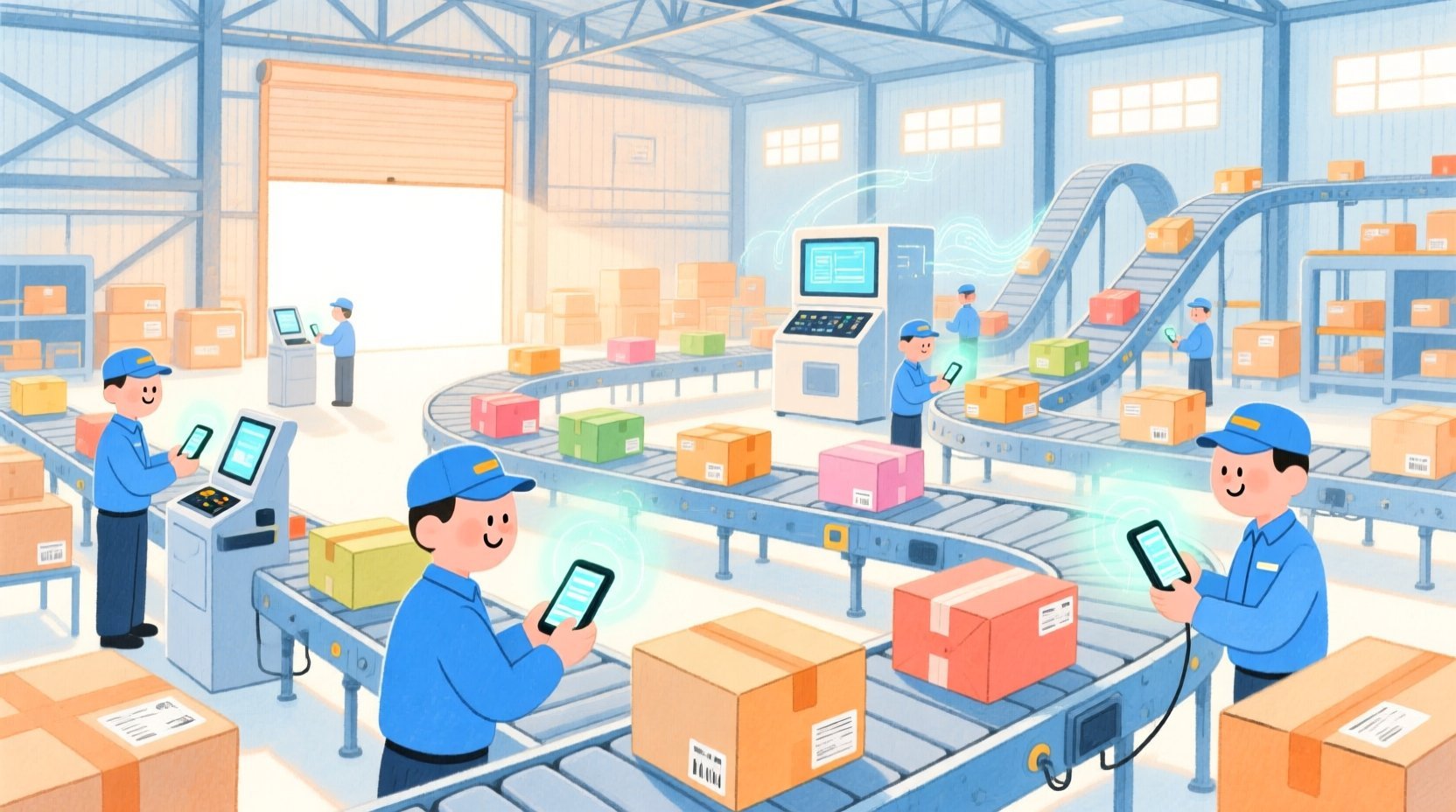
Visualizing this architecture through an Entity Relationship Diagram (ERD) is essential for architects and developers building the underlying database schemas. By using PlantUML within VPasCode, teams can instantly prototype and refine these complex relationships. This approach transforms abstract requirements into a living document that clearly defines how a Hub contains Conveyor Belts, how Scan Events are logged against specific runs, and how Fault Alerts are triggered by equipment status changes. This tutorial demonstrates how to construct a robust, scalable ERD for a courier sorting hub, ensuring your database design aligns perfectly with real-world logistics workflows.
Understanding the Model: Purpose, Scope & Problem Framing
Diagram Abstraction & Representation
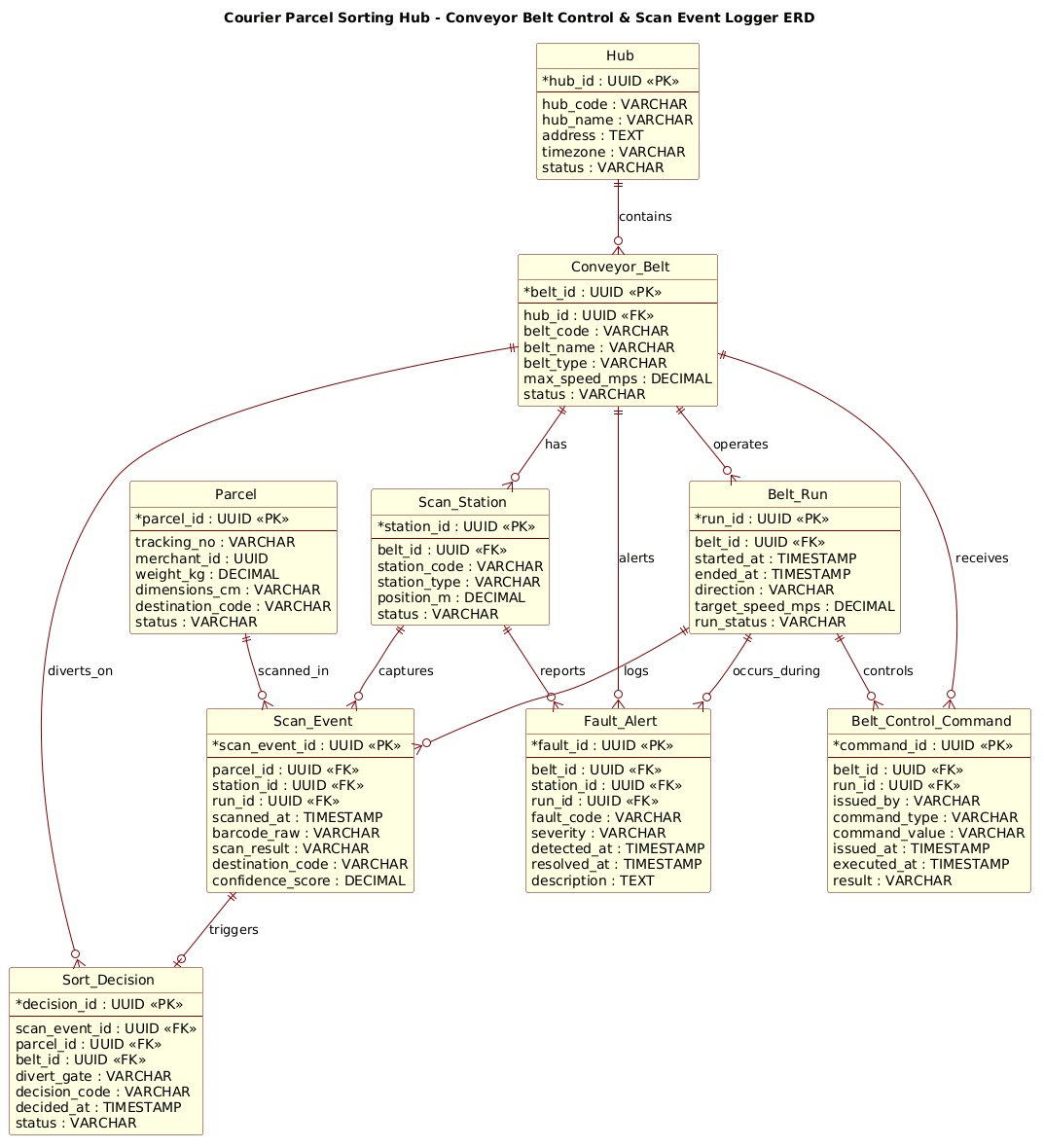
Entity Relationship Diagrams (ERDs) serve as the blueprint for relational databases, defining the structure of data and the integrity constraints between them. In this specific context, the ERD models a Courier Parcel Sorting Hub. It abstracts the physical reality of a warehouse into logical entities: Hubs (locations), Conveyor Belts (transport infrastructure), Scan Stations (data capture points), and Parcels (the items being processed). The diagram focuses on the temporal and causal relationships: how a belt run initiates a scan event, how a scan triggers a sort decision, and how faults are recorded against specific equipment states.
Target Domain Scope & Scenario
The scope of this diagram is strictly limited to the operational data flow within a single sorting facility. It covers the lifecycle of a parcel from entry (scanning) to sorting decisions, the operational state of the conveyor infrastructure (runs, speeds, status), and the audit trail of control commands and fault alerts. It intentionally excludes external systems like customer-facing tracking portals or inventory management for the merchant, focusing solely on the internal logistics control logic.
Key Takeaways & Educational Insights
By building this model, readers will learn how to handle one-to-many relationships (e.g., one Hub contains many Belts), associative entities (e.g., Scan Events linking Parcels, Stations, and Runs), and audit trails (e.g., logging commands and faults). The diagram illustrates how to normalize data for high-frequency event logging while maintaining referential integrity for asset management.
Complete Diagram & Full Source Code
Below is the complete, rendered ERD for the Courier Parcel Sorting Hub. It visualizes the entities, their attributes, and the cardinality of their relationships, all styled with the rose theme for a professional presentation.
@startuml
!include https://static.visual-paradigm.com/web/resources/plantuml-stdlib/themes/rose.puml

/'
Context:
This ERD models a courier parcel sorting hub where conveyor belts move parcels through scan points.
The system tracks physical assets (hubs, conveyor belts, scan stations), operational runs, and every
parcel scan event to support sorting decisions, traceability, and belt control auditing.
'/

title Courier Parcel Sorting Hub - Conveyor Belt Control & Scan Event Logger ERD

entity "Hub" as hub {
  *hub_id : UUID <<PK>>
  --
  hub_code : VARCHAR
  hub_name : VARCHAR
  address : TEXT
  timezone : VARCHAR
  status : VARCHAR
}

entity "Conveyor_Belt" as belt {
  *belt_id : UUID <<PK>>
  --
  hub_id : UUID <<FK>>
  belt_code : VARCHAR
  belt_name : VARCHAR
  belt_type : VARCHAR
  max_speed_mps : DECIMAL
  status : VARCHAR
}

entity "Scan_Station" as station {
  *station_id : UUID <<PK>>
  --
  belt_id : UUID <<FK>>
  station_code : VARCHAR
  station_type : VARCHAR
  position_m : DECIMAL
  status : VARCHAR
}

entity "Belt_Run" as run {
  *run_id : UUID <<PK>>
  --
  belt_id : UUID <<FK>>
  started_at : TIMESTAMP
  ended_at : TIMESTAMP
  direction : VARCHAR
  target_speed_mps : DECIMAL
  run_status : VARCHAR
}

entity "Parcel" as parcel {
  *parcel_id : UUID <<PK>>
  --
  tracking_no : VARCHAR
  merchant_id : UUID
  weight_kg : DECIMAL
  dimensions_cm : VARCHAR
  destination_code : VARCHAR
  status : VARCHAR
}

entity "Scan_Event" as scan {
  *scan_event_id : UUID <<PK>>
  --
  parcel_id : UUID <<FK>>
  station_id : UUID <<FK>>
  run_id : UUID <<FK>>
  scanned_at : TIMESTAMP
  barcode_raw : VARCHAR
  scan_result : VARCHAR
  destination_code : VARCHAR
  confidence_score : DECIMAL
}

entity "Sort_Decision" as decision {
  *decision_id : UUID <<PK>>
  --
  scan_event_id : UUID <<FK>>
  parcel_id : UUID <<FK>>
  belt_id : UUID <<FK>>
  divert_gate : VARCHAR
  decision_code : VARCHAR
  decided_at : TIMESTAMP
  status : VARCHAR
}

entity "Belt_Control_Command" as command {
  *command_id : UUID <<PK>>
  --
  belt_id : UUID <<FK>>
  run_id : UUID <<FK>>
  issued_by : VARCHAR
  command_type : VARCHAR
  command_value : VARCHAR
  issued_at : TIMESTAMP
  executed_at : TIMESTAMP
  result : VARCHAR
}

entity "Fault_Alert" as fault {
  *fault_id : UUID <<PK>>
  --
  belt_id : UUID <<FK>>
  station_id : UUID <<FK>>
  run_id : UUID <<FK>>
  fault_code : VARCHAR
  severity : VARCHAR
  detected_at : TIMESTAMP
  resolved_at : TIMESTAMP
  description : TEXT
}

hub ||--o{ belt : contains
belt ||--o{ station : has
belt ||--o{ run : operates
run ||--o{ scan : logs
station ||--o{ scan : captures
parcel ||--o{ scan : scanned_in
scan ||--o| decision : triggers
belt ||--o{ decision : diverts_on
belt ||--o{ command : receives
run ||--o{ command : controls
belt ||--o{ fault : alerts
station ||--o{ fault : reports
run ||--o{ fault : occurs_during

@endumlStep-by-Step Architectural Walkthrough
Constructing this ERD in VPasCode involves four logical phases: setting the visual theme, defining the core entities, establishing relationships, and refining the layout. The following steps break down exactly how this diagram was built.
Phase 1: Canvas Configuration & Layout Directives
The first step is to establish the visual identity of the diagram. We use the rose theme to provide a clean, modern aesthetic suitable for professional documentation. This is achieved by including the standard library theme at the very beginning of the code.
!include https://static.visual-paradigm.com/web/resources/plantuml-stdlib/themes/rose.pumlNext, we add a descriptive comment block to provide context for anyone reading the source code. In PlantUML, comments are wrapped in /' and /' to allow for multi-line descriptions without interfering with the rendering engine.
/'
Context:
This ERD models a courier parcel sorting hub...
'/
We then set the title to clearly identify the diagram’s purpose, ensuring the output is self-explanatory.
title Courier Parcel Sorting Hub - Conveyor Belt Control & Scan Event Logger ERDPhase 2: Declaring Core Entities, Actors, and Boundaries
With the canvas ready, we define the fundamental entities. Each entity represents a physical or logical object in the logistics system. We use the entity keyword followed by the name, an alias (for shorthand in relationships), and a block defining attributes.
For example, the Hub entity represents a physical sorting facility. The primary key is denoted by * and the foreign key by FK.
entity "Hub" as hub {
  *hub_id : UUID <>
  --
  hub_code : VARCHAR
  hub_name : VARCHAR
  address : TEXT
  timezone : VARCHAR
  status : VARCHAR
}
We repeat this pattern for Conveyor_Belt, Scan_Station, Belt_Run, and Parcel. Note how Conveyor_Belt references the hub via hub_id, establishing the hierarchy that one Hub contains multiple Belts. Similarly, Scan_Station references belt_id, indicating it is physically mounted on a specific belt.
Phase 3: Mapping Data Flows & Key Interactions
The most complex part of this ERD involves the event-driven entities: Scan_Event, Sort_Decision, Belt_Control_Command, and Fault_Alert. These entities capture the dynamic behavior of the system.
The Scan_Event is a classic associative entity. It links three distinct entities: the Parcel being scanned, the Station doing the scanning, and the Belt_Run active at that moment. This many-to-many relationship is resolved by creating the Scan_Event table which holds foreign keys to all three.
entity "Scan_Event" as scan {
*scan_event_id : UUID <>
--
parcel_id : UUID <>
station_id : UUID < >
run_id : UUID < >
scanned_at : TIMESTAMP
barcode_raw : VARCHAR
scan_result : VARCHAR
destination_code : VARCHAR
confidence_score : DECIMAL
} Similarly, Sort_Decision links back to the Scan_Event (the trigger) and the Parcel (the target), while also specifying which Belt the parcel was diverted onto.
Phase 4: Grouping, Annotations & Visual Polish
Finally, we define the relationships using PlantUML cardinality notation. This connects the entities defined in Phase 2 and 3.
The syntax ||--o{ represents a mandatory one-to-many relationship (one parent, zero or more children). For instance, a Hub must contain Belts (though logically a Hub could be empty, the diagram assumes operational context), and a Belt has many Stations.
hub ||--o{ belt : contains
belt ||--o{ station : has
belt ||--o{ run : operates
run ||--o{ scan : logs
station ||--o{ scan : captures
parcel ||--o{ scan : scanned_in
scan ||--o| decision : triggers
belt ||--o{ decision : diverts_on
belt ||--o{ command : receives
run ||--o{ command : controls
belt ||--o{ fault : alerts
station ||--o{ fault : reports
run ||--o{ fault : occurs_during
The o| notation in scan ||--o| decision indicates that a Scan Event triggers a Sort Decision (mandatory one), while a decision might exist without a scan in some edge cases (though in this logic, it’s strictly derived). The visual polish comes from the rose theme which automatically applies consistent colors, fonts, and spacing to all these connections.
Syntax & Keyword Deep Dive
To master PlantUML ERD modeling, it is crucial to understand the specific keywords and symbols used in this diagram. These elements define the structure and the logic of the data model.
entity: The primary keyword used to define a database table or class. It is followed by the display name (e.g.,"Hub") and an alias (e.g.,as hub) used for referencing.*(Asterisk): Placed before an attribute name (e.g.,*hub_id) to indicate a Primary Key (PK). This ensures the attribute uniquely identifies a record.FKStereotype: Used as<to denote a Foreign Key attribute. This visually communicates the relationship to other tables in the diagram.> --(Double Dash): A separator line within an entity block that visually divides attributes into sections, often used to separate keys from data fields.||--o{(Cardinality): Represents a mandatory one-to-many relationship. The double bar||means “one and only one” on the parent side, and the circle-pluso{means “zero or more” on the child side.||--o|(Cardinality): Represents a relationship where the child side is mandatory (the|bar) but the parent side is optional or one-to-many. In this diagram,scan ||--o| decisionimplies a decision is triggered by a scan./' ... /'(Comment Block): A multi-line comment syntax used to add context, descriptions, or notes to the diagram without rendering them as part of the visual model.
Best Practices & Pitfalls to Avoid
When modeling complex logistics systems like a parcel sorting hub, adhering to modeling best practices ensures your database design is both scalable and maintainable.
- Normalize Event Data: As seen with Scan_Event, avoid storing redundant data. Instead of storing the
parcel_iddirectly on theScan_Stationtable, create a separate event table that links the station, the parcel, and the run. This prevents data anomalies when a single station scans multiple parcels during a run. - Use Descriptive Aliases: While the entity names might be long (e.g.,
Conveyor_Belt), using short aliases (e.g.,as belt) makes the relationship lines much cleaner and the code easier to read. - Separate Static and Dynamic Data: Clearly distinguish between static assets (like the
HuborScan_Stationdefinitions) and dynamic events (likeScan_EventorBelt_Control_Command). This helps in optimizing database queries, as you may need to index event tables differently than static asset tables. - Consistent Naming Conventions: Stick to a consistent naming style (e.g.,
snake_casefor attributes andPascalCasefor entity names) to ensure the diagram is professional and easy to parse by both humans and automated tools.
Try It Yourself with VPasCode
Ready to design your own logistics data models? VPasCode provides a free, browser-based environment to write PlantUML code and see your ERD render instantly. No Java installation or complex setup is required—just open the editor, paste your code, and start building professional diagrams for your courier sorting systems today.
Start Building Logistics ERDs Faster with VPasCode
Instantly prototype and customize your Courier Sorting Hub ERD online with zero local installation required.