


In the complex ecosystem of modern supply chains, the forward flow of goods is only half the story. The reverse logistics workflow—managing returns, refurbishments, and recycling—is a critical operational backbone that determines profitability, customer satisfaction, and environmental compliance. For logistics architects and database designers, visualizing this intricate lifecycle is challenging. It involves tracking items from a customer’s initial return request through rigorous inspection, potential repair, parts replacement, and final disposition, whether that be restocking, reselling, or recycling. A static spreadsheet or a hand-drawn sketch often fails to capture the cardinality and dependencies required to build a robust database schema.
This is where diagramming-as-code becomes a strategic asset. By using PlantUML within the VPasCode editor, you can define the structural integrity of your logistics database with precision. A well-crafted Entity-Relationship Diagram (ERD) serves as a living blueprint, ensuring that every entity—from the Customer to the DispositionLog—is correctly linked. It allows teams to simulate data flows, identify missing foreign keys, and validate business rules before writing a single line of SQL. This tutorial walks you through building a production-grade ERD for a return merchandise processing and refurbishment system, demonstrating how code-driven modeling brings clarity to complex operational problems.
Understanding the Model: Purpose, Scope & Problem Framing
Diagram Abstraction & Representation
An Entity-Relationship Diagram (ERD) is the foundational blueprint for relational databases. In the context of logistics, it abstracts physical objects (like a returned laptop) into data entities (like ReturnItem) and defines the rules of how they interact. This specific diagram models the state and history of a product’s journey back into the supply chain. It captures the transition from a “broken” state to a “refurbished” or “scrap” state, tracking the labor, parts, and decisions involved in that transformation.
Target Domain Scope & Scenario
This model covers the end-to-end lifecycle of a return, starting from the Customer initiating a ReturnRequest. It explicitly excludes the initial manufacturing or forward shipping logistics, focusing instead on the reverse flow. The scope includes the inspection phase (determining condition), the refurbishment phase (repairing the item), and the final disposition phase (deciding the item’s fate). It also models the resource consumption involved, such as technician labor hours and spare parts usage.
Key Takeaways & Educational Insights
By constructing this diagram, you will gain a clear understanding of how to model one-to-many relationships in complex workflows. You will learn how to structure junction tables for many-to-many relationships (e.g., linking multiple parts to a single refurbishment order) and how to use entity attributes to store critical operational metadata like condition_grade or disposition_type. The resulting ERD provides a standardized view for developers to implement the database and for business analysts to verify process logic.
Complete Diagram & Full Source Code
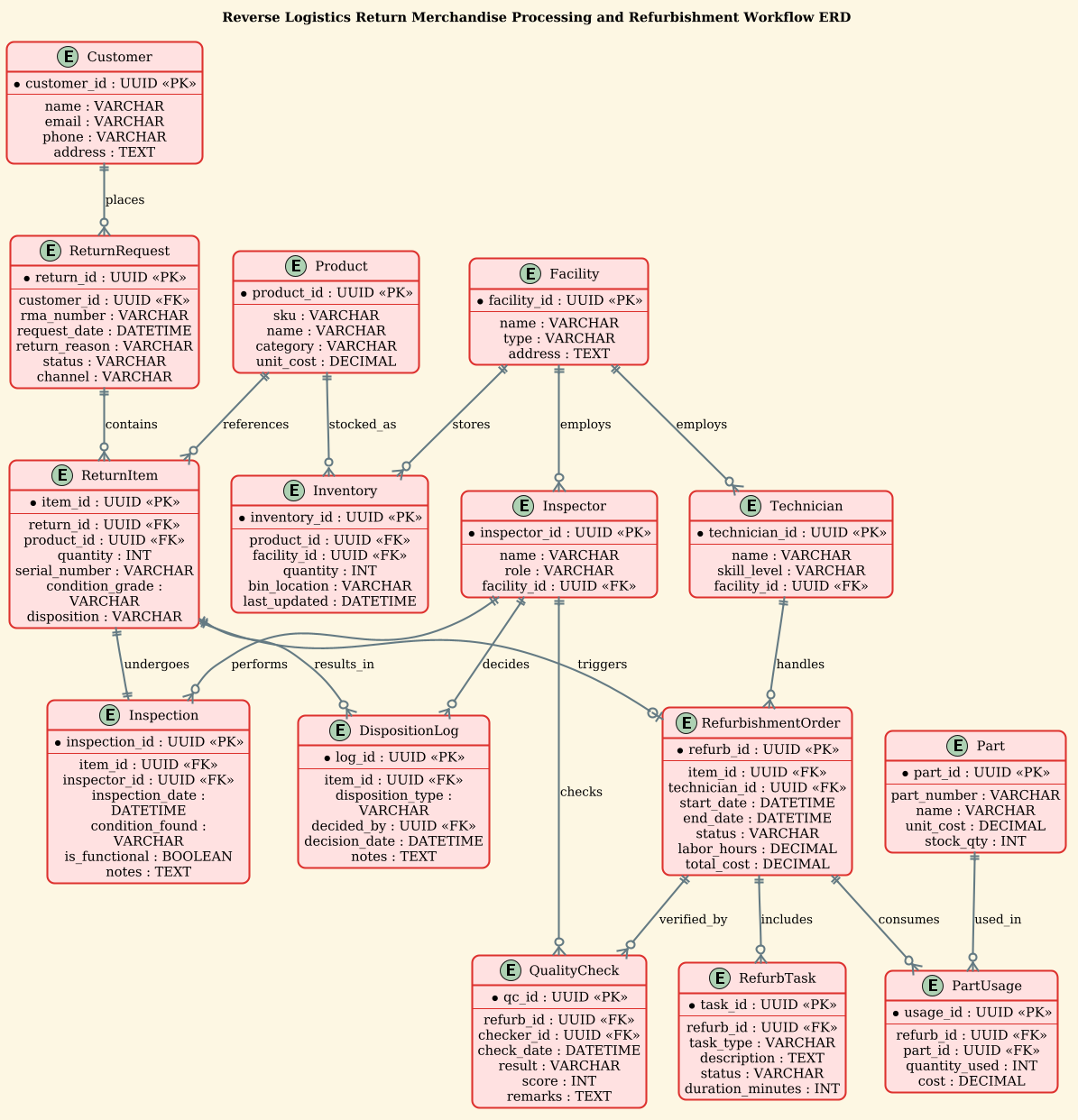
Below is the complete source code for the Reverse Logistics ERD. You can copy this entire block and paste it directly into the VPasCode Editor to see the rendered diagram instantly.
@startuml
!theme sunlust
title Reverse Logistics Return Merchandise Processing and Refurbishment Workflow ERD

/'
Diagram Context:
This ERD models the end-to-end reverse logistics workflow for returned merchandise,
from initial customer return request through inspection, disposition, refurbishment,
and final restocking or disposal. It captures the key entities involved in processing
returns, including customers, returned items, inspection results, refurbishment tasks,
technicians, parts/components consumed, quality checks, and inventory re-entry.
The diagram supports tracking of return reasons, item conditions, repair activities,
cost accumulation, and the routing decisions (refurbish, resell, recycle, scrap) that
drive the circular economy of returned goods.
'/

' Core entities
entity "Customer" as customer {
  * customer_id : UUID <<PK>>
  --
  name : VARCHAR
  email : VARCHAR
  phone : VARCHAR
  address : TEXT
}

entity "ReturnRequest" as return_request {
  * return_id : UUID <<PK>>
  --
  customer_id : UUID <<FK>>
  rma_number : VARCHAR
  request_date : DATETIME
  return_reason : VARCHAR
  status : VARCHAR
  channel : VARCHAR
}

entity "ReturnItem" as return_item {
  * item_id : UUID <<PK>>
  --
  return_id : UUID <<FK>>
  product_id : UUID <<FK>>
  quantity : INT
  serial_number : VARCHAR
  condition_grade : VARCHAR
  disposition : VARCHAR
}

entity "Product" as product {
  * product_id : UUID <<PK>>
  --
  sku : VARCHAR
  name : VARCHAR
  category : VARCHAR
  unit_cost : DECIMAL
}

entity "Inspection" as inspection {
  * inspection_id : UUID <<PK>>
  --
  item_id : UUID <<FK>>
  inspector_id : UUID <<FK>>
  inspection_date : DATETIME
  condition_found : VARCHAR
  is_functional : BOOLEAN
  notes : TEXT
}

entity "Inspector" as inspector {
  * inspector_id : UUID <<PK>>
  --
  name : VARCHAR
  role : VARCHAR
  facility_id : UUID <<FK>>
}

entity "RefurbishmentOrder" as refurb_order {
  * refurb_id : UUID <<PK>>
  --
  item_id : UUID <<FK>>
  technician_id : UUID <<FK>>
  start_date : DATETIME
  end_date : DATETIME
  status : VARCHAR
  labor_hours : DECIMAL
  total_cost : DECIMAL
}

entity "Technician" as technician {
  * technician_id : UUID <<PK>>
  --
  name : VARCHAR
  skill_level : VARCHAR
  facility_id : UUID <<FK>>
}

entity "RefurbTask" as refurb_task {
  * task_id : UUID <<PK>>
  --
  refurb_id : UUID <<FK>>
  task_type : VARCHAR
  description : TEXT
  status : VARCHAR
  duration_minutes : INT
}

entity "Part" as part {
  * part_id : UUID <<PK>>
  --
  part_number : VARCHAR
  name : VARCHAR
  unit_cost : DECIMAL
  stock_qty : INT
}

entity "PartUsage" as part_usage {
  * usage_id : UUID <<PK>>
  --
  refurb_id : UUID <<FK>>
  part_id : UUID <<FK>>
  quantity_used : INT
  cost : DECIMAL
}

entity "QualityCheck" as quality_check {
  * qc_id : UUID <<PK>>
  --
  refurb_id : UUID <<FK>>
  checker_id : UUID <<FK>>
  check_date : DATETIME
  result : VARCHAR
  score : INT
  remarks : TEXT
}

entity "Inventory" as inventory {
  * inventory_id : UUID <<PK>>
  --
  product_id : UUID <<FK>>
  facility_id : UUID <<FK>>
  quantity : INT
  bin_location : VARCHAR
  last_updated : DATETIME
}

entity "Facility" as facility {
  * facility_id : UUID <<PK>>
  --
  name : VARCHAR
  type : VARCHAR
  address : TEXT
}

entity "DispositionLog" as disposition_log {
  * log_id : UUID <<PK>>
  --
  item_id : UUID <<FK>>
  disposition_type : VARCHAR
  decided_by : UUID <<FK>>
  decision_date : DATETIME
  notes : TEXT
}

' Relationships
customer ||--o{ return_request : places
return_request ||--o{ return_item : contains
product ||--o{ return_item : references
return_item ||--|| inspection : undergoes
inspector ||--o{ inspection : performs
return_item ||--o| refurb_order : triggers
technician ||--o{ refurb_order : handles
refurb_order ||--o{ refurb_task : includes
refurb_order ||--o{ part_usage : consumes
part ||--o{ part_usage : used_in
refurb_order ||--o{ quality_check : verified_by
inspector ||--o{ quality_check : checks
facility ||--o{ inspector : employs
facility ||--o{ technician : employs
facility ||--o{ inventory : stores
product ||--o{ inventory : stocked_as
return_item ||--o{ disposition_log : results_in
inspector ||--o{ disposition_log : decides

@endumlStep-by-Step Architectural Walkthrough
Building a robust ERD requires a logical progression from high-level entities to detailed relationships. Here is how we constructed this reverse logistics model.
Phase 1: Canvas Configuration & Layout Directives
Before defining data structures, we set the visual tone and orientation. We use the !theme sunlust directive to apply a warm, professional color palette that distinguishes entities clearly. The @startuml tag initializes the PlantUML engine, and the title directive provides a clear caption for the diagram, ensuring it is self-documenting.
@startuml
!theme sunlust
title Reverse Logistics Return Merchandise Processing and Refurbishment Workflow ERD
Phase 2: Declaring Core Entities, Actors, and Boundaries
The foundation of the diagram lies in the entities. We start with the primary actors: Customer, Inspector, Technician, and Facility. These represent the human resources and locations. Then we define the data objects: Product, ReturnRequest, and ReturnItem.
Notice the use of the entity keyword followed by the name and the alias (e.g., "Customer" as customer). Inside the curly braces, we define attributes. We use * to denote Primary Keys (PK) and -- to separate keys from other attributes. Foreign Keys (FK) are explicitly marked with the <<FK>> stereotype, making the database dependencies immediately visible to the reader.
entity "Customer" as customer {
  * customer_id : UUID <>
  --
  name : VARCHAR
  email : VARCHAR
}
Phase 3: Mapping Data Flows & Key Interactions
Once entities are defined, we establish the relationships using the ||--o{ syntax. This specific notation is crucial for reverse logistics. For instance, a Customer can place zero or many ReturnRequests (||--o{). However, a ReturnItem must undergo exactly one Inspection (||--||), indicating a mandatory one-to-one relationship at that stage.
We also model complex workflows. The RefurbishmentOrder acts as a central hub. It links to RefurbTask (one order has many tasks) and PartUsage (one order consumes many parts). The PartUsage entity is a classic associative entity (junction table) that resolves the many-to-many relationship between RefurbishmentOrder and Part.
refurb_order ||--o{ refurb_task : includes
refurb_order ||--o{ part_usage : consumes
part ||--o{ part_usage : used_in
Phase 4: Grouping, Annotations & Visual Polish
To enhance readability, we added a comment block at the top using /' and '/. This block provides a high-level summary of the diagram’s context, explaining the business logic without cluttering the syntax. We also used the title directive to ensure the diagram stands alone as a professional document. The sunlust theme automatically handles the visual grouping and coloring, ensuring that the diagram looks polished without manual styling overrides.
Syntax & Keyword Deep Dive
Understanding the specific PlantUML syntax used here is essential for maintaining and extending the diagram.
entity "Name" as alias: Defines a database table or object. The alias (e.g.,customer) is the short identifier used in relationship definitions, while the string (e.g.,"Customer") is the human-readable label.* attribute : Type <: The asterisk> *visually marks the Primary Key in the diagram. The<<PK>>stereotype is a PlantUML convention for database modeling to denote the primary key constraint.<<FK>>: Explicitly marks Foreign Keys. This is critical in ERDs to show which tables reference others, aiding in database normalization checks.||--o{: This relationship arrow denotes a “One or More” relationship. The||represents “one” (mandatory), ando{represents “zero or more” (optional). For example, a Customer places zero or many returns.||--||: This denotes a strict “One-to-One” mandatory relationship. Used here forreturn_itemtoinspection, implying every item must have exactly one inspection record./'and'/: These characters define a multi-line comment block. This is perfect for embedding business context or requirements directly within the code file.
Best Practices & Pitfalls to Avoid
When designing complex ERDs for logistics or supply chain systems, adherence to best practices ensures the diagram remains useful as the system evolves.
- Consistent Naming Conventions: Always use singular names for entities (e.g.,
ReturnItemnotReturnItems) and lowercase aliases. This prevents confusion when writing SQL queries later. - Explicit Cardinality: Don’t guess. Use the correct cardinality markers (
||--o{,--o{,||--||). In logistics, the difference between “optional” and “mandatory” (e.g., does every return need an inspection?) is a critical business rule. - Modular Entity Definition: Keep entity definitions grouped logically. Define all attributes for one entity before moving to the next. This makes the code easier to read and debug.
- Avoid Over-Engineering: While it’s tempting to add every possible attribute, focus on the entities and relationships required for the specific workflow you are modeling. You can always expand the diagram later.
Start Building Reverse Logistics ERDs Faster with VPasCode
Design complex database schemas instantly in your browser with our free PlantUML editor. No installation required—just write code and see your logistics model come to life.